1OPERATION_.pdf - 第252页
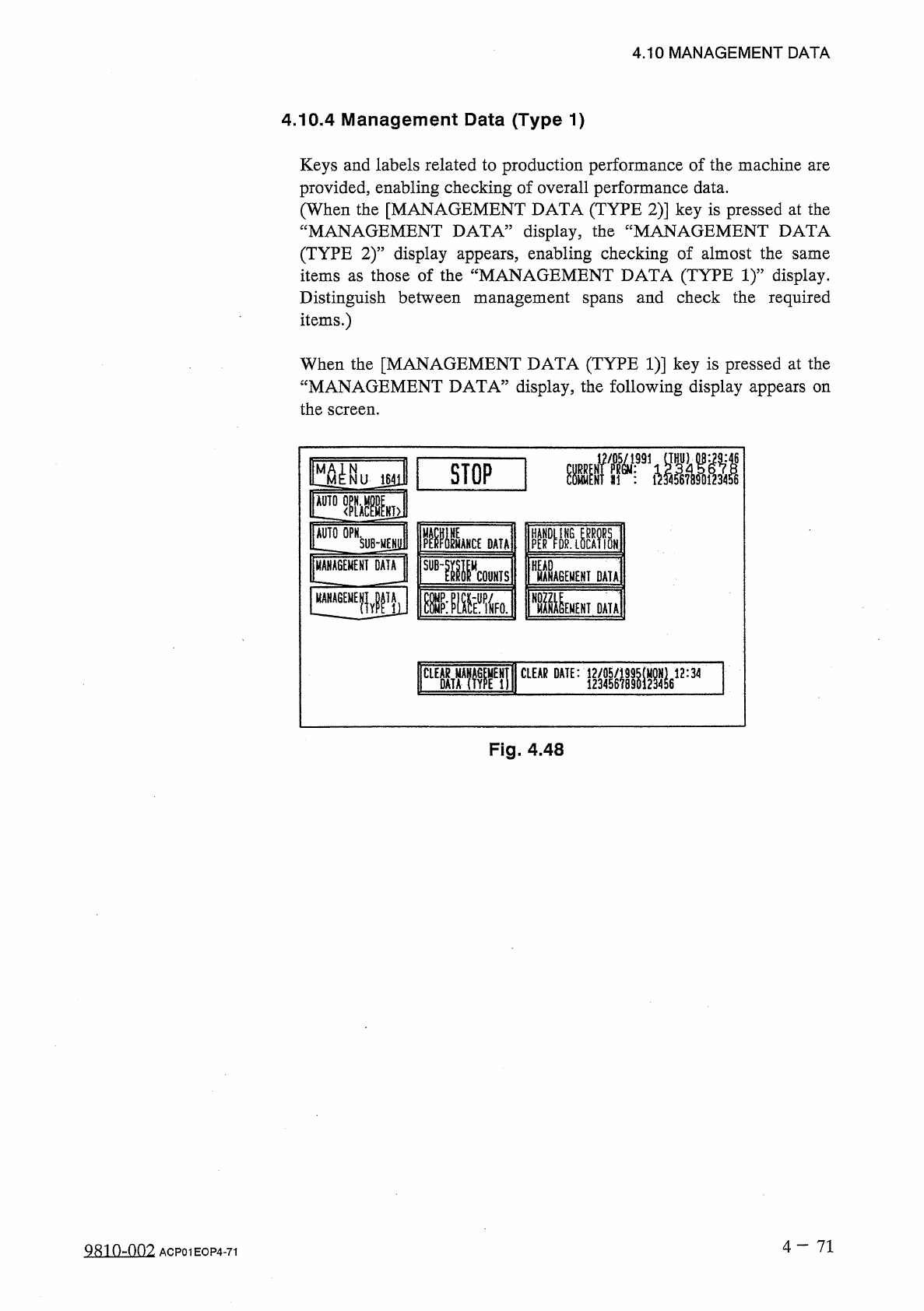
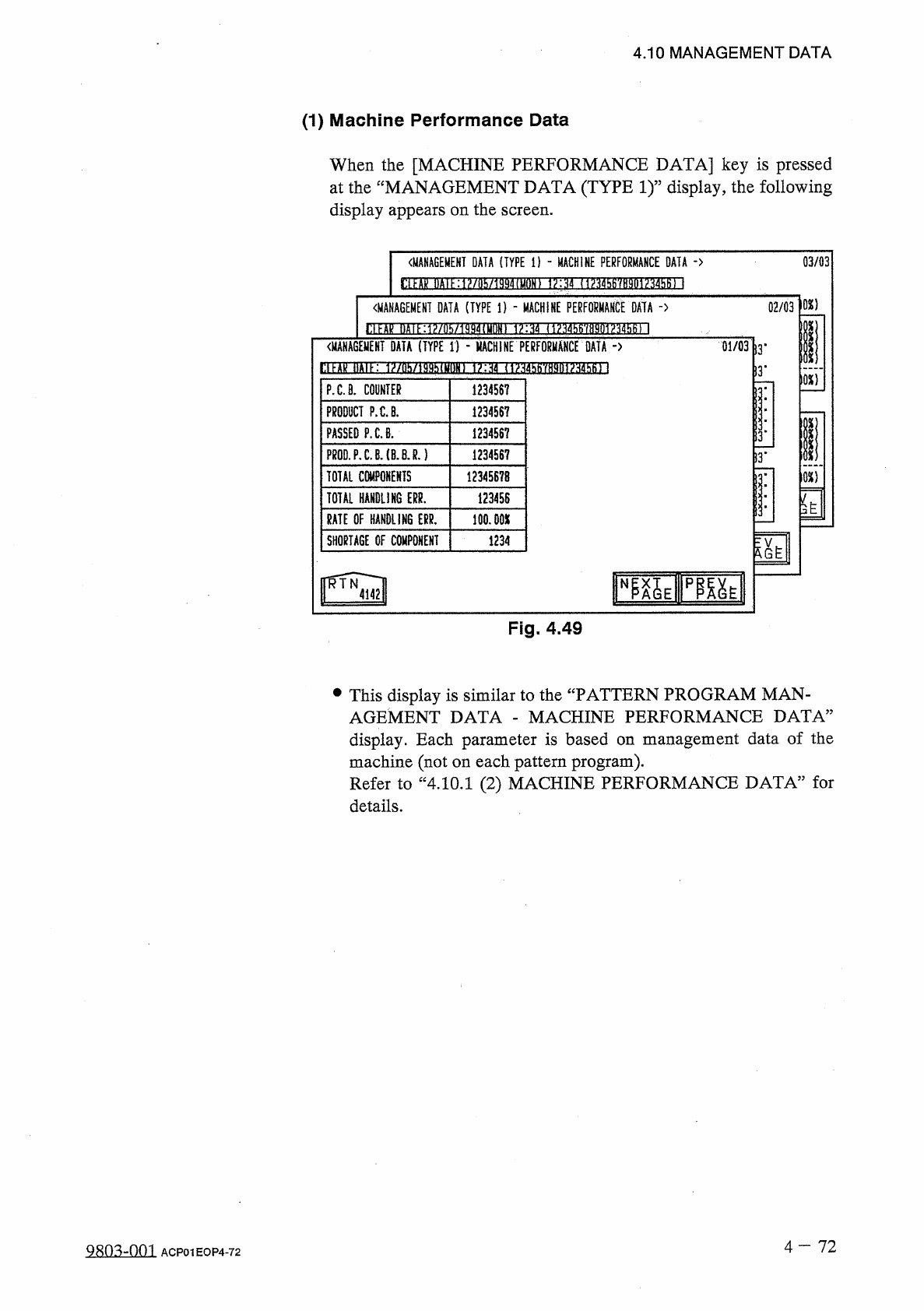
4.10 MANAGEMENT DATA 4.10 . 4 Management Data ( Type 1 ) Keys and labels related to production performance of the machine are provided , enabling checking of overall performance data . ( When the [ MANAGEMENT DATA ( TYPE…
4.10
MANAGEMENT
DATA
•
When
the
[
SAVED
/
CURRENT
]
key
is
pressed
,
the
“
NOZZLE
BYPASS
RATE
(
SAVED
DATA
)
,
,
display
disappears
and
the
“
NOZZLE
BYPASS
RATE
(
CURRENT
DATA
)
,,
appears
or
vice
versa
.
The
“
NOZZLE
BYPASS
RATE
(
SAVED
DATA
)
”
display
shows
parameters
calculated
just
before
the
current
ones
.
The
“
NOZZLE
BYPASS
RATE
(
CURRENT
DATA
)
”
display
shows
parameters
being
calculated
at
present
.
[
MANAGEMENT
DATA
NOZ
.
BYPASS
RATE
XX
/
XX
]
in
Figs
.
4.47
and
4.47
-
1
MANAGEMENT
DATA
NOZ
.
BYPASS
RATE
25
/
500
:
Numerator
25
shows
the
number
of
pick
-
up
errors
detected
before
500
components
are
picked
up
.
Denominator
500
shows
that
500
components
are
to
be
picked
up
.
When
25
pick
-
up
detected
,
a
message
appears
in
the
text
boxes
of
the
label
“
MGT
.
INFO
,
”
,
indicating
that
the
pick
-
up
rate
has
deteriorated
and
the
nozzle
is
automatically
bypassed
.
When
the
number
of
pick
-
up
errors
does
not
reach
“
25
”
after
500
components
are
picked
up
,
XX
/
XX
is
reset
to
“
00
/
00
”
and
counting
starts
again
.
The
“
NOZZLE
BYPASS
RATE
(
SAVED
DATA
)
”
shows
the
parameters
just
before
this
delimiter
.
errors
are
•
When
a
nozzle
is
automatically
bypassed
,
the
blue
head
/
nozzle
No
.
turns
red
at
the
“
NOZZLE
BYPASS
RATE
(
SAVED
DATA
)
”
display
.
4
一
70
Q
^
-
001
ACP
01
EOP
4
-
70
4.10
MANAGEMENT
DATA
4.10
.
4
Management
Data
(
Type
1
)
Keys
and
labels
related
to
production
performance
of
the
machine
are
provided
,
enabling
checking
of
overall
performance
data
.
(
When
the
[
MANAGEMENT
DATA
(
TYPE
2
)
]
key
is
pressed
at
the
“
MANAGEMENT
DATA
”
display
,
the
“
MANAGEMENT
DATA
(
TYPE
2
)
”
display
appears
,
enabling
checking
of
almost
the
items
as
those
of
the
“
MANAGEMENT
DATA
(
TYPE
1
)
”
display
.
Distinguish
between
management
spans
and
check
the
required
items
.
)
same
When
the
[
MANAGEMENT
DATA
(
TYPE
1
)
]
key
is
pressed
at
the
“
MANAGEMENT
DATA
”
display
,
the
following
display
appears
on
the
screen
.
曬
»
KI
1
■
STOP
1641
]
HT
>
^
°
PNSlJBjjEl
ESMi
mu
MAHCE
DATA
UANUGEMENI
DATA
SUB
-
w
HEAD
COUNTS
MANAGEMENT
DATA
^
IMENEH
!
DATA
DA
«
!
CLEAR
DATE
:
M
蠢
12
:
34
CLEAR
Fig
.
4.48
4
-
71
QS
10
-
007
.
ACP
01
EOP
4
-
71
4.10
MANAGEMENT
DATA
(
1
)
Machine
Performance
Data
When
the
[
MACHINE
PERFORMANCE
DATA
]
key
is
pressed
at
the
“
MANAGEMENT
DATA
(
TYPE
1
)
”
display
,
the
following
display
appears
on
the
screen
.
03
/
03
《
MANAGEMENT
DATA
(
TYPE
i
)
-
MACHINE
PERFORMANCE
DATA
-
>
狀 漏
?
抑 册
!
肫
》
嫌 通 僅 眈 砌 邶
MiiW
{
砌
Ml
102
)
〈
MANAGEMENT
DATA
(
TYPE
1
)
-
MACHINE
PERFOUMAKCt
DATA
-
>
02
/
03
H
屋汜邏咖
1881
11
收册
!
10
■
嫌隨
1
抽撕柳
1
砌棚
|
(
MANAGEMENT
DATA
(
TYPE
1
)
-
MACHINE
PERFORMANCE
DATA
-
>
01
/
03
13
'
)
3
*
10
X
1
PXB
.
COUNTER
1234567
PRODUCT
P
.
C
.
B
.
1234567
PASSED
P
.
C
.
8
.
1234567
13
.
PR
0
D
.
P
.
C
.
B
.
(
B
.
BJ
.
)
123456
?
!
3
.
TOTAL
COMPONENTS
12345678
m
TOTAL
HANDLING
ERR
.
123456
y
S
3
'
RATE
OF
HANDLING
ERR
.
100.00
X
SHORTAGE
OF
COMPONENT
1234
N
Fig
.
4.49
•
This
display
is
similar
to
the
“
PATTERN
PROGRAM
MAN
-
AGEMENT
DATA
-
MACHINE
PERFORMANCE
DATA
”
display
.
Each
parameter
is
based
on
management
data
of
the
machine
(
not
on
each
pattern
program
)
.
Refer
to
“
4.10
.
1
(
2
)
MACHINE
PERFORMANCE
DATA
”
for
details
.
4
-
72
9803
-
001
ACP
01
EOP
4
-
72