1OPERATION_.pdf - 第242页
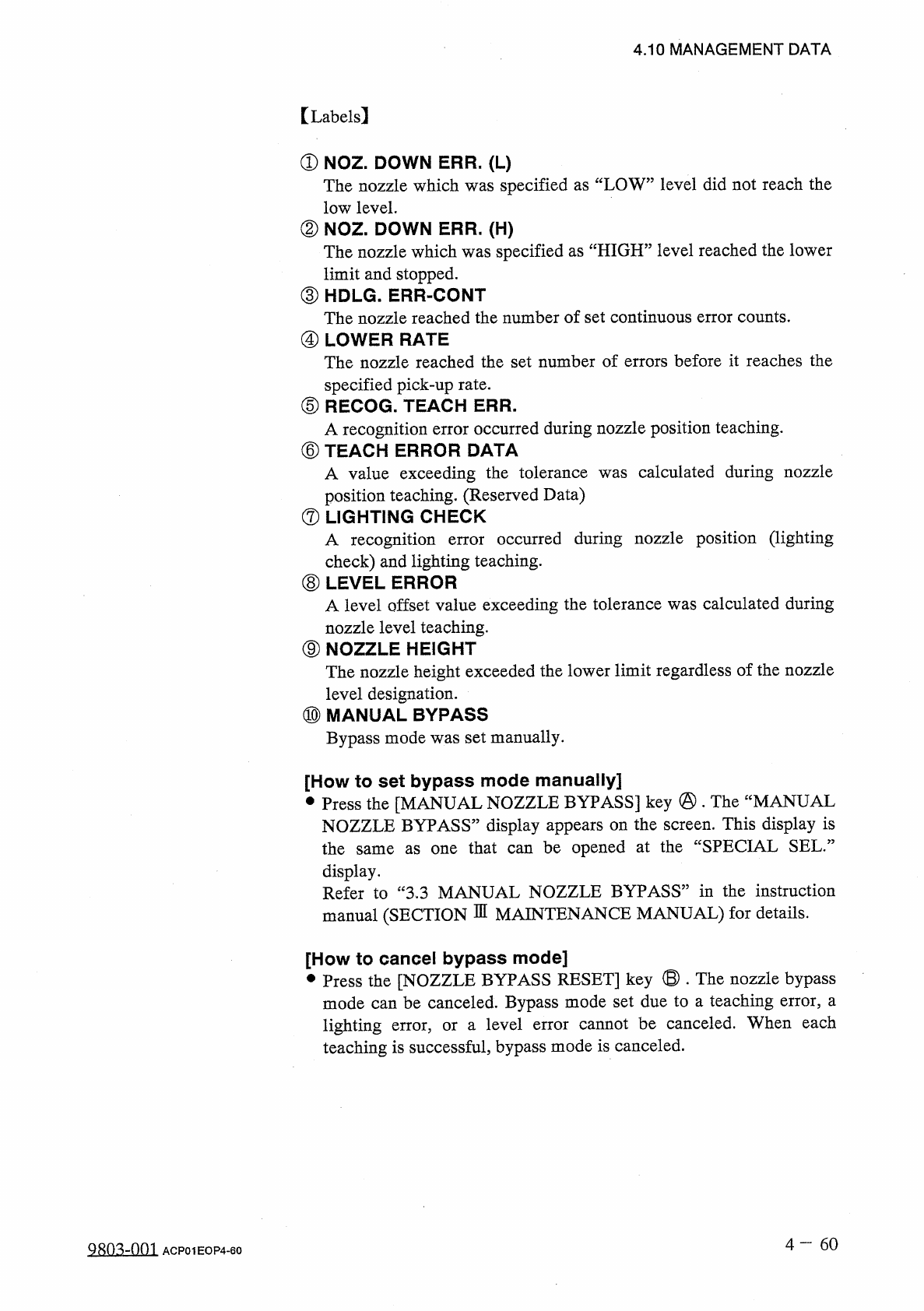
4.10 MANAGEMENT DATA ( 2 ) Head Bypassing Factor When the [ NEXT PAGE ] key is pressed at the “ HEAD . NOZZLE BYPASS DATA ” display , the following display appears on the screen . < HEAD > NQZZLE BYPASS DATA ) [ HD…
4.10
MANAGEMENT
DATA
【
Labels
】
①
NOZ
.
DOWN
ERR
.
(
L
)
The
nozzle
which
was
specified
as
“
LOW
”
level
did
not
reach
the
low
level
.
②
NOZ
.
DOWN
ERR
.
(
H
)
The
nozzle
which
was
specified
as
“
HIGH
2
limit
and
stopped
.
③
HDLG
.
ERR
-
CONT
The
nozzle
reached
the
number
of
set
continuous
error
counts
.
④
LOWER
RATE
The
nozzle
reached
the
set
number
of
errors
before
it
reaches
the
specified
pick
-
up
rate
.
⑤
RECOG
.
TEACH
ERR
.
A
recognition
error
occurred
during
nozzle
position
teaching
.
⑥
TEACH
ERROR
DATA
A
value
exceeding
the
tolerance
position
teaching
.
(
Reserved
Data
)
⑦
LIGHTING
CHECK
A
recognition
check
)
and
lighting
teaching
.
⑧
LEVEL
ERROR
A
level
offset
value
exceeding
the
tolerance
was
calculated
during
nozzle
level
teaching
.
⑨
NOZZLE
HEIGHT
The
nozzle
height
exceeded
the
lower
limit
regardless
of
the
nozzle
level
designation
.
⑩
MANUAL
BYPASS
Bypass
mode
was
set
manually
.
level
reached
the
lower
calculated
during
nozzle
was
occurred
during
nozzle
position
(
lighting
error
[
How
to
set
bypass
mode
manually
]
•
Press
the
[
MANUAL
NOZZLE
BYPASS
]
key
@
.
The
“
MANUAL
NOZZLE
BYPASS
”
display
appears
on
the
screen
.
This
display
is
the
same
as
one
that
can
be
opened
at
the
“
SPECIAL
SEL
.
”
display
.
Refer
to
“
3.3
MANUAL
NOZZLE
BYPASS
”
in
the
instruction
manual
(
SECTION
DI
MAINTENANCE
MANUAL
)
for
details
.
[
How
to
cancel
bypass
mode
]
•
Press
the
[
NOZZLE
BYPASS
RESET
]
key
®
•
The
nozzle
bypass
mode
can
be
canceled
.
Bypass
mode
set
due
to
a
teaching
error
,
a
lighting
teaching
is
successful
,
bypass
mode
is
canceled
.
error
,
or
a
level
error
cannot
be
canceled
.
When
each
4
一
60
QR
03
-
nm
ACP
01
EOP
4
-
60
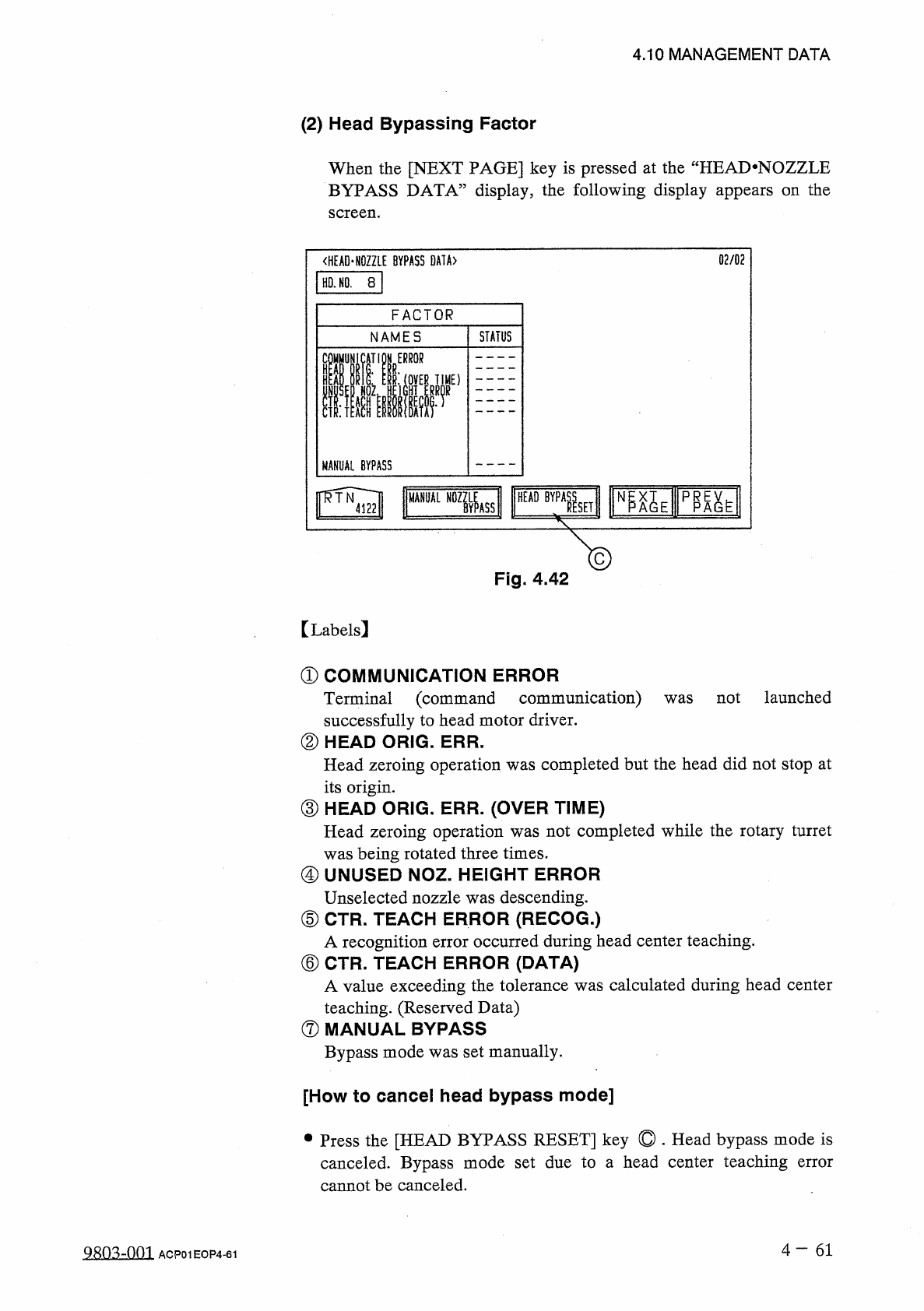
4.10
MANAGEMENT
DATA
(
2
)
Head
Bypassing
Factor
When
the
[
NEXT
PAGE
]
key
is
pressed
at
the
“
HEAD
.
NOZZLE
BYPASS
DATA
”
display
,
the
following
display
appears
on
the
screen
.
<
HEAD
>
NQZZLE
BYPASS
DATA
)
[
HD
.
NO
.
8
|
02
/
02
FACTOR
STATUS
NAMES
COMMUNICATiON
ERROR
III
ll
:
(
0
VER
TIME
)
MANUAL
BYPASS
巨
AGE
PPA
^
E
HEAD
BYPA
龍
N
MANUAL
SET
Fig
.
4.42
【
Labels
】
①
COMMUNICATION
ERROR
Terminal
(
command
communication
)
successfully
to
head
motor
driver
.
②
HEAD
ORIG
.
ERR
.
Head
zeroing
operation
was
completed
but
the
head
did
not
stop
at
its
origin
.
③
HEAD
ORIG
.
ERR
.
(
OVER
TIME
)
Head
zeroing
operation
was
not
completed
while
the
rotary
turret
was
being
rotated
three
times
.
④
UNUSED
NOZ
.
HEIGHT
ERROR
Unselected
nozzle
was
descending
.
⑤
CTR
.
TEACH
ERROR
(
RECOG
.
)
A
recognition
error
occurred
during
head
center
teaching
.
⑥
CTR
.
TEACH
ERROR
(
DATA
)
A
value
exceeding
the
tolerance
was
calculated
during
head
center
teaching
.
(
Reserved
Data
)
⑦
MANUAL
BYPASS
Bypass
mode
was
set
manually
.
not
launched
was
[
How
to
cancel
head
bypass
mode
]
•
Press
the
[
HEAD
BYPASS
RESET
]
key
©
.
Head
bypass
mode
is
canceled
.
Bypass
mode
set
due
to
a
head
center
teaching
cannot
be
canceled
.
error
4
-
61
Q
只
03
-
001
ACP
01
EOP
4
-
61
01
/
02
〈
NOZZLE
HANDLING
ERRORS
〉
HD
.
NO
.
8
NOZ
.
NO
.
2
NOZZLE
TYPE
11
1.6
X
0.8
NOZZLE
CLEAN
/
CHANGE
DATE
(
TOTALl
)
NOZZLE
BYPASS
/
START
DATE
4
/
18
(
11
:
15
4
/
15
(
FRI
)
11
:
15
NOZZLE
MANAGEMENT
DATA
(
TYPE
1
)
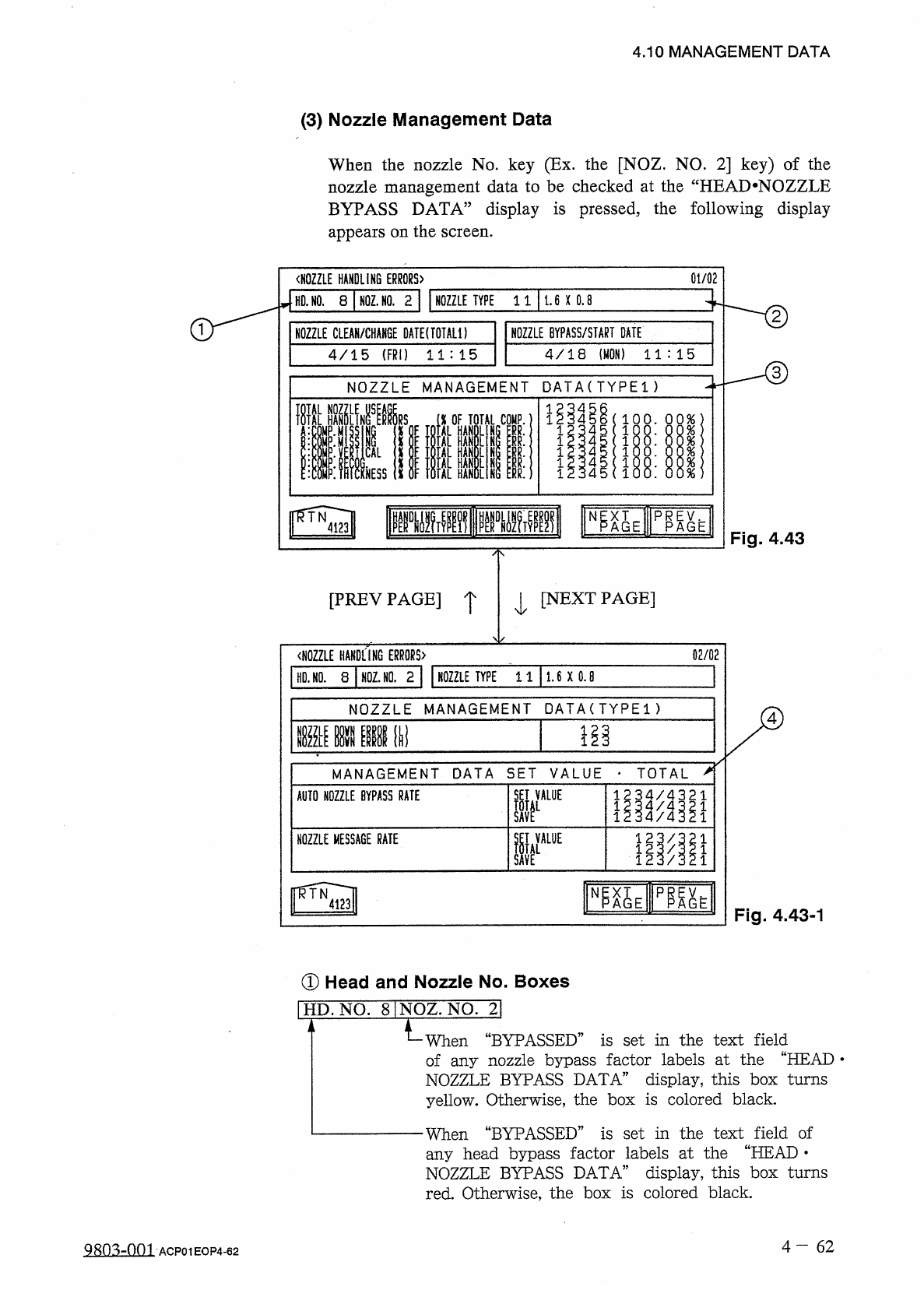
4.10
MANAGEMENT
DATA
(
3
)
Nozzle
Management
Data
When
the
nozzle
No
.
key
(
Ex
.
the
[
NOZ
.
NO
.
2
]
key
)
of
the
nozzle
management
data
to
be
checked
at
the
“
HEAD
*
NOZZLE
BYPASS
DATA
”
display
is
pressed
,
the
following
display
appears
on
the
screen
.
Fig
.
4.43
T
[
NEXT
PAGE
]
[
PREY
PAGE
]
I
02
/
02
〈
NOZZLE
HANDLING
ERRORS
〉
HO
.
NO
.
8
N
0
Z
.
N
0
.
2
NOZZLE
TYPE
11
1.6
X
0.8
NOZZLE
MANAGEMENT
DATA
(
丁丫
PEI
>
!!
IIW
MANAGEMENT
DATA
SET
VALUE
-
TOTAL
,
1234
/
4321
翻娜
1
AUTO
NOZZLE
BYPASS
RATE
SET
VALUE
w
ir
麗
i
NOZZLE
MESSAGE
RATE
既
E
邙仏
N
Fig
.
4.43
-
1
①
Head
and
Nozzle
No
.
Boxes
I
HD
.
NO
.
81
NOZ
.
NO
.
2
]
When
“
BYPASSED
”
is
set
in
the
text
field
of
any
nozzle
bypass
factor
labels
at
the
“
HEAD
•
NOZZLE
BYPASS
DATA
”
display
,
this
box
turns
yellow
.
Otherwise
,
the
box
is
colored
black
.
When
“
BYPASSED
”
is
set
in
the
text
field
of
any
head
bypass
factor
labels
at
the
“
HEAD
•
NOZZLE
BYPASS
DATA
”
display
,
this
box
turns
red
.
Otherwise
,
the
box
is
colored
black
.
4
-
6 2
gRO
^
-
nm
,
ACP
01
EOP
4
-
62
V
.
GE
%
%
%
%
%
%
ooonxuo
onxuooo
EA
.
Rp
p
onxunxuo
OOQUOO
vJ
.
vJ
.
-
<
ll
.
vx
/
1
i
.
v
"
J
Ei
TGi
XA
Ep
6655555
5544444
44330
O
0
O
3
3322
PS
3
OJOJV
-
lvxrJ
.
n
N
mm
AAAAA
^
HnnnnHH
Rsxl
:
NG
^
^
cdKN
0
NOZHANIP
.
HS
;