1OPERATION_.pdf - 第173页
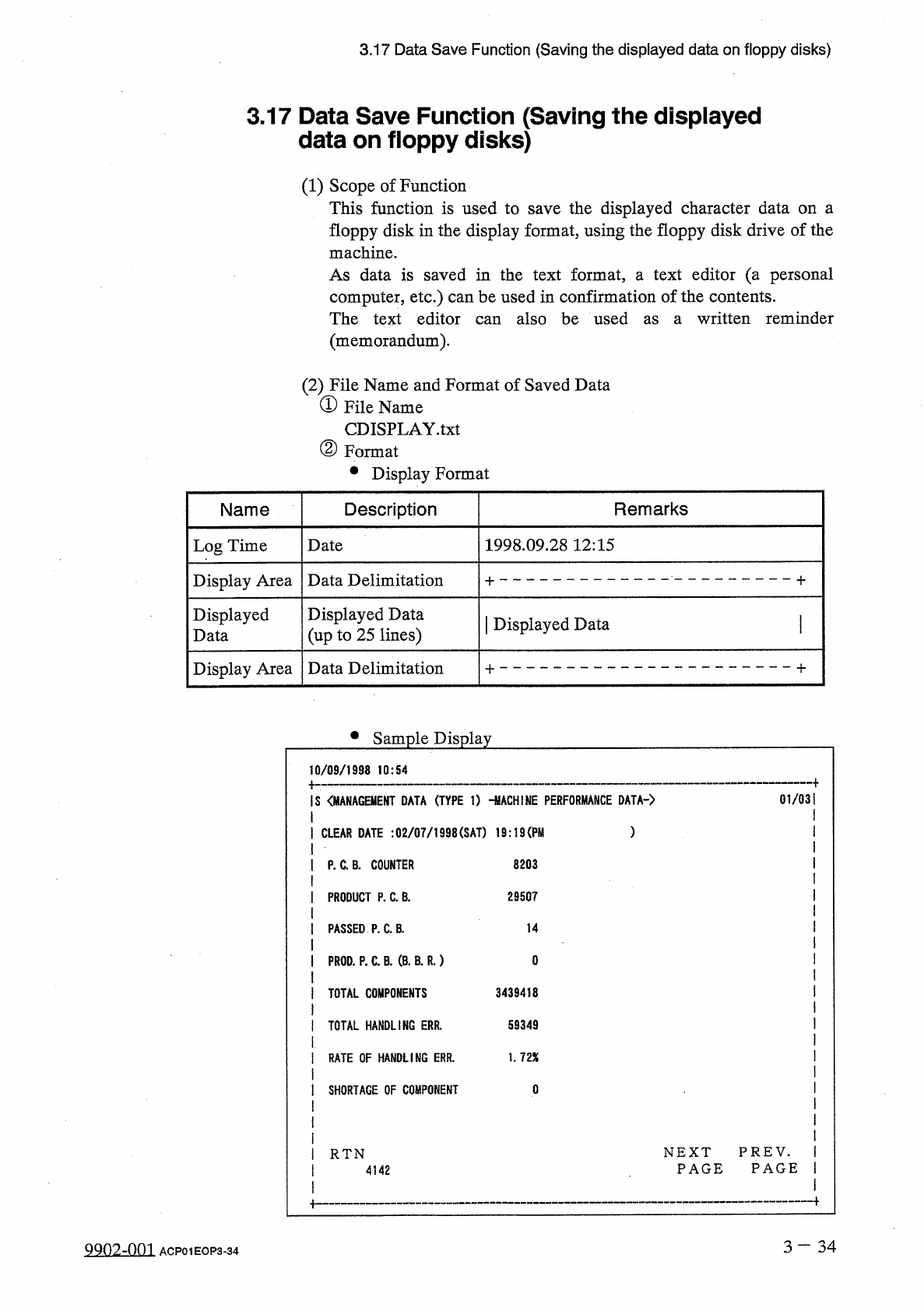
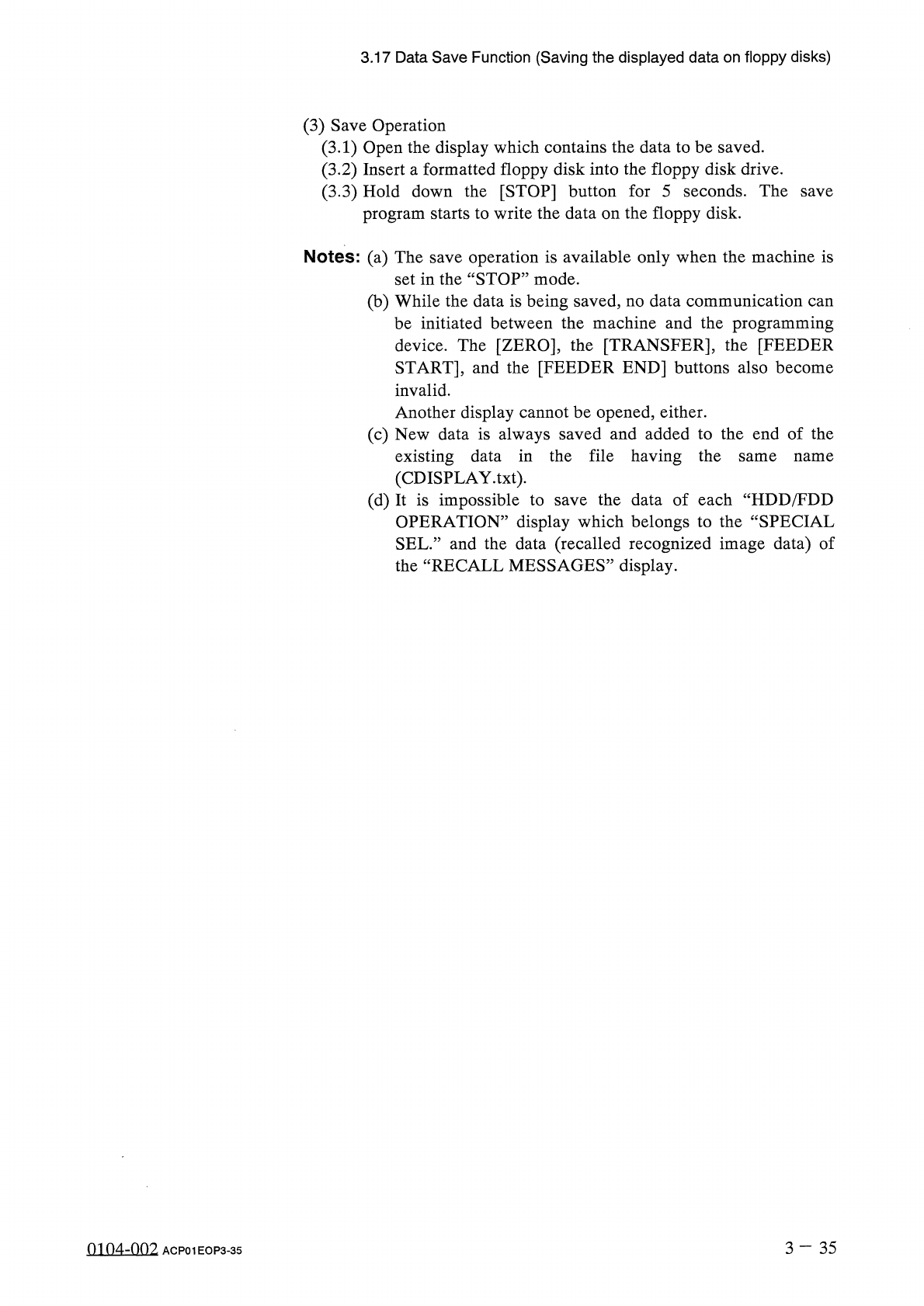
3.17 Data Save Function ( Saving the displayed data on floppy disks ) ( 3 ) Save Operation ( 3.1 ) Open the display which contains the data to be saved . ( 3.2 ) Insert a formatted floppy disk into the floppy disk drive …
3.17
Data
Save
Function
(
Saving
the
displayed
data
on
floppy
disks
)
3.17
Data
Save
Function
(
S
data
on
floppy
disks
)
aving
the
displayed
(
1
)
Scope
of
Function
This
function
is
used
to
save
the
displayed
character
data
on
a
floppy
disk
in
the
display
format
,
using
the
floppy
disk
drive
of
the
machine
.
As
data
is
saved
in
the
text
format
,
a
text
editor
(
a
personal
computer
,
etc
.
)
can
be
used
in
confirmation
of
the
contents
.
The
text
editor
can
also
be
used
(
memorandum
)
.
written
reminder
as
a
(
2
)
File
Name
and
Format
of
Saved
Data
①
File
Name
CDISPLAY
.
txt
②
Format
•
Display
Format
Name
Description
Remarks
Log
Time
Date
1998.09
.
28
12
:
15
Display
Area
Data
Delimitation
Displayed
Data
Displayed
Data
(
up
to
25
lines
)
|
Displayed
Data
Data
Delimitation
Display
Area
•
Sample
Display
0
/
09
/
1998
10
:
54
S
〈
MANAGEMENT
DATA
(
TYPE
1
)
-
MACHINE
PERFORMANCE
DATA
-
)
01
/
03
CLEAR
DATE
:
02
/
07
/
1998
(
SAT
)
19
:
19
(
PM
P
.
C
.
B
‘
COUNTER
8203
PRODUCT
P
.
C
.
B
.
29507
PASSED
P
.
C
.
B
.
14
PROD
.
P
.
C
.
B
.
(
B
.
B
.
R
.
)
0
3439418
TOTAL
COMPONENTS
59349
TOTAL
HANDLING
ERR
.
RATE
OF
HANDLING
ERR
.
1.72
X
SHORTAGE
OF
COMPONENT
0
NEXT
PREV
.
PAGE
PAGE
RTN
4142
3
-
34
QQ
02
-
0
ni
ACP
01
EOP
3
-
34
3.17
Data
Save
Function
(
Saving
the
displayed
data
on
floppy
disks
)
(
3
)
Save
Operation
(
3.1
)
Open
the
display
which
contains
the
data
to
be
saved
.
(
3.2
)
Insert
a
formatted
floppy
disk
into
the
floppy
disk
drive
.
(
3.3
)
Hold
down
the
[
STOP
]
button
for
5
seconds
.
The
save
program
starts
to
write
the
data
on
the
floppy
disk
.
Notes
:
(
a
)
The
save
operation
is
available
only
when
the
machine
is
set
in
the
“
STOP
”
mode
.
(
b
)
While
the
data
is
being
saved
,
no
data
communication
can
be
initiated
between
the
machine
and
the
programming
device
.
The
[
ZERO
]
,
the
[
TRANSFER
]
,
the
[
FEEDER
START
]
,
and
the
[
FEEDER
END
]
buttons
also
become
invalid
.
Another
display
cannot
be
opened
,
either
.
(
c
)
New
data
is
always
saved
and
added
to
the
end
of
the
existing
data
in
the
file
having
the
(
CDISPLAY
.
txt
)
.
(
d
)
It
is
impossible
to
save
the
data
of
each
“
HDD
/
FDD
OPERATION
”
display
which
belongs
to
the
“
SPECIAL
SEL
.
”
and
the
data
(
recalled
recognized
image
data
)
of
the
“
RECALL
MESSAGES
”
display
.
same
name
3
-
35
0104
-
002
ACP
01
EOP
3
-
35
4
Page
4.1
Hierarchical
Structure
of
Automatic
Operation
Displays
4.2
“
AUTO
OPN
.
MODE
<
PLACEMENT
>
”
Display
4.3
Automatic
Operation
Sub
-
Menu
4.4
Program
Change
4.5
SEMI
-
AUTOMATIC
OPERATION
4.5
.
1
Normal
Step
Designation
(
Without
Non
-
Placement
Steps
)
4.5
.
2
Setting
of
Warm
and
Cold
Start
Functions
4.5
.
3
WARM
START
4.6
Operation
Mode
4.6
.
1
AUTOMATIC
FEEDER
AXIS
ADJ
.
MODE
4.6
.
2
OVERALL
TACT
TIME
REDUCTION
4.6
.
3
SHORTAGE
OF
COMP
.
DETECTION
MODE
4.6
.
4
ALTERNATE
MODE
4.6
.
5
RECOVERY
MODE
4.6
.
6
FEEDER
CARRIAGE
AXIS
MODE
4.6
.
7
X
/
Y
TABLE
AXIS
MODE
4.6
.
8
Setting
of
Trash
Box
Fill
-
Up
Warning
Mode
4.7
RECOVERY
OPN
.
TEACHING
OPN
.
4.7
.
1
CURRENT
PROGRAM
4.7
.
2
COMPONENT
LIBRARY
EDIT
4.7
.
3
Modification
of
Component
Carriage
Data
(
Simplified
Packaging
Direction
Change
Function
)
4.7
.
4
FEEDER
(
B
)
OFFSET
4.8
Product
Change
Operation
4.9
RECALL
MESSAGES
4
-
1
4
-
2
4
-
6
4
-
10
4
-
11
4
-
11
4
-
14
4
-
15
4
-
17
4
-
19
4
-
20
4
-
21
4
-
23
4
-
26
4
-
27
4
-
28
4
-
29
4
-
32
4
-
33
4
-
34
4
-
35
4
-
39
4
-
40
4
-
42
nm
7
-
nn
?
ACP
01
EOPC
4
-
1