1OPERATION_.pdf - 第156页
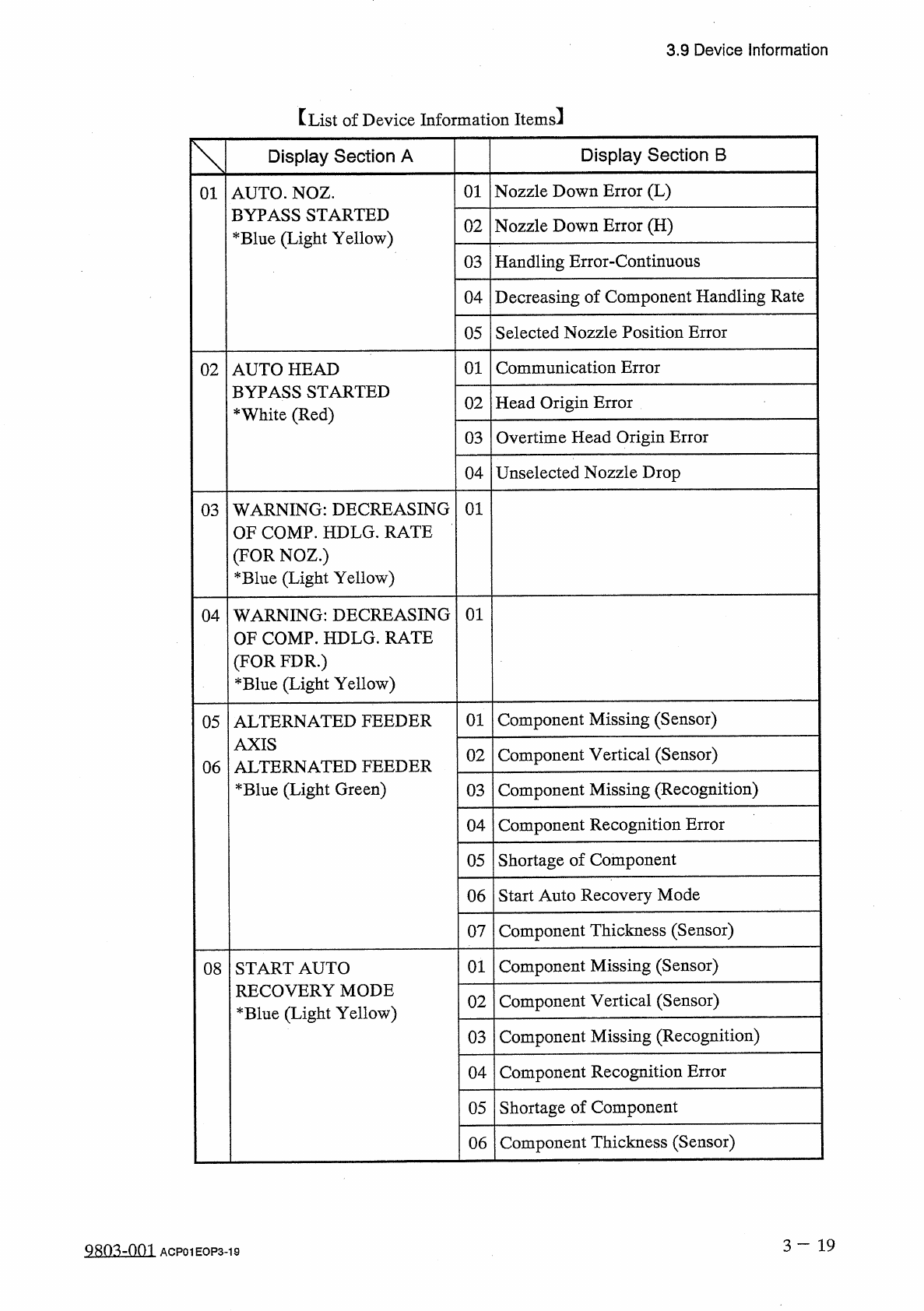
3.9 Device information 【 List of Device Information Items 】 Display Section B Display Section A 01 Nozzle Down Error ( L ) 01 AUTO . NOZ . BYPASS STARTED * Blue ( Light Yellow ) Nozzle Down Error ( H ) 02 Handling Error …
3.9
Device
Information
3.9
Device
Information
•
This
display
shows
various
information
during
automatic
operation
.
After
each
information
,
automatic
operation
still
continues
.
•
Warning
messages
indicate
that
the
machine
is
under
low
operation
rate
(
nozzle
and
feeder
message
rate
)
based
upon
the
set
operation
parameters
,
the
nozzle
which
causes
poor
handling
rate
is
automatically
bypassed
for
a
smooth
operation
(
function
to
prohibit
the
use
of
the
nozzle
automatically
)
,
the
machine
is
almost
short
of
components
,
etc
.
•
The
conditions
to
issue
device
information
according
to
the
operation
parameters
set
in
data
editing
.
(
Operation
parameters
can
be
set
not
to
issue
device
information
.
)
•
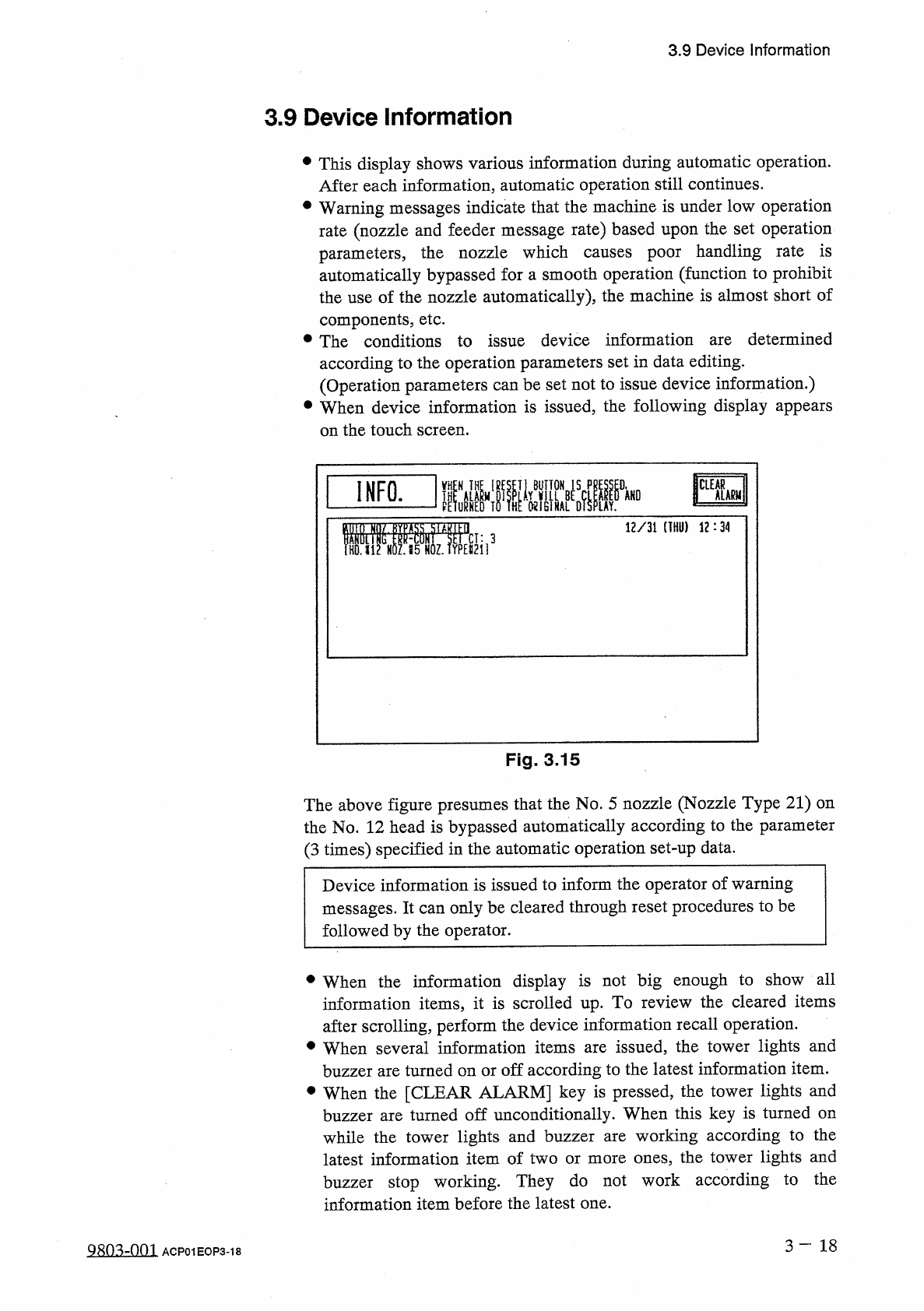
When
device
information
is
issued
,
the
following
display
appears
on
the
touch
screen
.
determined
are
INFO
.
12
/
31
(
THU
)
12
:
34
Fig
.
3.15
The
above
figure
presumes
that
the
No
.
5
nozzle
(
Nozzle
Type
21
)
on
the
No
.
12
head
is
bypassed
automatically
according
to
the
parameter
(
3
times
)
specified
in
the
automatic
operation
set
-
up
data
.
Device
information
is
issued
to
inform
the
operator
of
warning
messages
.
It
can
only
be
cleared
through
reset
procedures
to
be
followed
by
the
operator
.
•
When
the
information
display
is
not
big
enough
to
show
all
information
items
,
it
is
scrolled
up
.
To
review
the
cleared
items
after
scrolling
,
perform
the
device
information
recall
operation
.
•
When
several
information
items
are
issued
,
the
tower
lights
and
buzzer
are
turned
on
or
off
according
to
the
latest
information
item
.
•
When
the
[
CLEAR
ALARM
]
key
is
pressed
,
the
tower
lights
and
buzzer
are
turned
off
unconditionally
.
When
this
key
is
turned
on
while
the
tower
lights
and
buzzer
latest
information
item
of
two
or
more
ones
,
the
tower
lights
and
buzzer
stop
working
.
They
do
not
work
according
to
the
information
item
before
the
latest
one
.
working
according
to
the
are
3
-
1 8
9803
-
001
ACP
01
EOP
3
-
18
3.9
Device
information
【
List
of
Device
Information
Items
】
Display
Section
B
Display
Section
A
01
Nozzle
Down
Error
(
L
)
01
AUTO
.
NOZ
.
BYPASS
STARTED
*
Blue
(
Light
Yellow
)
Nozzle
Down
Error
(
H
)
02
Handling
Error
-
Continuous
03
Decreasing
of
Component
Handling
Rate
04
Selected
Nozzle
Position
Error
05
01
Communication
Error
02
AUTO
HEAD
BYPASS
STARTED
*
White
(
Red
)
Head
Origin
Error
02
Overtime
Head
Origin
Error
03
Unselected
Nozzle
Drop
04
03
WARNING
:
DECREASING
OF
COMP
.
HDLG
.
RATE
(
FOR
NOZ
.
)
*
Blue
(
Light
Yellow
)
01
04
WARNING
:
DECREASING
HDLG
.
RATE
01
OF
COMP
.
]
(
FOR
FDR
.
)
*
Blue
(
Light
Yellow
)
Component
Missing
(
Sensor
)
01
05
ALTERNATED
FEEDER
AXIS
ALTER
*
Blue
(
Light
Green
)
Component
Vertical
(
Sensor
)
02
NATED
FEEDER
06
Component
Missing
(
Recognition
)
03
Component
Recognition
Error
04
05
Shortage
of
Component
Start
Auto
Recovery
Mode
06
Component
Thickness
(
Sensor
)
07
Component
Missing
(
Sensor
)
01
08
START
AUTO
RECOVERY
MODE
*
Blue
(
Light
Yellow
)
Component
Vertical
(
Sensor
)
02
Component
Missing
(
Recognition
)
03
Component
Recognition
Error
04
Shortage
of
Component
05
Component
Thickness
(
Sensor
)
06
3
-
1 9
Qso
^
-
nm
ACP
01
EOP
3
-
19
3.9
Device
Information
Display
Section
B
Display
Section
A
The
Tape
End
was
Detected
.
09
ALARM
FOR
SHORTAGE
OF
COMP
.
*
Blue
(
Light
Green
)
01
Few
Components
to
Feed
.
02
01
Finished
Product
Interval
0
A
PRODUCT
INFORMATION
*
Blue
(
Light
Green
)
02
Auto
Run
Interval
03
Nozzle
Usage
Interval
No
Signal
from
Furnace
MACHINE
INTERFACE
SIGNAL
*
White
(
Red
)
01
0
B
CANCEL
RECOVERY
ON
oc
(
)
Trash
Box
Fill
Up
Warning
(
Notice
Count
Over
)
01
MAINTENANCE
WARNING
*
Blue
(
Light
Yellow
)
0
D
Keep
the
Machine
Cor
(
Maintenance
Cycle
Time
)
02
ion
.
Check
the
Setup
of
Machine
.
(
Program
Change
Completed
)
PROGRAM
CHANGE
WARNING
*
Blue
(
Light
Yellow
)
0
E
01
SIF
INFORMATION
(
)
*
White
(
Red
)
The
FDR
.
was
not
Recorded
SIF
Data
Exists
.
Please
Record
by
MNL
.
Operation
.
01
OF
The
SIF
Data
was
Changed
.
Please
Record
by
MNL
.
Operation
.
02
Auto
Offset
Teach
Information
AUTO
OFFSET
TEACH
INFORMATION
*
Blue
(
Light
Green
)
01
10
H
Notes
:
(
a
)
*
-
marked
colors
in
“
Display
Section
A
”
are
the
colors
(
background
color
)
of
characters
when
issued
.
(
b
)
The
-
marked
items
in
“
Display
Section
A
”
are
optional
.
message
is
a
3
—
20
QRin
-
0
n
2
ACP
01
EOP
3
-
20