3_AVS-V2_MCT-UM-internal_EN_07-2019.pdf - 第104页
ASM AVS - U SER M ANUAL P AGE 104 OF 182 5. 2.25 Proj ec ts for Pri nt er MC T 5.2.25.1 General The mai n d iffer ence from a P rin ter M CT to a M C T on pla ceme nt e quipm ent is, that one pr int- ing at leas t mea ns…
ASM AVS - USER MANUAL
PAGE 103 OF 182
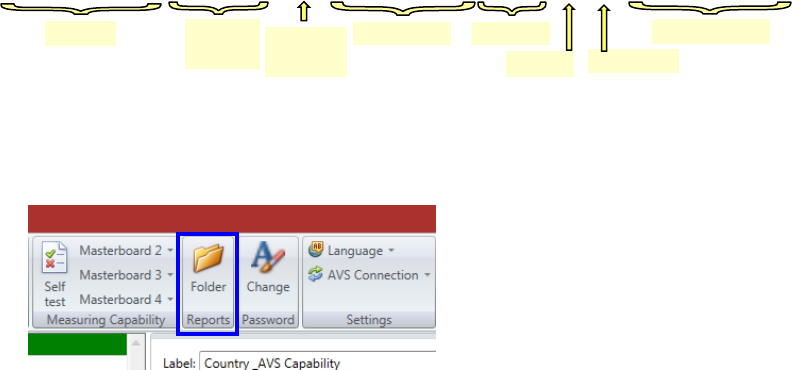
3. The file name is going to be changed to the following format:
The generated reports can then be picked up in this folder.
There is a direct access to the folder from the AVS software.
Click on “Folder” in the menu and select there the folder for the respective customer.
For clarity, you can then delete or move the files. The originals are still in the respective project
folder, but there they are named only with date and time (i.e. the project name).
Line
Machine
type
Conv.-Track
Maschine ID
Gantry
Serial No.
Date and Time
Project-
Type
TC-MUC_Room 5_SIPLACE D1_MCT_MID-00001234_SN-C89_G1_SC__2017-11-28 14-53.pdf
ASM AVS - USER MANUAL
PAGE 104 OF 182
5.2.25 Projects for Printer MCT
5.2.25.1 General
The main difference from a Printer MCT to a MCT on placement equipment is, that one print-
ing at least means nearly nothing.
On a placement machine, one board gives you already a result for the MCT,
because each placement (of each component) is a repetition of the whole process.
But for the Screen Printer, one printed board is just like one placed component.
Although you have up to ~50 printed dots, you have just one printing process.
For this reason, a printer MCT must be carried out in a different way.
5.2.25.2 Printer Preparation
Copy the AVS product file “AVS_Printer-MCT.PR1” from the Folder D:\SOFTWARE\DEK and load
it on to the printing machine.
If no USB memory devices are allowed on-site then the customer should be contacted to pro-
vide a suitable alternative.
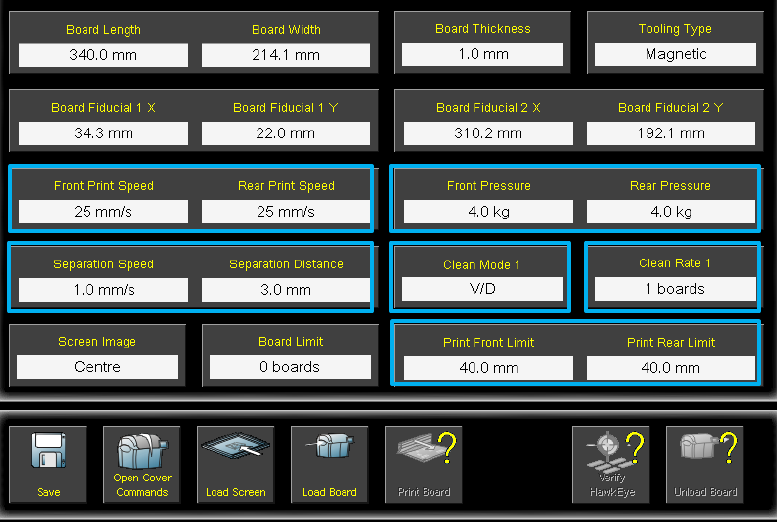
The AVS product file has the following recommended process parameters (See screen shots be-
low)
• Print Speed (Front and Back) – 25mm/s
• Print Pressure (Front and Back) – 4kg
• Separation Speed – 1mm/s
• Separation Distance – 3mm
• Front and Back Print Limit – 40mm
ASM AVS - USER MANUAL
PAGE 105 OF 182
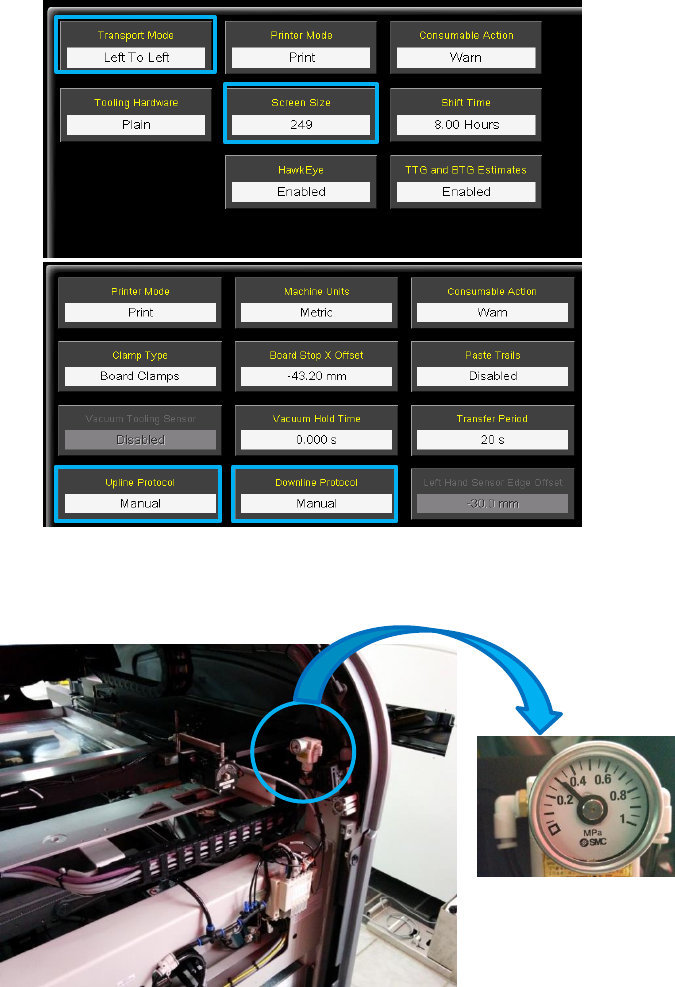
In addition to the above the Printing machine should have the following settings:
• Maintenance / Machine Setup / Transport Mode – Left to Left
• Maintenance / Machine Setup/ Screen Size - ensure set correctly (typically 249)
• Maintenance / Machine Setup / Basics /Upline and Downline – Manual
• Chase Clamp pressure set to 0.35MPa (3,5 bar) – this should be adjusted on the regulator at
the back left of machine.
• Ensure that sufficient cleaning material is available on the role.
For the MCT 1m is needed.
• If a blue USC is used, then set it to "Dry / Dry every board".
• Ensure when using a Cyclone cleaner that "Dry / Dry with Oscillate" is set.