3_AVS-V2_MCT-UM-internal_EN_07-2019.pdf - 第71页
ASM AVS - U SER M ANUAL P AGE 71 OF 182 5.2.18.13 Base Data – ASM AVS Devices It is neces sa ry to sto re so -cal led »dev ice data «, for eac h ASM A VS s yste m. In “Base D ata” = > “ Devi ces” you can ente r t his …
ASM AVS - USER MANUAL
PAGE 70 OF 182
(9) The measuring plan is displayed as an Image file.
To zoom this image, you can double click the image and it will be opened in a separate
window, which you can then enlarge over the whole monitor.
(10) If you want to load an existing recipe to the database, you have to enter the parameters
mentioned above first, then save it. After saving, the button „Load…“ is activated. With
this function you can select the corresponding recipe folder.
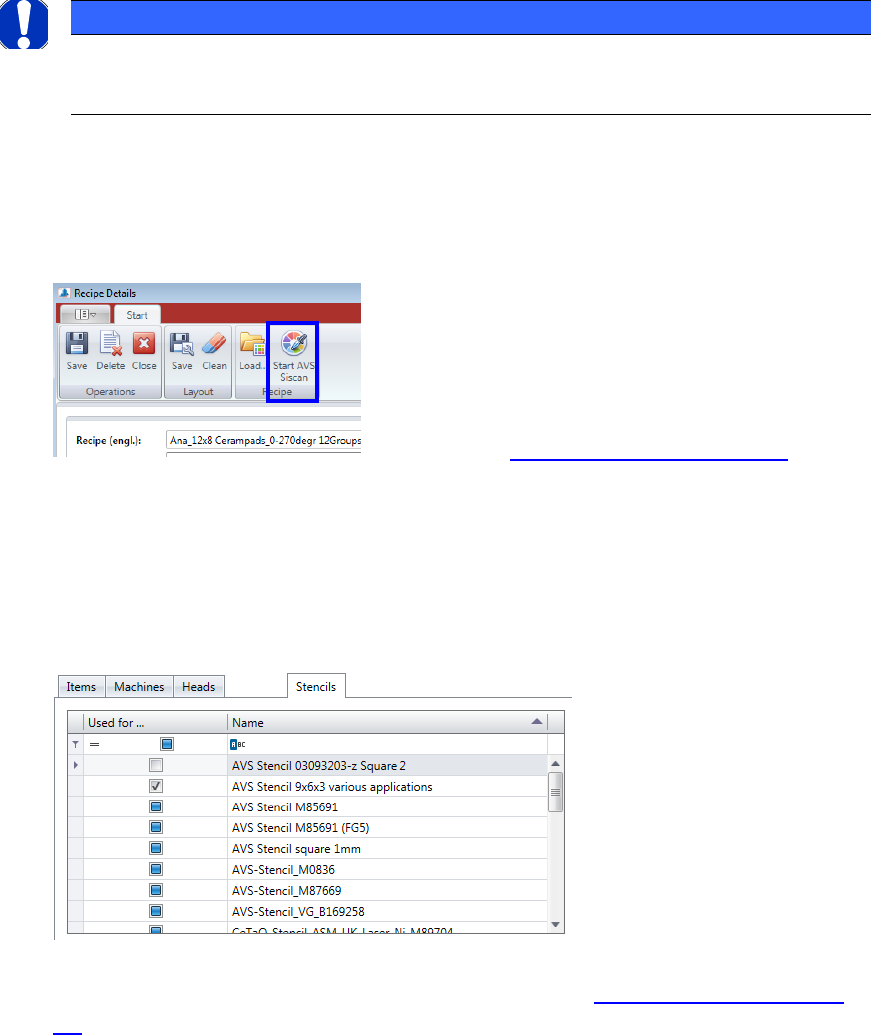
(11) If you are working on a ASM AVS device, the button „Start AVS_Scan“ will also be acti-
vated. If you press this button, you can edit the corresponding recipe in the AVS_Scan
Software.
The main recipe details are still generated and modified in the AVS_Scan Software.
See Chapter 4.3.5 »Create/change recipes«
(12) Machines: For each recipe, a general setting is required.
This is about the question, if the recipe is one for a placement machine, or it is one for
the measurement of a printer.
(13) If the Radio Button Machine Type is set to “Screen Printer”, the filters where changed.
Instead of a Filter for “Cameras” a filter for “Stencils” is displayed.
Here, a stencil, that is already defined in the database (see 5.2.18.15 Base Data – Sten-
cils) can be connected to the corresponding recipe.
NOTICE
If you want to load a recipe form a recipe folder to the database, you must take care, that the recipe folder
has the same name as the files with the endings: .sir, .jpg, .sirInfo., which are located in the folder.
ASM AVS - USER MANUAL
PAGE 71 OF 182
5.2.18.13 Base Data – ASM AVS Devices
It is necessary to store so-called »device data«, for each ASM AVS system.
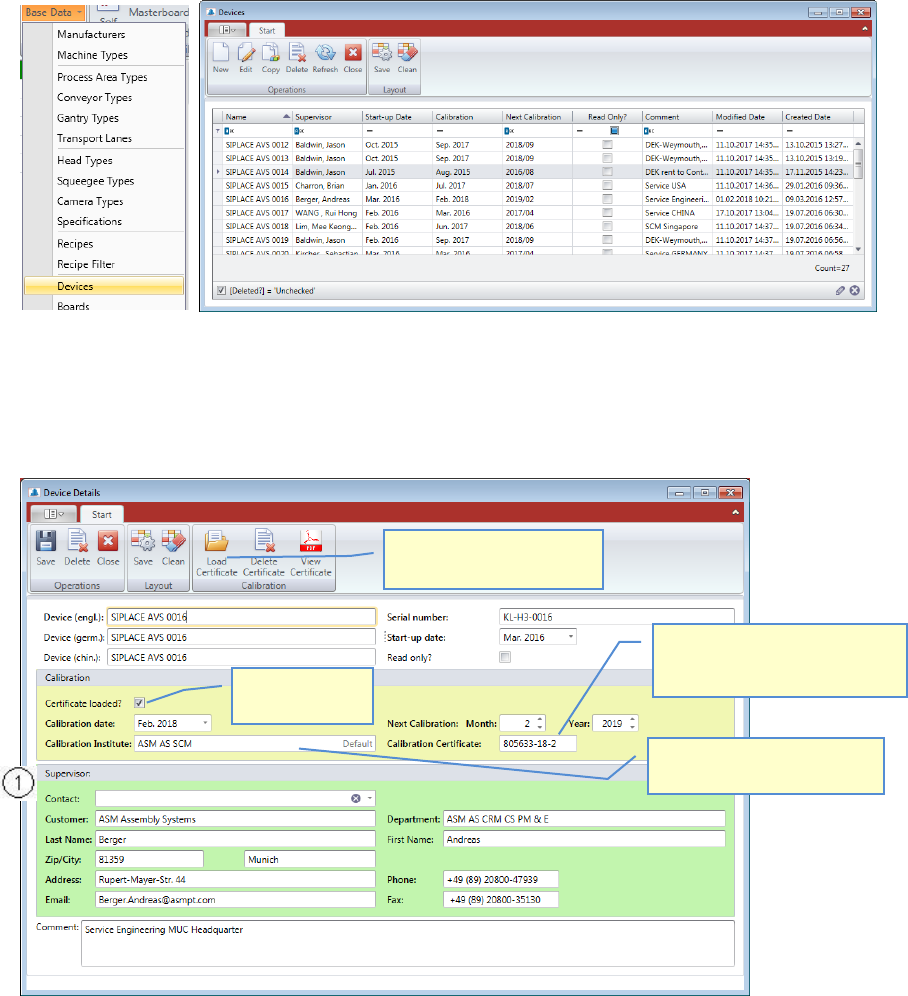
In “Base Data” => “Devices” you can enter this data.
First you got a list with all the AVS Devices.
Double Click the device you want to change or mark the line and press “Edit” to open the
“AVS device details” view.
Press “New” if you want to add another AVS Device into the database.
Assign a responsible person to the ASM AVS device.
This person must already be present as a »Contact« in the database.
Select the name from the list Contact (1).
The data is copied to data of the device.
The entries in the Area (1), regarding calibration, can be filled and changed out of a calibra-
tion project automatically.
See “4_AVS-V2_Certification_EN_MM-YYYY”, Chapter 3.6.1.
Enter the Certificate No..
Find it on the right top corner on
the first page of the certificate.
Enter the Calibration Institute
which makes the certificate.
This Checkbox is
for display only.
You can load the Certificate
(.pdf) for the device.
ASM AVS - USER MANUAL
PAGE 72 OF 182
5.2.18.14 Base Data – Boards
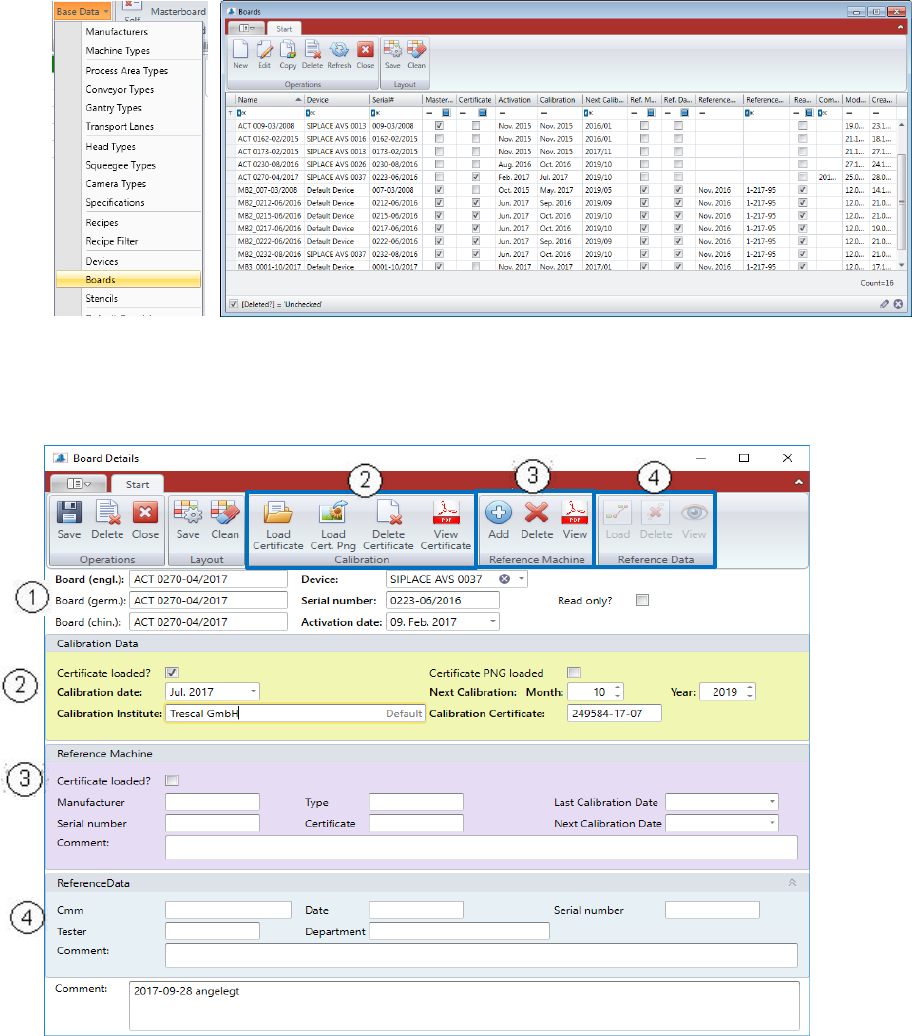
The glass plates, which are used for MCT does also have Calibration Certificates.
All the glass plates for AVS have to be registered in the database.
Double Click the board you want to change or mark the line and press “Edit” to open the
“Board details” view.
Press “New” if you want to add another Board into the database.
(1) Standard data for glass plates.
- Name: (written on the board, between the arrows)
- Serial number: (part of the name)
- Device: Boards are always linked to AVS devices. (choose from list)