3_AVS-V2_MCT-UM-internal_EN_07-2019.pdf - 第148页
ASM AVS - U SER M ANUAL P AGE 148 OF 182 5.3.5.3.7 »From Sta ge Pos« Wit h t he f unct ion » From Sta ge P os« , yo u are a ble to pla ce com pon ents at the lo cat ion o f t he cam era. • Mo ve t he came ra wi th the f …
ASM AVS - USER MANUAL
PAGE 147 OF 182
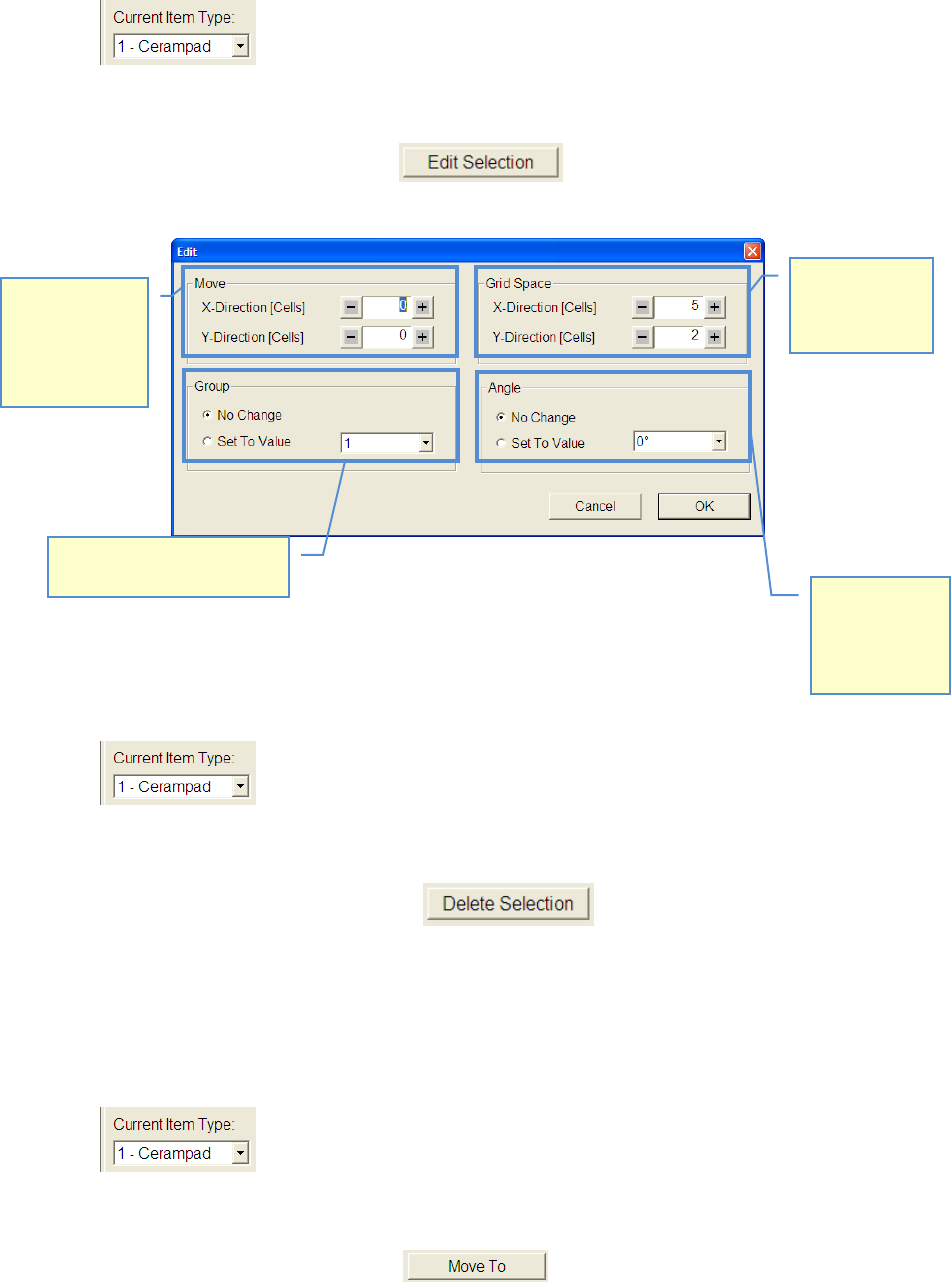
5.3.5.3.4 Move components, change grid
• Choose desired Item.
• Mark the components, you want to change by drawing a rectangle around the component
with the right mouse button
• Select function »Edit Selection«
• Modify your settings according to your desired measuring plan.
5.3.5.3.5 Delete components from recipe
• Choose component type which you want to delete.
• Mark the components, you want to delete by drawing a rectangle around the component
with the right mouse button.
• Select function »Delete Selection« , or push »Delete« button on key-
board.
5.3.5.3.6 Approach component with camera
• Select component you want to approach.
• Mark the components, you want to delete by drawing a rectangle around the component
with the right mouse button.
• Click on the button »Move To«. .
Distance of
components to
each other can
be changed
Marked compo-
nents can be
moved in X-
(horizontal) and
Y-direction
(vertical)
The angle of
marked com-
ponents can be
changed to
another value.
The group of marked compo-
nents can be changed.
ASM AVS - USER MANUAL
PAGE 148 OF 182
5.3.5.3.7 »From Stage Pos«
With the function »From Stage Pos«, you are able to place components at the location of the
camera.
• Move the camera with the function »Move Stage« to a position on your glass board.
• After the camera has reached the position, you can push the button »From Stage Pos«.
• Now you get a new component in the center of the closest 4 dots group.
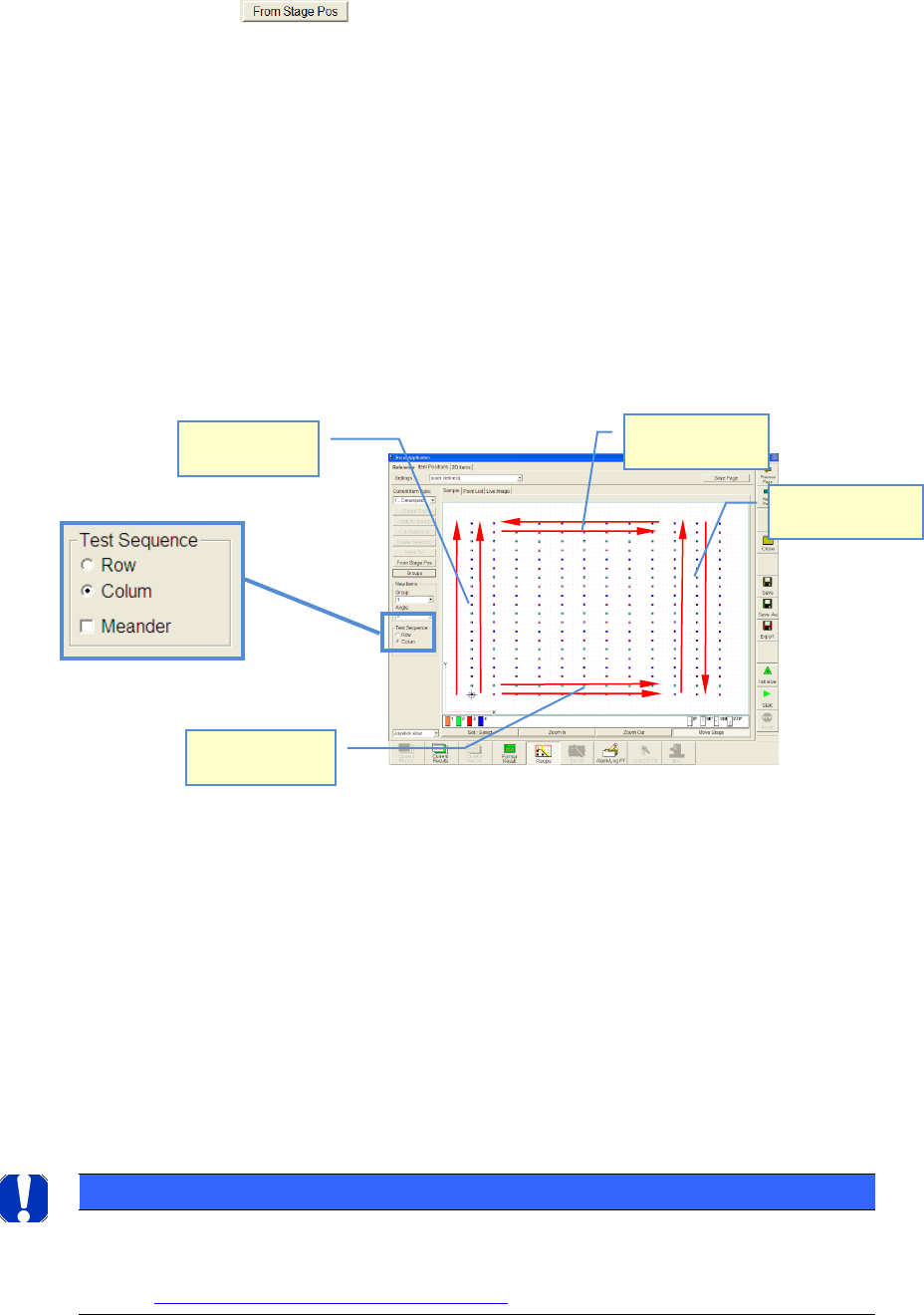
5.3.5.3.8 Adjustment of measurement sequence
• You have created a recipe (measuring plan).
• Now, you can adjust the measurement sequence.
• »Row« means: Measurement starts from the lower left side (component nr. 1). The cam-
era will be moved row by row and starts always to measure from the left side
• »Column« means: Measurement starts from the lower left side (component nr. 1). The
camera will be moved Colum by Colum and starts always to measure from the lower side
• The camera returns to the next component again, seen in a horizontal direction and moves
along the column in the same direction again
• »Meander« means: If a row or a column was measured, the camera does not return to the
next component again next to the 1st component but it moves along the next row or col-
umn in an opposite direction
NOTICE
The order of the measuring is mirrored again to 100% in the graphic "single value diagram". Therefore pay
attention at the interpretation of the graphic to the measuring order!
See also 6.4.2 Notes on evaluating the Single Value chart:
Test Sequence:
Row+Meander
Test Sequence:
Colum+Meander
Test Sequence:
Colum
Test Sequence:
Row
ASM AVS - USER MANUAL
PAGE 149 OF 182
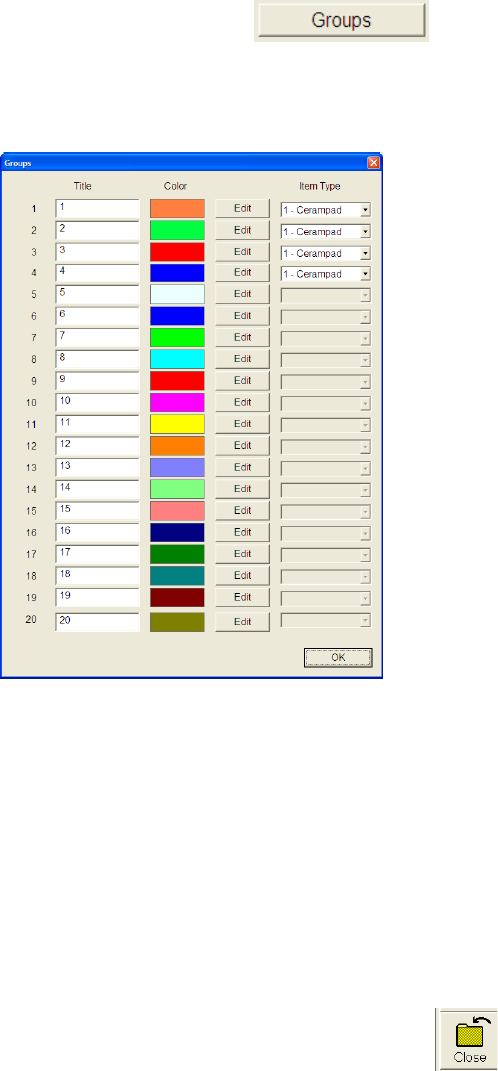
5.3.5.3.9 Assign group colors
• Choose function »Groups«.
• You can assign any color you like to each group, by using the following dialog.
Basically all 20 groups are visible in the dialog window but only the used groups have as-
signed a component.
5.3.5.4 Storage of a Recipe (measuring plan)
Once you have created or changed a recipe, you can save the recipe.
Save all the recipes into the folder: »C:\ ASM AVS Data\Recipe«.
In this folder you have to create a sub folder with the desired name of your recipe.
To find the recipes again, it is helpful to use names that are showing information about the
content of the recipe, like »20x12_Cerampads_4 Groups_0-270degr«.
Use the same name for the new sub folder as well as for the file name.
Exit the Siscan Application with the button »Close«!
You come back to the » ASM AVS Software«, automatically.
There you have to edit some parameters to add the recipe into the Database.