3_AVS-V2_MCT-UM-internal_EN_07-2019.pdf - 第84页
ASM AVS - U SER M ANUAL P AGE 84 OF 182 5. 2.24 P roj ec ts f or pla cem ent M CT C lic k o n t he in fro nt o f th e m achi ne , to l ist t he proje cts , whic h a re d epen ding to t his mac hine . The pro ject nam e…
ASM AVS - USER MANUAL
PAGE 83 OF 182
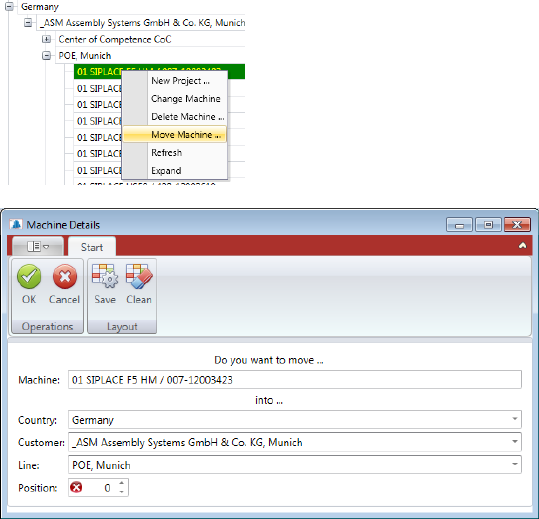
5.2.23.2 Moving a Machine
You can move a machine by right mouse click on it, choosing the function „Move Machine … „
in the Pop-up menu.
Now you can reassign "Country", "Customer", "Line" and the "Position" of the machine in the
line. Exit the dialog with "OK" and the machine will be moved to the desired location.
ASM AVS - USER MANUAL
PAGE 84 OF 182
5.2.24 Projects for placement MCT
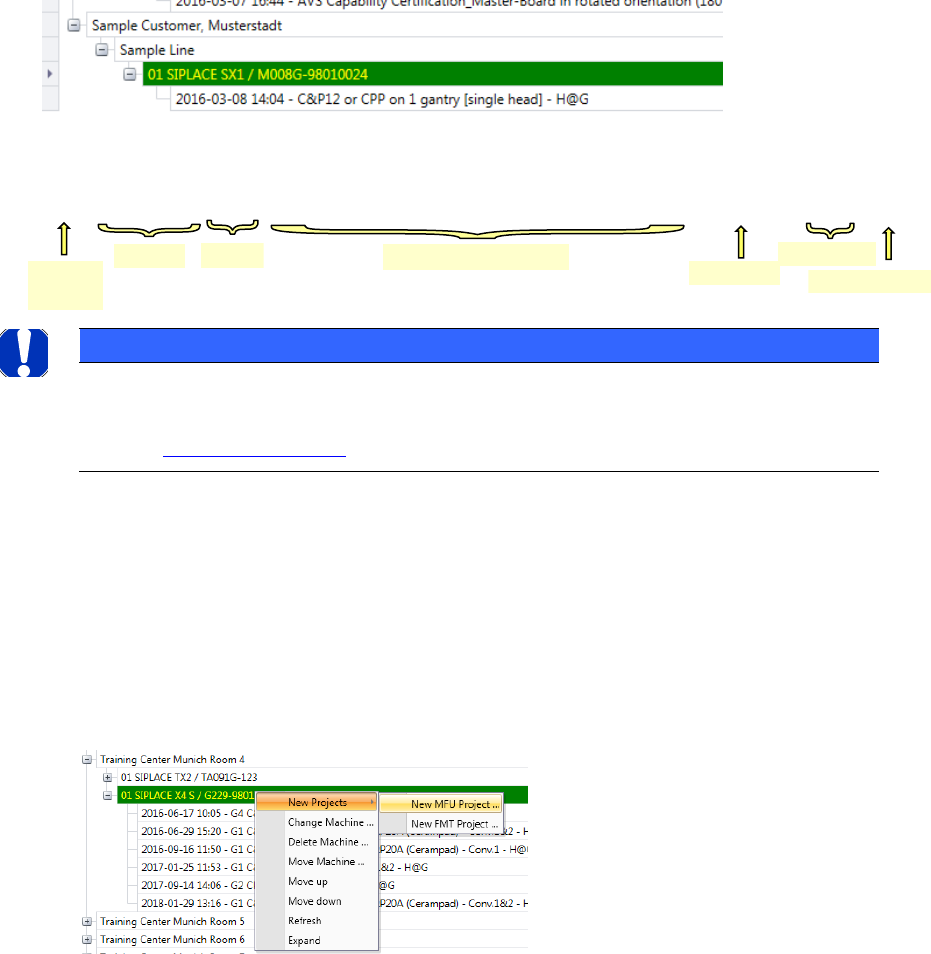
Click on the in front of the machine, to list the projects, which are depending to this machine.
The project names are made up as follows:
• Date and Time, of the project creation
• Track No. for dual conveyor machines
• Conveyor Track which is measured in the Project.
• Measurement mode (head @ gantry, segments @ head).
Example:
NOTICE
If you click on a project, so as this is signed green, then you find further information to the project in the
information area on the right side.
See also: 5.2.24.2 Existing Projects.
5.2.24.1 New Project
When you have found the corresponding machine and have established that the machine pa-
rameters are correct, you can create a project for the machine.
To do this, right-click on the machine and choose the »New Project …« => »New MCT Project
…« function.
The Project view will open in a new window.
Date
Time
Conv.-Track
Meas.-Mode
Gantry and Head Type
Short comment
MCT_2016-03-08 14:04 - G1 CP20P (Cerampad) - G4 CP20P (Cerampad) – Conv.1&2 - K@P - TEST
Project
type
ASM AVS - USER MANUAL
PAGE 85 OF 182
5.2.24.1.1 New Project – General
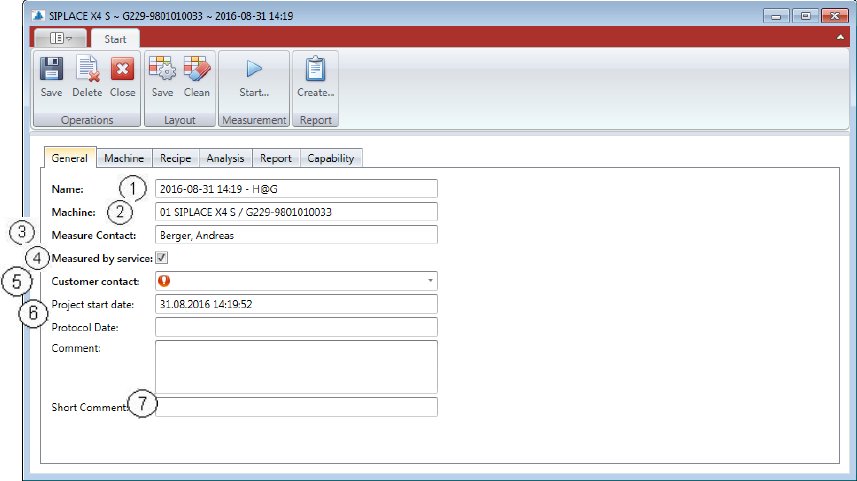
On the first tab of the window you find the “General Information”
(1) Project name:
e.g.: 2015-10-15 14:18
(2) Machine:
e.g.: 01 SIPLACE SX1 / M008G-98010024 (line pos., machine type, Serial No.)
(3) Measure Contact:
It’s always the user who was logged in.
(4) Measured by service:
If this checkbox is activated, a Customer contact can be selected from a list below. If the
checkbox is not activated, the user is supposed to be a customer and therefore no fur-
ther contact is necessary to be selected.
(5) Customer contact:
If the measurement is carried out by the service, a contact must be selected at the cus-
tomer, to whom you hand out the report finally. This contact must already exist in the
database.
(6) Project start date and Protocol date:
Two time stamps in the protocol are set automatically. One is the start date of the pro-
ject and the other one is the Protocol Date, which is set after a report is saved.
(7) Comment and Short Comment:
The comment will not be taken in any project name or protocol.
But the short comment offers the possibility to expand the project name.
The text length is limited to 20 characters.
This text is appended to the end of the project name.