3_AVS-V2_MCT-UM-internal_EN_07-2019.pdf - 第120页
ASM AVS - U SER M ANUAL P AGE 120 OF 182 e. Value ta ble: In thi s tab le a ll m easu red v alue s a re l isted in numb ers. Thi s v iew is o nly act ive in the p rinter mo de “ Sing le”! The eva luat ion is t he s ame a…
ASM AVS - USER MANUAL
PAGE 119 OF 182
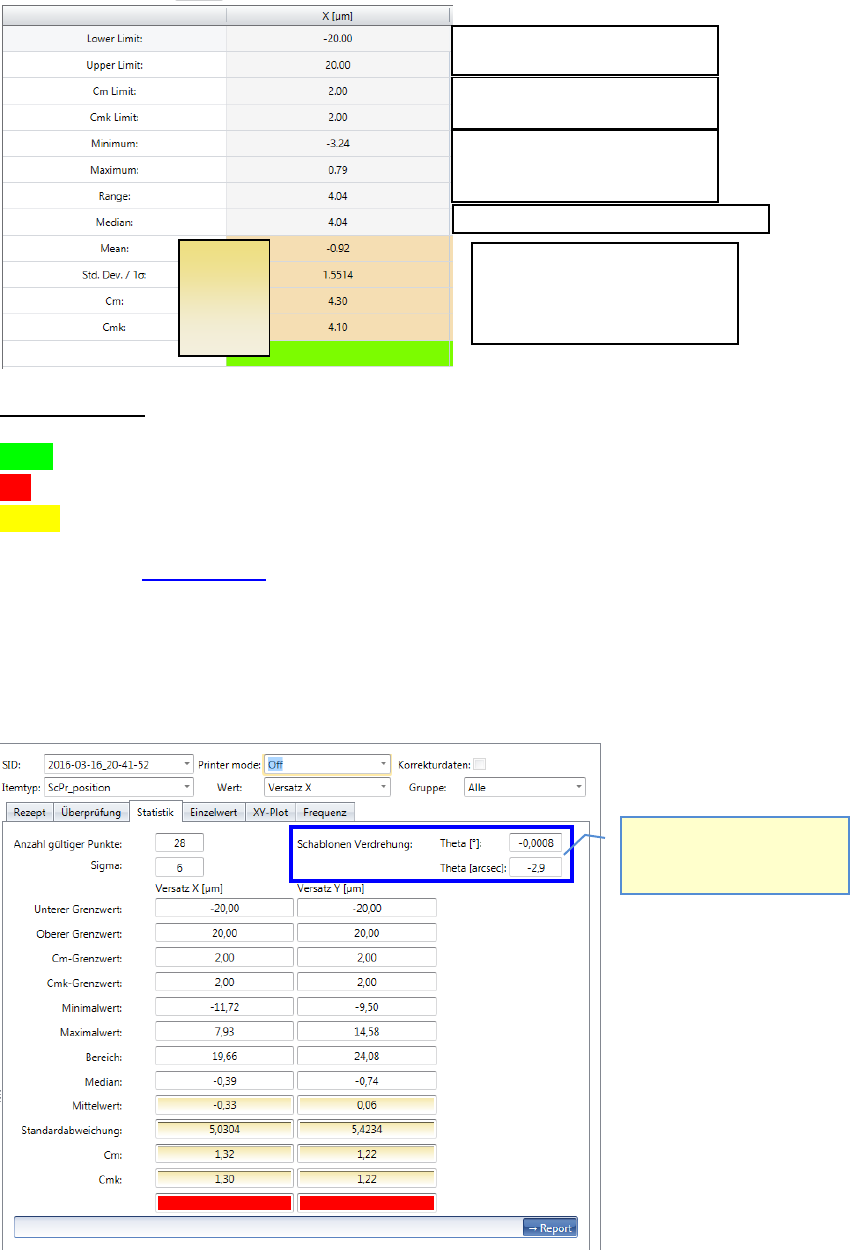
Average of all values
Standard Deviation
Cm
Cmk
Fast evaluation:
green = c
mk
inside the specification limits (Sigm a Limit inside Spec. Limits))
red = c
m
and c
mk
outside the specification limits (Sigma Limit outside Spec. Limits)
yellow = c
m
inside, but c
mk
outside => Offset Correction required.
Please see also 6.4.1 Statistik.
Depending on the "Printer Mode" the measured value for the stencil rotation is displayed
in the "Statistics" on the top right.
Specification limit; dimensions
Specification limit; Sigma Limits
Lowest measured value.
Highest measured value.
Distance min. to max.
Is only shown in printer
mode „Single“ and „Accumu-
late“!
The middle value of all values sorted by size.
Values used
for the
calculation
of the cm,
cmk.
ASM AVS - USER MANUAL
PAGE 120 OF 182
e. Value table:
In this table all measured values are listed in numbers.
This view is only active in the printer mode “Single”!
The evaluation is the same as with placement machines.
See also e. Value table:
f. Single Value Chart:
a. Zeigt das Ergebnis der selektierten Messung, abhängig von den Filtereinstellungen
oberhalb.
In a printer project, in printer mode „Point2Point“ the Offsets of all the activated
measures are displayed („Board2Board“-view).
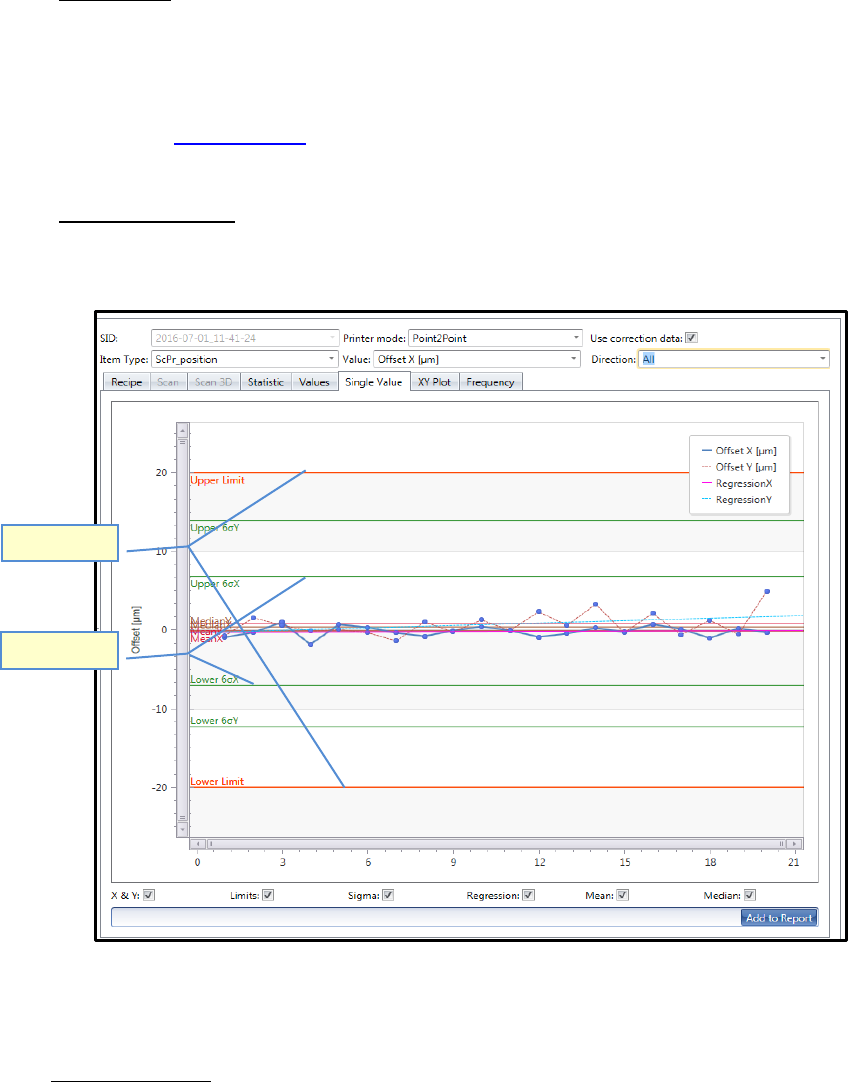
Evaluiation lines:
- Sigma limits (green lines) show, at which offset value the given accuracy class (e.g. 6
Sigma) is reached with the present measured values.
In the example above, the accuracy class of 6 Sigma (cmk >2.0) is already reached at the
value +7µm/-7µm in X direction. The specification limits are +/- 20µm (red Line).
- Regression Line shows the offset trend (flowing average) of the result.
- Mean and Median: Both average lines can also be displayed in one diagram. Different to
the regression line, these lines are always straight leveled.
Spec. Limits
Sigma Limits
ASM AVS - USER MANUAL
PAGE 121 OF 182
On the bottom of the chart, you can activate or deactivate all the evaluation lines.
- If you want to see either X-Offset values or Y-Offset values is organized by the filter set-
tings on top of the graph.
But if you want to see both, X- and Y- Offsets in one picture, you need to activate the
checkbox “X & Y” on the bottom of the graph.
The Y-Offset then is always shown in the same color, but in dashed line.
Set color of graph:
The color for the graph is normally set automatically for each measurement.
But you can change the color for each measurement.
Highlight the line of the corresponding measurement in the table and press “Colors” in the
menue bar.
g. X-/Y-Plot:
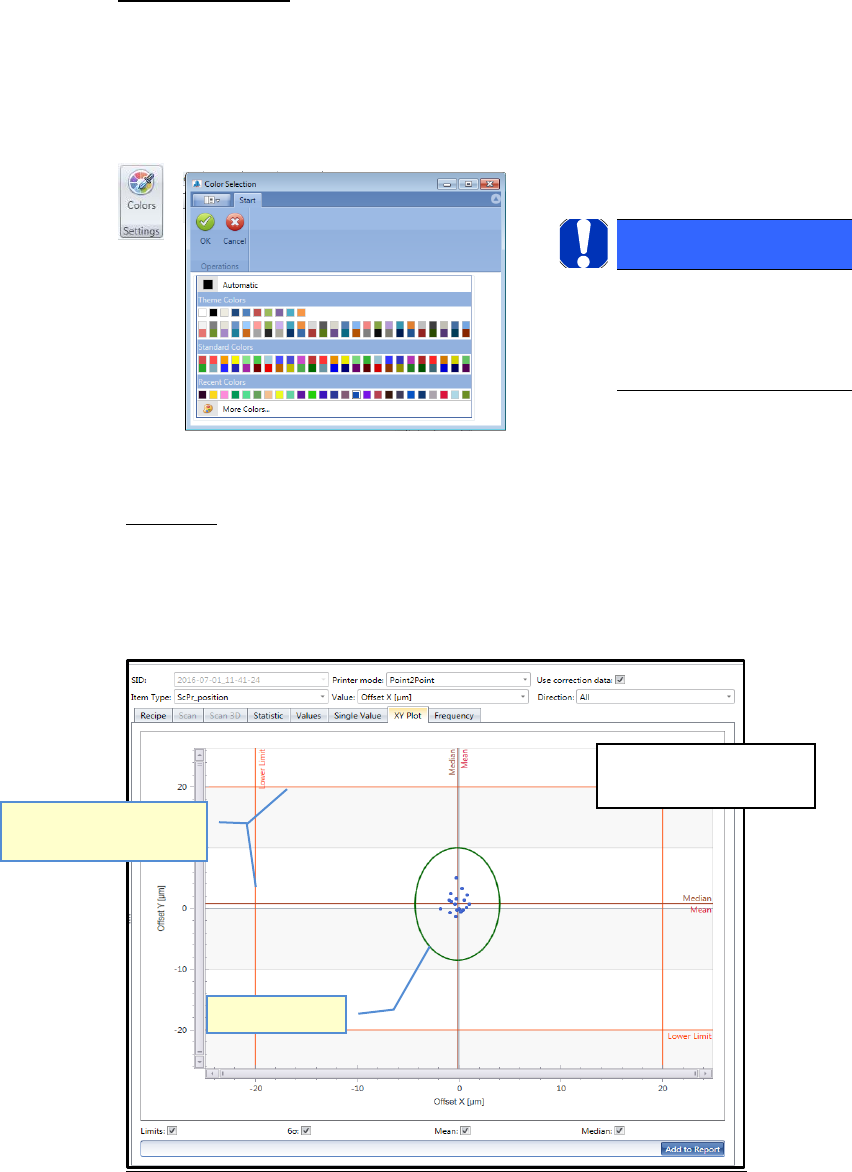
Shows the result of the selected measurement depending on the Filter settings above.
This view shows the result of X- and Y-axis together in one graph.
The same principles apply for evaluating the chart and in respect of the meanings of the
auxiliary lines as for the "Single Value Chart".
HINWEIS / NOTICE
After changing the color you
need to refresh the view, e.g.
by changing to the Recipe tab
and back to Analysis.
Sigma limit
Specification limits (Nom-
inal value), red lines
The Sigma Limit is shown
in a circle (ellipsis).