3_AVS-V2_MCT-UM-internal_EN_07-2019.pdf - 第137页
ASM AVS - U SER M ANUAL P AGE 137 OF 182 5.3.5.1 Change glass board / describe new If you want to cr eate a comp lete new boa rd, choo se » use r define d« fro m t he list . NOTICE Once you choose t he glass board templa…
ASM AVS - USER MANUAL
PAGE 136 OF 182
5.3.5 »Create/change recipes«
The creation / editing of recipes have always to be started from the ASM AVS
application! See also 4.2.2.11 Base Data – Recipes.
This page is to describe the glass board for the measurement.
Basically, standard boards are available. These can be selected from a list.
The standard board is locked by default, in order that no unintentional changes can be done.
To create a new recipe it is not necessary to change the settings of the board.
In case it is necessary to change the board or create a new one, follow the
next instructions.
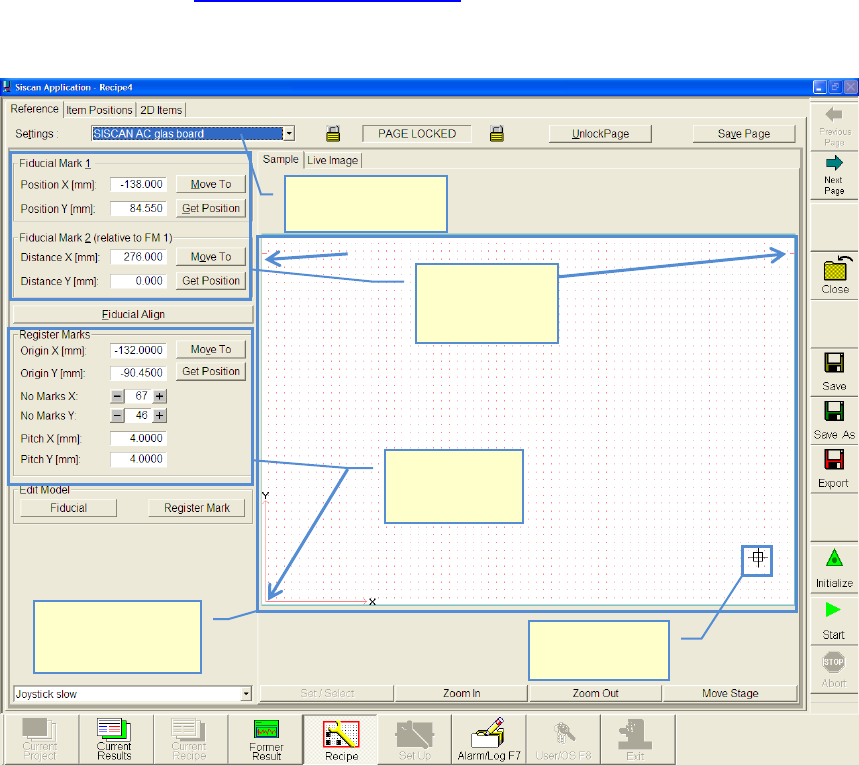
Select glass board
from list
Glass board with
grid points.
Top view
Actual camera
position
Description of
register mark
positions.
Description of
global fiducial
positions
ASM AVS - USER MANUAL
PAGE 137 OF 182
5.3.5.1 Change glass board / describe new
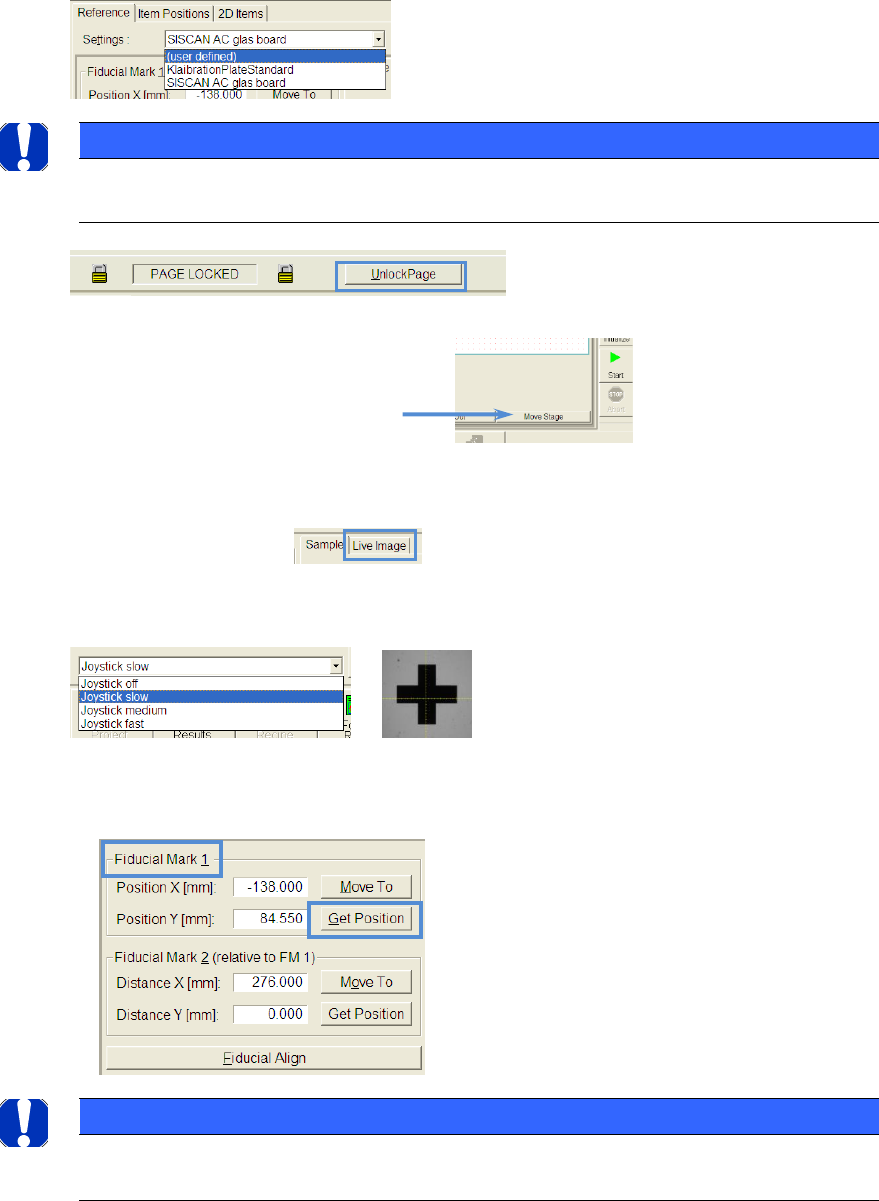
If you want to create a complete new board, choose »user defined«
from the list.
NOTICE
Once you choose the glass board template on which you like to build up your recipe, you have to “UNLOCK
PAGE” and answer the following question (should the board be copied to the Recipe?) with “YES”.
5.3.5.1.1 Global fiducials
Click on the button »Move Stage«
Now you can click on the position in the view, where you assume the
fiducial 1 is supposed to be. The camera will move to this position
(view »Sample«)
Switch to the live image.
Turn on the joystick and choose the right speed to move the camera
manually.
If the yellow cross is in the middle of the fiducial, you can apply this position with the button
»Get Position«.
NOTICE
The approach and apply of position can only be done for »Fiducial Mark 1«, because the position of »Fidu-
cial Mark 2« is relative specified to »Fiducial Mark 1« and has to be taken from drawings from the board.
ASM AVS - USER MANUAL
PAGE 138 OF 182
Now the global fiducial of the glass board has to be described (teached).
• The camera is above the fiducial!
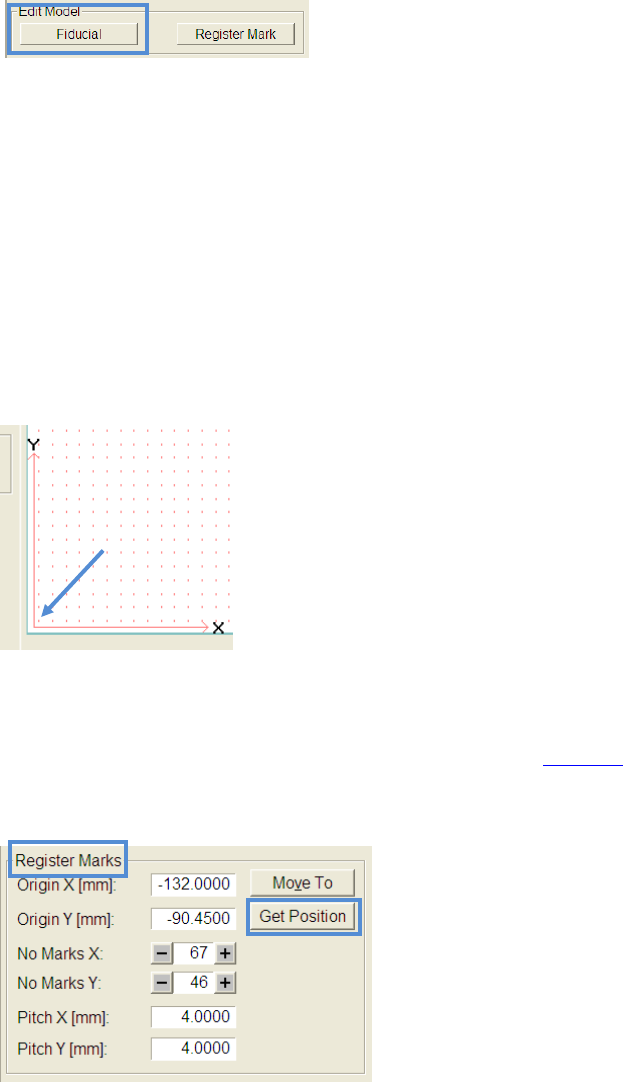
• Click the button »fiducial« in the area »Edit Model«.
• The Siplace Vision Software for fiducials will be opened
• Now you can teach (e.g. using the »wizard«) the fiducial like known in the station software
of SIPLACE machines.
• You will be asked whether you want to use the fiducial in your recipe when
you leave the SIPLACE Vison Software
5.3.5.1.2 Local fiducials (register marks)
• Ensure that the function »Move Stage« is active.
• Click on the »local fiducial« in the lower left corner, as shown in the picture
• Switch the partial view to »Live Image« and ensure that the lower left fiducial
is centered.
• For fine centering you can use the joystick like described in 4.3.5.1.1.
• If the yellow cross is in the middle of the fiducial, you can apply this position with the but-
ton »Get Position« inside the area »Register Marks«.
• Type in the correct numbers of local fiducials (register marks) in X and Y
direction.
• Type in the correct pitch in X and Y direction.