3_AVS-V2_MCT-UM-internal_EN_07-2019.pdf - 第69页
ASM AVS - U SER M ANUAL P AGE 69 OF 182 (1 ) Nam e of t he reci pe . C orres po nds to a la rge exte nt to t he fo lder nam e, o r th e . sir file co n- tai ned in t he folde r . (2 ) Sh ort n ame o f t he reci pe. T his…
ASM AVS - USER MANUAL
PAGE 68 OF 182
5.2.18.12 Base Data – Recipes
A Recipe is a measurement plan, a description of the glass plate with the components placed
on it, or with printed forms (circles, or rectangles) on it.
You get a list with an overview of all existing recipes. You can sort and filter as needed, with
the existing column.
Tabs in printer projects
ASM AVS - USER MANUAL
PAGE 69 OF 182
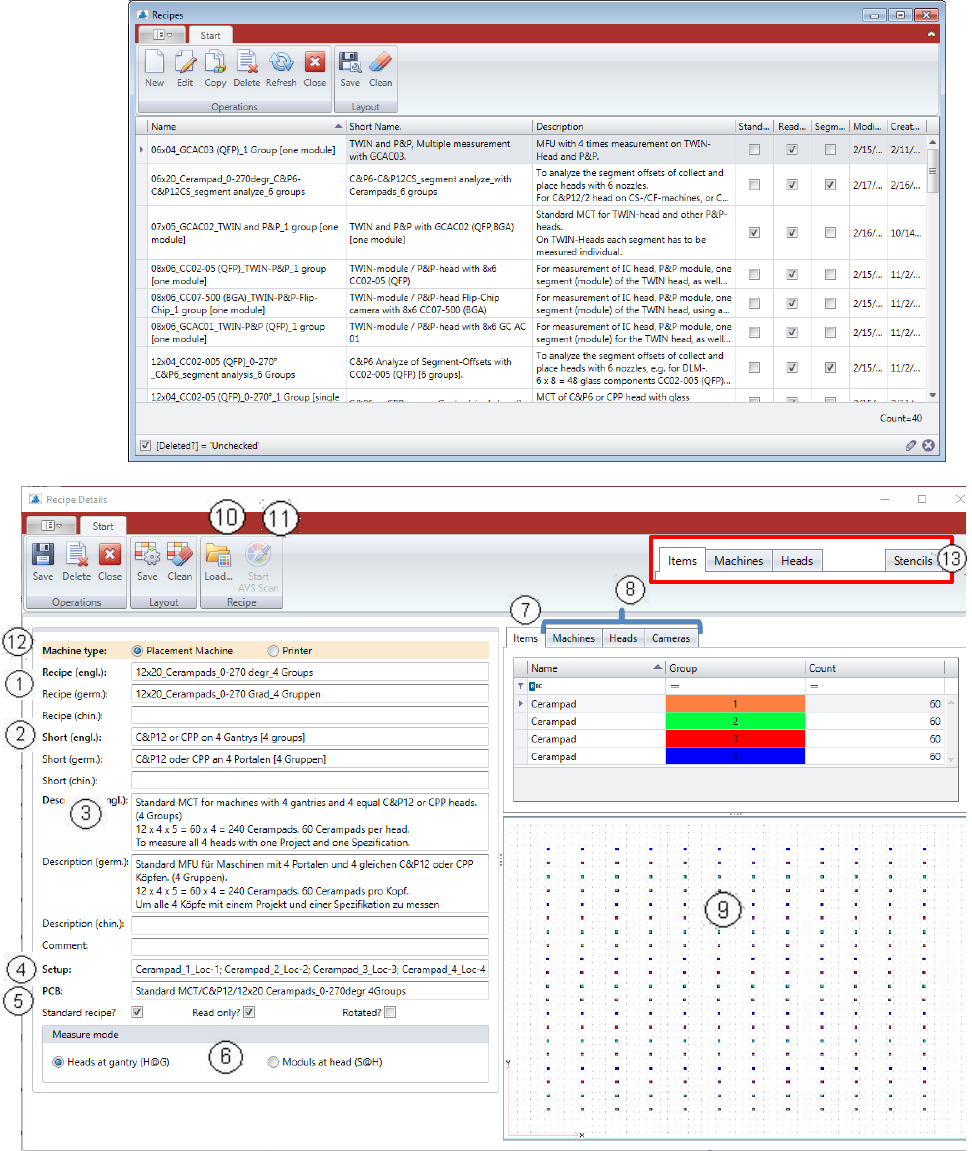
(1) Name of the recipe. Corresponds to a large extent to the folder name, or the .sir file con-
tained in the folder.
(2) Short name of the recipe. This should 1
st
contain information about the placement head,
as well as 2
nd
the number of gantries you can measure with it.
(3) Detailed description of the use and structure of the recipe.
(4) Setup and PCB are giving information to the data in SIPLACE Pro, which are prepared to
schedule the programs.
(5) Checkboxes:
a) Standard Recipe: Marking of recipes that are prepared by default for the MCT meas-
urements on different machine configurations (for the Report).
b) Read only: This is the so called write protection.
Recipes with this hook can only be copied, cannot be changed from the User but only ad-
ministrators.
c) Rotated: This parameter is only used for the MasterBoard, which is necessary for the
certification measurements. With this, the recipe MasterBoard 180° is signed for the soft-
ware as rotated.
(6) The measurement mode describes whether the recipe is used for the measurement of the
head at the gantry, or for the measurement (analysis) of the segments on the head.
The numbers in brackets (H@G) and (S@H) are also used in the project name as identifica-
tion.
(7) In the tab „Items“ all component names used and all group numbers are shown.
The number of components per group must be entered manually.
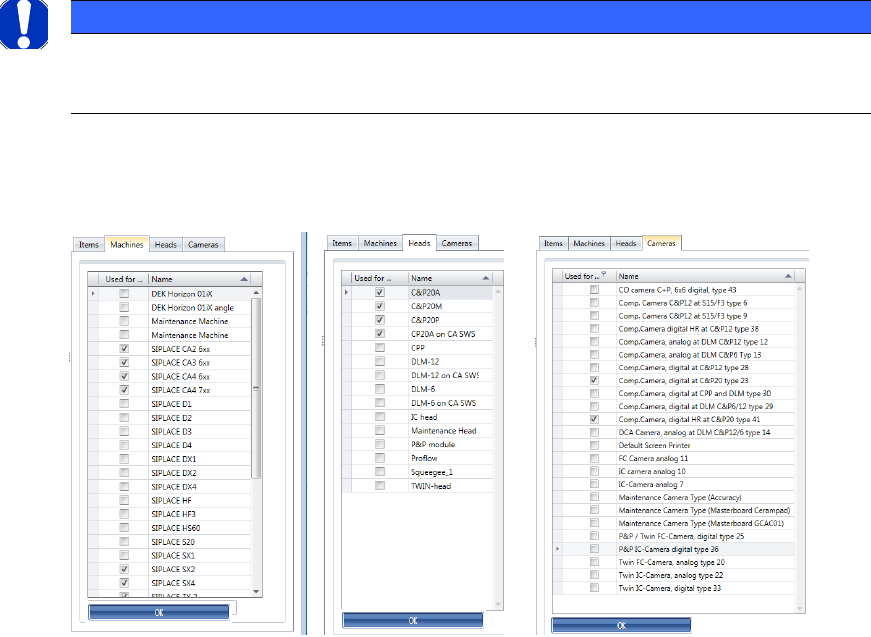
(8) The 3 tabs „Machines“, „Heads“, „Cameras“ are used to filter subsequent possibility of the
recipes in the selection for a project. In each tab, the corresponding checkboxes must be
selected, for which this recipe can be used.
NOTICE
All entries made in these tabs, must be confirmed with the Button OK, which is placed below this group
area, otherwise the changes will not be saved!
ASM AVS - USER MANUAL
PAGE 70 OF 182
(9) The measuring plan is displayed as an Image file.
To zoom this image, you can double click the image and it will be opened in a separate
window, which you can then enlarge over the whole monitor.
(10) If you want to load an existing recipe to the database, you have to enter the parameters
mentioned above first, then save it. After saving, the button „Load…“ is activated. With
this function you can select the corresponding recipe folder.
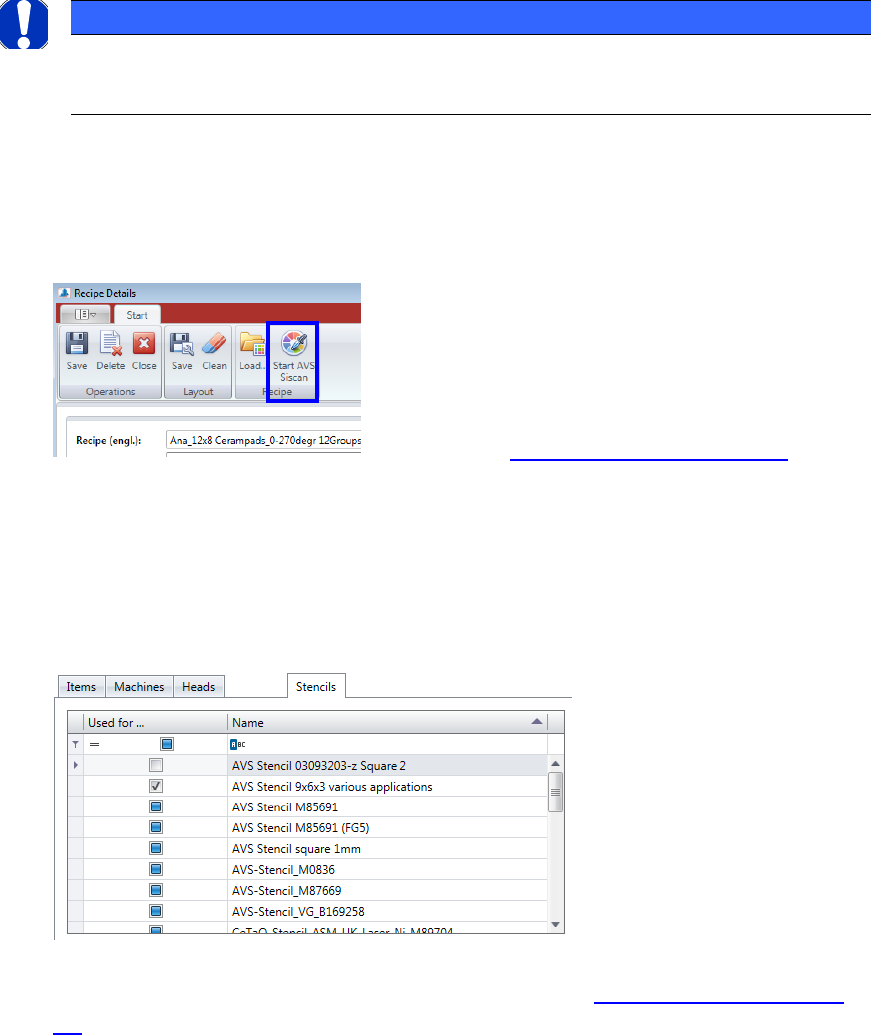
(11) If you are working on a ASM AVS device, the button „Start AVS_Scan“ will also be acti-
vated. If you press this button, you can edit the corresponding recipe in the AVS_Scan
Software.
The main recipe details are still generated and modified in the AVS_Scan Software.
See Chapter 4.3.5 »Create/change recipes«
(12) Machines: For each recipe, a general setting is required.
This is about the question, if the recipe is one for a placement machine, or it is one for
the measurement of a printer.
(13) If the Radio Button Machine Type is set to “Screen Printer”, the filters where changed.
Instead of a Filter for “Cameras” a filter for “Stencils” is displayed.
Here, a stencil, that is already defined in the database (see 5.2.18.15 Base Data – Sten-
cils) can be connected to the corresponding recipe.
NOTICE
If you want to load a recipe form a recipe folder to the database, you must take care, that the recipe folder
has the same name as the files with the endings: .sir, .jpg, .sirInfo., which are located in the folder.