3_AVS-V2_MCT-UM-internal_EN_07-2019.pdf - 第129页
ASM AVS - U SER M ANUAL P AGE 129 OF 182 5.3.2.6.1 Group Statistic The fie lds o f t he v iew » Stati stic « are prese nti ng o nly o ne resu lt. There for on ly the r e sult of the ove ral l me asure ment, or a singl e …
ASM AVS - USER MANUAL
PAGE 128 OF 182
5.3.2.5 »Current Results« – »Recipe«
Here you can view the project to the corresponding recipe
5.3.2.6 »Current Results« – »Statistic«
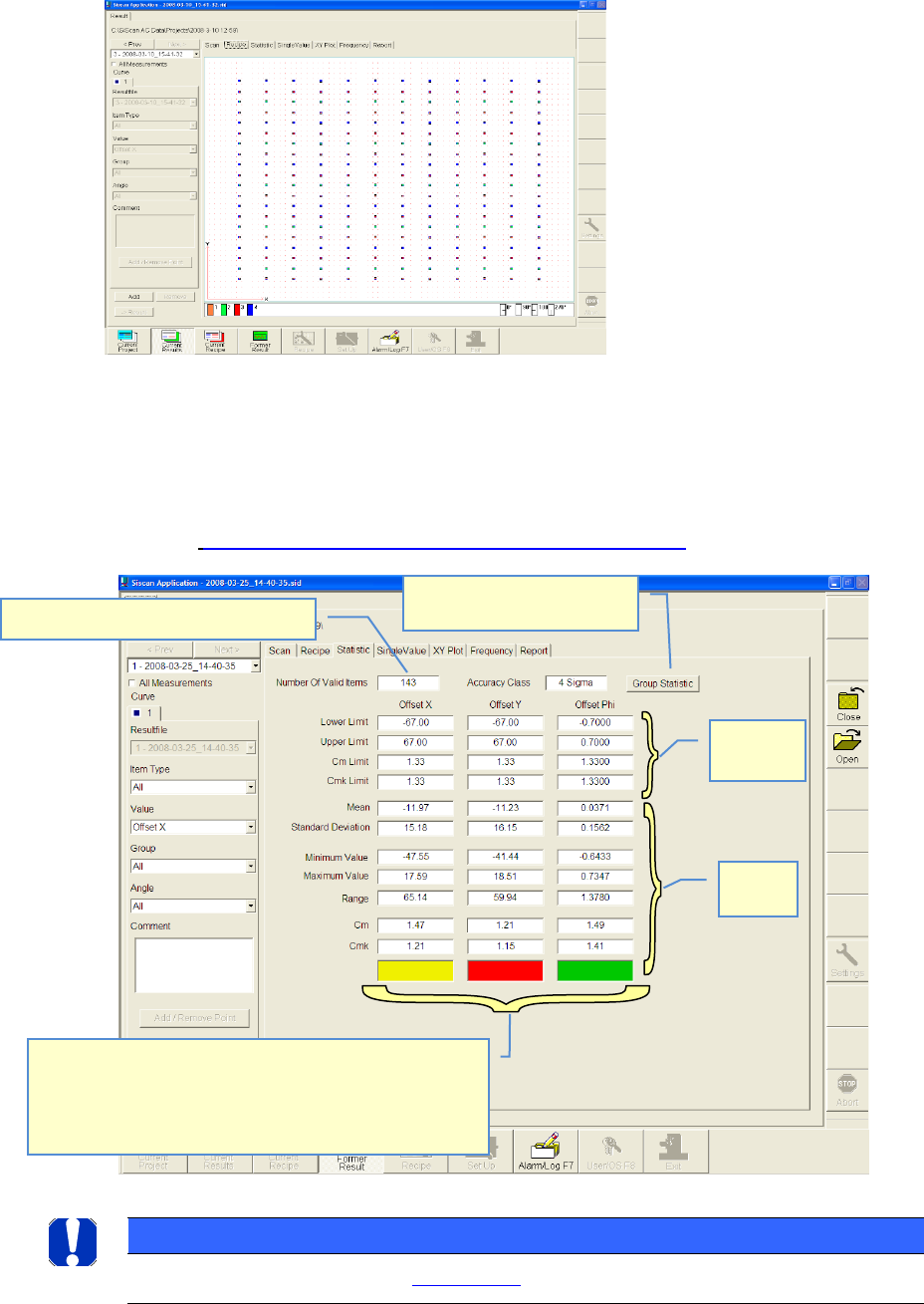
The tables shown in statistic view, are resulting from the settings on the left side of the win-
dow.
See also 4.3.2.3 »Current Results«, selecting the result display
NOTICE
Details on the result assessment see: 6.4.1 Statistics
Numbers of valid measuring points
Nominal
values
Actual
values
Fast result evaluation:
gn = cmk-value within nominal value
rd= cm-value out of nominal value
ye= cm- value OK, but cmk-value out of nominal value
→ Offset correction is necessary
Overview of all the single
groups and items
ASM AVS - USER MANUAL
PAGE 129 OF 182
5.3.2.6.1 Group Statistic
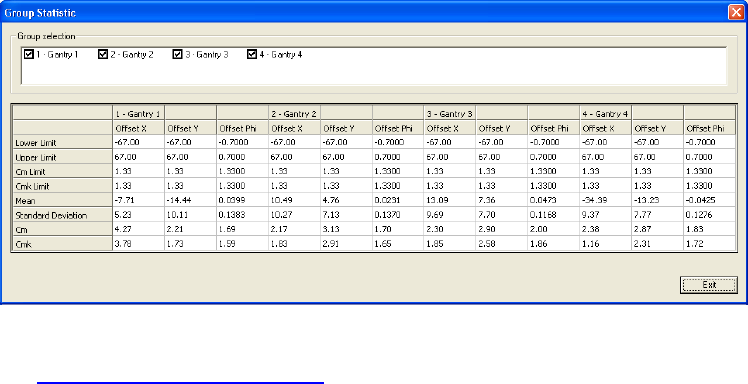
The fields of the view »Statistic« are presenting only one result. Therefor only the result of
the overall measurement, or a single item, respectively
a single group can be displayed.
With the function »Group Statistic« all different groups can be displ. at once.
For correction of Offsets on the Siplace machines,
see 6.1 Corrections of Offset values.
ASM AVS - USER MANUAL
PAGE 130 OF 182
5.3.2.7 »Current Results« – »Single value«
The tables shown in »Single value« view, are resulting from the settings on the left side of the
window. See also 4.3.2.3 »Current Results«, selecting the result display.
Only at the »Single value« view, more than one graph can be displayed in one picture at once.
See therefore 4.3.2.3.
CAUTION
It is not possible to display graphs together which have different specification limits (nominal values). e.g.
X- and Y- axis can not be shown together with the angle graph.
The indication of the specification limits is hanging on the “Item”.
Therefore it is possible to evaluate different “Items” with different spec. limits.
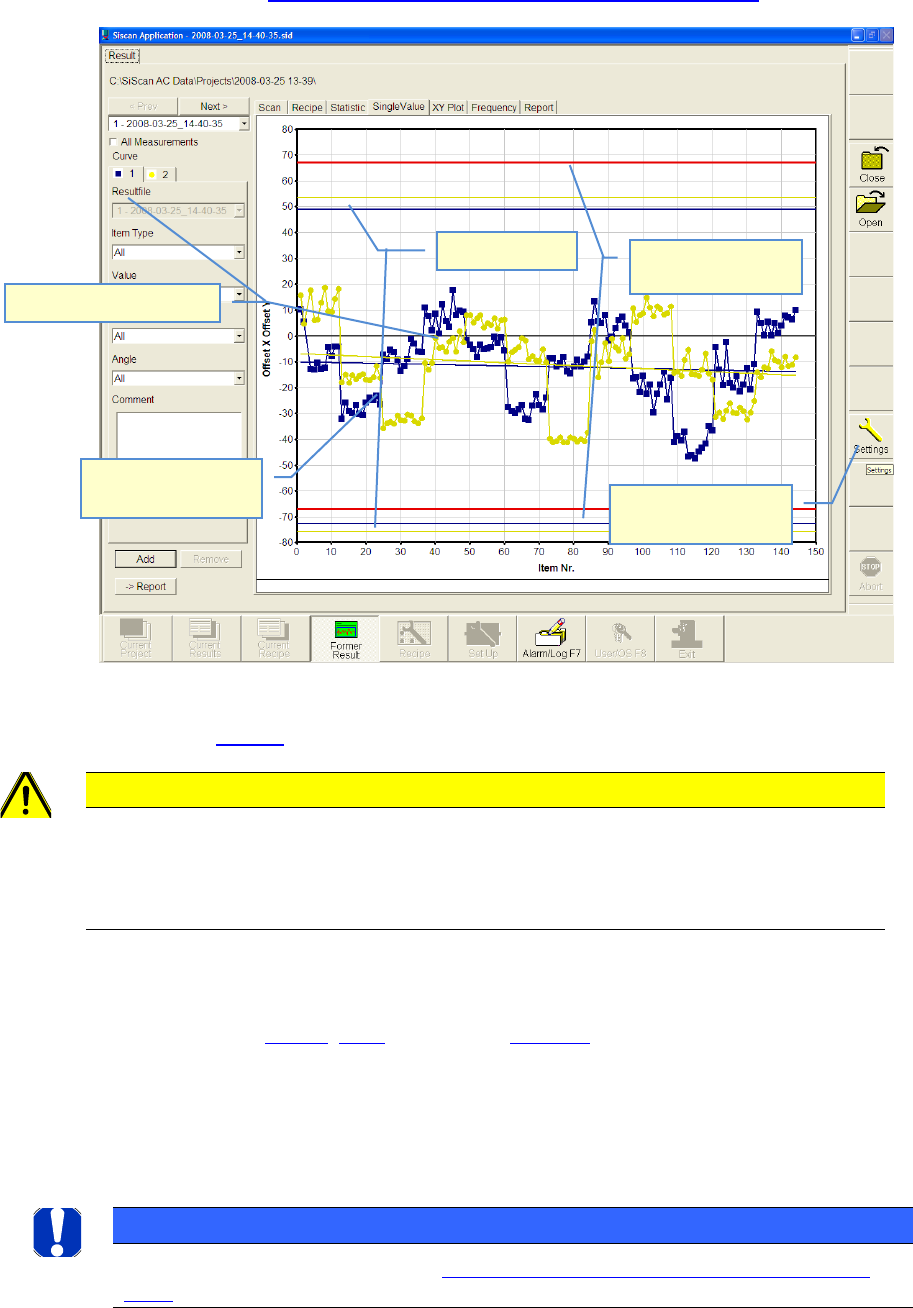
Sigma limits show, at which offset value the given accuracy class will be achieved by the actual
result.
Accuracy Class, see 4.3.2.6, 4.3.1, respectively 4.2.6.1.2
In the example above, in the minus direction, the required 4 Sigma (cmk=1,33) is only achieved
at approx. -73µm for the X-axis (blue graph), as well as at approx. -77µm for the Y-axis (yellow
graph). But the required specification limit is, however, 67µm (red line).
Regression lines show the mean value trend of the result.
NOTICE
More details about reading the results, see 6.4 Notes on the statistics and on the interpretation of the
results.
Graph 1, e.g. X Offset.
Regression line
(Trend)
Sigma limit
Specification limits
(Nominal value)
Support lines can be
turned on/off .