4OM-1003-007.pdf - 第180页
*4 [OK] Button When pressed, this button closes the "CHECK" window . *5 Saving the check message The check message is saved as a production message. • • • • • Reset Procedure from "CHECK" Window (1) T…
1.2 "CHECK" Windows
1.2.1 "CHECK" Windows
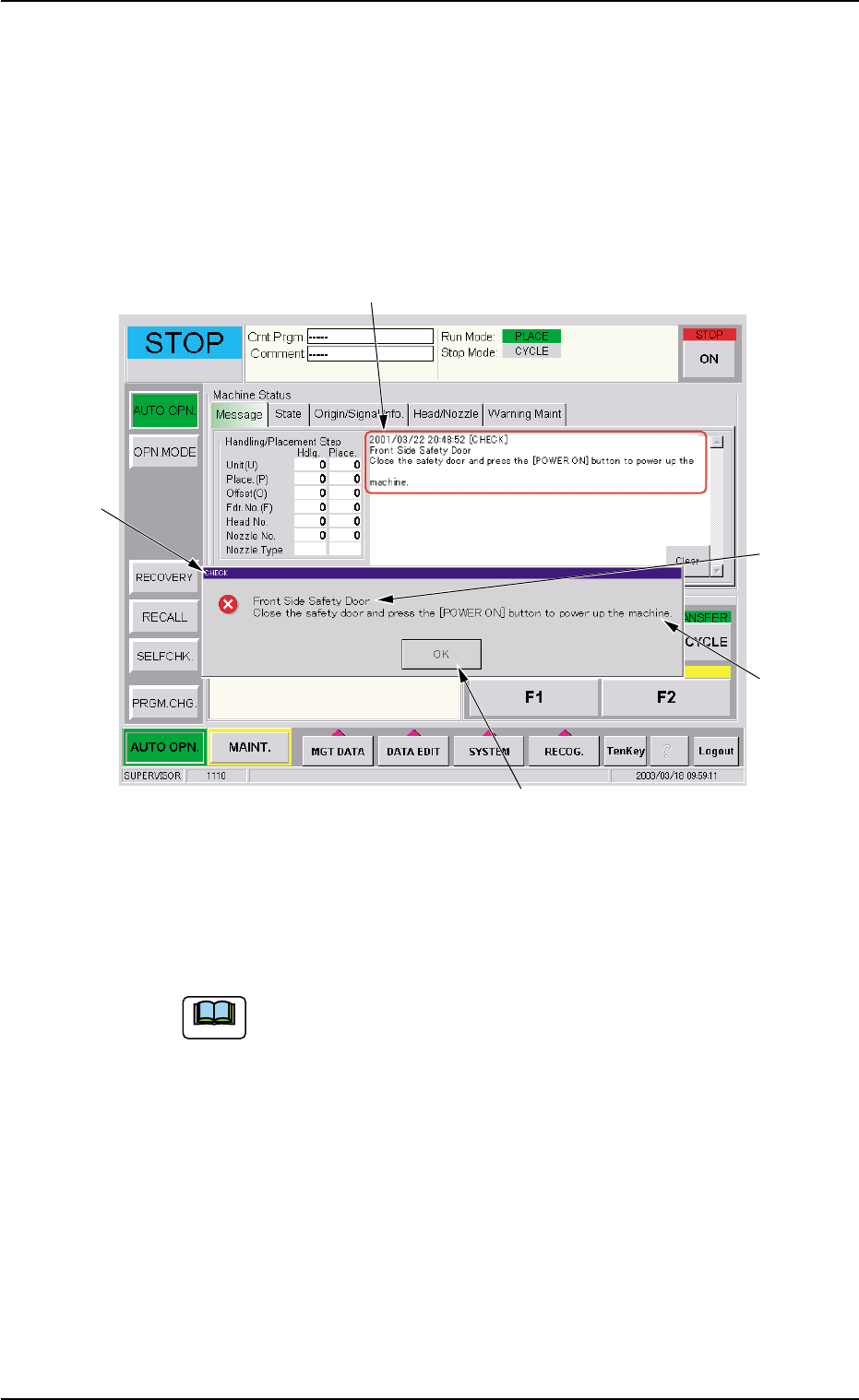
When the machine is not reset to its normal condition after an operator
makes an error operation or an error occurs in the operation system, a
window like the following opens.
Fig. 4B2 Example of "CHECK" Window
*1 Check Message
A check message is issued and displayed.
Refer to "1.2.2 List of Check Messages" for details.
*2 Display Field A
Displayed is the scope of the check message.
*3 Display Field B
Displayed are the details of the check message.
0511-002 2-2
AIL01ETRP
1.2 "CHECK" Windows
*1
*4
*3
*5
*2
Note

*4 [OK] Button
When pressed, this button closes the "CHECK" window.
*5 Saving the check message
The check message is saved as a production message.
••
••
• Reset Procedure from "CHECK" Window
(1) Take a note of the issued check message.
Be sure to take a note of the check message. If you forget the
contents of the message, the machine cannot be reset cor-
rectly to its normal condition.
(2) Press the [OK] button. The original window resumes.
(3) Follow the contents of the check message to reset the machine
correctly to its normal condition.
0305-001 2-3
AIL01ETRP
1.2 "CHECK" Windows
Note
1.2.2 List of Check Messages
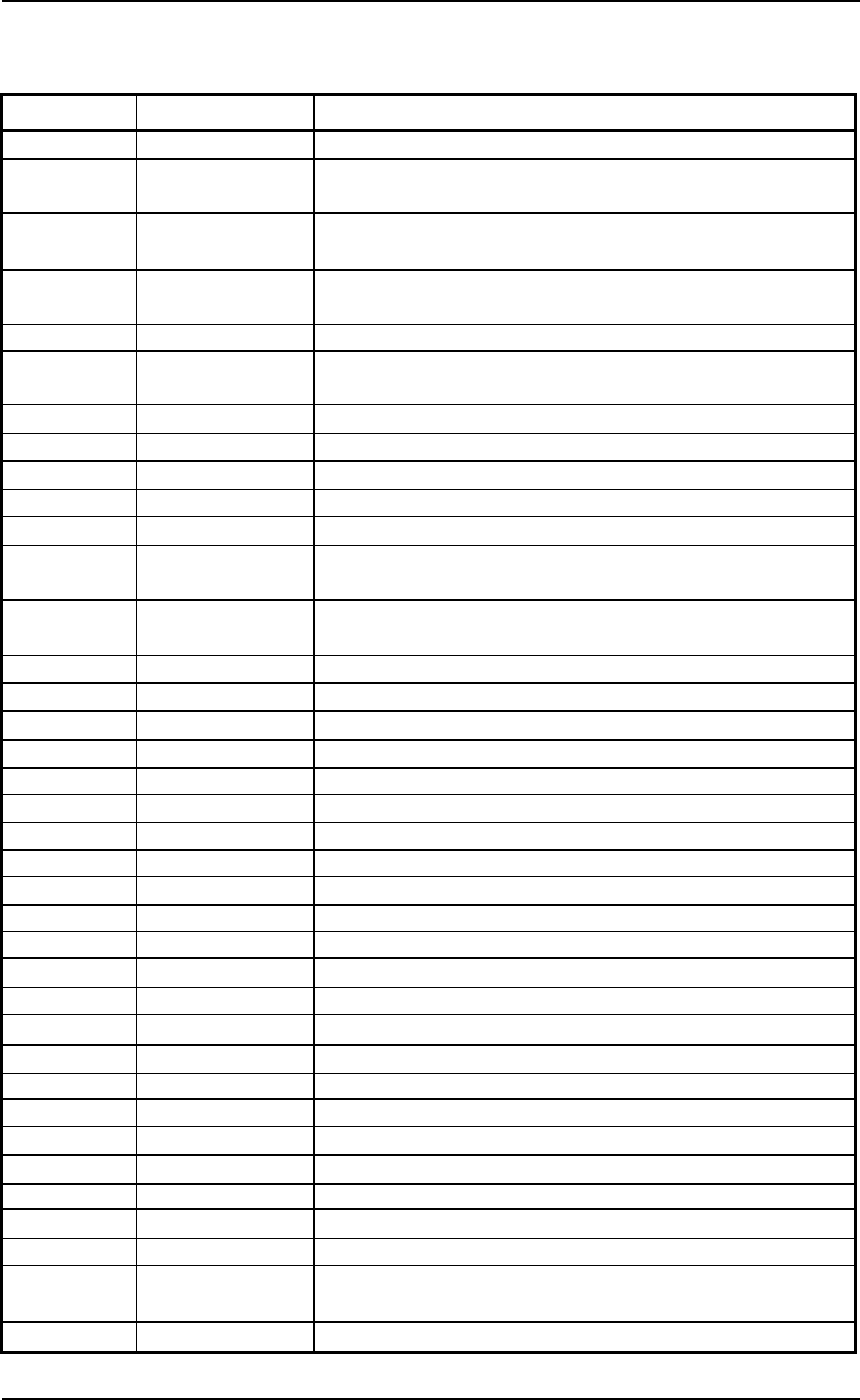
Table 4B1
Check Code Display Section A Display Section B
010101 Emergency Stop Turn on the [POWER ON] button.
010201 Air Pressure Drop Increase air pressure and press the [POWER ON] button to power
up the machine.
010301 Feeder Axis Central Close the feeder safety guard and press the [POWER ON] button
Safety Guard to power up the machine.
010401 Front Side Safety Close the safety door and press the [POWER ON] button to power
Door up the machine.
010501 Circuit Protector Circuit protector is active in the machine.
010601 Control Power
Source
030101 Operator’s Error Set operation mode to "placement".
030102 Operator’s Error Please select the available menu.
030103 Operator’s Error Input registered test ID.
030104 Operator’s Error Select correct combination of camera and lighting mode.
030105 Operator’s Error Selected available carriage.
030106 Operator’s Error Cancel the component shortage designated position stop func-
tion.
030107 Operator’s Error Recovery mode is not available while grouped component func-
tion is implemented.
030108 Operator’s Error Set "ENABLE" for destination alternate feeder.
030109 Operator’s Error Machine is in "PAUSE" mode.
03010a Operator’s Error Stop the input cnvr. (+) movement in manual mode.
03010b Operator’s Error Stop the input cnvr. (-) movement in manual mode.
03010c Operator’s Error Input correct data for manual axis operation.
03010d Operator’s Error Please input correct nozzle type data.
03010e Operator’s Error Input non-defective P.C.B. (O-NO.)
03010f Operator’s Error Wait until data communication with external device is completed.
030110 Operator’s Error P.C.B.’s were at inlet and outlet of input buffer cnvr.
030111 Operator’s Error P.C.B.’s were at inlet and outlet of input cnvr.
030112 Operator’s Error P.C.B. on Inp. Cnvr. was not able to move to its transfer action.
030113 Operator’s Error P.C.B. stop movement in manual mode.
030114 Operator’s Error Please input the test ID.
030115 Operator’s Error Please cancel "set up" mode as closing a safe cover.
030116 Operator’s Error P.C.B.’s were at inlet and outlet of output cnvr.
030117 Operator’s Error Remove the P.C.B. at the inlet of output cnvr.
030118 Operator’s Error Remove P.C.B. on the L conveyor.
030119 Operator’s Error Remove P.C.B. on the R conveyor.
03011a Operator’s Error Remove P.C.B. on the X/Y table.
03011b Operator’s Error Cannot start in CVS start protection mode.
03011c Operator’s Error Remove P.C.B. on the conveyor.
03011d Operator’s Error Cancel the start protect mode.
03011e Operator’s Error Out of range P.C.B. is exist on the conveyor.
(lot management production)
03011f Operator’s Error Not released p-out mode.
0305-001 2-4 AIL01ETRP
1.2 "CHECK" Windows