4OM-1003-007.pdf - 第25页
Safe-14 AIL01E-P Safety Precautions 0412-001 Notes on Maintenance W ARNING Only qualified personnel should perform the maintenance work carefully for the machine in compliance with the specified instructions. Before the …

Safe-13 AIL01E-P
Safety Precautions
0412-001
Notes on Installation, Transfer, and Maintenance
z Do not install or transfer the machine on the customer side after shipment.
To ensure perfect operation of the machine, including safety and accuracy, only our
installation service department will install the machine or transfer it to another place.
z Only the maintenance work on items described in this manual should be performed by
the customer.
Please read the instruction manual carefully before maintenance work.
Do not perform any maintenance work on items that are not described in this manual.
Otherwise, not only breakdown of the machine but also personal injury may result.
Safe-14 AIL01E-P
Safety Precautions
0412-001
Notes on Maintenance
WARNING
Only qualified personnel should perform the maintenance work
carefully for the machine in compliance with the specified
instructions.
Before the maintenance work, be sure to turn off the power
breaker and the air source and lock them with padlocks.
Power Breaker: Set the power breaker to the "OFF" side and
lock it with a padlock.
Air Source : Stop the air supply and set the main valve to
the "EXH." side. After that, be sure to lock it
with a padlock.
Designate a person who can have charge of the padlock key.
If the provided padlock is lost or damaged, purchase its
substitute.
Residual voltages may remain behind for a few minutes in the
internal devices of the machine after power interception.
Touch the internal devices carefully. Otherwise, electric shock
can result from direct contact with live conductors.
Safe-15 AIL01E-P
Safety Precautions
Œx••‚Æ•\•¦‚³‚ê‚Ä‚¢‚é‚à‚Ì
0412-001
3. Safety-Related Functions
Safety Switches
When an error is detected in the machine, the safety switches are designed to stop the
dangerous moving mechanisms of the machine. Everything is processed on the machine
side (hardware) without using any software application on the computer side.
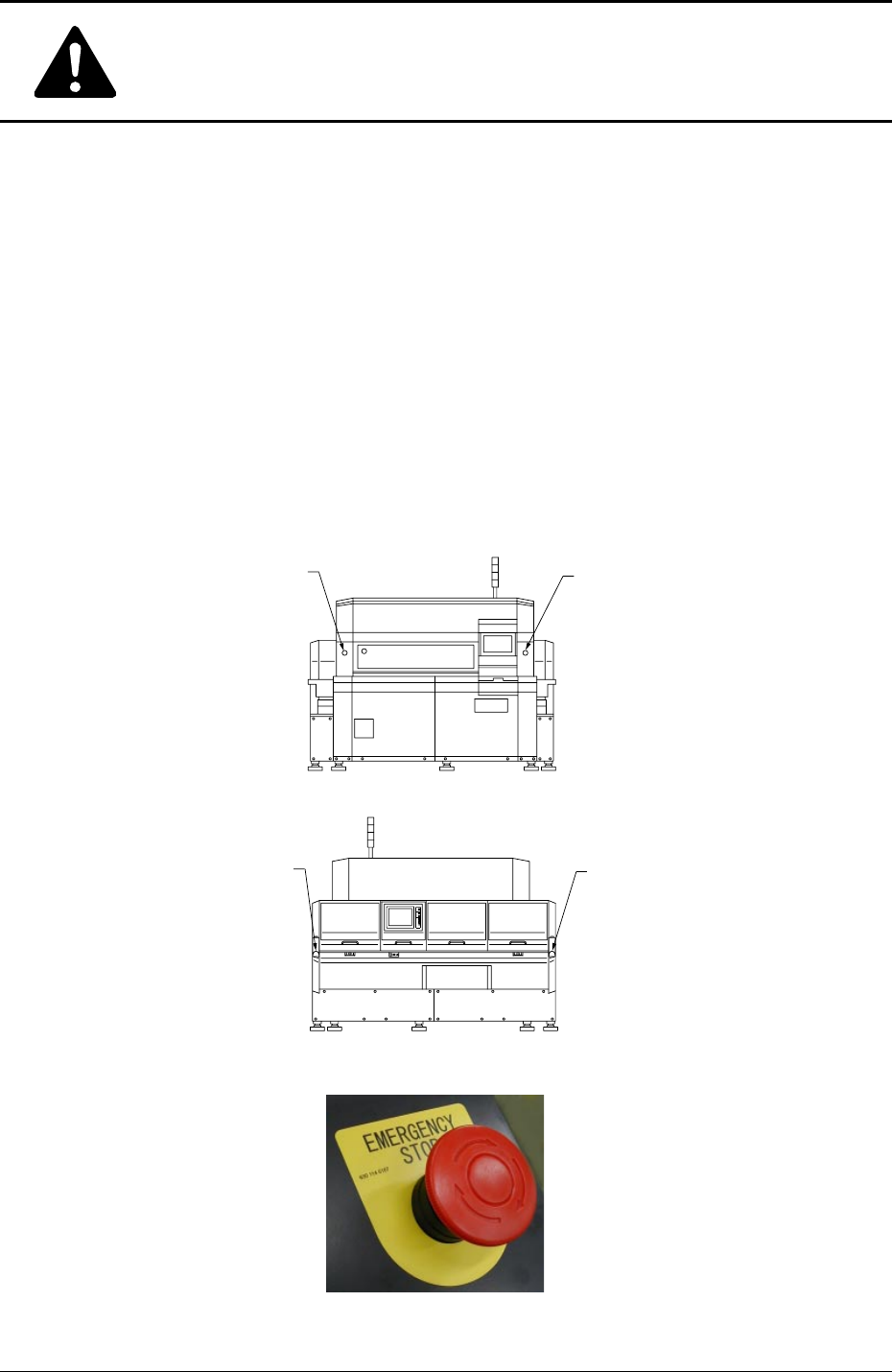
[EMERGENCY STOP] Switches
Press one of the [EMERGENCY STOP] switches to immediately stop the machine in an
emergency. The power is turned off and the machine stops immediately.
[EMERGENCY STOP]
Switch (1)
[EMERGENCY STOP]
Switch (2)
[EMERGENCY STOP]
Switch (4)
[EMERGENCY STOP]
Switch (3)
Fig. 1X13 Front View
Fig. 1X14 Rear View
Fig. 1X15 [EMERGENCY STOP] Switch