印刷机通用说明书(中英文版) 450+.pdf - 第28页
- 28 2.2 开 箱 Open the equipment 开箱后,请您首先做好以下工作: Do the follow ing che cks after opening the equipment 1. 对照《装箱清单》所列各项进行查验。 Recheck all in items on the p acking list. 2. 检查机器各部分是否有损坏,包括另箱包装的显示器、键盘、鼠标及刮刀板等,并将 它们重新安装到印刷机上。 …

- 27
completed "Operation Certificate" and lifting plan should be submitted to the head of the safety
management department for approval.
3.《作业证》批准后,项目单位负责人应将《作业证》交吊运指挥。吊运指挥机作业人员应
检查《作业证》,确认无误后方可作业。
After the approval of the "Work Permit", the project unit leader should submit the "Work Permit"
to the lifting command. The operator of the hoisting command machine should check the "Work
Permit" and confirm that it is correct before starting the operation.
4.应按《作业证》上填报的内容进行作业,严禁涂改、转借《作业证》,变更作业内容,扩
大作业范围或转移作业部位。
The homework should be carried out according to the content filled in the "Homework
Certificate", and it is strictly prohibited to alter or lend the "Homework Certificate", change
the homework content, expand the homework scope or transfer the homework part.
5.对吊装作业审批手续齐全,安全措施全部落实,作业环境符合要求的,作业人员方可进行
作业。
Only when the approval procedures for lifting operations are complete, safety measures are
fully implemented, and the working environment meets the requirements, can the operators carry
out the operation.

- 28
2.2
开 箱 Open the equipment
开箱后,请您首先做好以下工作:
Do the following checks after opening the equipment
1. 对照《装箱清单》所列各项进行查验。
Recheck all in items on the packing list.
2.
检查机器各部分是否有损坏,包括另箱包装的显示器、键盘、鼠标及刮刀板等,并将
它们重新安装到印刷机上。
Check all the units, including the screen, keyboard, mouse and scraper board etc.
And assemble them on the printer.
3. 将运输导轨上的固定扎带剪开。
Cut off the fixed tie on the transmission rail.
4. 刮刀横梁固定在网框横杆上的,请将固定带剪开。
Scraper beam is fixed on the frame beam with the tie. Cut off the tie.
5. 请将网框横杆上的固定套松开,使网框支板能左右移动。
Loose the fixed sleeve on the frame beam so that the frame supporting board can
move left and right.
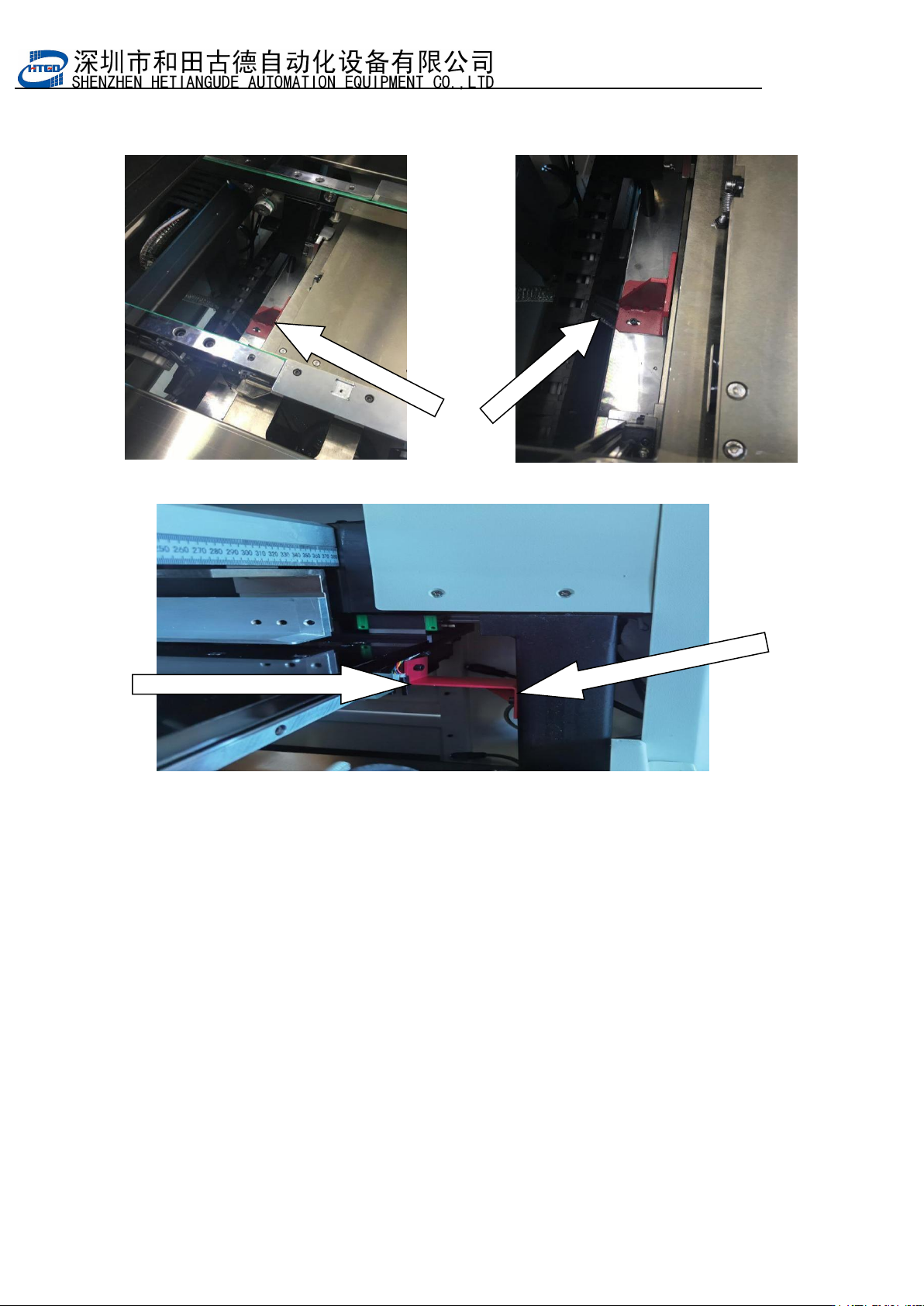
6. 将运输时安装的工作台固定板取下(如图 2 –1 示)。
Take off the fixed plate which is assembled inside the table during the
transportation.(see pix 2-1)
7. 检查各连接处是否有松动脱落,各运动部分传输皮带有无脱落。
Check all the connections are loosen or not and the transmission belts are loosen or
not.
8. 检查各直线导轨上的滑块有无滑脱。
Check the sliders on the linear rail slip or not
9.
检查电气元件是否固定、接触是否良好。
Check electronic components are fixed or not, connected or disconnected.
- 29
10.
开机前请务必详细阅读本《操作说明书》。
Read help manual carefully before turn on the equipment.
图
2-1工作台固定板(红色)Fixed plate on the table (red section)
CCD固定板(红色)CCD fixing plate (red)
2.3
操作环境 Operating environment
环境温度:不论印刷机内有无工件,该机的工作环境温度最好在
23
±3℃之间。
Temperature: No matter there are work pieces or not inside the printer, the operation
temperature is best between 23
±3℃
.
相对湿度:该系列机的工作环境相对湿度应<70%。
Relative humidity: The operation relative humidity of this serial of printer need be <70%.
储存条件:机器储存应防潮、防尘、防暴晒。在运输过程中,请尽量避免过高的湿度、震动、压
力及机械冲击。
Restore requirement: Dampproof, dustproof, anti-exposure. Avoid high humidity, shake,
pressure and mechanical shock during the transportation.
安装空间:见机器外形结构图。
Installation Space: See the pix of equipment appearance structure