印刷机通用说明书(中英文版) 450+.pdf - 第31页
- 31 2.6 工控机控制 系统安装 Installation of the industrial computer control sy stem 按图 2-3 将工控机控制系统中显示器、键盘及鼠标等安装到印刷机主机上,并与工控机 连接,然后接通电源。 Assemble the screen, keyboard and mouse e tc on t he print er and connect it with the indus…
- 30
2.4
设备安置及高度调整
Equipment location and height
adjustment
1. 将印刷机移动安置到选定位置。调节机器下部四个可调机脚(调整范围:±20mm),
确定所需的设备高度。
Place the printer in a selected location. Adjust the four adjustable mounts on the
bottom of the equipment ( adjustment range: ± 20mm). Make sure the equipment
height.
2. 调水平。调整方法是:
Adjust the horizontal. Methods are following:
a) 使用精密水平仪(框式水平仪)进行测量。
Measure it with accurate spirit level (frame spirit level).
b)
通过四个可调机脚,对印刷机反复进行水平调整,直到其完全水平为止。
Adjust the four mounts, do the horizontal adjustment on the printer repeatedly until
it is totally horizontal.
c) 将可调机脚螺母锁紧。
Fasten the screws on the mounts.
2.5
电源气源 Power supply and air power
1) 请使用 AC 220V、50/60H
Z
具有额定电流的稳定电源,用户在使用本机器过程中如电
压不稳定,应自备稳压电源。
Stable power: AC 220V
、
50/60H
Z
and rated current. If the current is not stable
during the operation, please prepare a regulated power supply.
2)
请使用稳定的压力为
4e
~
6kgf/cm
2
的工业气源。
The stable pressure of industrial air power need be 4e~6kgf/cm
2.
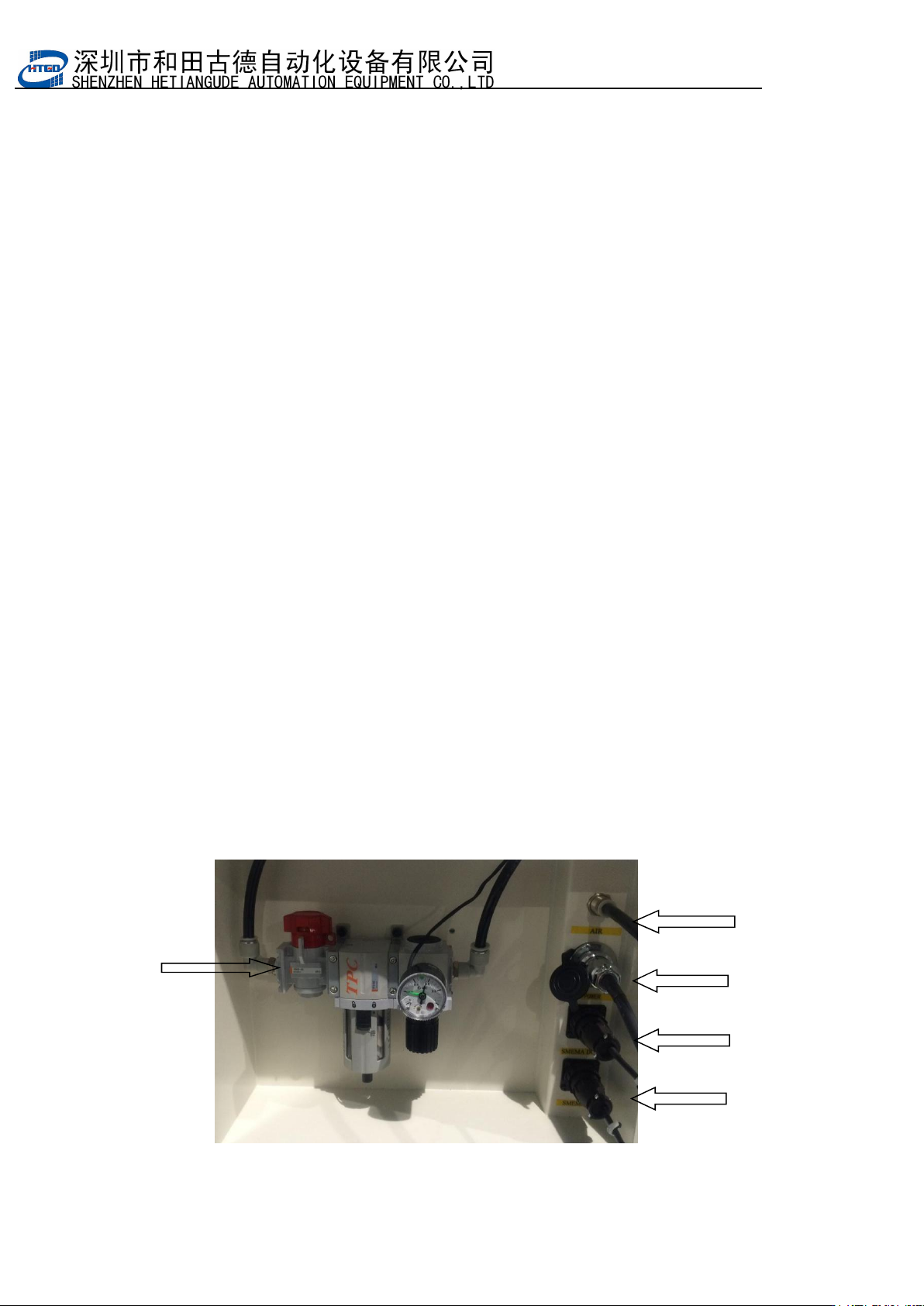
主 气 源 接
口
main air power port
气 源 开 关
air power switch
主 电 源 接 口
Main power interface
下 位 机 接 口
lower computer port
上 位 机 接
口
upper computer port
图 2-2 电气源接口位置图Pix 2-2 Power supply and air power port location
- 31
2.6
工控机控制系统安装 Installation of the industrial computer
control system
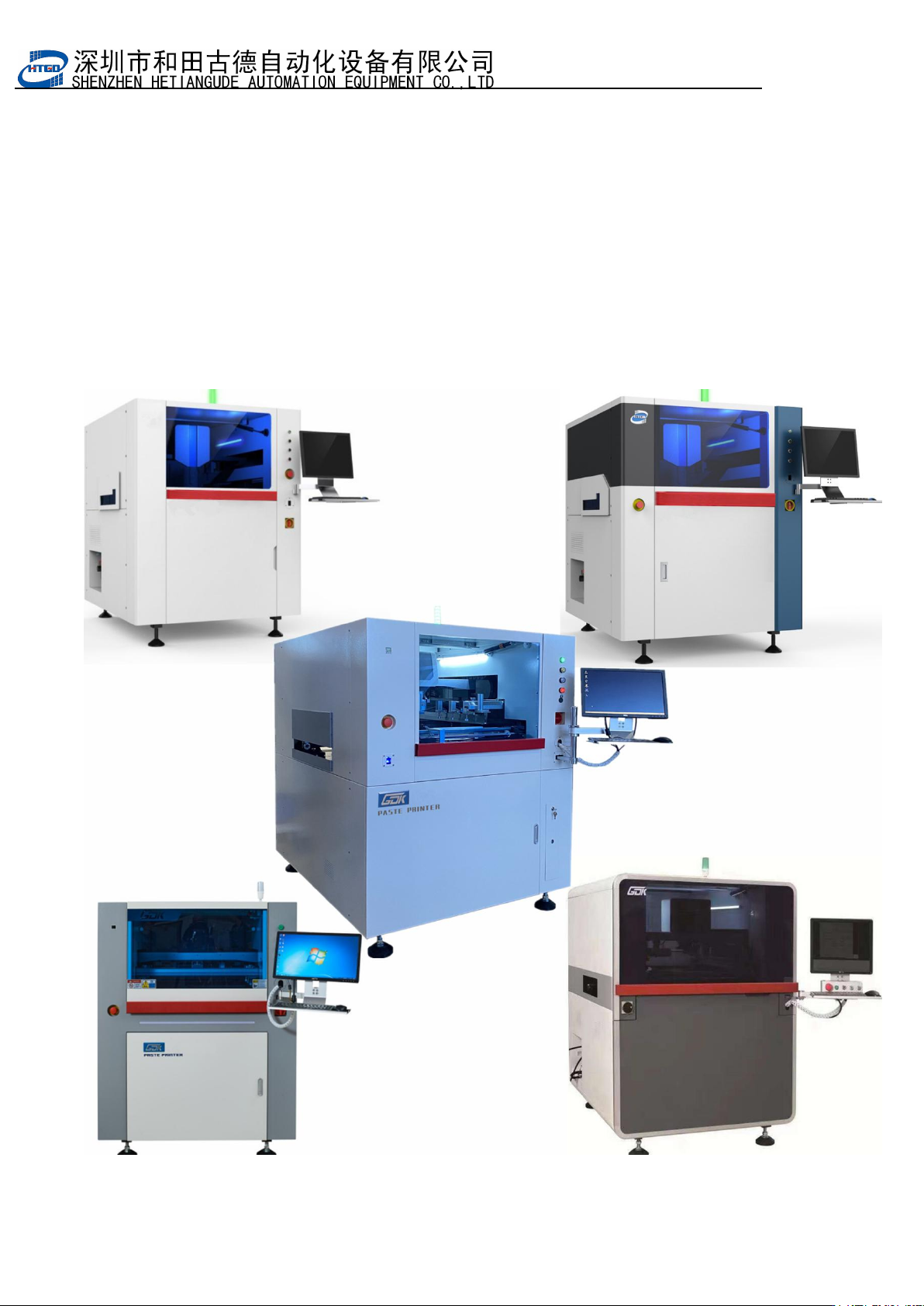
按图
2-3
将工控机控制系统中显示器、键盘及鼠标等安装到印刷机主机上,并与工控机
连接,然后接通电源。
Assemble the screen, keyboard and mouse etc on the printer and connect it with the
industrial computer and turn on the power supply.
注:具体外观认机型为准
Note: The specific appearance depends on the model
图
2-3
印刷机外形图
Pix 2-3 Printer external view

- 32
2.7
软件安装 Software installation
2.7.1 软件功能简介 Software introduction
本软件是自动化设备有限公司最新推出的 全自动视觉印刷机控制软件,具有 Windows7
视窗操作界面,功能强大,参数设定方便,操作简单且安全可靠,易学、易用。
This automatic visual printing control software is researched by our company.
Windows7 interface powerful functions and safe. Easy to set parameter, learn and operate.
此软件在全自动视觉印刷机上的应用,实现了机电一体化的控制,大大地提高了印
刷机的自动化程度和控制精度,保证了印刷质量。
This software applied on the automatic visual printer realizes the control of mechanical
and electrical integration. It improves the automatic level and control accuracy of the printer
and insures the printing quality.
本机器所用软件具有如下一些功能:
This equipment software owns following function:
1) 印刷参数设定
Printing parameter setting
2) 机器参数设定
Equipment parameter setting
3)
导轨宽度自动调节
Adjust the width of rail automatically
4) 视觉系统辨识及钢网与 PCB 板自动对准
Visual system identification, alignment of the stencil and PCB board
5)
网板与
PCB
板自动夹紧
Stencil and PCB board can clamp automatically