印刷机通用说明书(中英文版) 450+.pdf - 第55页
- 55 - J , [ 标志点类型 ] : 5 种选项供勾选; (remark type):T here are five options for selecting. K , [ 自动查找 ] :系统自动识别选定类型 Mark 点; (automatic sea rching): Th e system will a utomatic searching th e select ed mark point. L , [ 模板控制操作…

- 54
-
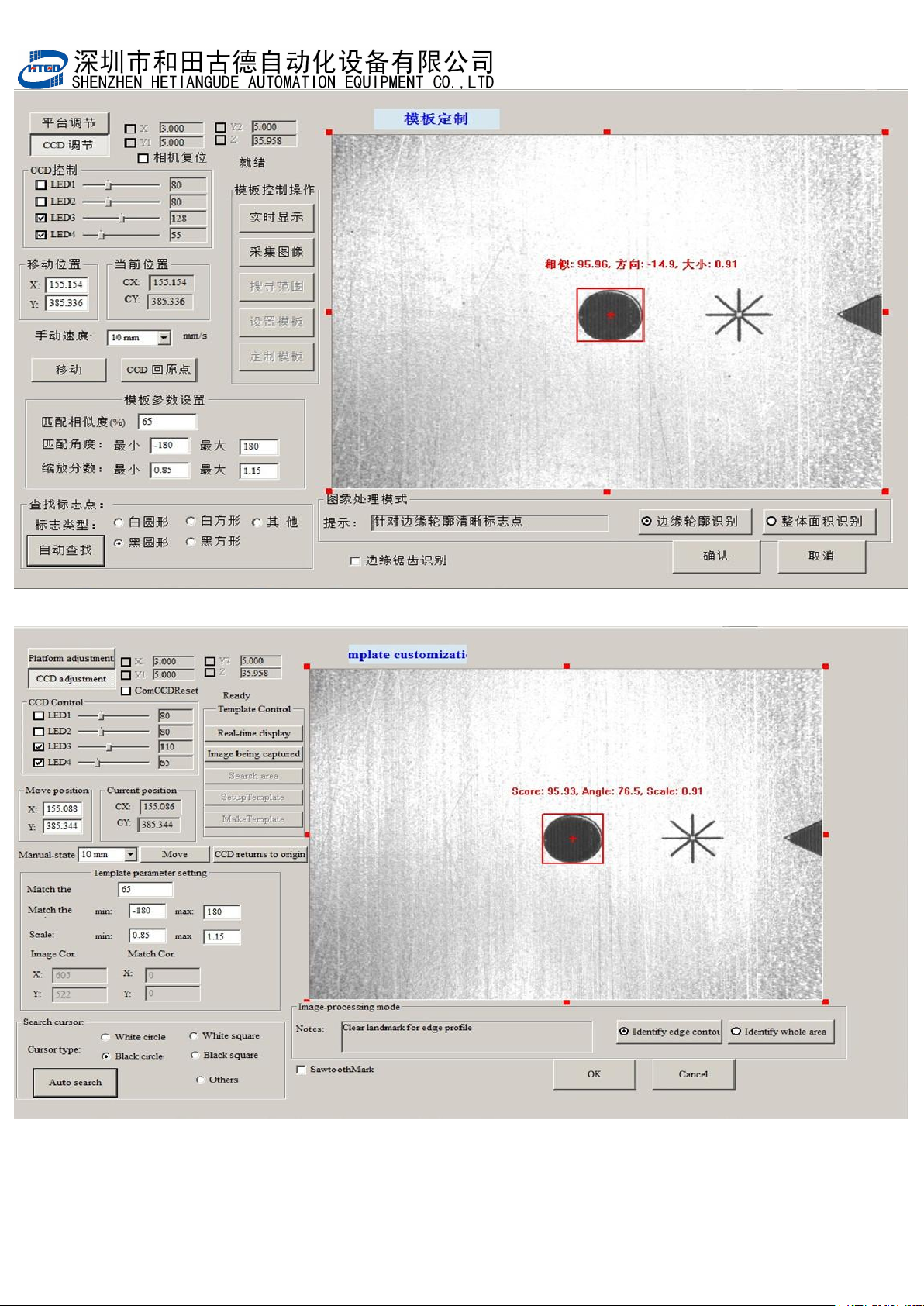
注:各按钮功能解释
Notice: The introduction of all the buttons.
A,[平台调节]:点击输入密码后调节平台的高度,平面位置等;
(platform adjustment): Adjust the height and position of the platform after clicking
“
输入密码
”
(
input password
)
button.
B,[CCD 调节]:移动 CCD 位置;
(CCD adjustment): Remove CCD.
C,[LED 1,2,3,4]:调节 LED 灯的亮度
[LED 1,2,3,4]: Adjust the brightness of the LED.
D
,
[
手动速度
]
:使用键盘上方向键移动
CCD
的速度;
(manual speed): Adjust the CCD speed by pressing the direction keys on the
keyboard.
E,[匹配相似度]:MARK 点质量匹配分数设定分数越高,Mark 点越难设别,精度越高;
反之反是;
(matching degree of similarity):The setting score is higher for the mark point
matching, it is more difficult to set mark and the accuracy is more higher. And
vice versa.
F
,
[
移动位置
]
:修改里面的参数后点
[
移动
]
,
CCD
会移动到对应的坐标上去;
(position change): Revise the parameter and click “移动”(move)button, the CCD
will move to the corresponding position.
G
,
[
当前位置
]
:显示当前
CCD
的坐标;
(current position): Show the current position of CCD.
H
,
[CCD
回位
]
:点击后
CCD
回到原点位置;
(CCD comes back to the origin): CCD will come back to origin after clicking this
button.
I, [
移动
]
:点击后
CCD
从
[
当前位置
]
移动到
[
移动位置
]
;
(move): CCD will move from origin to the changed position after clicking this
button.

- 55
-
J,[标志点类型]:5 种选项供勾选;
(remark type):There are five options for selecting.
K,[自动查找]:系统自动识别选定类型 Mark 点;
(automatic searching): The system will automatic searching the selected mark
point.
L,[模板控制操作]:设定搜索范围,并当自动查找失败时手动设置 MARK 点;
(template control operation): Specify the searching scope. When the automatic
searching fails, operator sets the mark point manually.
M
,
[
实时显示
]
:实时显示图像,手动设置
MARK
点使用;
(real-time display): Display the real-time image. Click this button when set the
mark point manually.
N
,
[
采集图像
]
:采集当前图像,手动设置
MARK
点使用;
(image capture): Capture the current image. Click this button when set the mark
point manually.
O,[搜索范围]:在视域中划出一个区域后点击该按钮设定搜索范围,系统只在该范围
中识别
Mark
点,该功能用在视域中有
2
个以上相似
Mark
点时。用于过滤掉不需
要识别的
Mark
点;
(searching scope): Click this button to set the searching scope after drawing a
region in the field of vision. System only identifies mark point in this scope. This
function can be used when there are above 2 similar marks in the field of vision
and it can filter the useless identified mark points.
P,[设定模板]:在视域中标示一个图像范围,点击『定制模板』系统将该范围中图形
识别为
Mark
点模板,
(template setting): Mark a image scope in the field of vision. Click “
定 制 模
板”(template customization) button and the system will identify the image in this
scope as the template of mark point.
Q,[定制模板]:将设定的图形范围作为 MARK 点模板;
(template customization): Setup the image in this scope as the template of
mark point.
- 56
-
图 3-16 钢网 Mark 点的匹配,匹配完成后点击[确定]
Pix 3-16 the matching of stencil mark point. Click “确定”(ok)button after the matching
is finished.