印刷机通用说明书(中英文版) 450+.pdf - 第48页
- 48 - the origin) f . ( 导轨夹紧 ) :开启 / 关闭导轨夹紧 PCB ; (rail clam ps): T urn on /turn off that rail clamps PCB g . (PCB 吸板阀 ) :开启 / 关闭真空吸盘 / 吸腔,吸住 PCB ; (PCB suction valve): Turn on /turn off t he vacuum sucke r/suction cha …

- 47
-
the stencil. Check whether the bonding pad align at the hole.
L.[CCD 回位]:点击后 CCD 会回到原点,手工对钢网的时候使用。
(CCD return): Click it and CCD will return to the original spot. D Do it when operate
manually on the stencil.
M.[MARK 点设置]:点击后 PCB 标志点成可编辑状态。
(MARK setting): Click it and PCB mark will become editable.
N
.
[Z
轴到取像位置
]
:点击后
Z
轴会升到取像位置,手工对钢网的时候使用;
(Z axis comes to the position of capturing image): Click it and Z axis will lift to the
position of capturing image. Do it when operate manually on the stencil.
O.[自动定位]:点击后机器会自动定位 PCB。这个按钮经常使用,通常设置好 PCB Mark
点到边的距离后点击该按钮,机器会自动执行停板气缸到位、
PCB
压板机构开启、
PCB
传送、PCB 到位停止、Z 上升到取像位置、侧压夹紧、PCB 压板机构关闭、停板气缸
复位、CCD 回到原点。至此 PCB 定位完毕,后面只需进行 PCB,钢网 Mark 点匹配
即可。
(automatic positioning):Click it and the equipment will automatically positioning the
PCB. This button will be used frequently. Click this button after setting the distance
between the PCB Mark and the side. The equipment will automatically execute the
return and reset of board limit cylinder, the open and close of the PCB pressure
plate mechanism, PCB transmission, the stop at given spot of the PCB. And the Z
axis will lift up to the position of capturing image and lateral pressure will clamp.
Then PCB positioning has been done. Next should need be done is to match the
PCB and stencil mark spot.
a.(挡板气缸):开启/关闭停板气缸;
( board limit cylinder):Turn on /turn off board limit cylinder
b.(运输开关):开启/关闭运输传送带;
(transmission switch): Turn on /turn off transmission belt
c
.
(
压板到位
)
:开启
/
关闭导轨压板;
(pressing plate in place): Turn on /turn off the pressing plate of the rail
d.(平台顶板):平台顶起 PCB 上升到取像位置;
(platform lifts the board): Platform lifts the PCB to the position of capturing image.
e.(平台松板):平台从取像位置下降到进板高度(Z 轴回到原点);
(platform declines the board): Platform declines to the boarding height(Z axis return to
- 48
-
the origin)
f.(导轨夹紧):开启/关闭导轨夹紧 PCB;
(rail clamps): Turn on /turn off that rail clamps PCB
g.(PCB 吸板阀):开启/关闭真空吸盘/吸腔,吸住 PCB;
(PCB suction valve): Turn on /turn off the vacuum sucker/suction chamber, suck PCB
h
.
(
网框固定阀
)
:开启
/
关闭钢网固定气缸与夹紧气缸;
(frame fixed valve): Turn on /turn off stencil fixed cylinder and clamping cylinder.
6. 3-9
画面左上角白色方框内的
4
个圆圈表示
PCB
或钢网的
4
个
Mark
点。一般我们选
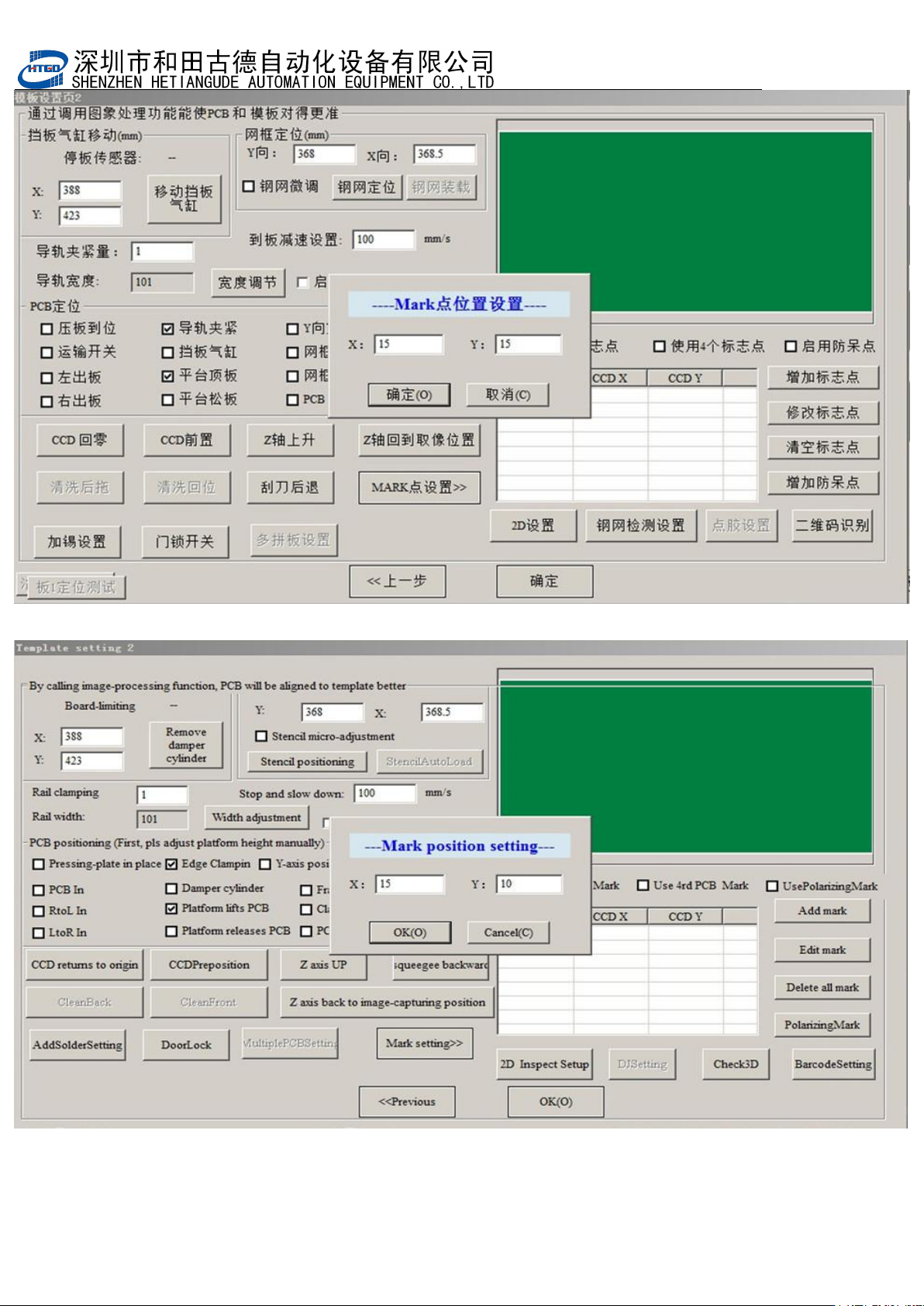
择 2 个对角的点进行匹配即可。通常情况下,为了在搜索马克点时 Mark 点能出现在
CCD 的视域里,我们需要在选择匹配的Mark 点时输入Mark 点到边的距离,如图3-10,
3-11
所示。
The four cycles in the white box which is in the top left corner of pix 3-9 represent
the four mark points of PCB or stencil. Usually select two diagonal points to match.
In general, in order the mark point can exist in the view of the CCD when search it,
operator needs input the distance data between mark point and side when select
the matching mark points. See pix 3-10 and 3-11.
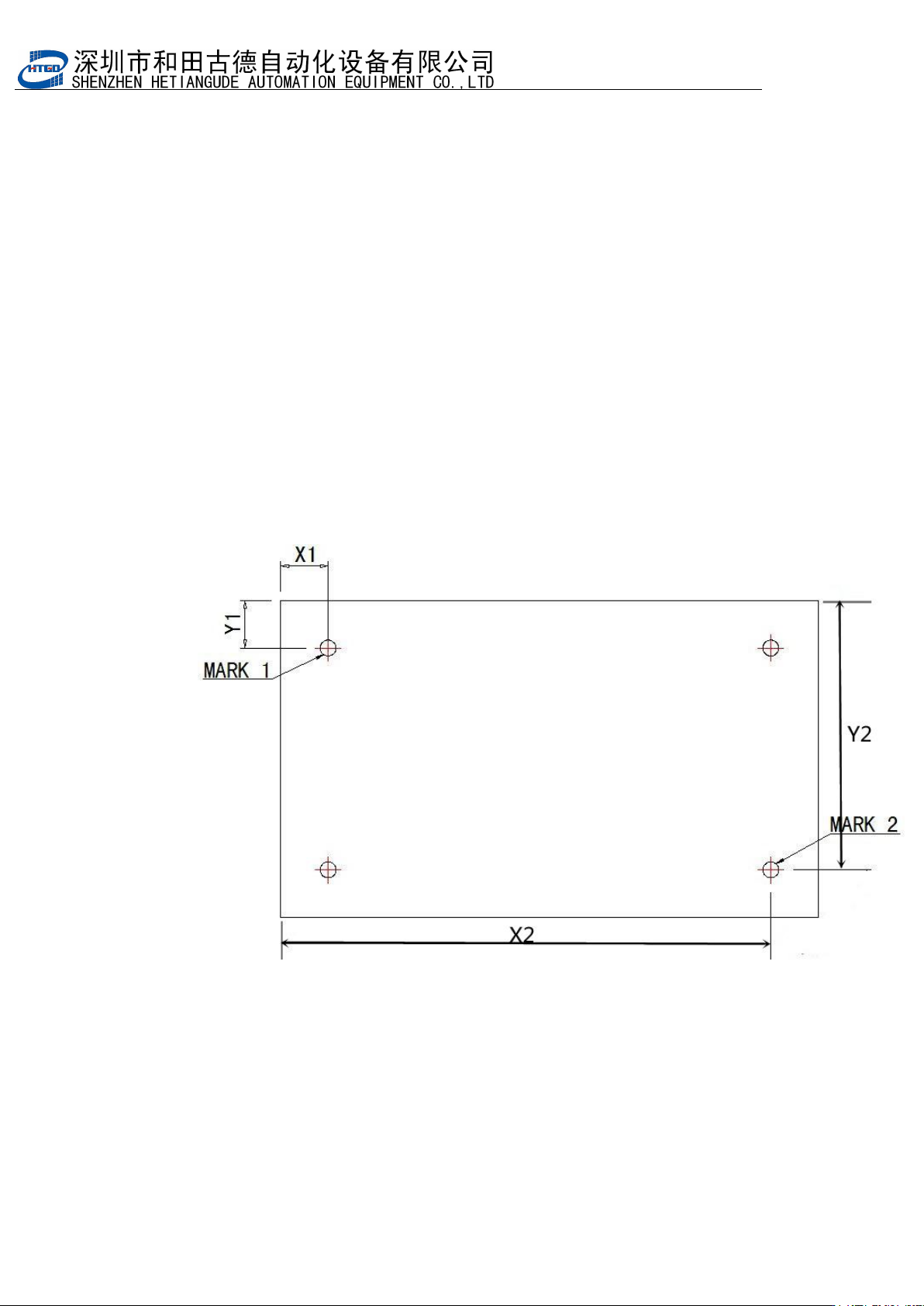
图
3-10
【
PCB Mark
点到边距离】
Pix 3-10(the distance between PCB mark and side)
图 3-10 是 PCB Mark 点到边的距离,输入后搜索 PCB Mark 点时,所选的 PCB Mark
点能直接出现在视域里;
It is the distance between PCB mark and side show in the pix 3-10. Input the
distance date when search the PCB mark point, the selected PCB mark point can
show in the field of vision.
- 49
-
图 3-11(输入 PCB Mark 点到边距离,尺寸关系参考图 3-10)
Pix 3-11(input the distance data between PCB mark point and side. The size relationship in
pix 3-10 is for the reference.)