88242361-04-01 Vol 1 DEK TQ TECHNICAL REFERENCE (1).pdfPDFA.pdf - 第146页
9 PASTE DISPENSER SYSTEM 9.3 ADJUSTMENTS AND SETTINGS 146 TECHNICAL REFERENCE MANUAL DEK TQ 04/2021 9.3 ADJUSTMENTS AND SETTINGS 9.3.1 Paste Level Sensor (Cartridge) 9.3.1.1 Mechanical Setting 1. Open the front cover. 2.…
9 PASTE DISPENSER SYSTEM
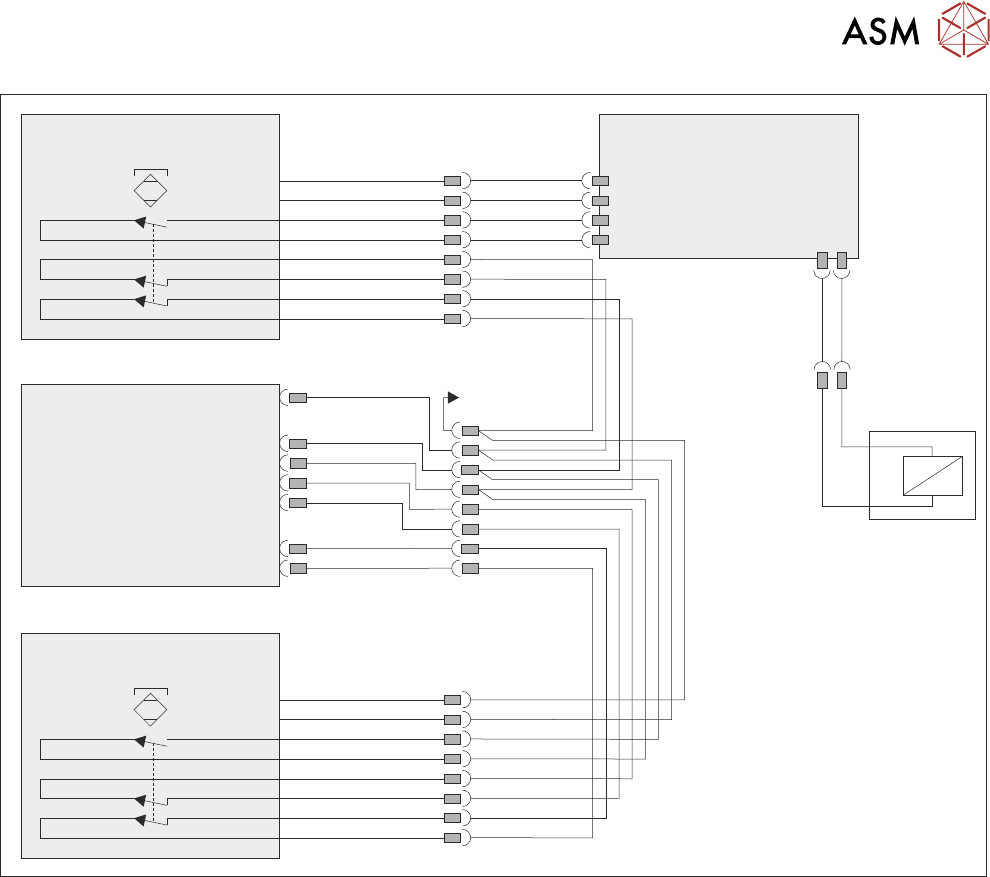
9.2 ELECTRICAL SCHEMATIC
TECHNICAL REFERENCE MANUAL DEK TQ 04/2021 145
Power Supply Enclosure
(M71)
Paste Dispenser
Interlock PCBA
Paste
Dispense
Cover Lock
5MAG1
PL1
PL2
M71PL60
Single Cover
Blanking Socket
M71PL23
M71PL33
M71PL31
Front Cover
Safety Switch
M71PL61
M71PL38
M71PL62
Paste Dispenser Motor
Switch (M71SW6)
Paste Dispenser Cover
Switch (M71SW7)
Paste Dispenser Cover Lock
9 PASTE DISPENSER SYSTEM
9.3 ADJUSTMENTS AND SETTINGS
146 TECHNICAL REFERENCE MANUAL DEK TQ 04/2021
9.3 ADJUSTMENTS AND SETTINGS
9.3.1 Paste Level Sensor (Cartridge)
9.3.1.1 Mechanical Setting
1. Open the front cover.
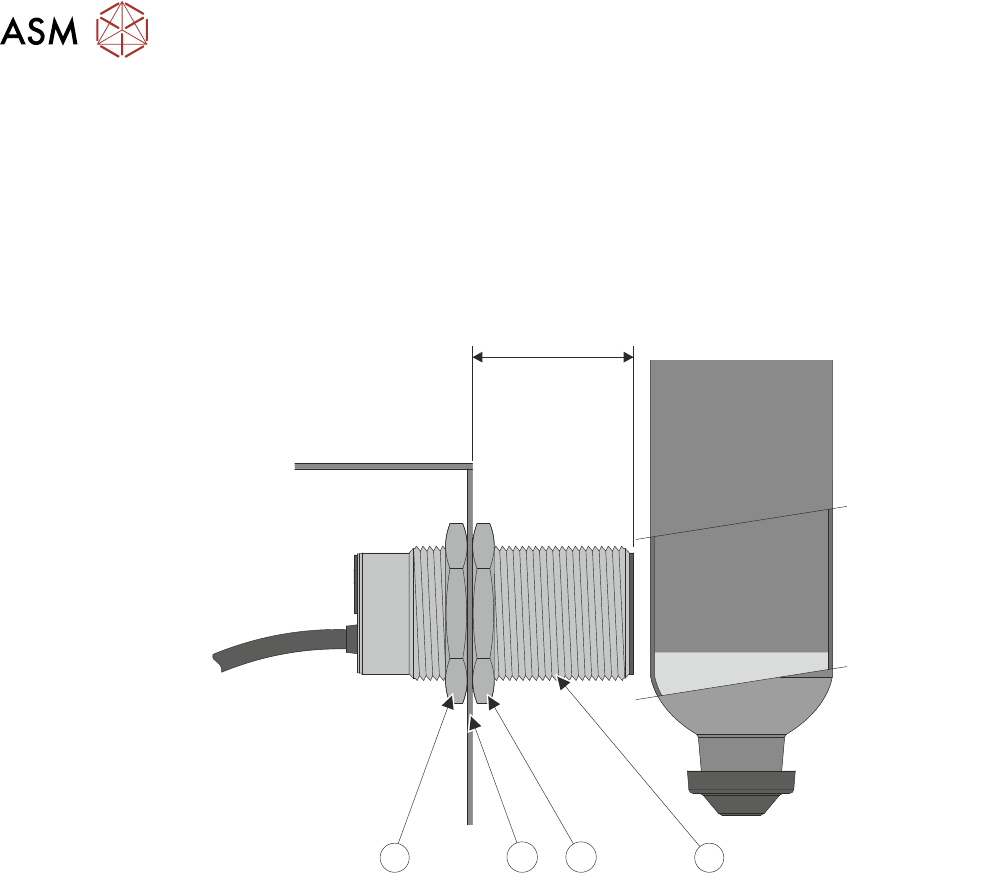
2. Check the 37mm measurement between the cartridge paste regulator assembly (3) and the
end of the paste level sensor (1) as shown below.
37mm
1
2
2
3
3. If adjustment is required, loosen the securing nuts (2) on the sensor (1), adjust the sensor to
achieve the 37mm
dimension from the cartridge paste regulator assembly (3) to the end of
the sensor (1). Tighten the securing nuts (2).
9 PASTE DISPENSER SYSTEM
9.3 ADJUSTMENTS AND SETTINGS
TECHNICAL REFERENCE MANUAL DEK TQ 04/2021 147
9.3.1.2 Electrical Setting
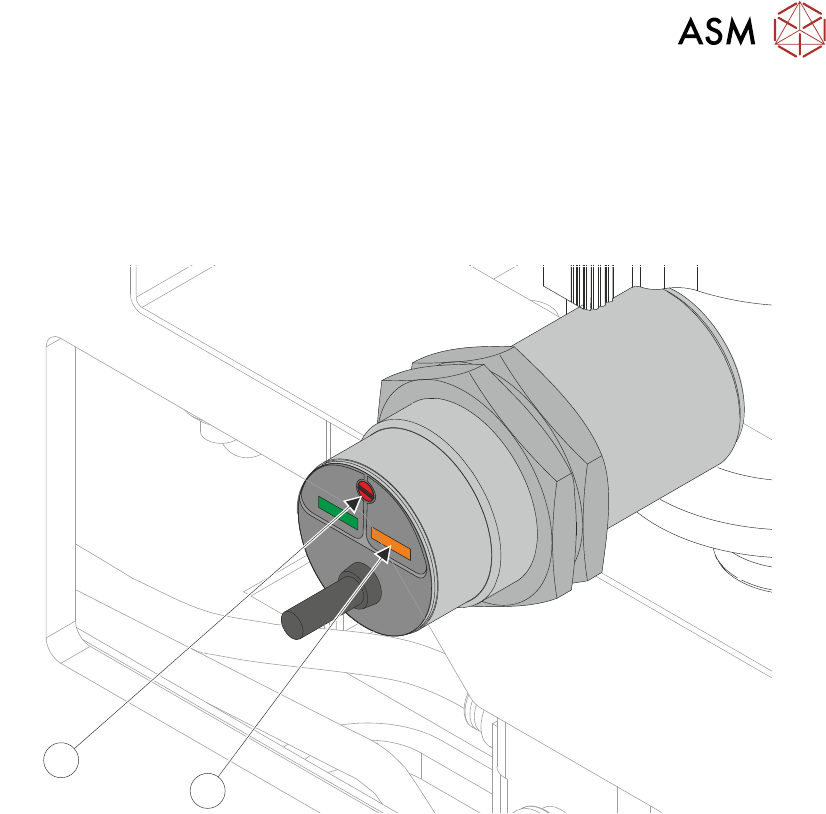
Ensure that the measurement in 9.3.1.1 "Mechanical Setting" [}146] is correct before adjusting the
sensitivity of the paste level sensor.
1. Fit an empty paste cartridge into the paste dispenser.
2. Slowly adjust the sensitivity control (2) to the point where the amber status LED (1) switches
ON
.
1
2
3. Fit a full paste cartridge into the paste dispenser. The amber status LED (1) switches OFF.
4. Slowly adjust the sensitivity control (2) anti clockwise to the point where the amber status LED
switches ON
. Note the amount of turns taken.
5. Turn the sensitivity control (2) clockwise half the noted amount of turns above. The amber
status LED (1) switches OFF
.
6. Remove and refit the full cartridge, ensuring the amber LED (1) switches on and off.
9.3.2 Paste Dispenser Regulator
For information on the regulator setting, refer to the Pneumatic Module chapter.