88242361-04-01 Vol 1 DEK TQ TECHNICAL REFERENCE (1).pdfPDFA.pdf - 第72页
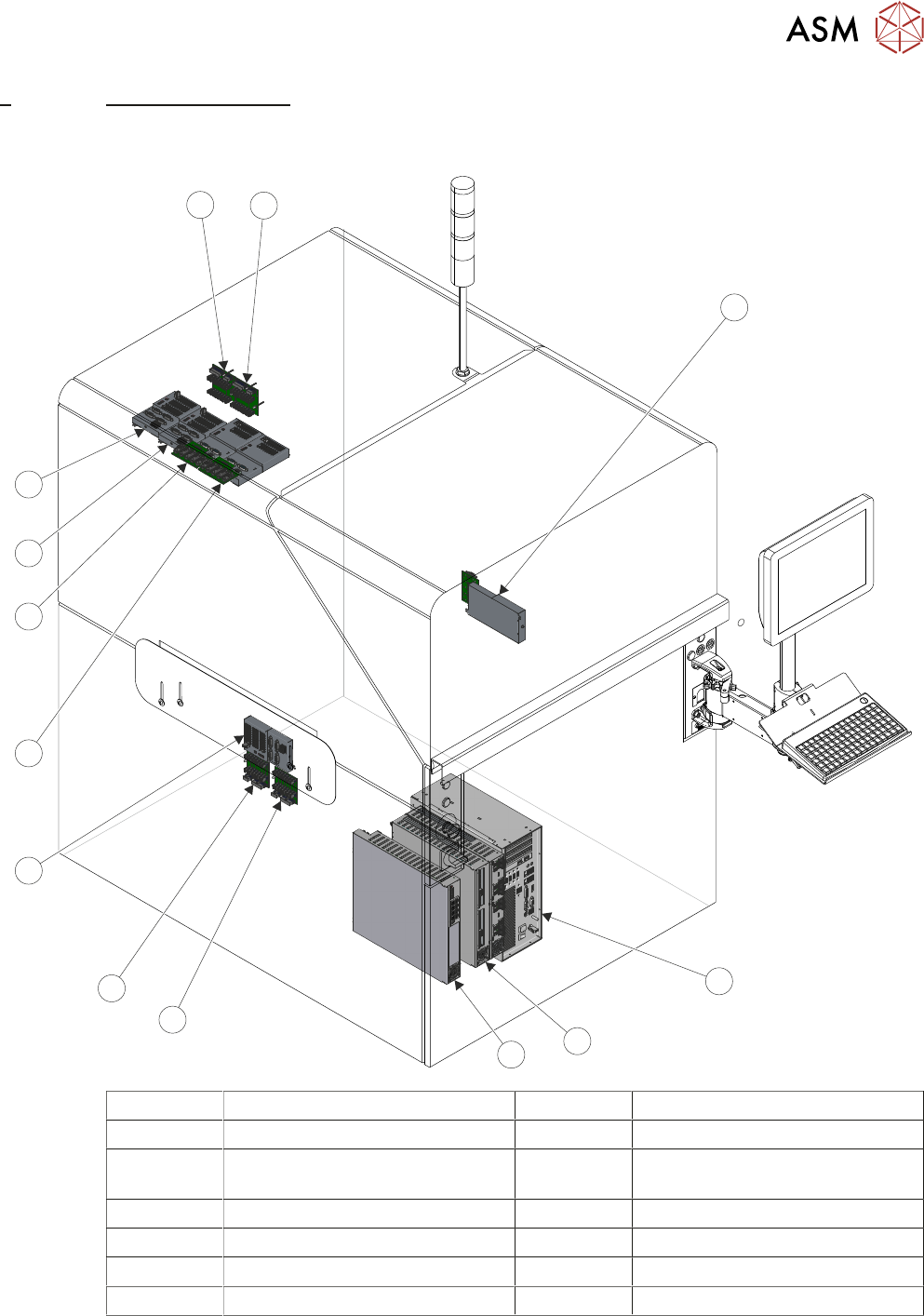
6 MACHINE CONTROL 6.1 OVERVIEW 72 TECHNICAL REFERENCE MANUAL DEK TQ 04/2021 All machine functions are initiated by the DEK software installed on the machine controller (PC). It incorporates a NuMotion control card which …
6 MACHINE CONTROL
6.1 OVERVIEW
TECHNICAL REFERENCE MANUAL DEK TQ 04/2021 71
6 MACHINE CONTROL
6.1 OVERVIEW
1
2
3
4
5
6
7
8
9
10
11
12
13
1 ESIO-2 & ADC 8 ESIO-6 & ADC (Optional)
2 Machine Controller (PC) 9 ESIO-5 & ADC
3 EPMs (2 or 3 depending on op-
tions)
10 ESIO-4
4 CPM 11 ESIO-3
5 ESIO-1: Breakout B 12 ESIO-3: Breakout A
6 ESIO-1: Breakout A 13 ESIO-3: Breakout B
7 ESIO-1
6 MACHINE CONTROL
6.1 OVERVIEW
72 TECHNICAL REFERENCE MANUAL DEK TQ 04/2021
All machine functions are initiated by the DEK software installed on the machine controller (PC). It
incorporates a NuMotion control card which handles all requests from the software for the following
actions:
●
Monitoring of Safety Circuits (eg E Stop and Cover Safety Switches)
●
Motor and Actuator Drive Control
●
Motor and Actuator Positional Information (Feedback from Sensors and Encoders)
●
Mechanism Positional Information (Feedback from Sensors)
●
Activation of Electronic and Pneumatic Solenoids
●
Monitor of Analogue Sensors
●
Analogue Control Outputs
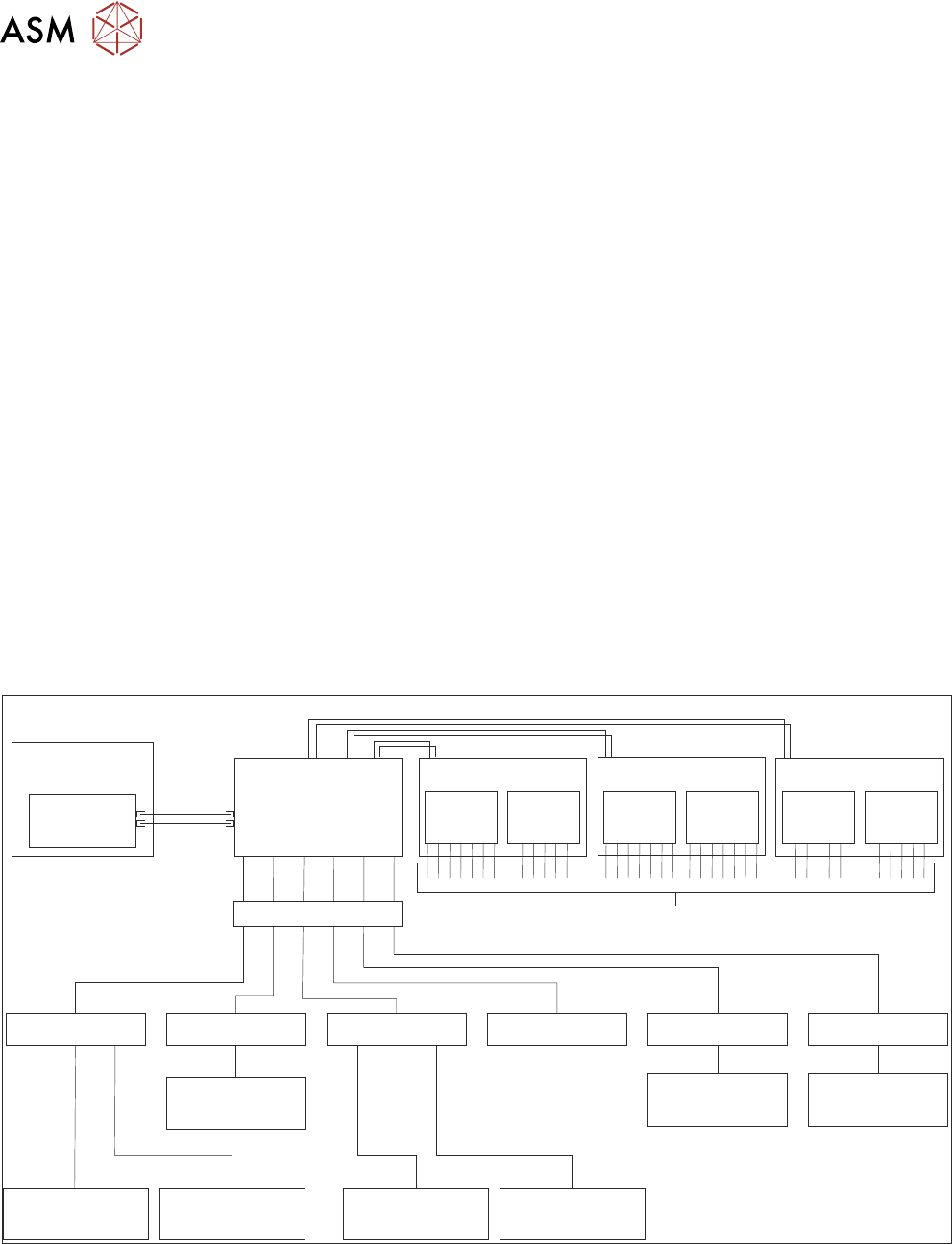
The NuMotion control card transmits and receives information via a fibre optic link to the Controller
Power Module (CPM).
The CPM uses two ribbon cables to connect to each of the three Extended Power Modules
(EPM’s). The CPM also uses RJ11 serial cables to connect to Encoder Serial Input or Output
(ESIO) modules which are located close to the mechanism that the ESIO is associated with.
The EPM’s consist of a combination of either two stepper drive cards, two servo drive cards or one
of each. The outputs of the drive cards connect directly to stepper or servo motors.
The ESIO modules provide digital inputs, digital outputs, analogue inputs and analogue outputs.
Each connector on an ESIO can provide an input or an output. An ESIO module can be connected
to an ESIO Breakout module which splits each I/O port to an independent input and output, effect-
ively doubling the capacity of the ESIO module.
6.1.1 Schematic
Machine
Controller (PC)
CPM
EPM 1
ESIO-1
ESIO-1:
Breakout A
ESIO-3:
Breakout A
ESIO-1:
Breakout B
ESIO-3:
Breakout B
ESIO-2
ADC/DAC
15-2 DIST
ADC/DAC
15-5 DIST
ADC/DAC
15-6 DIST
ESIO-3 ESIO-4 ESIO-5 ESIO-6
EPM 2
EPM 3
NuMotion
Control Card
Fibre
Optic
Links
Stepper Stepper ServoServo Stepper Servo
Stepper and Servo Motors
Ribbon Cables
RJ11 Serial Cables

6 MACHINE CONTROL
6.2 MACHINE CONTROLLER
TECHNICAL REFERENCE MANUAL DEK TQ 04/2021 73
6.2 MACHINE CONTROLLER
The machine controller is a computer using the Windows 10 IoT Enterprise operating system to run
the DEK software which controls all the printer functions.
6.2.1 Motherboard
The motherboard houses the Central Processing Unit (CPU) which is an Intel® Celeron® Dual
Core processor G3900 2.8GHz and provides the master control of all machine functions.
The main features of the motherboard are:
External
●
SVGA, DVI-D and DisplayPort Video Outputs
●
12 USB Ports (4 x Type 2 and 8 x Type 3.0)
●
2 Ethernet 10/100Base-T output via an RJ45 connectors
●
RS232 Interface (COM1) Connector
●
6 Pin Mini Keyboard Connector
●
Line Out Connector
●
Microphone In Connector
Internal (Not Shown)
●
6 SATA HDD Controllers
●
4 PCI Express Bus Interface
●
4 DDR4 DIMM Sockets (RAM)
●
Lithium battery backup
6.2.2 CMOS Settings
The CMOS settings are password protected to prevent any settings being changed.
It is highly unlikely that the CMOS settings could be responsible for machine controller issues how-
ever, if the settings are strongly suspected, contact the local CSG office.
NOTE
If a USB drive is plugged in during power-up, the DEK software does not start as the printer tries to
boot from the USB drive. All USB drives should be removed prior to the machine being shut down.