88242361-04-01 Vol 1 DEK TQ TECHNICAL REFERENCE (1).pdfPDFA.pdf - 第17页
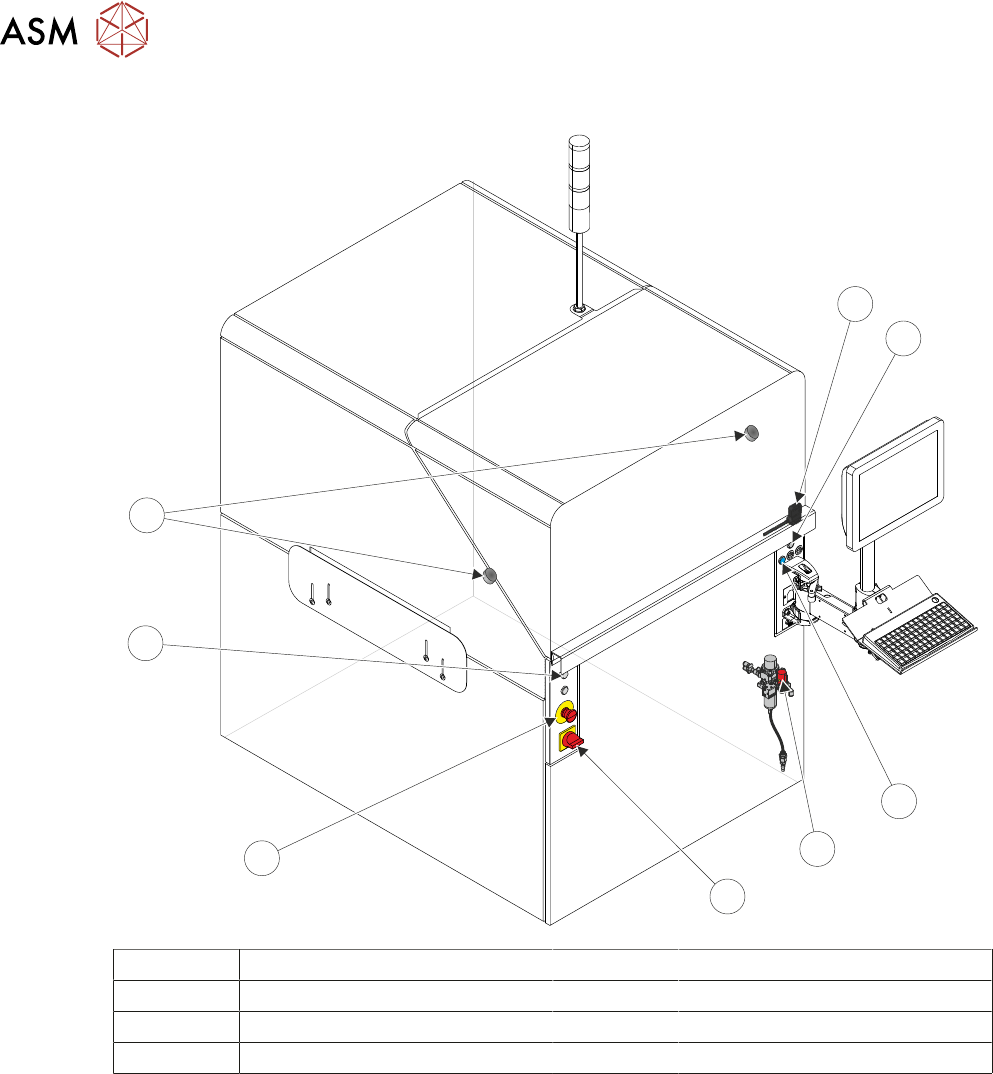
2 SAFETY FEATURES 2.3 SAFETY CIRCUIT TECHNICAL REFERENCE MANUAL DEK TQ 04/2021 17 9 8 8 7 6 5 4 3 2 1 10 1 Front Cover Safety Switch 6 Emergency Stop (E Stop) Button 2 Right Jog Button 7 Left Jog Button 3 System Button 8…
2 SAFETY FEATURES
2.3 SAFETY CIRCUIT
16 TECHNICAL REFERENCE MANUAL DEK TQ 04/2021
2.3 SAFETY CIRCUIT
1
2
3
4
5
6
8
7
1 Front Cover Safety Switch 5 Mains Isolator Switch
2 Right Jog Button 6 Emergency Stop (E Stop) Button
3 System Button 7 Left Jog Button
4 Pneumatic Lockout 8 Electromagnetic Cover Locks
2 SAFETY FEATURES
2.3 SAFETY CIRCUIT
TECHNICAL REFERENCE MANUAL DEK TQ 04/2021 17
9
8
8
7
6
5
4
3
2
1
10
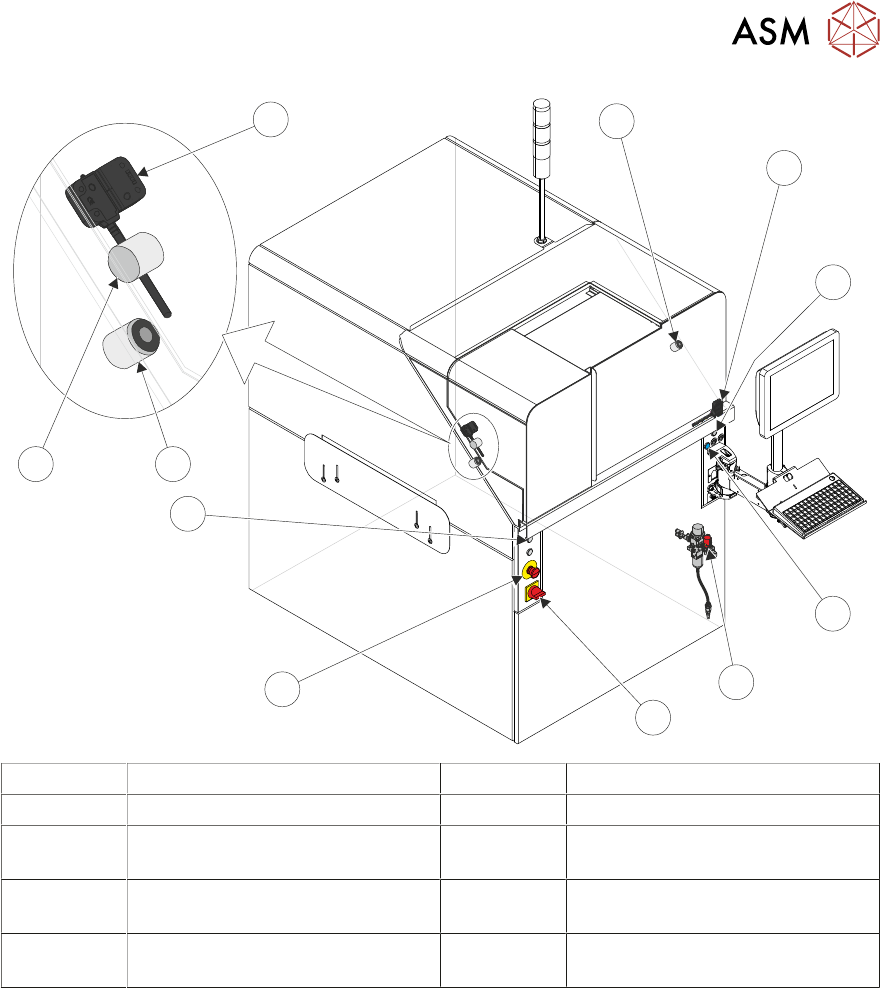
1 Front Cover Safety Switch 6 Emergency Stop (E Stop) Button
2 Right Jog Button 7 Left Jog Button
3 System Button 8 Electromagnetic Front Cover
Locks
4 Pneumatic Lockout 9 Electromagnetic Paste Dispenser
Cover Lock
5 Mains Isolator Switch 10 Paste Dispenser Cover Safety
Switch
The safety circuit ensures that the printer is in a safe condition before the printer can operate. In
the event of the safety circuit being interrupted, switched power is disconnected from all motors
and some pneumatic solenoids preventing any hazardous movement within the printer.
The safety circuit consists of the E Stop button and the front cover safety switch. With the safety
components in a safe state, the safety relay allows power to the motors and I/O by pressing the
system button.
2 SAFETY FEATURES
2.3 SAFETY CIRCUIT
18 TECHNICAL REFERENCE MANUAL DEK TQ 04/2021
2.3.1 Emergency Stop (E Stop)
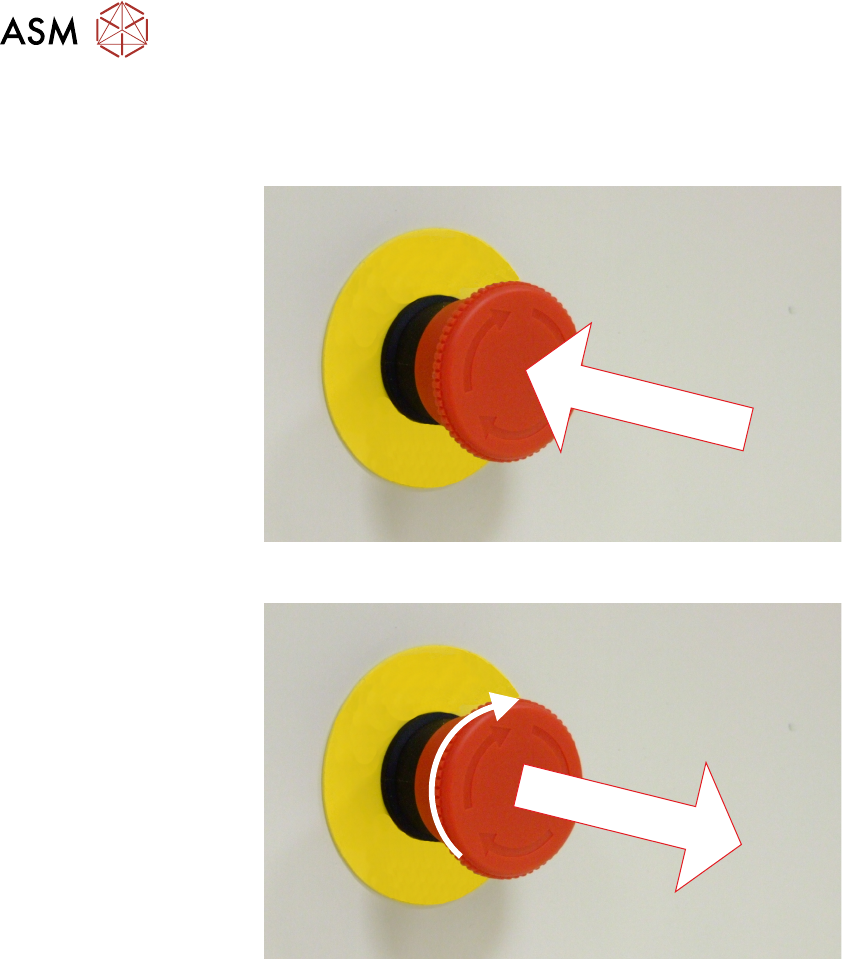
The machine is fitted with an E Stop which suspends all machine operations. The switch is within
easy reach of the operator and once pressed, the latching switch requires resetting.
To reset the E Stop, turn the button clockwise until it unlatches and extends outward.
Press the System button to reinitialise the machine.
2.3.2 Opening Cover
NOTE
The safety features designed into the printer are for the protection of all operators and maintenance
personnel. ASM strongly recommend safety devices are never overridden.
There are two variants of opening covers:
Dual Covers machine - Front Cover and Paste Dispenser Cover
Single Covers Machine - Front Cover
The cover(s) are fitted with safety switches to protect personnel from internal moving parts. The
cover(s) are secured by electromagnetic locks to prevent the cover from opening when not permit-
ted.
The front cover electromagnets are de-energised when:
●
Open Cover is selected on the monitor
●
Open Cover is requested by software to complete an action
●
The E Stop is pressed
The paste dispenser cover electromagnets are de-energised when:
●
Open paste dispenser is selected on the monitor