Printer 710_810 v8 Transportation.pdf - 第109页
TRANS PORTATION MACHI NE POWE R UP SEQU ENCE Chapter Issue 7 Oct 06 Technical Reference Manual 34.109 10. Using the Incr . or Decr. keys, set the Cont act Posi tion t o 5.5mm . 1 1. Select Move t o Position , the ProFl o…
TRANSPORTATION
MACHINE POWER UP SEQUENCE
34.108 Technical Reference Manual Chapter Issue 7 Oct 06
ProFlow Contact
Position setup
For machines using ProFlow only, set up the contact height position as follows:
1. Load a stencil with an off centre image.
2. Fit an empty transfer head to the ProFlow pressure mechanism. Remove
the cover.
NOTE
Ensure wipers and skis are fitted to the transfer head.
CAUTION
MACHINE JAMMING.
In order to prevent the inadvertent jamming of squee-
gee mechanical mechanisms, the following procedure must be carried out
in the correct sequence.
3. Position a 0.1mm shim on the stencil under the transfer head.
4. Select Show Classic.
5. Select Maint..
6. Select Calib Machine.
7. Select ProFlow.
8. Select ProFlow Heights.
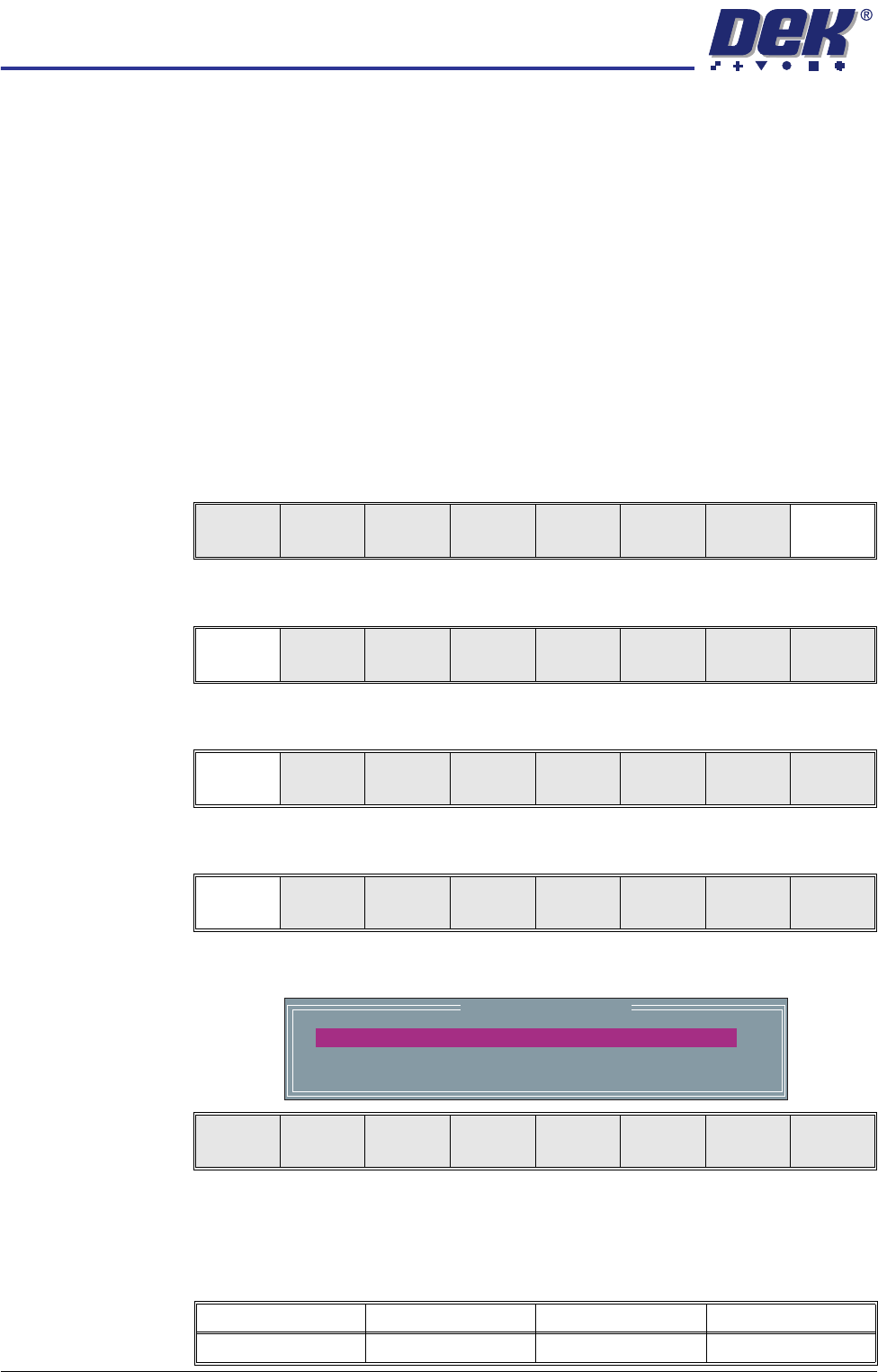
The following window and menu bar is displayed:
9. PFLOW CONTACT POS. is highlighted.
This parameter sets the height of the ProFlow printhead so that it just
touches the stencil surface.
Run
Open
Cover
Knead
Paste
Clean
Screen
Adjust Setup Monitor Maint.
Calib
Machine
House
Keeping
Set
Prefs
Diagnost
Te st
Cycles
Exit
ProFlow Offset Vision Solvent Exit
ProFlow
Heights
Transfer
Material
Exit
ProFlow Calibrations
PFLOW CONTACT POS.
0.0
mm
Move to
Position
Restore
Defaults
Next Previous Incr. Decr. Exit
Minimum Maximum Increment Default
- 10mm +10mm 0.1mm 0.0mm
TRANSPORTATION
MACHINE POWER UP SEQUENCE
Chapter Issue 7 Oct 06 Technical Reference Manual 34.109
10. Using the Incr. or Decr. keys, set the Contact Position to 5.5mm.
11. Select Move to Position, the ProFlow unit is driven to the position set.
NOTE
Correct contact height is when the shim is just held between the transfer
head wipers and stencil. At this position it is not possible to slide the shim
sideways past the transfer head skis. If correct contact height is not yet
achieved, carry out the following steps:
12. If correct contact height is achieved go to Step 17. If correct contact height
is not yet achieved, continue with Step 13.
13. Using the Incr. or Decr. keys, increase or decrease the Contact Position set
height by 0.5mm (eg 5.0mm or 6.0mm).
NOTE
Normally the contact position is between 4mm and 8mm (nominally 6mm).
14. Select Move to Position, the ProFlow unit is driven to the position set.
15. Repeat Steps 13 and 14, varying the set position, until the correct contact
height is achieved.
16. Select Exit.
17. Select Exit.
18. Select Exit.
19. Select Exit.
20. Open the front printhead cover/shutter and remove the shim. Remove
empty transfer head, if necessary.
21. Close the front printhead cover/shutter.
22. Press the System button.
Move to
Position
Restore
Defaults
Next Previous Incr. Decr. Exit
ProFlow
Heights
Transfer
Material
Exit
ProFlow Offset Vision Solvent Exit
Calib
Machine
House
Keeping
Set
Prefs
Diagnost
Te st
Cycles
Exit
TRANSPORTATION
FOREIGN MACHINE INTERFACE
34.110 Technical Reference Manual Chapter Issue 7 Oct 06
FOREIGN MACHINE INTERFACE
Introduction The Foreign Machine Interface (FMI) is an electrical means of communication
between the DEK machine and an adjacent machine, using electrical signals.
The signals are transferred using opto-couplers and/or relay contacts which
keep the machines electrically isolated.
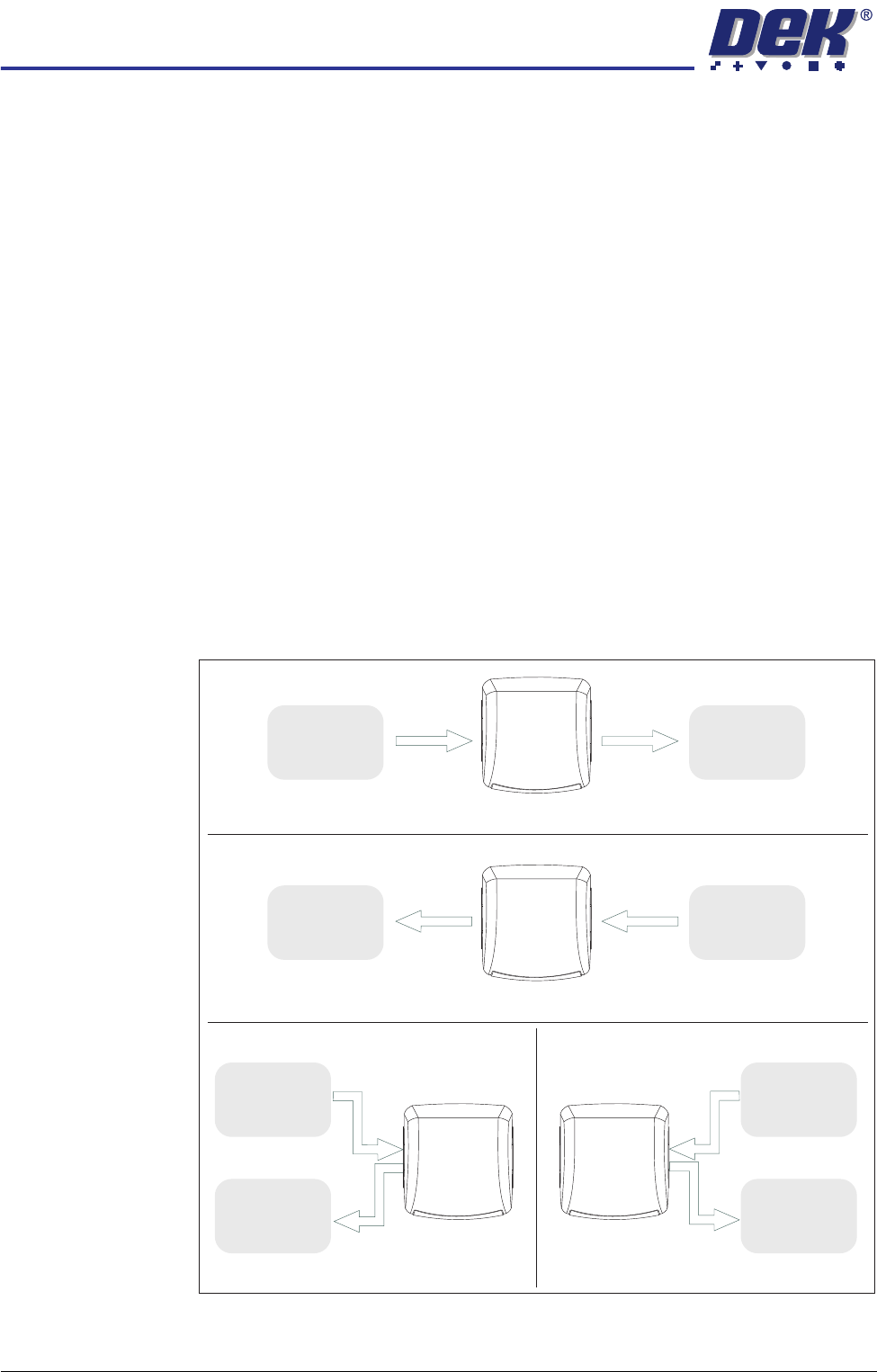
The adjacent machine can be upline or downline of this machine in a left-to-right
or right-to-left board transfer arrangement, or it can be at one side of this
machine in a left-to-left or right-to-right arrangement.
The machine can interface with many different types of adjacent machinery
which can be of any proprietary manufacture. The adjacent machine utilizes a
set of timing and control signals (protocols) for communication with other
machines. As there are many different protocols, DEK supplies a custom
designed FMI to suit the protocol for each type of adjacent machine.
The FMI hardware comprises:
• An FMI Pod and connecting cable for SMEMA, Fuji and Panasonic only.
• A Multi-Interface Unit (MIU) for all other interfaces.
• An FMI loom which connects the FMI port, on the machine controller, to
the MIU or FMI Pod.
• Two interface cables, one cable for each adjacent machine.
Figure 34-27 Machine Arrangements for Board Transfers
Left to Right Board Transfers
Right to Left Board Transfers
Upline
Downline
Adjacent
Machine
Adjacent
Machine
UplineDownline
Adjacent
Machine
Adjacent
Machine
Left to Left Board Transfers Right to Right Board Transfers
Upline
Adjacent
Machine
Downline
Adjacent
Machine
Upline
Adjacent
Machine
Downline
Adjacent
Machine
DEK
Machine
DEK
Machine
DEK
Machine
DEK
Machine