Printer 710_810 v8 Transportation.pdf - 第115页
TRANS PORTATION FOREIGN MACHINE INTERFA CE Chapter Issue 7 Oct 06 Technical Reference Manual 34.115 connected. 2. During th e machine i nitiali sation, pr ess the Syst em button when prompted. 3. Using the t ouchscreen s…
TRANSPORTATION
FOREIGN MACHINE INTERFACE
34.114 Technical Reference Manual Chapter Issue 7 Oct 06
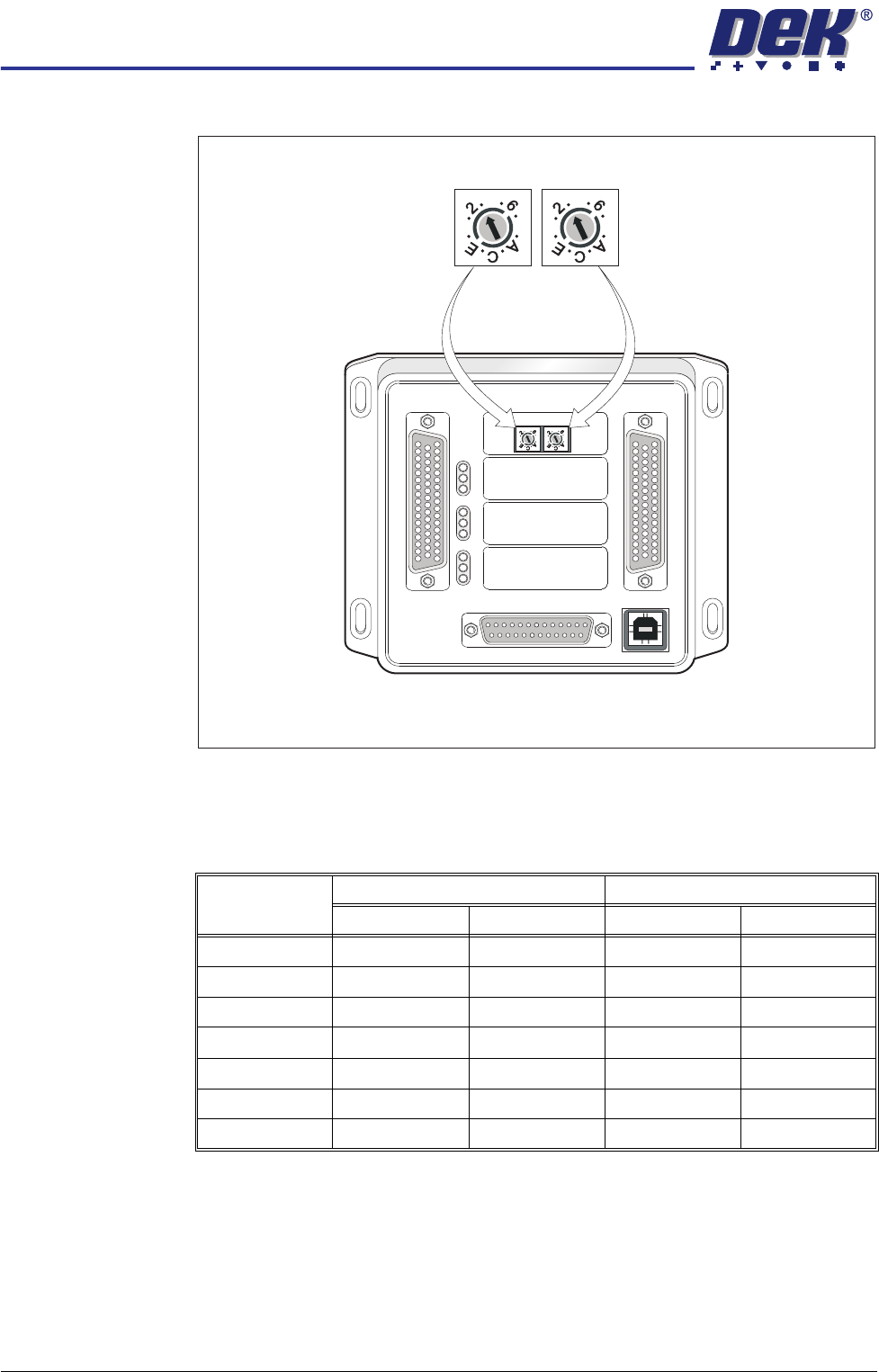
Protocol Selection
Figure 34-29 Interface Selector Switches
Part Numbers &
Settings
FMI Cables With the cables supplied, connect the upline and downline machines to the
screen printer MIU box connections or FMI Pod. Cables should be routed down
behind the rear access panel.
Procedure Ensure the MIU is configured with the correct protocols for upline and downline
machines as detailed earlier.
1. Power up the machine using the mains isolator, ensure that the air supply is
M1SK1
UPLINE
M1SK2
DOWNLINE
M1PL3
DEK M/C
M1SK4
DEK USB
+12V
+24V
+24V SW
SEND UPLINE
SEND DOWNLINE
CONTROL IN
UPLINE READY
DOWNLINE READY
CONTROL OUT
POWER
I/P'S
O/P'S
PROTOCOL SELECTION
UP
LINE
DOWN
LINE
MIU 191114
4
80
4
80
4
80
4
80
Upline Interface
Selector Switch (SW2)
Downline Interface
Selector Switch (SW3)
Protocol MIU Setting Cable Part Number
Upline SW2 Downline SW2 Upline Downline
SMEMA 2 2 131343 131345
Siemens 3 3 131335 131337
SMPI 4 4 131331 131333
TDK 5 5 131323 131325
Fuji 7 7 126757 126758
Panasonic 7 7 131339 131341
Sanyo 8 8 146120 146119

TRANSPORTATION
FOREIGN MACHINE INTERFACE
Chapter Issue 7 Oct 06 Technical Reference Manual 34.115
connected.
2. During the machine initialisation, press the System button when prompted.
3. Using the touchscreen select Setup, Machine to display the Machine Setup
Procedure menu.
4. Select Basic Parameters.
5. Using the drop down menu, change NO FMI to MIU for the Downline
Protocol.
6. Using the drop down menu, change NO FMI to MIU for the Upline Protocol.
7. In Set Prefs change the mode to No Print.
NOTE
In No Print mode, the DEK machine acts as a conveyor, passing the board
through the machine without printing.
8. Ensure that the Upline and Downline Machines are connected and are
powered up.
9. Select Run.
The screen printer requests a board from the upline machine and passes it
through the machine. The board stops at the sensor on the conveyor. On
request from the downline machine the board passes onto the external
conveyor. When the sensor is clear the screen printer requests another
board from the upline machine and the sequence repeats.
This shows that the interface is working between the screen printer and the
external machines.
TRANSPORTATION
HIGH THROUGHPUT CONVEYOR (HTC)
34.116 Technical Reference Manual Chapter Issue 7 Oct 06
HIGH THROUGHPUT CONVEYOR (HTC)
Introduction
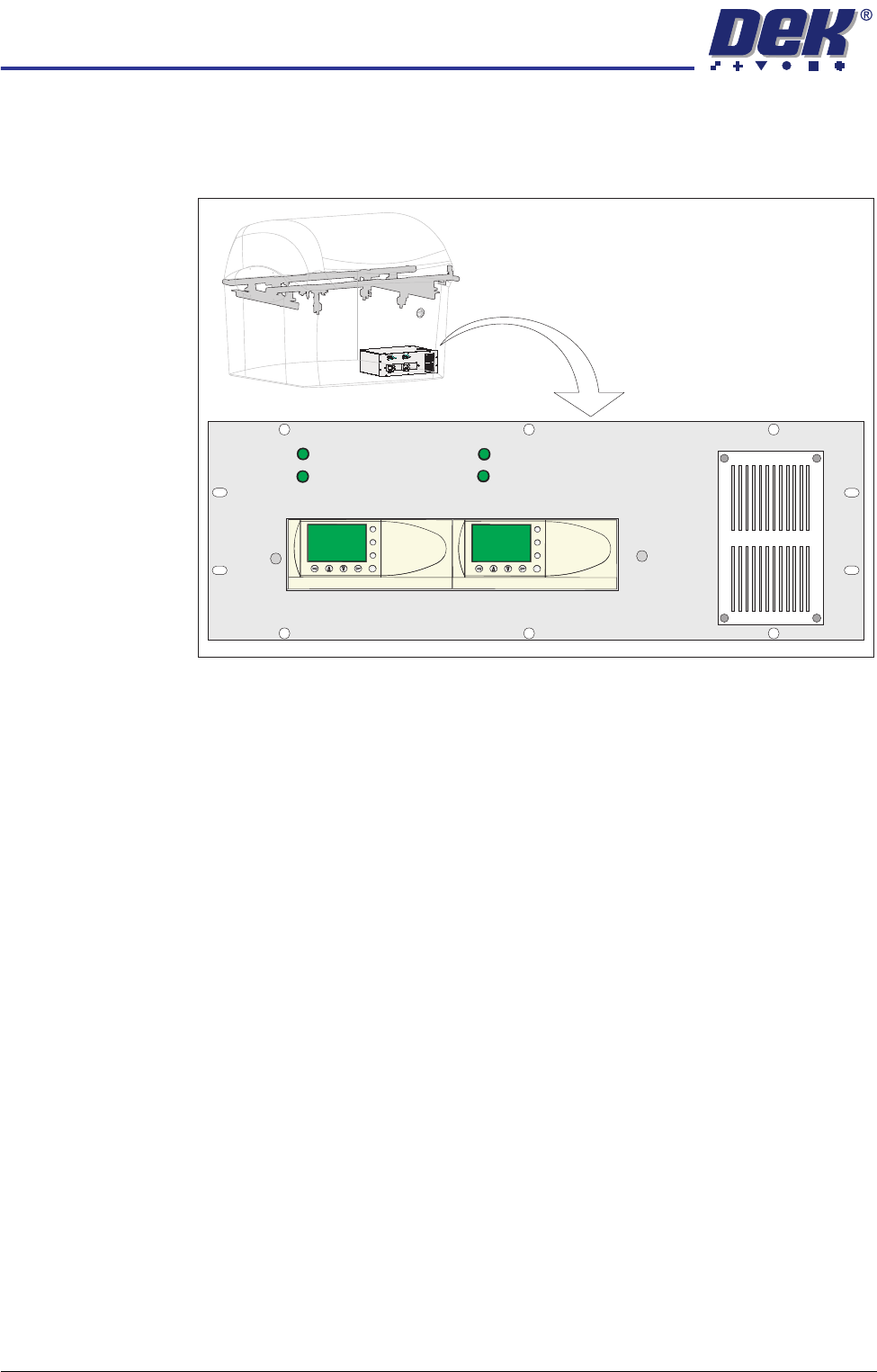
Figure 34-30 HTC Controller Location
The HTC controller (M27) enclosure is located behind the front maintenance
cover just below the mains isolator switch.
The M27 consists of a Programmable Logic Controller (PLC) for each auxiliary
conveyor. Above each PLC are the switches for selecting between 3-stage/
single stage and fast/normal mode.
On machine initialisation, each auxiliary conveyor PLC needs to detect the
machine ’System Power’ and a ’Downline Available’ signal before the system
starts operating. If the machine is being run in a stand-alone environment, the
’Downline Available’ signal from the downline machine can be mimicked by
shorting pins 1 & 2 of loom Pt No 160645 to the downline machine.
1/3 STAGE
OPERATION
1/3 STAGE
OPERATION
FAST TRANSFERS
DISABLED
FAST TRANSFERS
DISABLED
R/H CONVEYOR L/H CONVEYOR
ESC
OK
+
-
ESC
OK
+
-