Printer 710_810 v8 Transportation.pdf - 第93页
TRANS PORTATION PRE POWER UP CHECKS Chapter Issue 7 Oct 06 Technical Reference Manual 34.93 PRE POWER UP C HECKS Electrica l T est Before the machine i s connected to the fact ory electrica l supply , the fol lowing elec…
TRANSPORTATION
MAJOR RELOCATION
34.92 Technical Reference Manual Chapter Issue 7 Oct 06
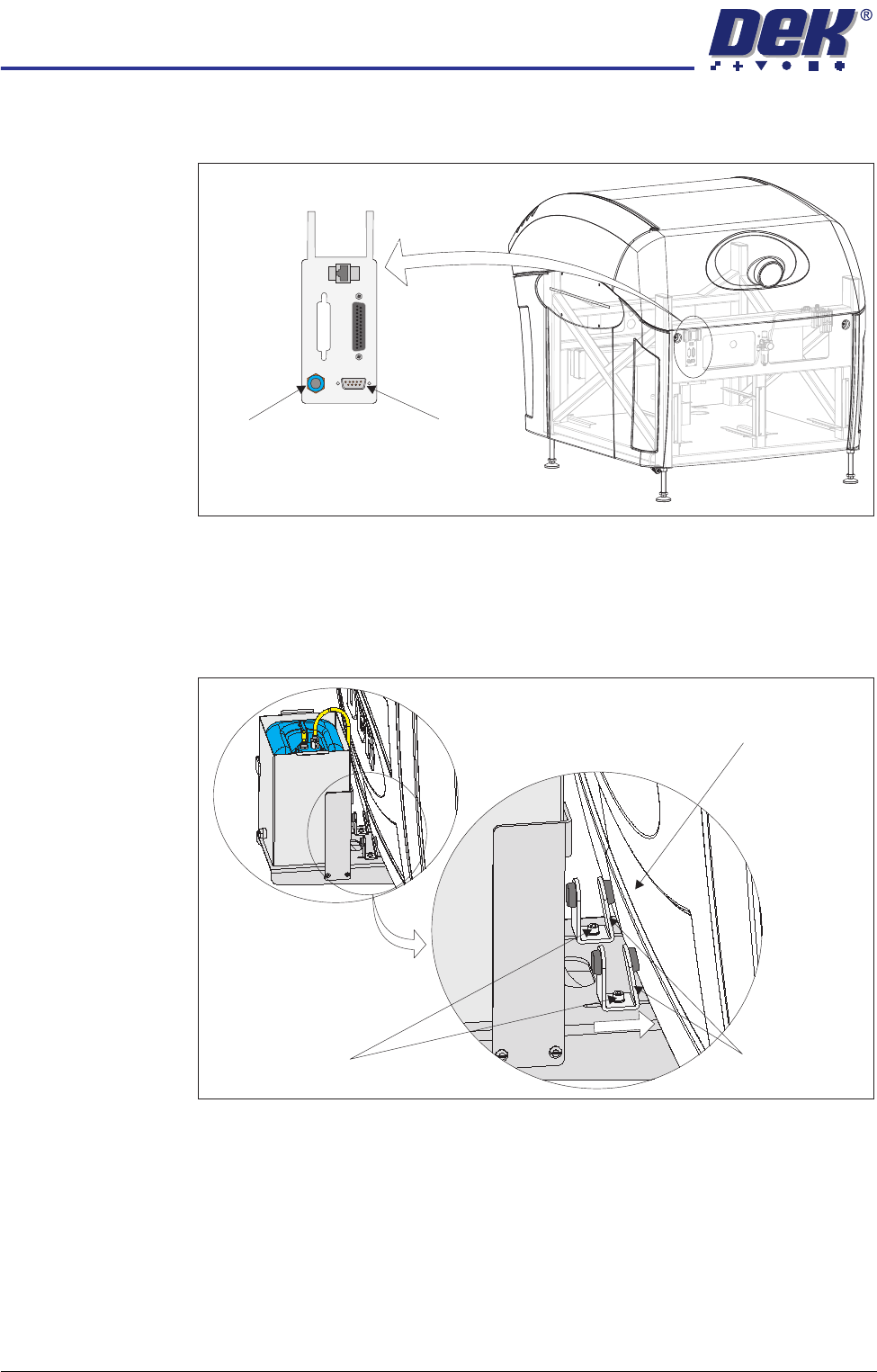
8. Connect the 4mm tubing from the external solvent tank to the solvent fluid
connector on the external services panel.
9. Connect the cable from the external solvent tank to 9SK69 on the external
services panel.
10. Fit the rear cover.
11. Slide the angle brackets towards the machine cover, ensuring that either the
vertical or sloping side as appropriate, abuts the machine cover.
12. Tighten the two M5 cap head securing screws.
Other Items The following items are to be fitted, if applicable:
• Barcode readers
• Interactiv headset
• Paste cartridge
• Squeegees
•Tooling
View on Rear of Machine
POWER ON
PART No. 160740
M/C AVAILABLE
BOARD AVAILABLE
BOARD PASS
D
O
W
N
L
IN
E
BOARD AVAILABLE
BOARD PASS
M/C AVAILABLE
U
P
L
IN
E
FMI POD
Solvent Fluid
Connector
Solvent Sensor
9SK69
Machine Cover
Securing Screws
Angle Brackets
TRANSPORTATION
PRE POWER UP CHECKS
Chapter Issue 7 Oct 06 Technical Reference Manual 34.93
PRE POWER UP CHECKS
Electrical Test Before the machine is connected to the factory electrical supply, the following
electrical tests must be performed:
1. Ensure the mains isolator switch is in the OFF position.
2. Remove the front cover of the machine to gain access to the mains isolator
switch.
3. Remove the front cover of the mains isolator switch.
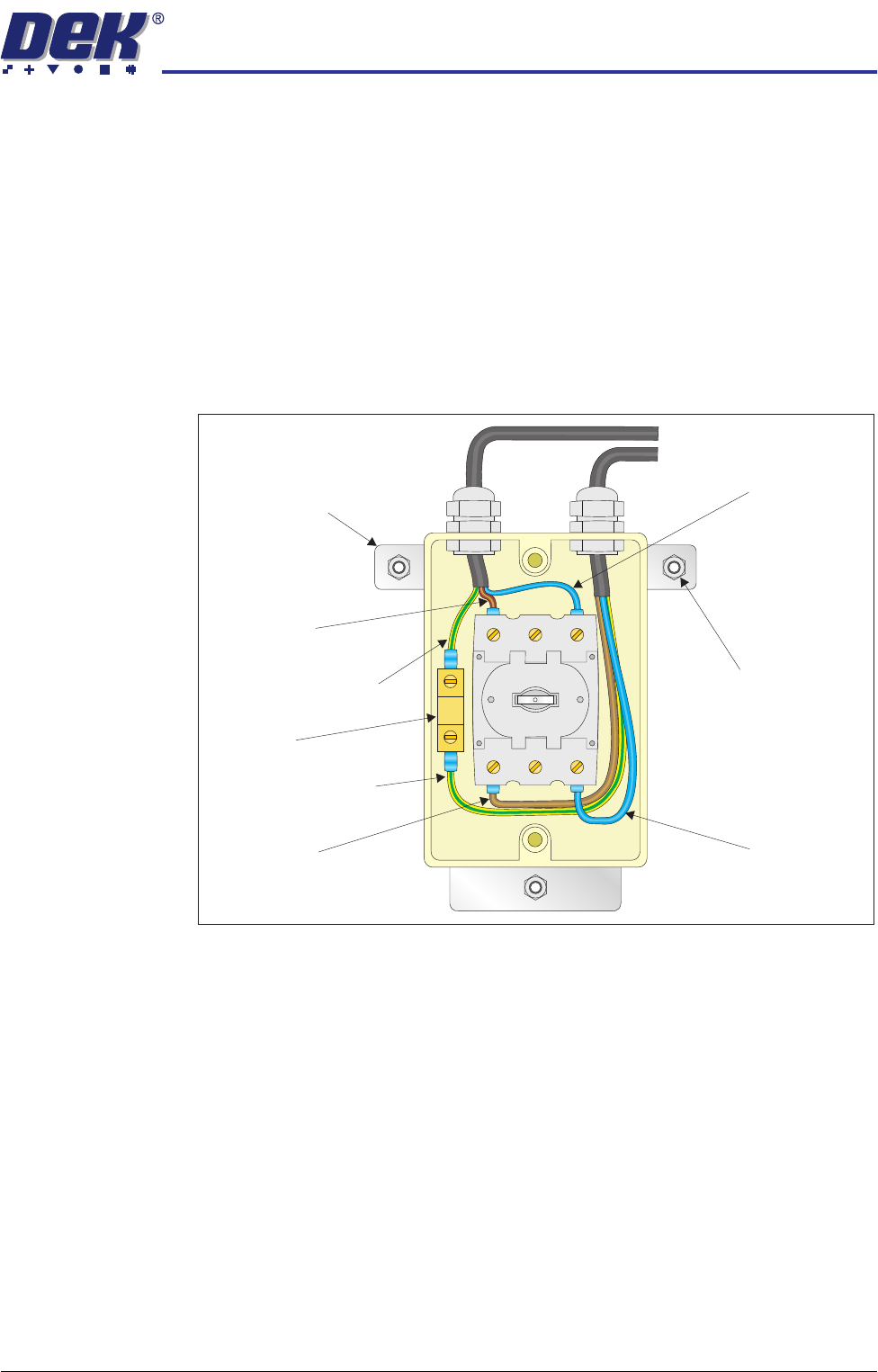
4. Perform a visual inspection of the mains isolator switch ensuring the follow-
ing:
a. The earth input and earth output cables are connected to the earth tag.
b. The live input is connected to the top of the isolator switch on the left hand
side.
c. The live output is connected to the bottom of the isolator switch on the left
hand side.
d. The neutral input is connected to the top of the isolator switch on the right
hand side.
e. The neutral output is connected to the bottom of the isolator switch on the
right hand side.
5. Ensure that all six cables are secure and no bare wires are showing.
6. Connect the two probes of a digital volt meter (DVM) together and ensure
that the DVM is reading 0Ω.
Neutral (Blue)
Input
Isolator Mount
Securing Nut
(in 3 positions)
Isolator Mount
Live (Brown)
Input
Earth (Green/Yellow)
Input
Earth (Green/Yellow)
Output
Earth Tag
Live (Brown)
Output
Neutral (Blue)
Output

TRANSPORTATION
PRE POWER UP CHECKS
34.94 Technical Reference Manual Chapter Issue 7 Oct 06
7. Measure the resistance between the following points ensuring that all the
measurements are greater than 2MΩ:
a. Earth tag and the live output.
b. Earth tag and the neutral output.
c. Isolator mount and the neutral output.
d. Isolator mount and the live output.
8. Measure the resistance between the earth tag and all three isolator mount
securing nuts ensuring that all measurements are less than 0.5Ω.
9. For gull wing cover machine only, measure the resistance between the earth
tag and the earth screw on the MMI arm (located inside the machine)
ensuring that the measurement is less than 0.5Ω.
10. Remove the rear cover of the machine.
11. Measure the resistance between the following points ensuring that all
measurements are less than 0.5Ω:
a. PC earth stud and a securing screw that secures the PC to the machine
frame.
b. M36 earth stud and a securing screw that secures the M36 to the machine
frame.
c. M37 earth stud and a securing screw that secures the M37 to the machine
frame.
12. Refit the rear cover.
13. Refit the mains isolator cover.
14. Refit the front cover.