Printer 710_810 v8 Transportation.pdf - 第95页
TRANS PORTATION PRE POWER UP CHECKS Chapter Issue 7 Oct 06 Technical Reference Manual 34.95 V acuum Filtration Unit There are three ty pes of onboard vacuum filtrat ion unit, for use with the under screen cl eaner , the …

TRANSPORTATION
PRE POWER UP CHECKS
34.94 Technical Reference Manual Chapter Issue 7 Oct 06
7. Measure the resistance between the following points ensuring that all the
measurements are greater than 2MΩ:
a. Earth tag and the live output.
b. Earth tag and the neutral output.
c. Isolator mount and the neutral output.
d. Isolator mount and the live output.
8. Measure the resistance between the earth tag and all three isolator mount
securing nuts ensuring that all measurements are less than 0.5Ω.
9. For gull wing cover machine only, measure the resistance between the earth
tag and the earth screw on the MMI arm (located inside the machine)
ensuring that the measurement is less than 0.5Ω.
10. Remove the rear cover of the machine.
11. Measure the resistance between the following points ensuring that all
measurements are less than 0.5Ω:
a. PC earth stud and a securing screw that secures the PC to the machine
frame.
b. M36 earth stud and a securing screw that secures the M36 to the machine
frame.
c. M37 earth stud and a securing screw that secures the M37 to the machine
frame.
12. Refit the rear cover.
13. Refit the mains isolator cover.
14. Refit the front cover.
TRANSPORTATION
PRE POWER UP CHECKS
Chapter Issue 7 Oct 06 Technical Reference Manual 34.95
Vacuum Filtration
Unit
There are three types of onboard vacuum filtration unit, for use with the under
screen cleaner, the VF25, the VF10 and the VF35i. The VF25 is a fixed voltage
unit at either 110V or 230V, ensure that the unit fitted matches the supply
voltage.
The onboard VF35i vacuum filtration unit is dual voltage 110V/230V (50Hz/
60Hz) switchable from the front panel of the unit.
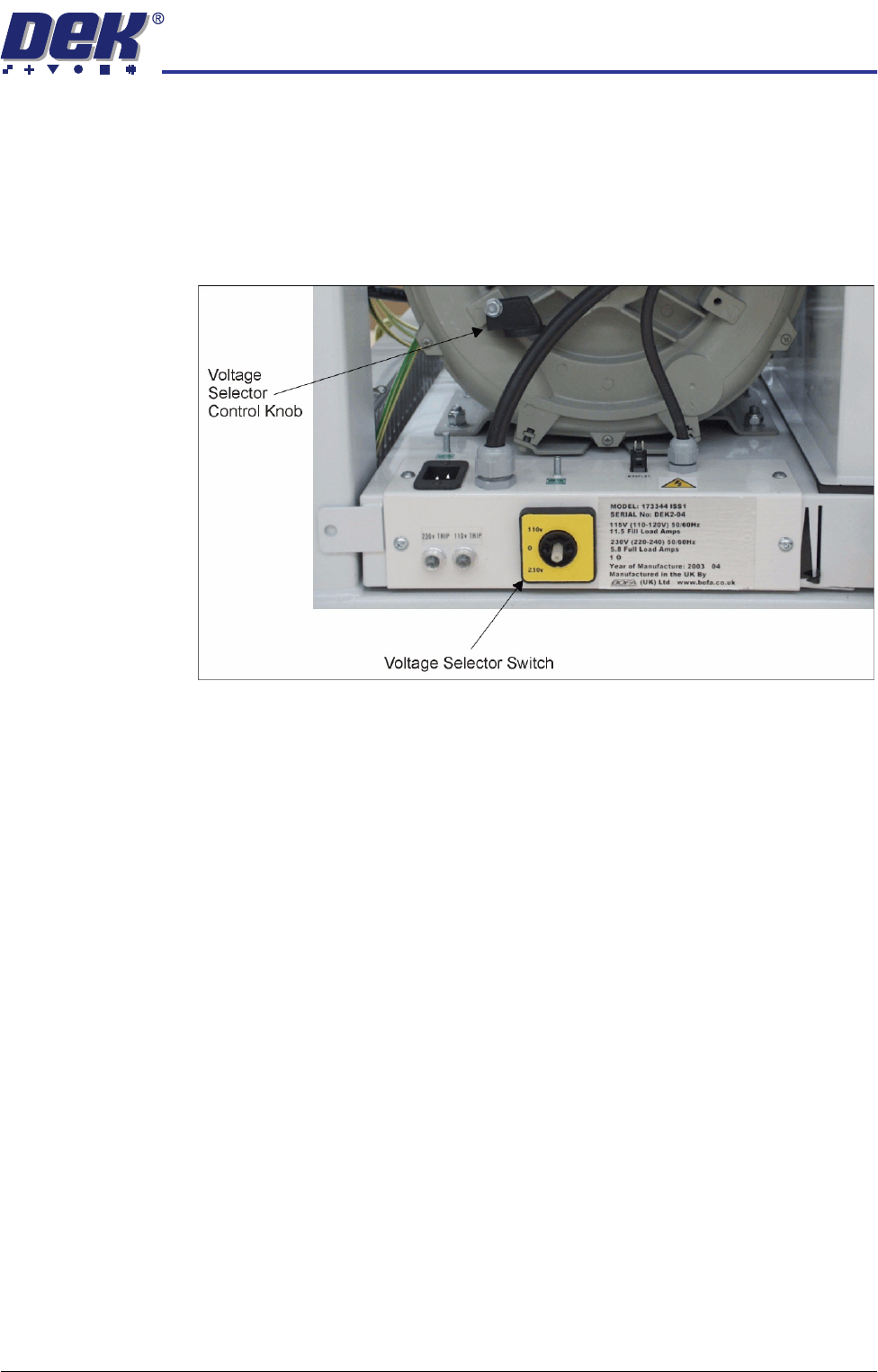
Figure 34-25 Vacuum Filtration Unit
Ensure that the voltage selector switch, on the front panel of the onboard
vacuum filtration unit, is set to match the supply voltage. To check or switch the
voltage selector, carry out the following:
1. Using a 10mm spanner, remove the voltage selector control knob from the
fan housing.
2. Fit the voltage selector control knob to the voltage selector switch.
NOTE
The spindle has three keyways allowing the knob to be fitted in one position
only.
3. Ensure that the pointer of the knob is indicating the voltage that closely
matches the mains supply voltage.
CAUTION
VACUUM FILTRATION UNIT.
This unit is liable to damage if the voltage
selector does not match the supply voltage.
NOTE
The ‘0’ position on the voltage selector is OFF disabling the vacuum filtration
unit.
4. Return the voltage selector control knob to the fan housing to prevent further
adjustment.
TRANSPORTATION
PRE POWER UP CHECKS
34.96 Technical Reference Manual Chapter Issue 7 Oct 06
External Services
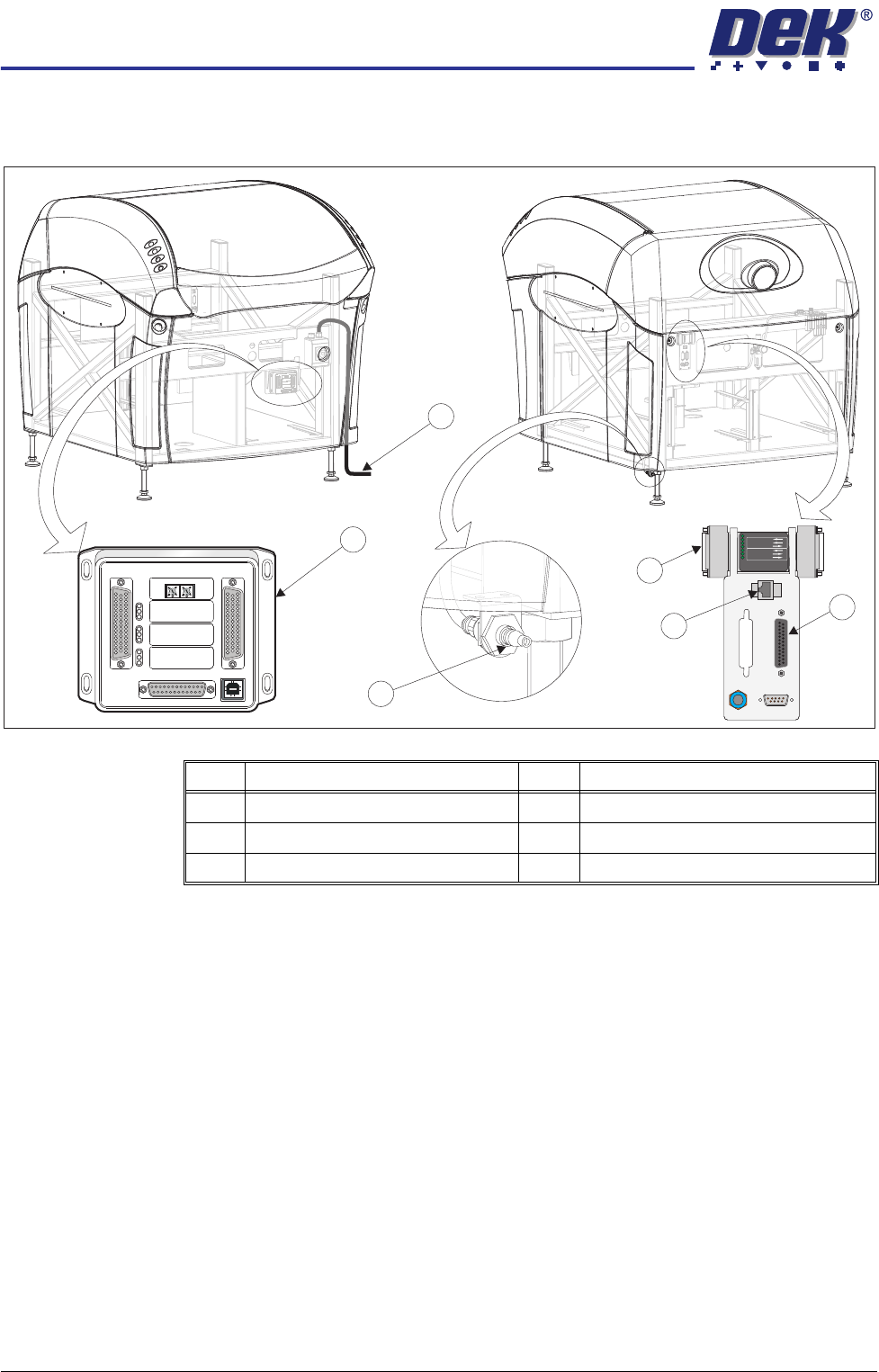
In order for the machine to function correctly the following services must be
available:
• Pneumatic Supply
• Electrical Supply
Other services that may be required are:
• Host Communications
• Upline/Downline Machine Interface (FMI/MIU)
• Temperature Control Module (TCM)
Item Description Item Description
1 Printer Mains Supply Cable 4 Foreign Machine Interface (FMI) Pod
2 Temperature Control Module (TCM) 5 Air Connection
3 Host Comms LAN RJ45 6 Multi Interface Unit (MIU)
M
1S
K1
M1SK1
U
PL
IN
E
UPLI
NE
M
1
SK
2
M1SK2
D
O
W
N
L
I
N
E
DO
W
NLINE
M
1
P
L3
M
1PL3
DE
K
M
/C
DEK
M/C
M
1
S
K
4
M
1S
K
4
D
EK
US
B
DE
K
USB
+1
2
V
+12V
+24
V
+24V
+2
4V
S
W
+24V
SW
S
EN
D
U
PL
IN
E
SE
ND
UP
LI
N
E
SE
ND
D
OW
NL
I
N
E
S
E
ND
D
OWN
L
I
N
E
C
ON
T
R
OL
I
N
CO
NTR
OLI
N
U
PLI
NE
R
EA
D
Y
UPL
I
NE
READ
Y
DO
W
N
LIN
E
RE
A
D
Y
DOWNLINE
READY
CO
NT
R
O
L
O
UT
C
ON
TROLOUT
P
O
W
E
R
PO
W
ER
I/P'
S
I/P'
S
O
/
P
'
SO
/
P
'
S
P
R
O
T
O
C
OL
S
EL
E
C
T
I
O
N
P
R
O
T
O
C
OLSELE
C
TIO
N
U
P
UP
L
IN
E
LI
NE
D
OW
N
DOWN
L
IN
E
LI
N
E
M
IU
1
9
1
11
4MIU
191114
4
8
0
4
8
0
POWER ON
PART No. 160740
M/C AVAILABLE
BOARD AVAILABLE
BOARD PASS
D
O
W
N
LIN
E
BOARD AVAILABLE
BOARD PASS
M/C AVAILABLE
U
P
LIN
E
FMI POD
View on RearView on Front
1
2
3
4
5
6
M1SK1
UPLINE
M1SK2
DOWNLINE
M1PL3
DEK M/C
M1SK4
DEK USB
+12V
+24V
+24V SW
SEND UPLINE
SEND DOWNLINE
CONTROL IN
UPLINE READY
DOWNLINE READY
CONTROL OUT
POWER
I/P'S
O/P'S
PROTOCOL SELECTION
UP
LINE
DOWN
LINE
MIU 191114
4
80
4
80