Printer 710_810 v8 Transportation.pdf - 第116页
TRANSPORT ATION HIGH THROUG HPUT CONVEY OR (HTC) 34.116 Technical Reference Manual Chapter Issue 7 Oct 06 HIGH THROUGHPUT C ONVEYOR (HTC) Introduct ion Figure 34-3 0 HTC Cont roller Loca tion The HTC controll er (M27) en…

TRANSPORTATION
FOREIGN MACHINE INTERFACE
Chapter Issue 7 Oct 06 Technical Reference Manual 34.115
connected.
2. During the machine initialisation, press the System button when prompted.
3. Using the touchscreen select Setup, Machine to display the Machine Setup
Procedure menu.
4. Select Basic Parameters.
5. Using the drop down menu, change NO FMI to MIU for the Downline
Protocol.
6. Using the drop down menu, change NO FMI to MIU for the Upline Protocol.
7. In Set Prefs change the mode to No Print.
NOTE
In No Print mode, the DEK machine acts as a conveyor, passing the board
through the machine without printing.
8. Ensure that the Upline and Downline Machines are connected and are
powered up.
9. Select Run.
The screen printer requests a board from the upline machine and passes it
through the machine. The board stops at the sensor on the conveyor. On
request from the downline machine the board passes onto the external
conveyor. When the sensor is clear the screen printer requests another
board from the upline machine and the sequence repeats.
This shows that the interface is working between the screen printer and the
external machines.
TRANSPORTATION
HIGH THROUGHPUT CONVEYOR (HTC)
34.116 Technical Reference Manual Chapter Issue 7 Oct 06
HIGH THROUGHPUT CONVEYOR (HTC)
Introduction
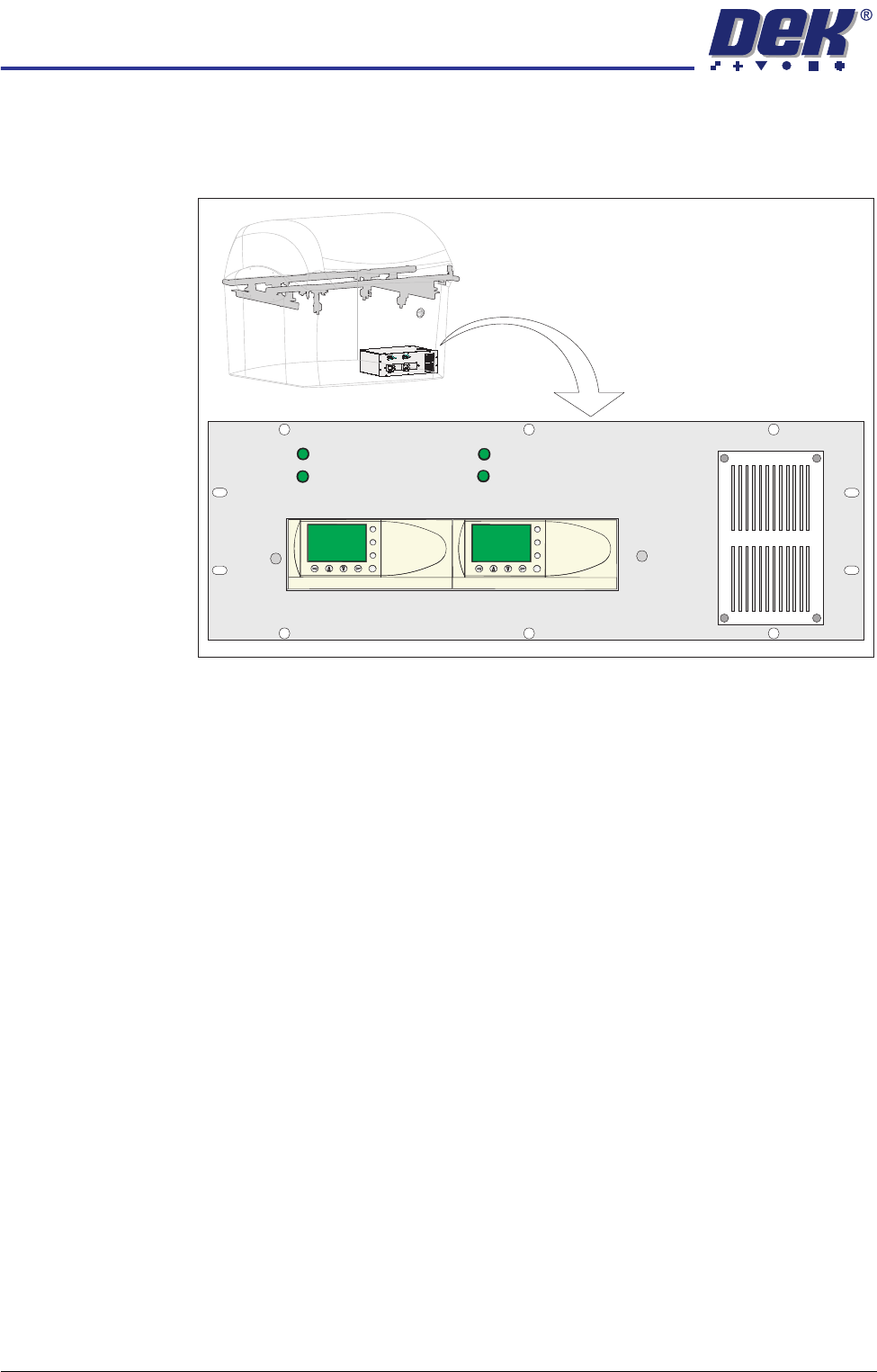
Figure 34-30 HTC Controller Location
The HTC controller (M27) enclosure is located behind the front maintenance
cover just below the mains isolator switch.
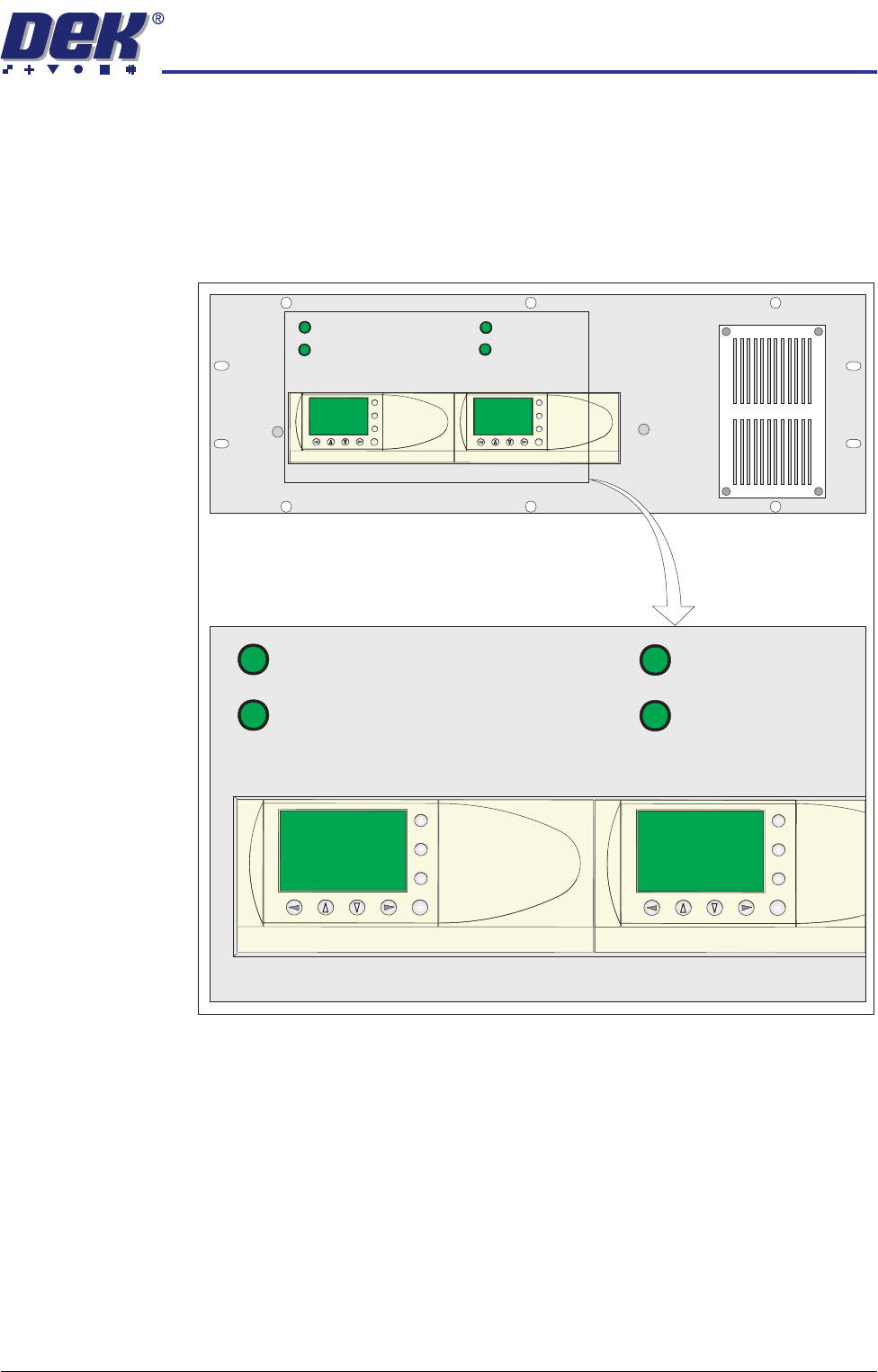
The M27 consists of a Programmable Logic Controller (PLC) for each auxiliary
conveyor. Above each PLC are the switches for selecting between 3-stage/
single stage and fast/normal mode.
On machine initialisation, each auxiliary conveyor PLC needs to detect the
machine ’System Power’ and a ’Downline Available’ signal before the system
starts operating. If the machine is being run in a stand-alone environment, the
’Downline Available’ signal from the downline machine can be mimicked by
shorting pins 1 & 2 of loom Pt No 160645 to the downline machine.
1/3 STAGE
OPERATION
1/3 STAGE
OPERATION
FAST TRANSFERS
DISABLED
FAST TRANSFERS
DISABLED
R/H CONVEYOR L/H CONVEYOR
ESC
OK
+
-
ESC
OK
+
-
TRANSPORTATION
HIGH THROUGHPUT CONVEYOR (HTC)
Chapter Issue 7 Oct 06 Technical Reference Manual 34.117
Operation The 1/3 Stage Operation and Fast Transfers Disabled buttons are LED illumi-
nated push buttons and are configured as follows:
3-Stage/Single
Stage Mode
For 3-stage mode, both 1/3 Stage Operation buttons must be OFF (LED
extinguished). The LCD screen on the PLC displays ’3 Stage’ on the top line.
For single stage mode, both 1/3 Stage Operation buttons must be ON (LED lit).
The LCD screen on the PLC displays ’1 Stage’ on the top line.
Fast/Normal Mode For a conveyor to operate in fast transfer mode, both Fast Transfer Disabled
buttons must be OFF (LED extinguished). The LCD screen on the PLC displays
’Fst.Trans.’ on the bottom line for 5 seconds on power-up or when the button
is switched to OFF.
For a conveyor to operate in normal transfer mode, both Fast Transfer Disabled
buttons must be ON (LED lit). Normal transfer mode is not displayed on the
PLC.
1/3 STAGE
OPERATION
1/3 STAGE
OPERATION
FAST TRANSFERS
DISABLED
FAST TRANSFERS
DISABLED
R/H CONVEYOR L/H CONVEYOR
1/3 STAGE
OPERATION
1/3 STAGE
OPERATION
FAST TRANSFERS
DISABLED
FAST TRANSFERS
DISABLED
R/H CONVEYOR L/H CONVEYOR
ESC
OK
+
-
ESC
OK
+
-
ESC
OK
+
-
ESC
OK
+
-