Printer 710_810 v8 Transportation.pdf - 第64页
TRANSPORT ATION MAJOR RE LOCATION 34.64 Technical Reference Manual Chapter Issue 7 Oct 06 Camera T ransit Screws (Linear Drive) 1. Loosen the lock nut t hat secures th e transit screw to the camera Y plate. 2. Remove the…
TRANSPORTATION
MAJOR RELOCATION
Chapter Issue 7 Oct 06 Technical Reference Manual 34.63
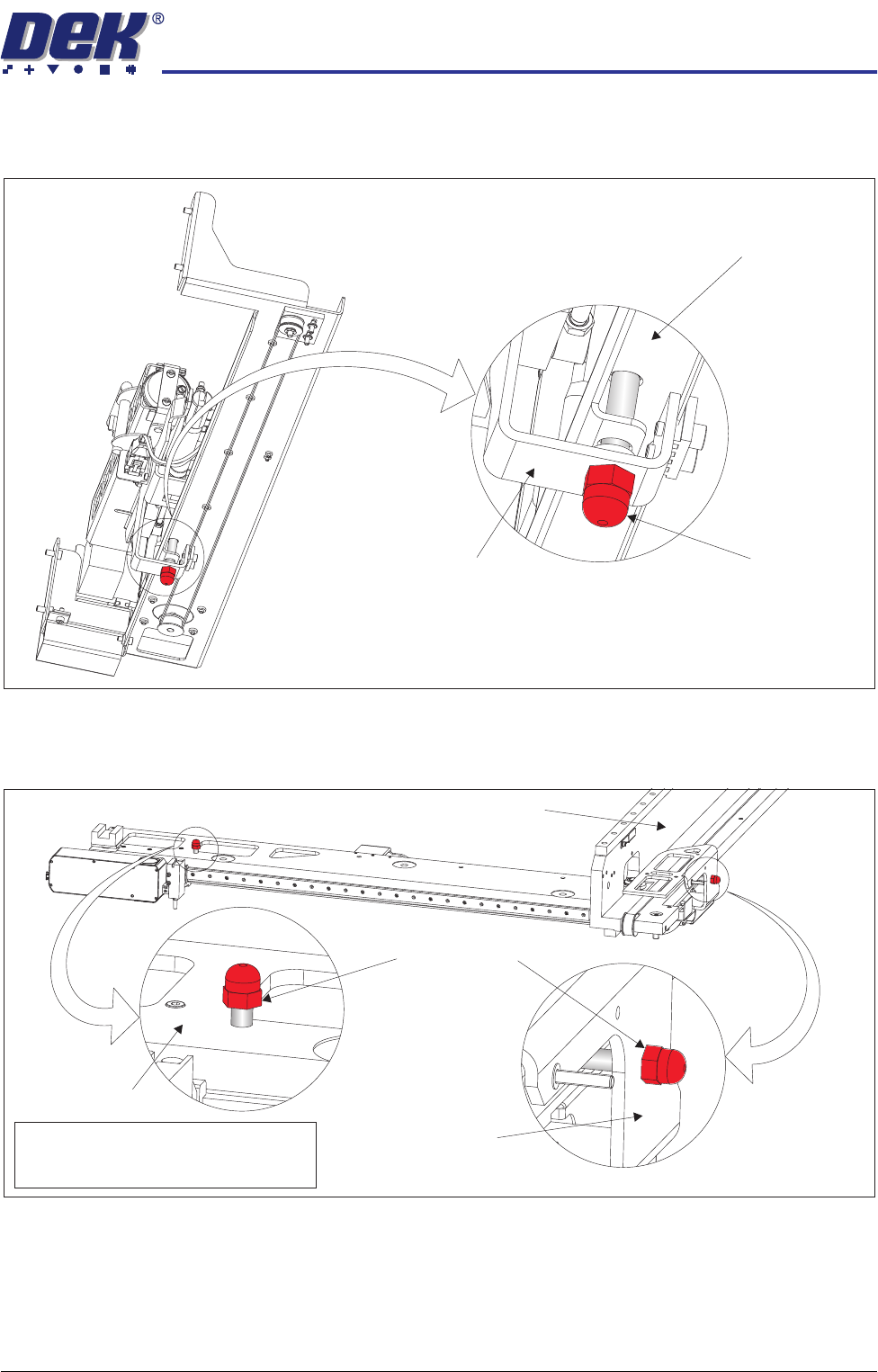
Paste Dispenser
Transit Screw
Remove the paste dispenser transit screw that secures the belt clamp bracket
to the paste dispenser mounting tray.
Camera Transit
Screws (Rotary
Drive)
1. Remove the transit screw that secures the camera beam to the camera X
drag chain bracket.
2. Remove the transit screw that secures the camera Y drag chain bracket to
the right hand printhead.
View on Right Hand Underside of Paste Dispenser
Transit Screw
Paste Dispenser Mounting Tray
Belt Clamp Bracket
Note
Camera X Drag Chain Bracket is hidden
from view by the Camera Beam
Transit Screws
Camera Beam
Right Hand Printhead
Camera Y Drag
Chain Bracket
TRANSPORTATION
MAJOR RELOCATION
34.64 Technical Reference Manual Chapter Issue 7 Oct 06
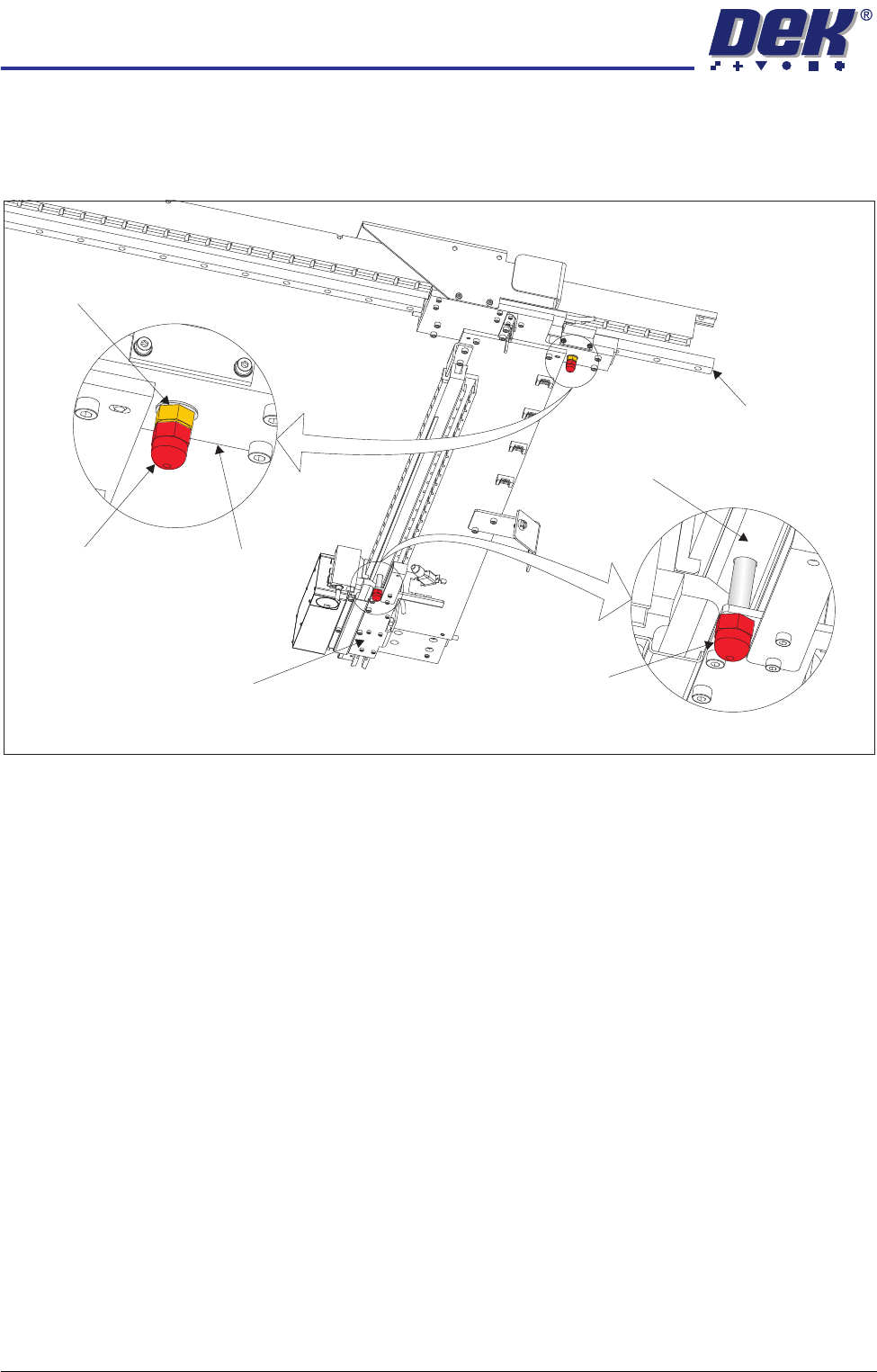
Camera Transit
Screws (Linear
Drive)
1. Loosen the lock nut that secures the transit screw to the camera Y plate.
2. Remove the transit screw that secures the camera Y plate to the camera Y
linear bearing ensuring that the lock nut and crinkle washer are removed
with the transit screw.
3. Remove the transit screw that secures the camera X drag chain bracket to
the camera beam extrusion.
Under Screen
Cleaner
Snip the cable ties securing the piece of card to the top of the under screen
cleaner. Remove the cable ties and the piece of card from the machine.
This concludes the transit bracket and screw removal procedure. Transit
brackets, screws and associated fasteners should be stored for future reuse.
View on Right Hand Underside of Camera Beam
Transit Screw
Transit Screw
Camera Y Plate
Camera Y Linear Bearing
Camera X Drag Chain Bracket
Camera Beam Extrusion
Lock Nut and
Crinkle Washer
TRANSPORTATION
MAJOR RELOCATION
Chapter Issue 7 Oct 06 Technical Reference Manual 34.65
Leg Spacers
(Camera Linear
Drive Machine
Only)
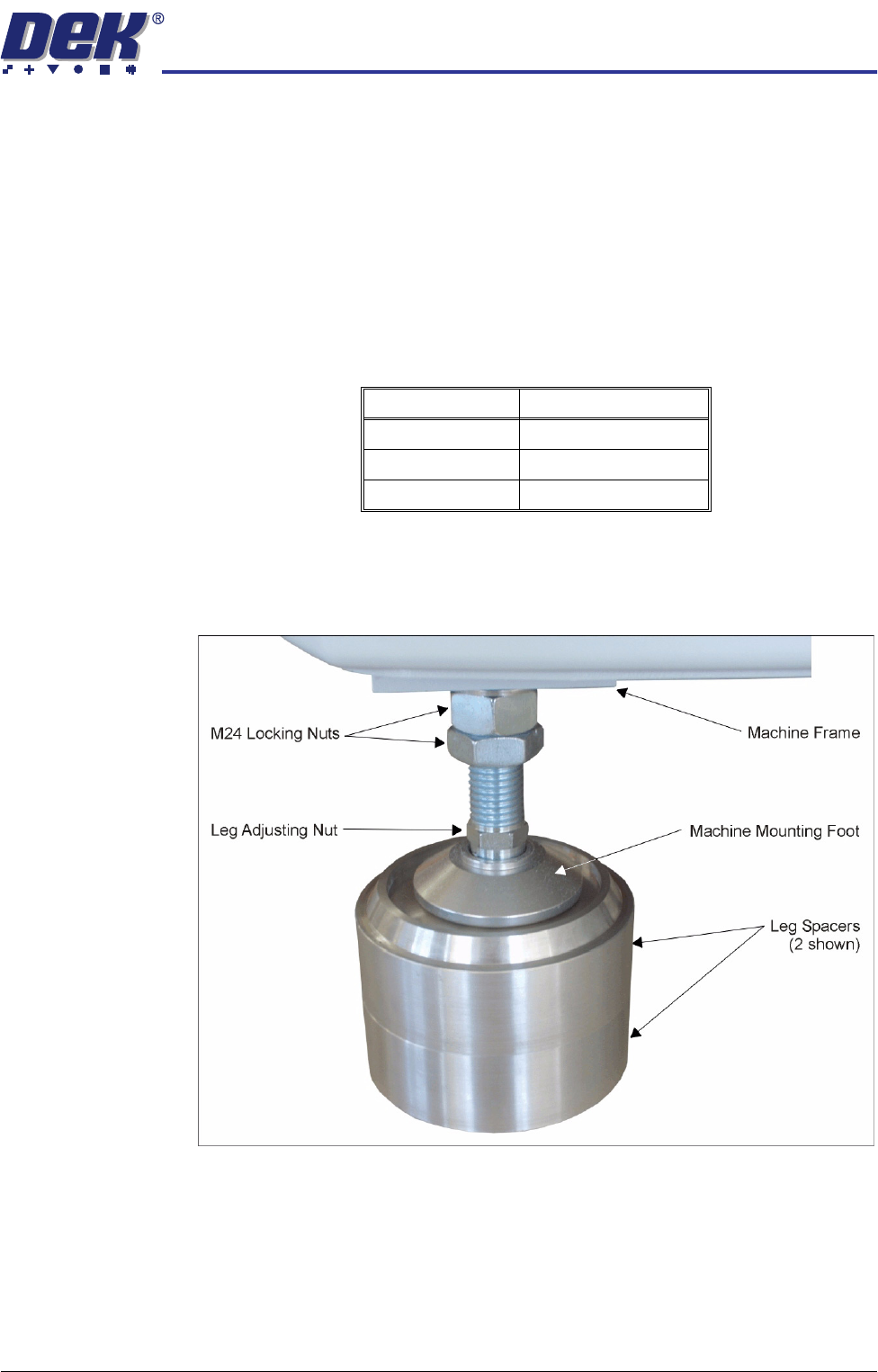
The mounting feet on the camera linear drive machine must be kept as short as
possible to reduce vibration and oscillation.
To achieve the height required, 8 leg spacers (maximum of two per foot) are
supplied. The leg spacers interlock together and the machine foot locates in
the recess of the top leg spacer.
1. Using the table below, determine the amount of leg spacers to achieve the
required machine height:
NOTE
The amount of exposed thread of the machine leg should be kept to a
minimum to ensure machine accuracy remains within limits.
2. Place the correct number of leg spacers under each mounting foot. Do not
place leg spacers under the centre rear mounting foot. Lower the machine
ensuring that each foot is located inside the recessed top, figure below
refers.
NOTE
Do not attempt to manoeuvre the machine into position whilst mounted on
the leg spacers. The machine must be lifted, moved and lowered ensuring
that the leg spacers are moved with the machine.
Transport Height Leg Spacers Required
840mm - 895mm 0
896mm - 940mm 1
941mm - 980mm 2