80S-2080F480F5.pdf - 第197页
SIPLACE 80S-20/F4/F5 User M anual 4 Single Functions 05/99 Issue from Software Version SR.405.xx 4.2 Single Functions, Gantry with 12x Revolver Head 4 - 21 4.2.7.1 Open / Cl ose Interlock Y ou can o pen or c lose the l o…
4 Single Functions SIPLACE 80S-20/F4/F5 User Manual
4.2 Single Functions, Gantry with 12x Revolver Head 05/99 Issue from Software Version SR.405.xx
4 - 20
4.2.7 Nozzle Changer Configuration, 12x Revolver Head
This function is used for displaying, checking and changing the nozzle types in the individual magazines of the
nozzle changer.
NOTE
A revolver head nozzle changer must be installed and configured in the machine options.
In the
Gantry functions
menu click on the symbol button for
Nozzle changer configuration revolver
head.
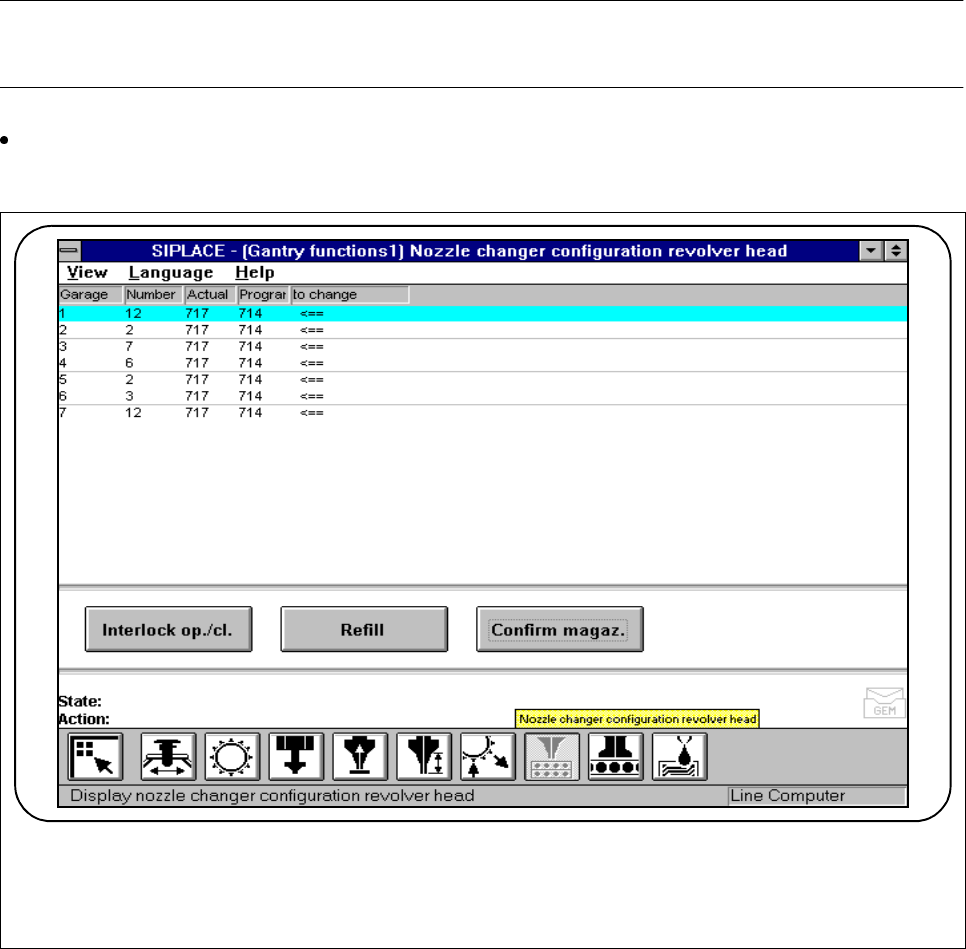
Fig. 4.2.9 Nozzle changer configuration, 12x revolver head
- The nozzle changer magazine concerned is shown in the Garage column.
- The Number column contains the number of nozzles currently in the magazine concerned.
- The Actual column indicates the actual set-up at the nozzle changer.
- The Programmed column indicates the set-up specified by the line computer.
- The To change column exhibits an arrow (<== ) when the Programmed and Actual configurations are
not the same.
F

SIPLACE 80S-20/F4/F5 User Manual 4 Single Functions
05/99 Issue from Software Version SR.405.xx 4.2 Single Functions, Gantry with 12x Revolver Head
4 - 21
4.2.7.1 Open / Close Interlock
You can open or close the locking plate of the nozzle changer in order manually to remove nozzles from the
nozzle changer or to insert new nozzles.
Click on the
Interlock open/close
button. The locking plate of the nozzle changer will either close or open,
depending on its original position.
4.2.7.2 Refill
This function is used for filling magazines with new nozzles of the same type but without changing the set-up.
If necessary, use the
Interlock open/close
function to open the lock of the locking plate.
Fill the magazines with the same nozzle types and click on the
Refill
button. The fill level of the magazine
in question will be updated.
NOTE
The magazines must always be filled up to their full capacity (per magazine this is 12 nozzles of the same
type).
4.2.7.3 Confirm Magazine
Set up the nozzles which have to be changed (in the
To change
column marked with an arrow (<==) in the
individual magazines to the
Programmed
state.
Mark the line in question (it is displayed against a blue background) and within the working area click on
the
Confirm magazine
button.
Programmed
and
Actual
must now be the same.
NOTE
Up to 7 magazines each with 12 nozzles of the same type can be set up.
Each magazine must be confirmed individually.
See also Section 11.1.
4 Single Functions SIPLACE 80S-20/F4/F5 User Manual
4.2 Single Functions, Gantry with 12x Revolver Head 05/99 Issue from Software Version SR.405.xx
4 - 22
4.2.8 IC Head Nozzle Changer Configuration (Siplace 80F
4
)
This function is used for displaying, checking and changing the nozzle types in the individual magazines of the
nozzle changer.
In the
Gantry functions
menu click on the symbol button for
Nozzle configuration IC head.
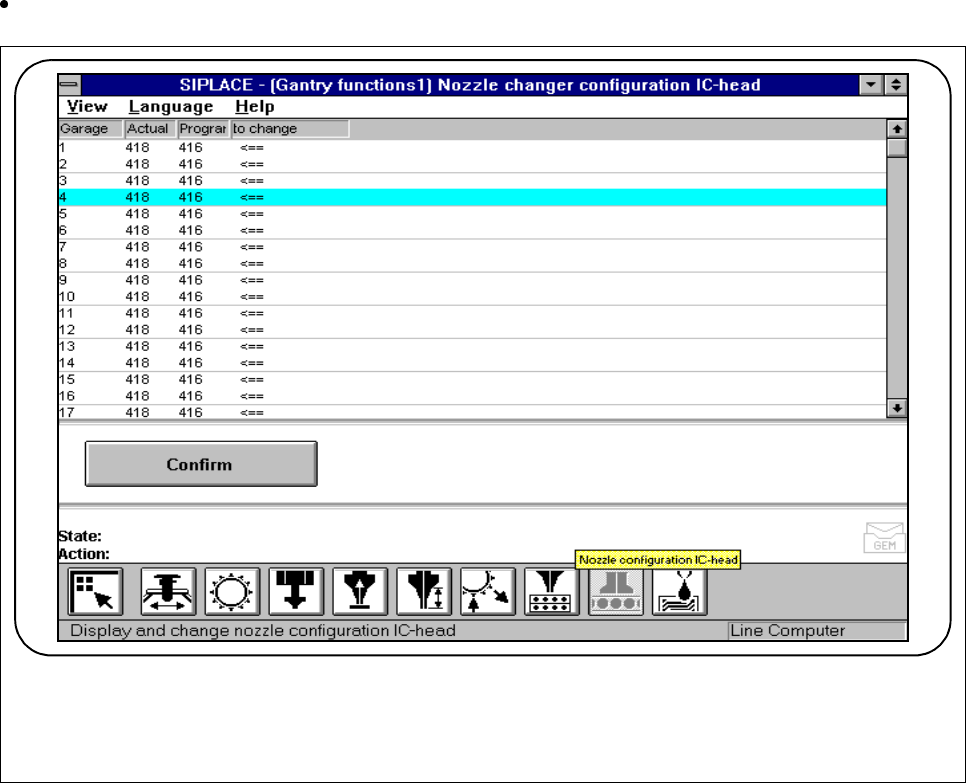
Fig. 4.2.10 Nozzle configuration IC head
- The nozzle garage concerned is shown in the
Garage
column.
- The
Actual
column indicates the actual set-up at the nozzle changer.
- The
Programmed
column indicates the set-up specified by the line computer.
- The
To change
column exhibits an arrow (<== ) when the
Programmed
and
Actual
configurations are
not the same.
F