80S-2080F480F5.pdf - 第596页
10 Component Handling SIPLACE 80 S20/F4/F5 User Manual 10.6 Wafflepack Changer 05/99 Issue from Software Version SR.405.xx 10 - 24 10.6.5 Display and Operating Element s The wafflepack cha nger has an E MERGENCY STOP mus…
SIPLACE 80 S20/F4/F5 User Manual 10 Component Handling
05/99 Issue from Software Version SR.405.xx 10.6 Wafflepack Changer
10 - 23
added to the set-up. The wafflepack changer is defined as Location 1. In this connection see UNIX line
computer user manual, under ’Station editor’.
10.6.4 Inserting the Trays
The trays are monitored to make sure they are in the correct position in the magazine storage
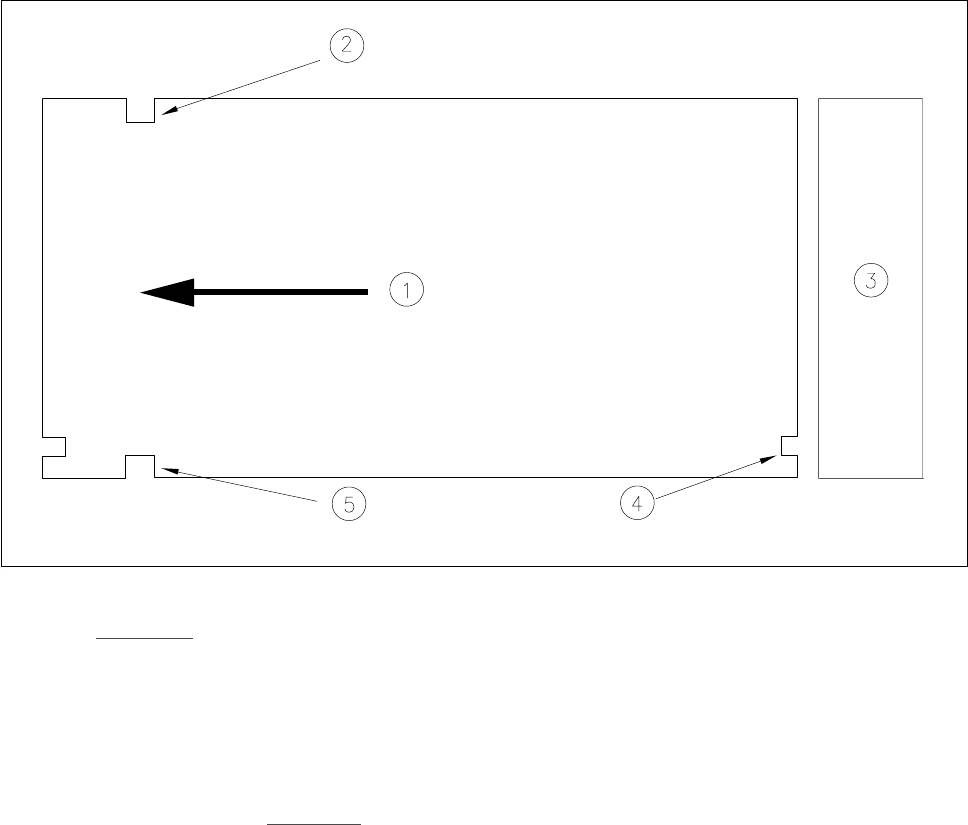
Fig. 10.6.4 Position of the trays - viewed from the top
- Key to Fig. 10.6.4
1 Transport direction 2 Driver notch
3 Magazine storage unit 4 Check notch
5 Driver notch
It should be noted here that the driver notches in the magazine carriers are inserted forwards with respect to
the direction of transport (see Fig. 10.6.4
). The check notches of the individual magazine carriers must be
positioned one above the other and point in the direction of the magazine storage unit.

10 Component Handling SIPLACE 80 S20/F4/F5 User Manual
10.6 Wafflepack Changer 05/99 Issue from Software Version SR.405.xx
10 - 24
10.6.5 Display and Operating Elements
The wafflepack changer has an EMERGENCY STOP mushroom-head push-button and a switch for changing
the speed. These two control elements are located on the machine base at the rear of the wafflepack changer.
l Key - slow
With flatpack magazines carrying small components which could fall out of their pockets if the flatpack
magazine moves quickly, it is possible to reduce the speed for the flatpack magazine.
Press the Slow key.
All flatpack magazines will now travel at a slower speed.
l EMERGENCY STOP button
Press the EMERGENCY STOP mushroom-head push-button. The power supply will be switched off and
the entire system shut down.
10.6.6 Safety Devices
l EMERGENCY STOP MUSHROOM-HEAD PUSH-BUTTON
The entire system with, for example, SIPLACE 80F and wafflepack changer is immediately stopped. At this
point placement can be continued or aborted. Make sure that all boards have been completely assembled.
l Safety panel
Once the safety panels are opened the wafflepack changer is switched into a de-energized state and the
wafflepack changer’s operational sequence stopped. Upon the safety panel being closed the wafflepack
changer resumes operations.
CAUTION
The wafflepack changer safety door should not be opened while a component is being picked up from the waf-
flepack changer.

SIPLACE 80 S20/F4/F5 User Manual 10 Component Handling
05/99 Issue from Software Version SR.405.xx 10.6 Wafflepack Changer
10 - 25
10.6.7 Refilling the Wafflepack Changer
NOTE
The trays with the item numbers 00132110-04 (old) or 00116 431-xx (new) can both be used. However the
two types cannot be used together: in other words, only trays of exactly the same type can be used at one
time in the set-up.
- The wafflepack changer can be refilled without the machine having to stop.
- It is possible to approach and quit the filling position of the wafflepack changer even while placement is in
progress. In this connection see also Section 3.4.5
of this user’s manual.
- In the
Feeders
menu and in its submenu "Wafflepack changer" those functions are described which can
be performed using the wafflepack changer.
- If a wafflepack changer is physically installed and wired up to the corresponding location it will be possible
to approach and quit under Single functions even when there is no corresponding set-up. It is not possible
to input the fill level.
- If refilling is carried out with a different set-up during the course of placement, the fill levels will have to be
communicated to the station afterwards (after transmission of the corresponding set-up).
- Checking the magazine carrier assignments after quitting the refill position will be carried out against the
current set-up obtaining at the station. If refilling has already been carried out for a subsequent set-up, the
information in response to the request may not agree with the future set-up.
10.6.8 System Behavior in Fault Situations
- If the refill position is selected during pick-up or when a magazine carrier is being changed, the request will
be rejected with the message "Wafflepack changer currently being processed". Once the pick-up has been
completed it will still be necessary to reselect the menu item
Go to refill position
.
- If the placement head accesses the wafflepack changer while it is in the refill position, the placement
sequence will be suspended until after the status message 'Waiting for wafflepack changer refill position to
be quit' has been issued and refilling of the wafflepack changer has been finished by the operator.
- If the operator selects any other wafflepack changer function, apart from
Quit refill position
, while the
changer is still in the refill position, the request will be refused with the message Wafflepack changer in
refill position. The same will apply with
Quit refill position
if the changer is not actually in the refill position.
- If a wafflepack changer function is selected for a location where there is no wafflepack changer then this
will be refused after a 10 sec timeout with the message "No wafflepack changer at this location".