80S-2080F480F5.pdf - 第250页
5 Vision Functions SIP LACE 80S-20/F4/F5 Us er Manual 5.2 PCB Vision System 05/99 Issue f rom Software Version SR.405.xx 5 - 18 Line en gineer Fig. 5.2.2 Row and column profile of a double cross - Key to Fig. 5.2.2 1 F i…
SIPLACE 80S-20/F4/F5 User Manual 5 Vision Functions
05/99 Issue from Software Version SR.405.xx 5.2 PCB Vision System
Line engineer 5 - 17
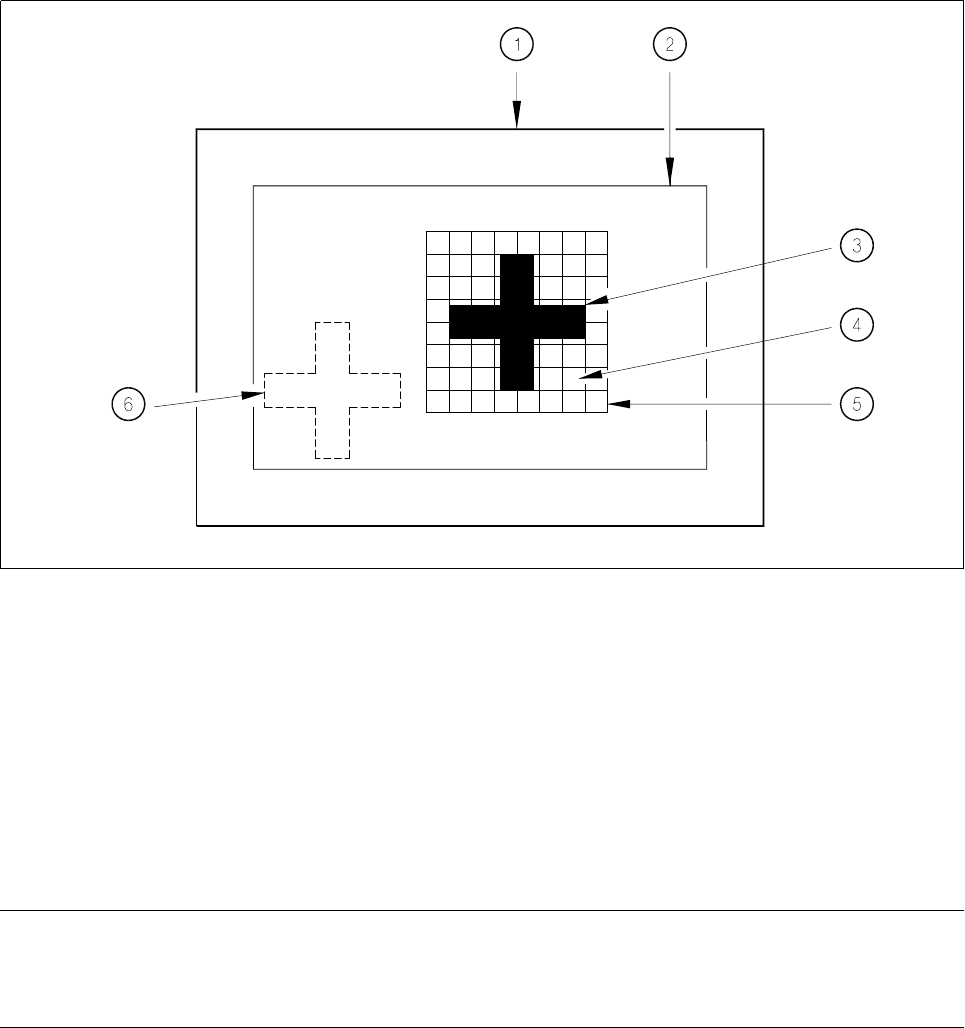
With the 2-D pattern search process the template window is divided into moxel areas. Moxels (
mo
saic pi
xel
s)
are pixel fields containing for example 16 x 16, 8 x 8 pixels and so on. The lower the pixel count the higher the
resolution and the lower the search speed.
Fig. 5.2.1 Explanation of camera field of view, search area and template window
- Key to Fig. 5.2.1
1 Camera field of view 2 Search area, ≤ camera field of view
3 Reference fiducial (the fiducial is searched for in this area )
5 Template window 4 Moxel = pixel field, eg 16 x 16 pixels
(it contains the reference fiducial) 6 Fiducial which is to be searched for
The template window is moved over the search area in moxel steps. The gray scale values of each moxel of
the reference fiducial are calculated at this time. This reduced data structure will contain enough information
on the coarse structure and position of the reference fiducial.
NOTE
The search window should be as small as possible in order to keep the speed of searching high. On the other
hand the window should be large enough to allow the fiducial to be identified without ambiguity.
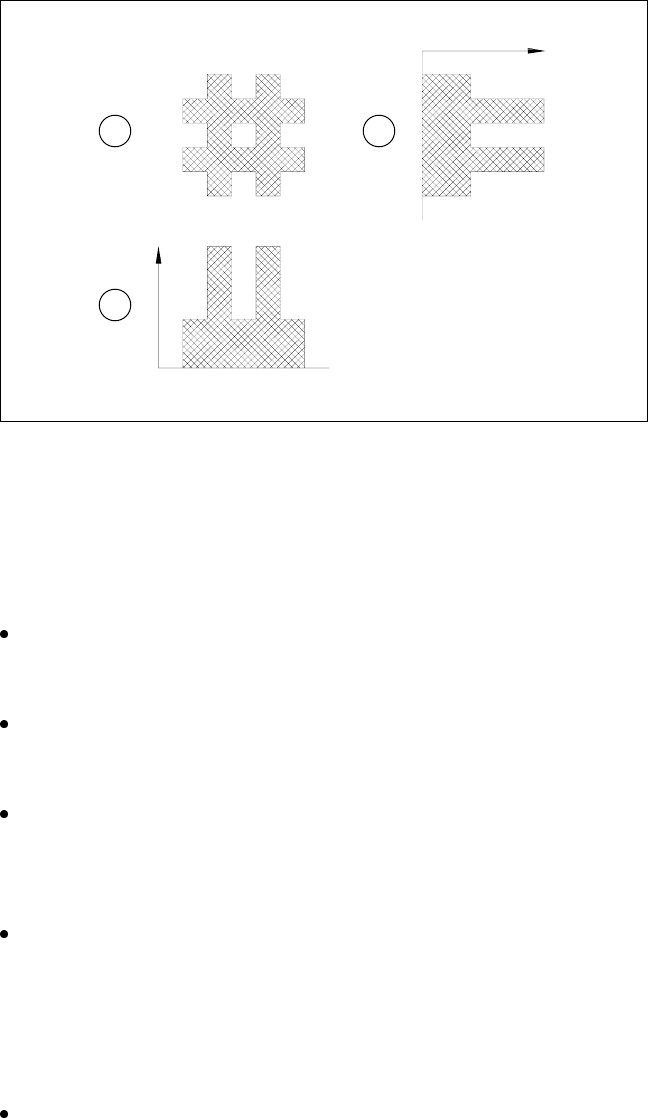
The 1-D pattern search procedure is used for precisely determining the pattern and position of the fiducial.
The fiducial image is broken up into rows and columns and the gray scale values in each row and column
added up. The next diagram illustrates this process using a double cross.
5 Vision Functions SIPLACE 80S-20/F4/F5 User Manual
5.2 PCB Vision System 05/99 Issue from Software Version SR.405.xx
5 - 18 Line engineer
Fig. 5.2.2 Row and column profile of a double cross
- Key to Fig. 5.2.2
1 Fiducial
2 Sum of the gray scale values in one column: column profile
3 Sum of the gray scale values in one row: row profile
The position of the fiducial is precisely determined from the horizontal and vertical profiles. After teaching
the fiducial structure parameters obtained are saved to the line computer.
The saved pattern is now tested. The gantry moves the PCB camera over the board to all 4 corners of the
search area (worst case). During this test the vision system must re-identify the fiducial four times.
Finally the coordinates of each individual fiducial (at least two) are manually added to the NU file or trans-
ferred from the CAD file to the NU file. In this way the coordinates and fiducial structure parameters for the
board which is to be inserted are defined as a pattern in the system.
During the placement process the fiducial will then be determined once again using the 2-D and 1-D image
processing methods described above. The template window is moved moxel by moxel over the search
area searching for the best possible agreement of the gray scale values of the reference and board search
fiducials (correlation procedure). Maximum correlation is attained when the reference and search fiducials
agree.
Once the fiducial has been found, the 1-D pattern search process starts its very precise determination of
the shape and coordinates of the fiducial. The precise shape and coordinates of the fiducial are now deter-
mined in each case by applying the correlation procedure to the column and row profiles (see Fig. 5.2.2).
From the coordinates obtained in this way the location, skew and shear of the board are determined.
Reject fiducials (= ink dots) are also detected and evaluated using the methods described above.
1 2
3

SIPLACE 80S-20/F4/F5 User Manual 5 Vision Functions
05/99 Issue from Software Version SR.405.xx 5.2 PCB Vision System
Line engineer 5 - 19
5.2.5 Criteria for Creating Fiducials
Basically the same criteria apply to both fiducials and reject fiducials (ink dots): uniqueness of fiducial shapes
and readily detectable structures which stand out from their surroundings.
l Use existing structures as fiducials
Instead of fiducials you can also use uniquely identifiable structures within the layout. It should, however,
be remembered that the solder stop lacquer is frequently accompanied by a loss in contrast.
l Location of the fiducials
Position the fiducial where there are as few structures as possible and where the fiducial will stand out well
from its surroundings. Measuring outwards from the center of the fiducial, there should be a clearance on
each side at least equal to the fiducial size plus 1 mm.
l Type of fiducials
There are 2 types of fiducials:
– Positive fiducials
The fiducial extends beyond of the base material of the board.
– Negative fiducials
The fiducial is etched into the base material of the board.
l Fiducial shape
Always choose a well-structured, distinct shape as fiducial shape:
Recommended fiducial shapes:
Rectangle, square or circle
Properties
– Low informational content (fiducials can easily be confused with test dots).
NOTE
Make sure that there are no similar structures in the fiducial search area.
– Low space requirements in the layout
– Very robust with respect to different tinning procedures (e.g. hot-tinning).
Recommended fiducial dimensions
– for square and rectangles: Side length 1.2 mm - 2.2 mm
– for the circle: Diameter 1.2 mm - 2.2 mm
Double cross and single cross
Properties of the double cross
– Higher informational content
– More space required in the layout
– Sensitivity with respect to high tin-coatings (bare copper is preferable)
– If a fiducial quality is permitted which is too low you will run the risk of four incorrect positions being
recognized.