80S-2080F480F5.pdf - 第707页
SIPLACE 80S-20/F4/F5 User M anual 11 Station Extensions/Options 05/99 Issue from Software Version SR.405.xx 11.13 Transferring PCB data 11 - 91 1 1.13 T ransferring PCB dat a 1 1 .13.1 Description of the func tions The ’…
11 Station Extensions/Options SIPLACE 80S-20/F4/F5 User Manual
11.12 Nozzle Changer for the 6x Revolver Head 05/99 Issue from Software Version SR.405.xx
11 - 90
SIPLACE 80S-20/F4/F5 User Manual 11 Station Extensions/Options
05/99 Issue from Software Version SR.405.xx 11.13 Transferring PCB data
11 - 91
11.13 Transferring PCB data
11.13.1 Description of the functions
The ’Machine options’ menu now includes a ’Transfer PCB data’ option. The purpose of this function is to
increase the line performance of placement systems. At the
first
placement station, all the PCB measure-
ments are recorded and the associated data concerning fiducials, circuit images, ink spots, etc, is calculated,
stored and passed on to the subsequent stations. This means that it is only necessary to determine the data
for two fiducial positions at the next stations. A position correction for the PCB to be processed is then carried
out on these two fiducial positions at each station. It is thus unnecessary to measure the entire PCB again
when measuring circuit images, ink spots, etc.
11.13.2 Activating the Transfer PCB data option
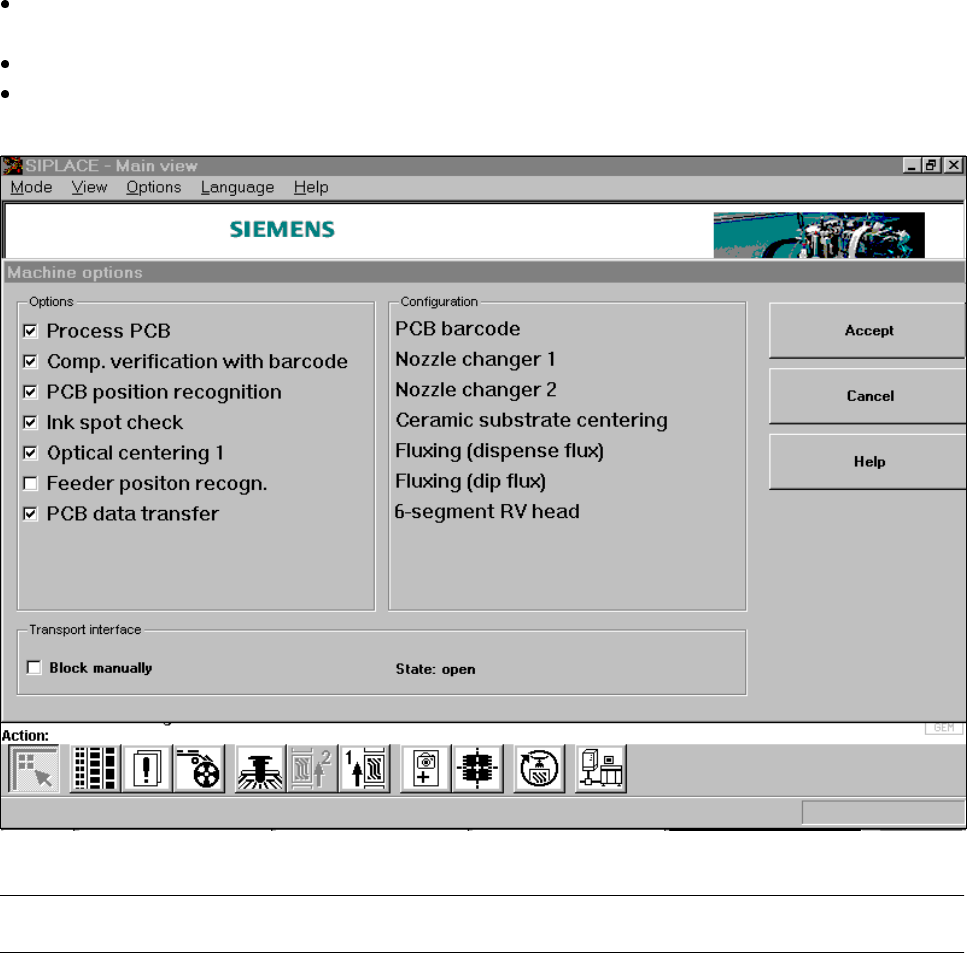
Click on the ’Machine options’ button in the main view.
The ’Machine options’ window will appear.
In the ’Options’ box, activate the ’Transfer PCB data’ option for the station concerned.
Click on the ’Accept’ button.
The ’Transfer PCB data’ is now active.
Fig. 11.13.1 Machine option: Transfer PCB data
PLEASE NOTE: Transfer PCB data can only be used in conjunction with a PCB barcode reader.
❒
11 Station Extensions/Options SIPLACE 80S-20/F4/F5 User Manual
11.13 Transferring PCB data 05/99 Issue from Software Version SR.405.xx
11 - 92