Portal-Operation-Manual-REV-I.pdf - 第10页
PVA Portal Manual Revision I / Janua ry 2022 Page 10 of 106 1.4 System Description The manual applie s to the follo wing Precision V alve & Automati on, Inc. wor kcells: PVA350™ PVA6000 ™ PVA650™ Delta 6 PVA2000™ Del…
PVA Portal Manual
Revision I / January 2022
Page 9 of 106
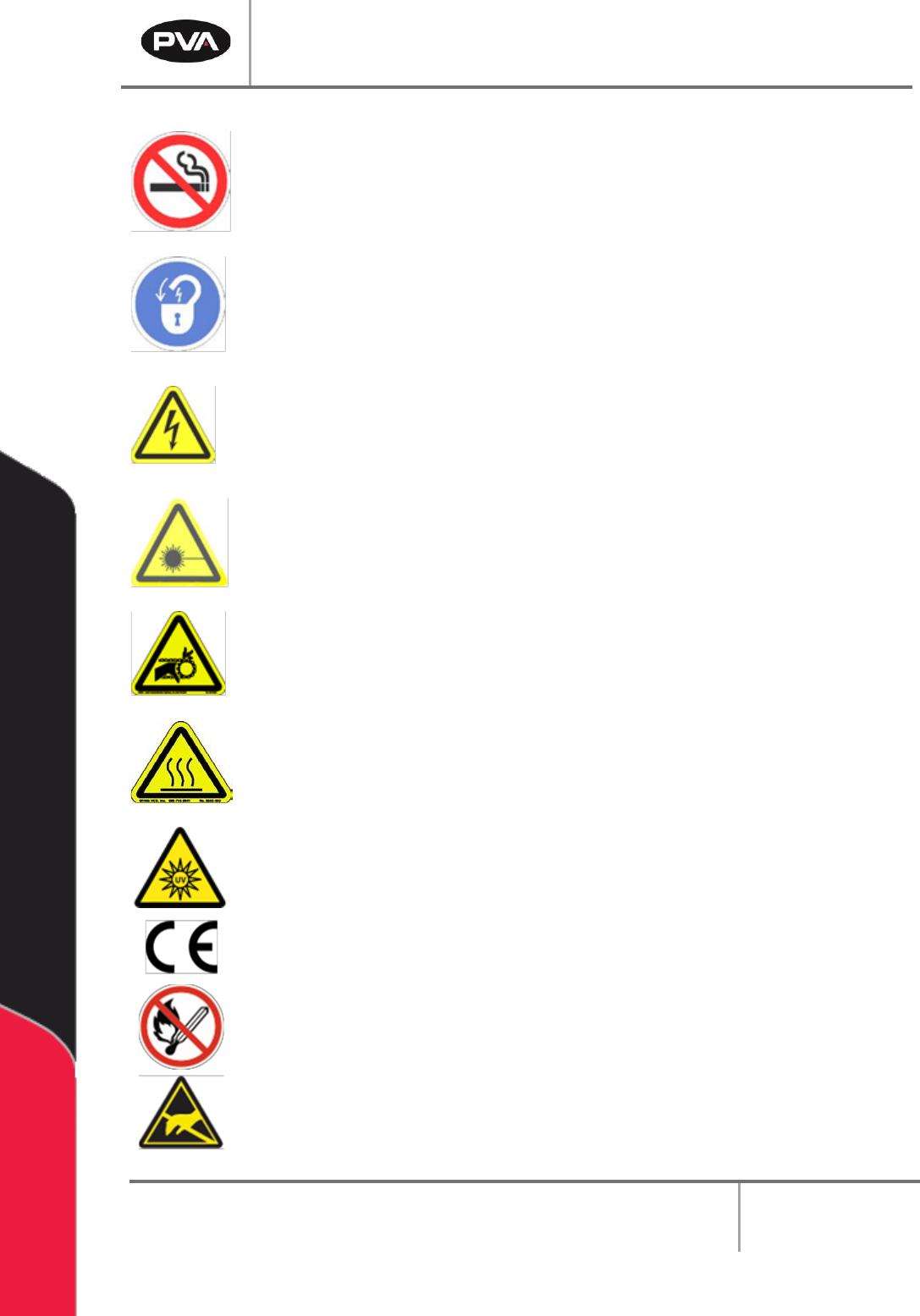
Do not smoke near the machine. Always have a fire extinguisher available
for emergency use.
Before performing any repairs or maintenance to the system, turn off power
and lock out the power disconnect switch.
Warning notices are used to emphasize that hazardous voltages, current,
temperatures, or other conditions that could cause personal injury exist in
this equipment or may be associated with its use. Only qualified personnel
should enter areas designated with this symbol.
Laser light source present. Do not stare directly into the beam. Do not use in
the presence of highly reflective surfaces
Pinch hazard from moving parts. Avoid contact.
Hot surface. Avoid contact.
Warning, Ultraviolet (UV) light hazard. Do not look directly at the UV light
source.
This product meets EU standards for health, safety, and environmental
protection.
Warning, no open flames.
Electrostatic sensitive device warning. Observe precautions for handling.

PVA Portal Manual
Revision I / January 2022
Page 10 of 106
1.4 System Description
The manual applies to the following Precision Valve & Automation, Inc. workcells:
PVA350™ PVA6000™
PVA650™ Delta 6
PVA2000™ Delta 8
PVA3000™ Flex Cell
The dispense path and active heads are controlled by a program stored in the motion
controller. The motion controller can save up to 30 programs at one time.
The operator controls the workcell with PVA Portal software. This includes machine setup,
manual operation, program selection, and automatic operation. Machine status and error
messages are shown in the program window and the light tower. The operator(s) must
have read this manual or have been trained and understand the operation of the machine.
Any uses that are not approved could result in dangerous conditions that the safety
features on the system cannot prevent.
1.5 Personal Protective Equipment
Workcell operation includes air pressure, electrical power, mechanical devices, and the use
of hazardous materials. Only qualified personnel can operate and service workcells.
Operators must use eye protection because material contents are under pressure. Always
wear gloves when handling materials and solvents. Refer to MSDS sheets on the material
that is used for other precautions.

PVA Portal Manual
Revision I / January 2022
Page 11 of 106
1.6 PVA Portal Computer Requirements
Portal requires an Intel® Core i5 processor or equivalent processor with 4 Gigabytes of
RAM, 2 Gigabytes free hard drive space and Windows® 10 LTSB OS (64 bit) or newer. The
computer must also have:
• (2) Ethernet adapters
• (1) RS232 serial communications port
• 17” monitor with 1280 x 1024 resolution
• Mouse (USB)
• Keyboard (USB) with a touch pad if used with a PVA monitor mount
• Keyboard extension cable, 6’
• Mouse extension cable, 6’
• Monitor cable, 15’ (Display port or DVI)
• Display port or DVI video support (VGA cannot be used)
Note: Portal may not work correctly with systems that do not meet these minimum
requirements.
1.6.1 Galil Controller Requirements
Galil controller minimum of DMC-4000 or newer. Due to the custom Galil firmware,
controller replacements must be purchased from PVA.
1.6.2 Security Software
Some security software packages and firewalls can interfere with PVA system software.
PVA software uses Ethernet ports 23, 60007, and 502 by default. Security software and
firewalls must be configured to allow traffic on these ports.
1.7 Operator Skills
The operator must have basic computer skills and be familiar with the Windows® 10
operating system.