MD600 Series Compact AC Drive Hardware Guide-EN-B06.PDF - 第89页
Maintenance and Repair ‑ 88 ‑ 10.2.2Replacing the Fan Removing the fan The MD600 fan can be removed without any tool. Press and hold the four snap-fit joints around the fan to pull the fan out, as shown by ①. Figure 10‑1…
Maintenance and Repair
‑87‑
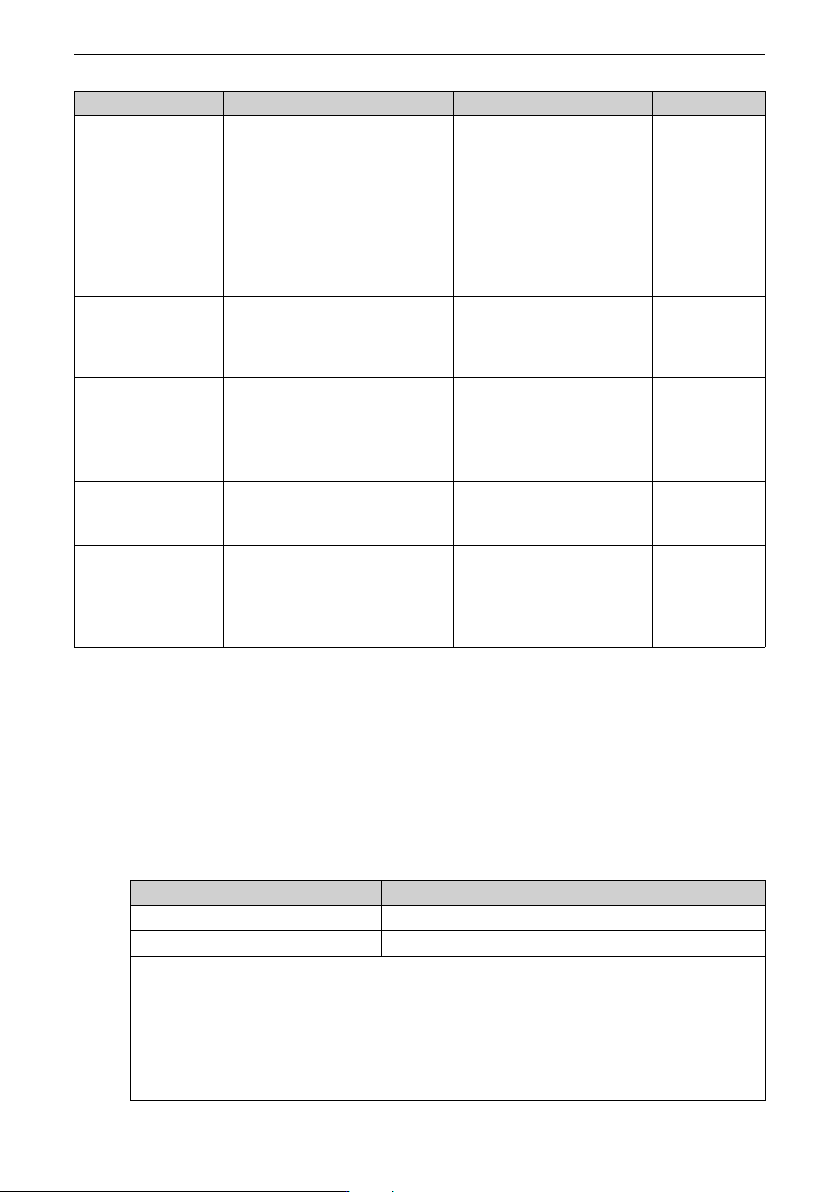
Item Description Solution Checked
Drive There are no waste, dirt, or dust on
the surface.
● Ensure that the power supply
of the controller cabinet is
connected.
● Use a vacuum cleaner to suck
up waste and dust to prevent
direct contact with the parts.
● For stubborn surface dirt, wipe
up the dirt with a piece of soft
cloth immersed in alcohol.
Cable
● Power cables and connections are
not discolored.
● The insulation is not aged or
cracked.
● Replace the cracked cables.
● Replace the damaged
terminal.
Peripherals of the
electromagnetic
contactor
● The contact can be closed without
abnormal noise.
● There are no short circuit, water
seepage, swelling, or cracking
occurs on peripheral devices.
Replace such defective
peripherals.
Air duct
● The air duct and heatsink are not
clogged.
● The fan is operating normally.
● Clean the air duct.
● Replace the fan.
Control circuit
● Control components are in good
contact.
● Terminal screws are tightened.
● The insulation of the control cable is
not cracked.
● Clean the surface of control
circuit cables and terminals.
● Replace control circuit cables
that are damaged or corroded.
10.2 Components Replacement
10.2.1Service Life of Maintainable Components
The quick-wear parts of the AC drive include the cooling fan and filter electrolytic
capacitor. The service life of such devices is closely related to the operating environment
and maintenance conditions. Generally, the lifespan is as follows.
Part
Service Life
[Note]
Fan
≥ Five years
Electrolytic capacitor
≥ Five years
Note:
The standard lifetime indicates the lifetime when the parts are used in the following
conditions. You can determine when to replace these parts according to the actual
operating time.
Ambient temperature: 40°C
Load rate: 80%
Operating rate: 24 hours per day
Maintenance and Repair
‑88‑
10.2.2Replacing the Fan
Removing the fan
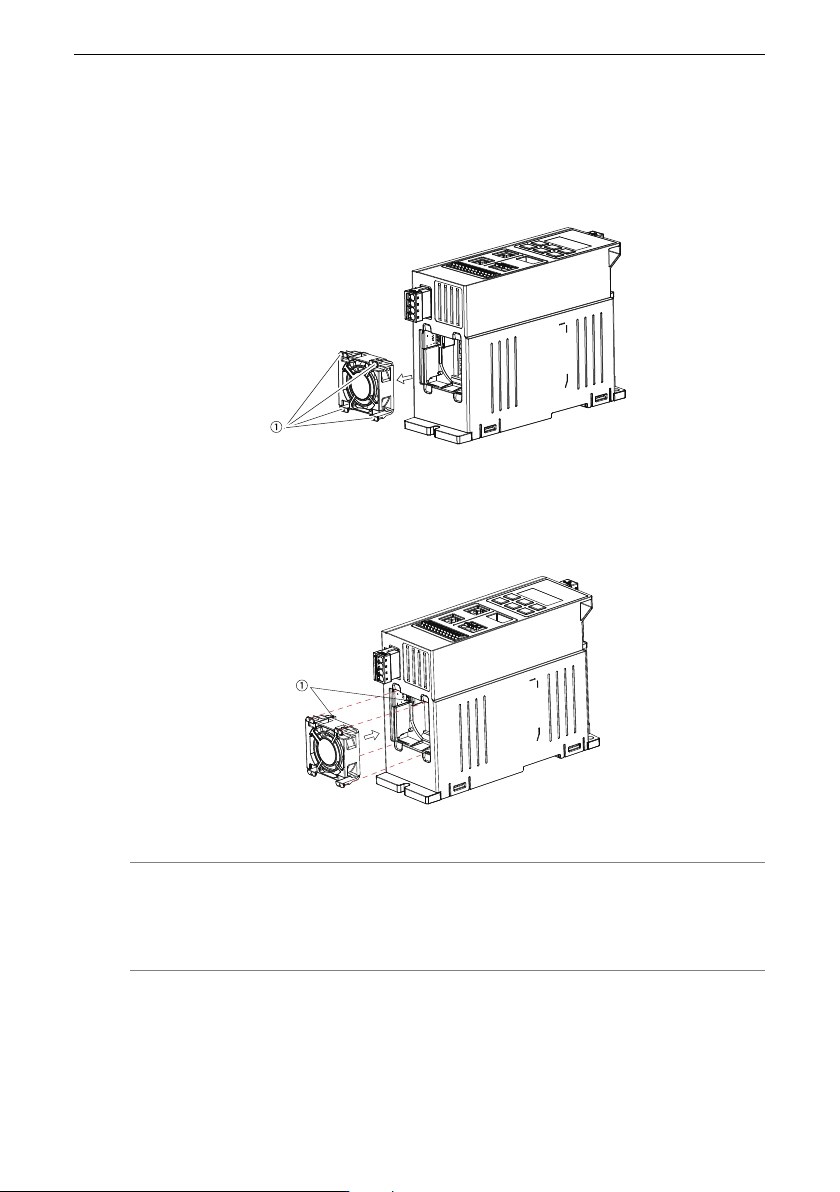
The MD600 fan can be removed without any tool.
Press and hold the four snap-fit joints around the fan to pull the fan out, as shown by ①.
Figure 10‑1 Fan removal
Installing the fan
Align the fan terminal with the slot as shown in ① and push the fan toward the drive until
the snap-fit joints are in the places.
Figure 10‑2 Fan installation
Note
For RS485 and CAN models, single-phase 0.75 kW, 1.5 kW, and 2.2 kW AC drives, as well
as three-phase 1.5 kW, 2.2 kW, 4 kW, and 5.5 kW AC drives provide one fan.
Technical Data
‑89‑
11 Technical Data
11.1 Model Selection List
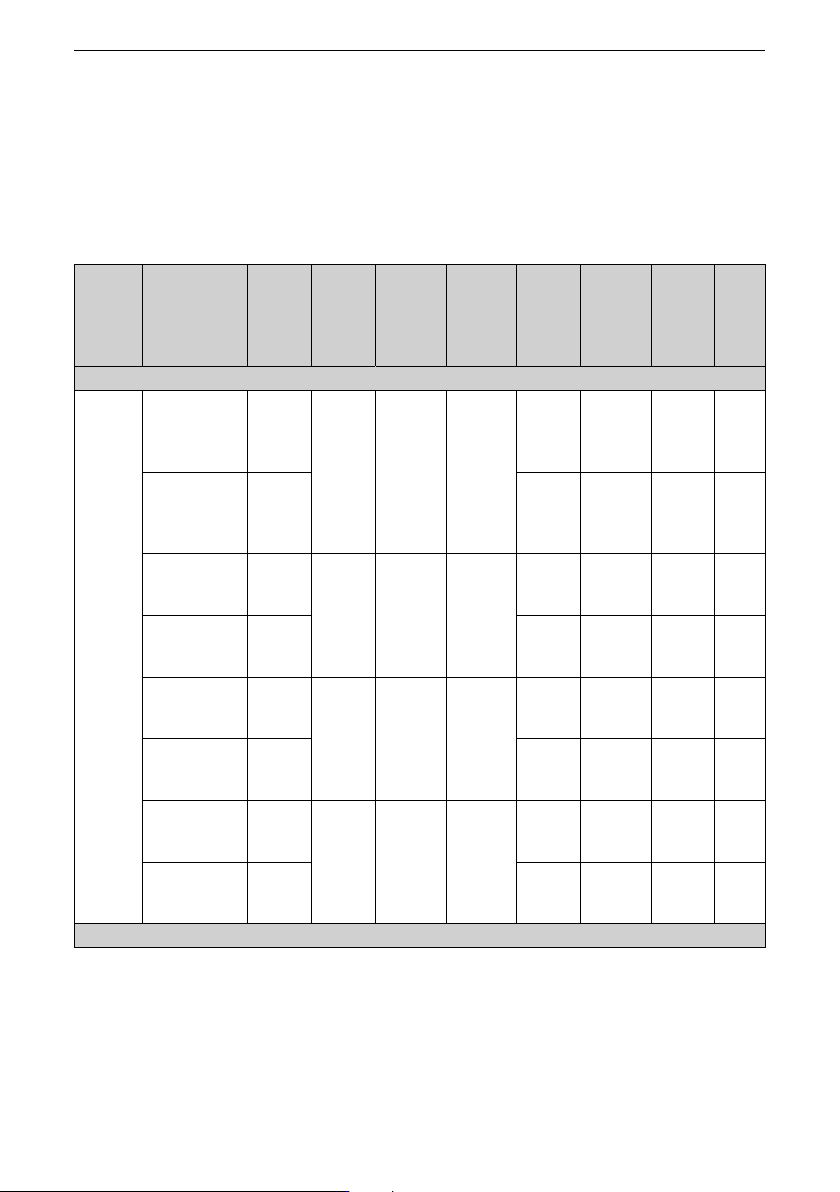
See the following table for key specifications.
Table 11–1 Model Selection List
Model Model Structure
Power
(kW)
Rated
input
current
(A)
Rated
output
current
(A)
Product
code
Function
Cooling
method
Built-
in
Brak
ing
Unit
Single-phase 200 V to 240 V
RS-485
MD600S‑2S2R8 T1 0.37 6.2 2.8 0101C42
7
RS485
Communi
cation
Natural
ly-
ventilat
ed
None
MD600S‑2S2R8B T1 0101C
R67
RS485
Communi
cation
Natural
ly-
ventilat
ed
Yes
MD600S‑2S4R6 T1 0.75 10.2 4.6 0101C52
3
RS485
Communi
cation
Air
cooling
None
MD600S‑2S4R6B T1 0101C
R68
RS485
Communi
cation
Air
cooling
Yes
MD600S‑2S7R5 T1 1.5 16.6 7.5 0101C
R63
RS485
Communi
cation
Air
cooling
None
MD600S‑2S7R5B T1 0101C52
4
RS485
Communi
cation
Air
cooling
Yes
MD600S‑2S010 T2 2.2 22.2 10 0101C
R87
RS485
Communi
cation
Air
cooling
None
MD600S‑2S010B T2 0101C52
1
RS485
Communi
cation
Air
cooling
Yes
Three-phase 380 V to 480 V