00196962-04-BA-SX12-V2-EN.pdf - 第132页
3 Technical data and assemblies User manual SIPLACE SX1/SX2 3.7 PCB conveyor system From software version SC 706.1 SP1 Version 10/2014 132 3.7.3.2 PCB dual conveyor in single conveyor mode The dual conveyor can be config…
User manual SIPLACE SX1/SX2 3 Technical data and assemblies
From software version SC 706.1 SP1 Version 10/2014 3.7 PCB conveyor system
131
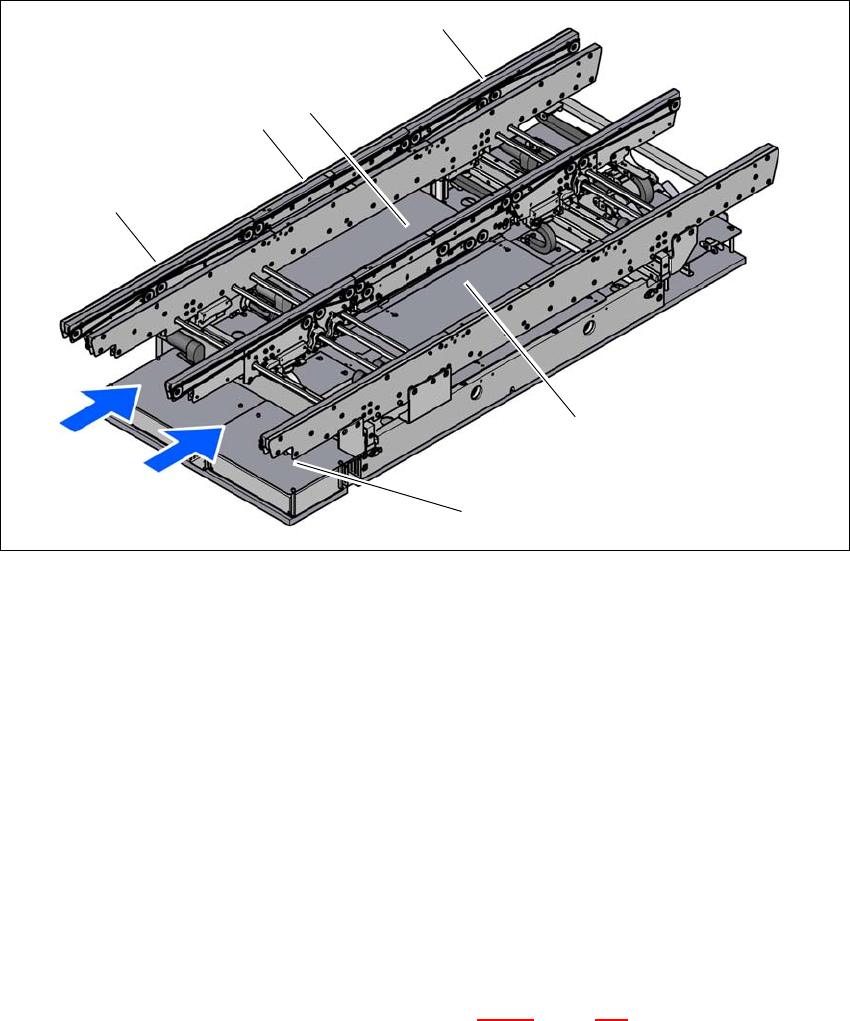
3.7.3 Structure of the flexible PCB dual conveyor
The flexible dual conveyor has two conveyor tracks that are electrically and mechanically inde-
pendent of one another. The fixed conveyor side is on the right as a standard. The PCB dual con-
veyor can be operated as a single or dual conveyor, according to your needs.
3
Fig. 3.7 - 2 Structure of the PCB dual conveyor
(1) Input conveyor
(2) Processing conveyor
(3) Lifting table 1
(4) Output conveyor
(5) Lifting table 2
(6) Conveyor control (under the cover)
T1 Conveyor track 1
T2 Conveyor track 2
3.7.3.1 Flexible PCB dual conveyor - lanes and types
The right-hand conveyor lane (viewed in the direction of transport) is known as "conveyor 1" while
the left conveyor lane is termed "conveyor 2" (see fig. 3.7 - 4
, page 133 ).
(5)
(1)
(4)
(T1)
(3)
(T2)
(2)
(6)
3 Technical data and assemblies User manual SIPLACE SX1/SX2
3.7 PCB conveyor system From software version SC 706.1 SP1 Version 10/2014
132
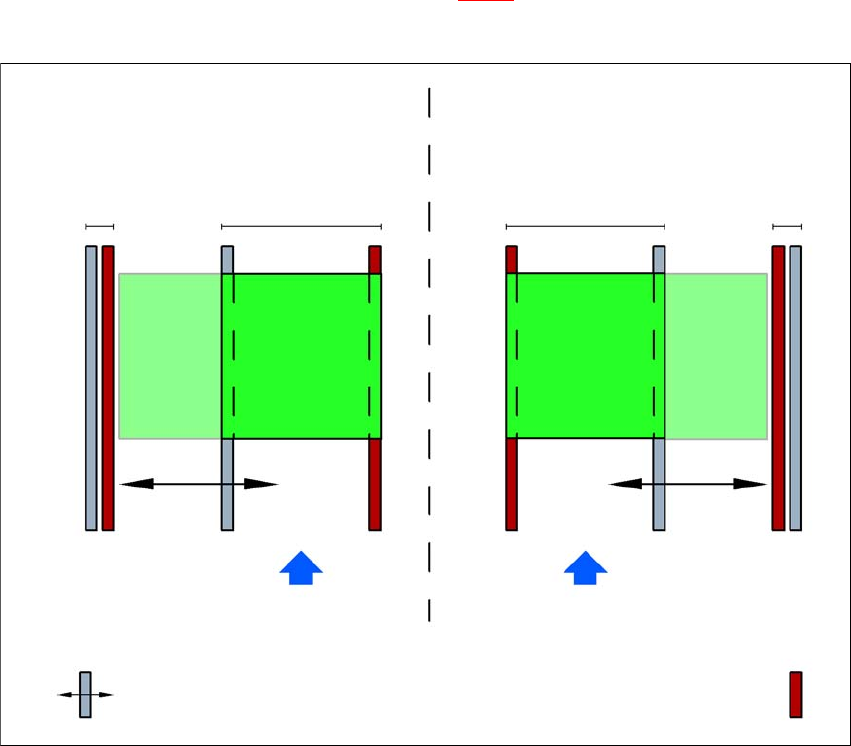
3.7.3.2 PCB dual conveyor in single conveyor mode
The dual conveyor can be configured online to create a single conveyor. One conveyor lane is
moved together completely and is disabled (see fig. 3.7 - 3
). This gives a conveyor track width of
up to 460 mm.
3
Fig. 3.7 - 3 Flexible dual conveyor in Single conveyor mode
Dual conveyor with widened conveyor track 2
(stationary conveyor side wall on left)
Conveyor track 2
deactivated
Conveyor track 1 Conveyor track 2 Conveyor track 1
deactivated
PCB transport direction PCB transport direction
Stationary conveyor side wall
Dual conveyor with widened conveyor track 1
(stationary conveyor side wall on right)
Movable conveyor side wall
User manual SIPLACE SX1/SX2 3 Technical data and assemblies
From software version SC 706.1 SP1 Version 10/2014 3.7 PCB conveyor system
133
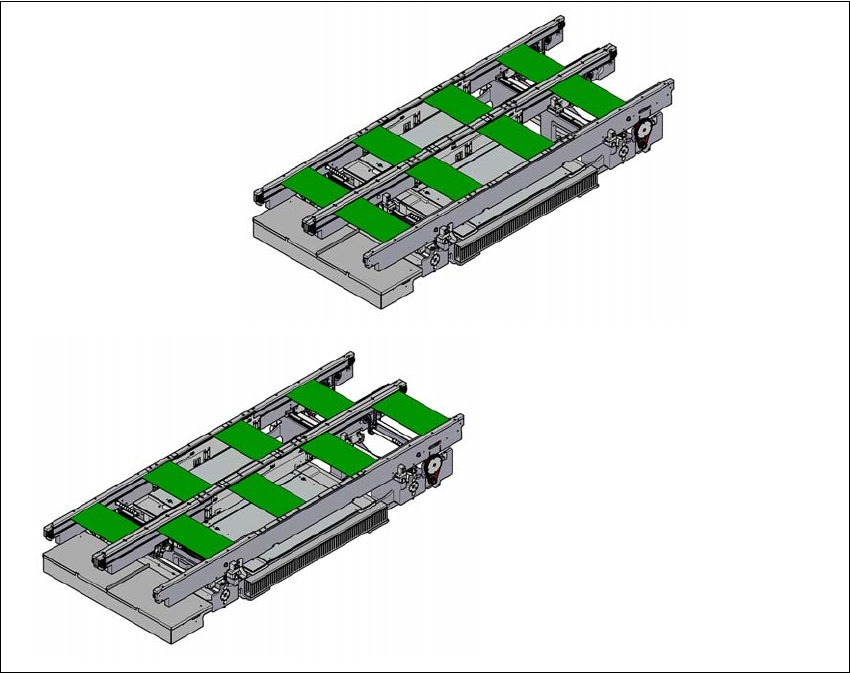
3.7.3.3 Asynchronous transport mode
In asynchronous mode, only one PCB in a transport track is processed. At the same time, another
PCB in the second transport track is moved into the placement position. This saves the full con-
veying time of one PCB, thus considerably increasing performance, particularly for PCBs with a
short cycle time.
Once the machine has received the job data (panel, setup), the PCBs on the feeding belts are con-
tinuously transported to the available processing belt (provided that the processing belt is free)
throughout the placement operation. The placement sequence starts as soon as a PCB has
moved onto the processing belt. The PCBs are processed one after another.
If the placement sequence is interrupted, the conveyor interface will be disabled and the PCBs
currently on the processing belts will be completed.
The conveyor interface is disabled or enabled simultaneously for both transport tracks.
3
Fig. 3.7 - 4 Transport modes
Synchronous transport mode
Asynchronous transport mode