00196962-04-BA-SX12-V2-EN.pdf - 第270页
5 Working with the machine User manual SIPLACE SX1/SX2 5.11 Observing displays on the X feeder module From software version SC 706.1 SP1 Version 10/2014 270 5.1 1 Observing displays on the X feeder module 5.1 1.1 Feeder …

User manual SIPLACE SX1/SX2 5 Working with the machine
From software version SC 706.1 SP1 Version 10/2014 5.10 Setting up the feeder modules
269
5.10.4.5 Splice sensors for X tape feeder modules
Splice sensors can be retrofitted to the X tape feeder modules. There are two versions of the sen-
sor:
Splice sensor for 8 mm and 12 mm X tape feeder modules
Splice sensor for 16 mm to 88 mm X tape feeder modules 5
The splice sensor is installed at the position indicated by item 3 in fig. 5.10 - 8
, page 268.
Tape feeder modules with a splice sensor already installed can also be supplied (see section
3.9.2
, from page 148).
5.10.5 Configuring components on the 2x8 mm tape feeder module
The operation and configuration of 2x8 mm feeder modules is described in the "Tape Feeder Mod-
ule 2x8 mm X / Smart Feeder 12 mm X /16 mm X Job Guide".
Item number, German 00197216-01
Item number, English 00197217-01
5.10.6 Configuring components on the SIPLACE Smart Feeder
The operation and configuration of the SIPLACE Smart Feeder is described in the "Tape Feeder
Module 2x8 mm X / Smart Feeder 12 mm X /16 mm X Job Guide".
Item number, German 00197216-01
Item number, English 00197217-01
5 Working with the machine User manual SIPLACE SX1/SX2
5.11 Observing displays on the X feeder module From software version SC 706.1 SP1 Version 10/2014
270
5.11 Observing displays on the X feeder module
5.11.1 Feeder module with LCD display
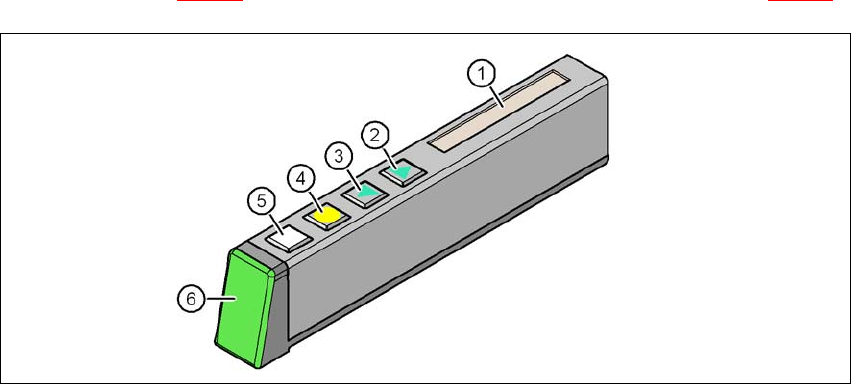
The X feeder modules (8 mm to 88 mm) have a multicolored status display to indicate operating
states (item 6 in fig. 5.11 - 1
) and for showing the texts on an LCD display (item 1 in fig. 5.11 - 1).
5
Fig. 5.11 - 1 Buttons, LCD and status displays on the X feeder module
(1) LCD display
(2) FORWARD button
(3) BACK button
(4) FOIL button
(5) SET button
(6) Status display, multicolor
User manual SIPLACE SX1/SX2 5 Working with the machine
From software version SC 706.1 SP1 Version 10/2014 5.11 Observing displays on the X feeder module
271
5.11.2 Feeder module with LED display
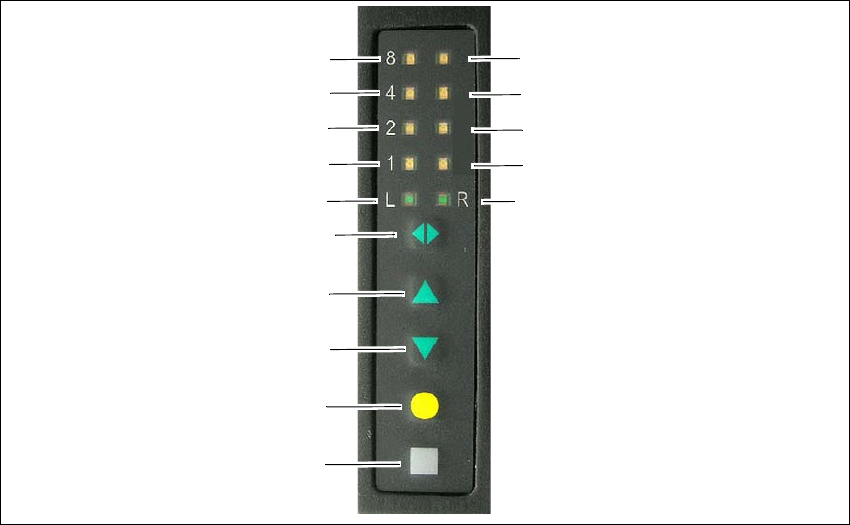
The SIPLACE SmartFeeder have a multicolored LED status display for each track, to indicate the
operating states.
5
Fig. 5.11 - 2 Buttons and status displays: Example of SIPLACE SmartFeeder 2x8 mm
(1) SET button
(2) FOIL button
(3) BACK button
(4) FORWARD button
(5) Track change button for switching between right and left
(6) LED L left track active
(7) LED 1 mm increment for left track
(8) LED 2 mm increment for left track
(9) LED 4 mm increment for left track
(10) LED 8 mm increment for left track
(11) LED R right track active
(12) LED 1 mm increment for right track
(13) LED 2 mm increment for right track
(14) LED 4 mm increment for right track
(15) LED 8 mm increment for right track
(1)
(2)
(3)
(4)
(5)
(6)
(7)
(8)
(9)
(10)
(15)
(14)
(13)
(12)
(11)