00196962-04-BA-SX12-V2-EN.pdf - 第234页
5 Working with the machine User manual SIPLACE SX1/SX2 5.3 Switching on the SIPLACE line From software version SC 706.1 SP1 Version 10/2014 234 5 Fig. 5.3 - 2 Flow chart - switch ing on the "SIPLACE line" Stati…
User manual SIPLACE SX1/SX2 5 Working with the machine
From software version SC 706.1 SP1 Version 10/2014 5.3 Switching on the SIPLACE line
233
5.3.5 Action by Machine Start Button
The action performed by the start button can be set.
Open the "Check sensors and functions" view (see section 5.5.3, page 238).
The following settings are possible:
Start production automatically 5
Standard setting.
Pressing the start button automatically begins the production process.
Do not change production status 5
This is used, for example, to calibrate and test the machine
Pressing the start button simply closes the electricity circuit; production is not started immediately.
5
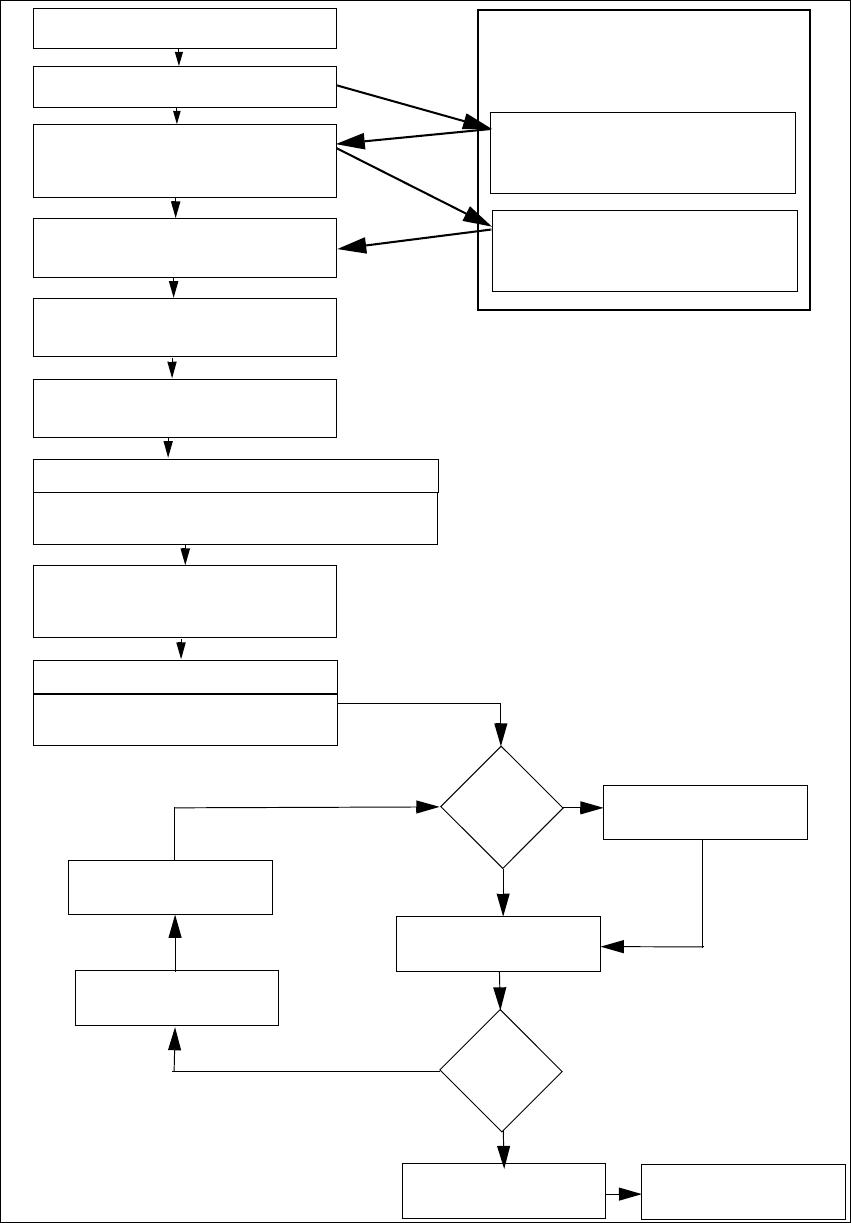
5.3.6 "Switching on the SIPLACE line" flow chart
The following flow diagram shows the actions performed after the SIPLACE line has been
switched on.
CAUTION
Machine functions can be directly started via the GUI, irrespective of the start button set-
ting. If the electrical circuit has already been closed, you do not need to confirm with the
start button again.
5 Working with the machine User manual SIPLACE SX1/SX2
5.3 Switching on the SIPLACE line From software version SC 706.1 SP1 Version 10/2014
234
5
Fig. 5.3 - 2 Flow chart - switching on the "SIPLACE line"
Station computer
Switch on
Check setup
(configure feeder modules
Teach fiducials
Load board data
Press the start button
Wait for reference run
Move board in
Wait for PCB
Check setup
(if table marked red
If required: change nozzle configuration
Nozzle check
Fiducials
OK?
Track er-
ror
Placement
Check setup
Fill up tracks
Placement
PCB in output conveyor
Italics: Performed or reported by the station
Yes
Yes
No
No
Presettings at machine
Download assistant
Programming system
Tasks
Confirm conversion in download
assistant
Bold lettering: job to be performed by op-
erator
User manual SIPLACE SX1/SX2 5 Working with the machine
From software version SC 706.1 SP1 Version 10/2014 5.4 Switching off the SIPLACE line
235
5.4 Switching off the SIPLACE line
5
5.4.1 Switching off the stations
To switch off the stations, proceed as follows:
End all placement procedures, so that there are no more boards in the machine.
Check whether the Z axes of all placement heads are in their uppermost end positions.
Check whether there are still components on the placement heads and remove these.
Close the station computer software in the view
Settings --> Machine Settings --> Shut Down Machine...
Once the computer has been shut down, switch off the station at the main switch.
5.4.2 Exiting SIPLACE Pro (Windows)
In the SIPLACE Pro menu, select Object --> Close.
Close all other programs on the computer.
Select Shut down from the Windows Start menu.
CAUTION
Before you switch off the line, observe the following procedures.