00196962-04-BA-SX12-V2-EN.pdf - 第57页
User manual SIPLACE SX1/SX2 2 Operational safety From software version SC 706.1 SP1 Version 10/2014 2.5 Safety instructions for operating the SX1/SX2 machine 57 2.5.2 Manual insertion of board into the input conveyor 2 …
2 Operational safety User manual SIPLACE SX1/SX2
2.5 Safety instructions for operating the SX1/SX2 machine From software version SC 706.1 SP1 Version 10/2014
56
2.5 Safety instructions for operating the SX1/SX2
machine
2.5.1 Safety instructions for closing the protective covers
To avoid risk of injury when closing the protective covers on the machine, the operator must in-
struct the personnel concerned to always follow the instructions below when handling the protec-
tive covers.
2
2
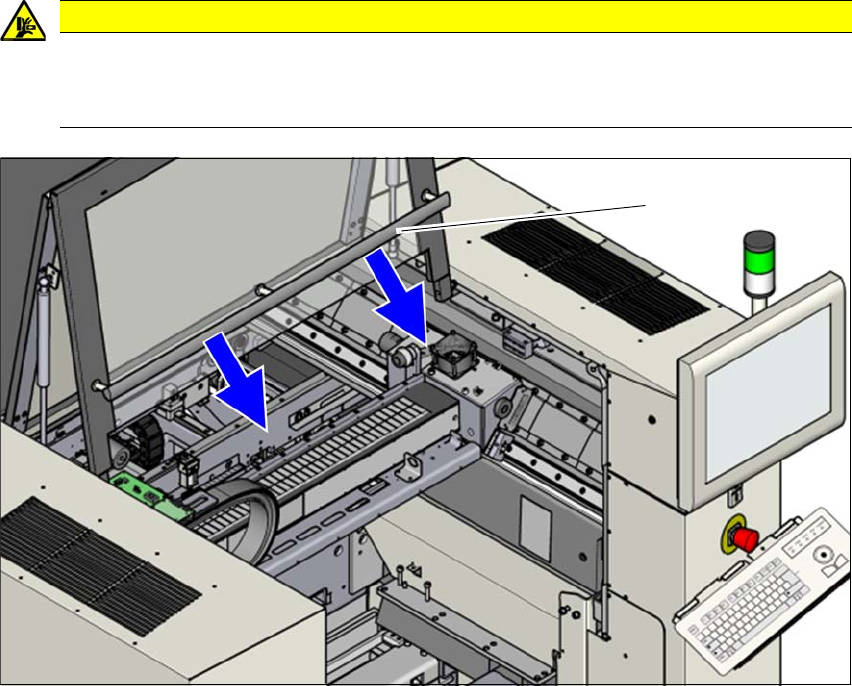
Fig. 2.5 - 1 Safety instructions for closing the protective covers
(1) Grab handles
To open or close the protective covers, always take hold of these by the grab handles.
When closing, do not reach into the gap between the protective cover and the machine panel.
CAUTION
DANGER OF CRUSHING!
Risk of crushing hands if the protective covers are not closed correctly.
Close the protective covers correctly.
(1)

User manual SIPLACE SX1/SX2 2 Operational safety
From software version SC 706.1 SP1 Version 10/2014 2.5 Safety instructions for operating the SX1/SX2 machine
57
2.5.2 Manual insertion of board into the input conveyor
2
Observe the warning instructions when inserting boards into the input conveyor.
Start moving the board into the conveyor with the Move Board In function on the SC GUI.
2.5.3 Safety instructions for processing capacitors based on powdered metal
There is a risk associated with processing capacitors based on powdered metal (e.g. tantalum).
The risk is that
– an exothermic reaction, i.e. a sudden build-up of heat, may occur, if these components are
damaged. If the ambient conditions are unfavorable, and depending on the capacitance, this
buildup of heat can cause damage.
– This effect can occur when these components are cut.
Please contact your suppliers to clarify whether the components that you handle are affected.
In extremely rare cases, this risk can occur in the tape cutter of SIPLACE machines, with the re-
mote possibility of causing a smoldering fire in the waste tape.
The ambient conditions are unfavorable if:
(1) The components remain on the tape while the set tape cycle is checked (since the operator
can cycle the feeder module onward without removing components during this check).
(2) The components remain on the tape, e.g. due to a tear in the cover foil.
(3) The components remain on the tape, and the components or tape do not conform to the spec-
ification, thus increasing the pickup error rate.
WARNING
Risk of injuries!
When manually inserting the board into the input conveyor, the hands could be caught
and injured by the gantry when it starts moving.
Do not push the board further than 5 cm into the machine with your hands.

2 Operational safety User manual SIPLACE SX1/SX2
2.5 Safety instructions for operating the SX1/SX2 machine From software version SC 706.1 SP1 Version 10/2014
58
Please follow the instructions given below to minimize the risk when placing capacitors based on
powdered metal.
(1) If the component tape is cycled onward manually, the operator must remove any components
remaining in the tape pocket.
(2) If the cover foil tears, the operator must remove any components remaining on the tape.
To prevent tantalum capacitors which were not picked up from causing the tape material to burn
when it is cut, the user interface has been extended to include the option "Stop immediately on
pickup error". This option must be enabled in SIPLACE Pro. On the placement machine, the com-
ponent that was not picked up is paced forward again until it is ready for removal from the com-
ponent tape. The track is deactivated and the operator is sent an error message to remind him to
pick up the tantalum component from the tape.
2
PLEASE NOTE
Manual removal of tantalum capacitors not picked up
A description of how the operator can manually remove those tantalum capacitors which
were not picked up can be found in section 3.9.1.3
, page 144.