00196962-04-BA-SX12-V2-EN.pdf - 第195页
User manual SIPLACE SX1/SX2 4 Setting up and commissioning From software version SC 706.1 SP1 Version 10/2014 4.2 Infrastructure at the installation location 195 4.2.3.4 Mains connection - delivery configuration The main…
4 Setting up and commissioning User manual SIPLACE SX1/SX2
4.2 Infrastructure at the installation location From software version SC 706.1 SP1 Version 10/2014
194
4.2.3.1 Danger notes
4
4.2.3.2 Checking the main power supply
Check whether the power supply complies with the prescribed machine specifications (see table
in section 3.2
, page 97).
4
4.2.3.3 Power supply cable - specification
The following specifications apply to the power supply cable for the machine:
– 5 x 2.5 mm² for 3 x 380 V~ / 3 x 400 V~ / 3 x 415 V~ for a cable length of up to 20 meters to
the machine mains power cable. Over 20 meters cable 5 x 4 mm².
– 5 x 4 mm² for 3 x 200 V~/ 3 x 208 V~ / 3 x 220 V~ / 3 x 230 V~ for a cable length of up to 10
meters to the machine mains power cable. Over 10 meters cable 5 x 6 mm².
The color coding for the wires will depend on the country in which the system is operated.
4
4
DANGER
Dangerous voltage levels!
The machine is supplied with 3 x 200 V~, 3 x 208 V~, 3 x 220 V~, 3 x 230 V~, 3 x 380 V~,
3 x 400 V~ or 3 x 415 V~ ± 5 %, 50/60 Hz mains voltage. This means that some parts of
the system carry potentially lethal voltages - even when switched off at the main power
switch.
Incorrect handling of this machine can therefore result in death or severe injury or consid-
erable damage to equipment.
Always follow the applicable accident prevention and DIN regulations (particularly EN
60204, part 1 or IEC 60204, part 1) and the applicable regulations in your own coun-
try.
The covers over the power supply unit may ONLY be opened by appropriately quali-
fied and trained personnel.
PLEASE NOTE
Load peaks in power supply
For technical reasons, load peaks occur in the power supply.
Please contact your power company to clarify the mains impedance, if necessary.
WARNING
Clear marking of electrical leads!
The electrical leads to each individual machine and to the options installed (e.g. WPC5/
WPC6) must be clearly labeled and easily assignable.
The regulations of the country in which the machine is operated apply.
User manual SIPLACE SX1/SX2 4 Setting up and commissioning
From software version SC 706.1 SP1 Version 10/2014 4.2 Infrastructure at the installation location
195
4.2.3.4 Mains connection - delivery configuration
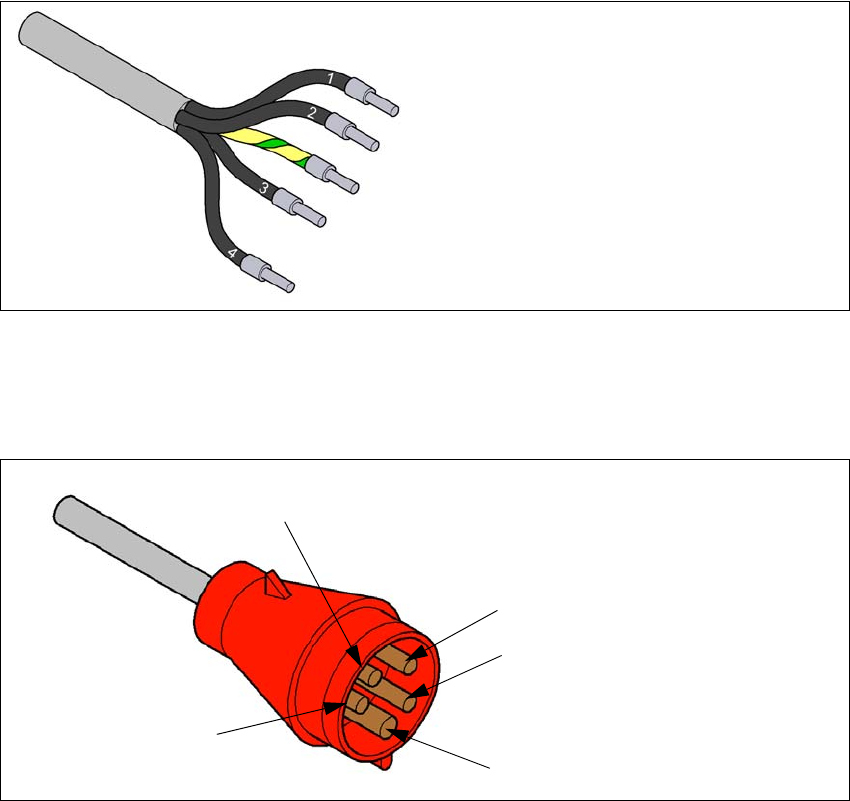
The main power connection is configured according to the power supply of the country concerned.
– The machine is configured for voltages of 204V AC, 220V AC or 230V AC.
The machine has a mains power cable WITHOUT plug. 4
4
Fig. 4.2 - 3 Description of wires in the mains power cable
– The machine is configured for voltages of 380V AC, 400V AC or 415V AC.
The machine has a mains power cable WITH Cekon plug. 4
4
Fig. 4.2 - 4 Assignment in the Cekon plug
1 = (L1): three-phase
2 = (L2): three-phase
3 = (L3): three-phase
4 = (N): neutral conductor
green/yellow = (PE): conductor
PE
L1
L2
L3
N
4 Setting up and commissioning User manual SIPLACE SX1/SX2
4.2 Infrastructure at the installation location From software version SC 706.1 SP1 Version 10/2014
196
4.2.3.5 Connecting the power supply cable
4
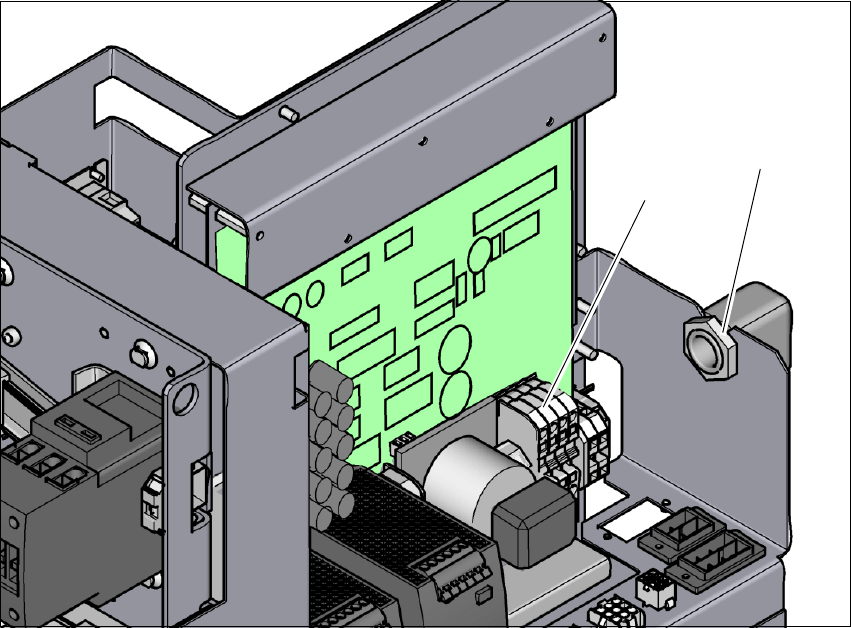
Fig. 4.2 - 5 Terminal panel for connecting the power cable
(1) Terminal panel (X99)
(2) Cable fixtures
Crimp a ferrule onto each end of the wire.
Loosen the nuts on the cable fixture (2).
Run the mains power cable through the cable fixture (2) to the terminal panel X99 (1).
Fasten the cable to the terminal panel X99 (item 1).
(L1): three-phase 4
(L2): three-phase 4
(L3): three-phase 4
(N): neutral conductor 4
(PE): PE conductor 4
Make sure that the bending radius is adequate. The wires must not be kinked.
Manually tighten the cable fixture.
(1)
(2)