00191913-01.pdf - 第157页
User Manual SIPLACE 80S-20/F4 4 Placemen t functions Software Version SR.406.xx 02/2000 Issue US 4.3 Feeders 155 4.3 Feede rs Å Clic k on th e icon in the toolba r in the M ain v iew . The user interface s witch es to on…
4 Placement functions User Manual SIPLACE 80S-20/F4
4.2 Error display Software Version SR.406.xx 02/2000 Issue US
154
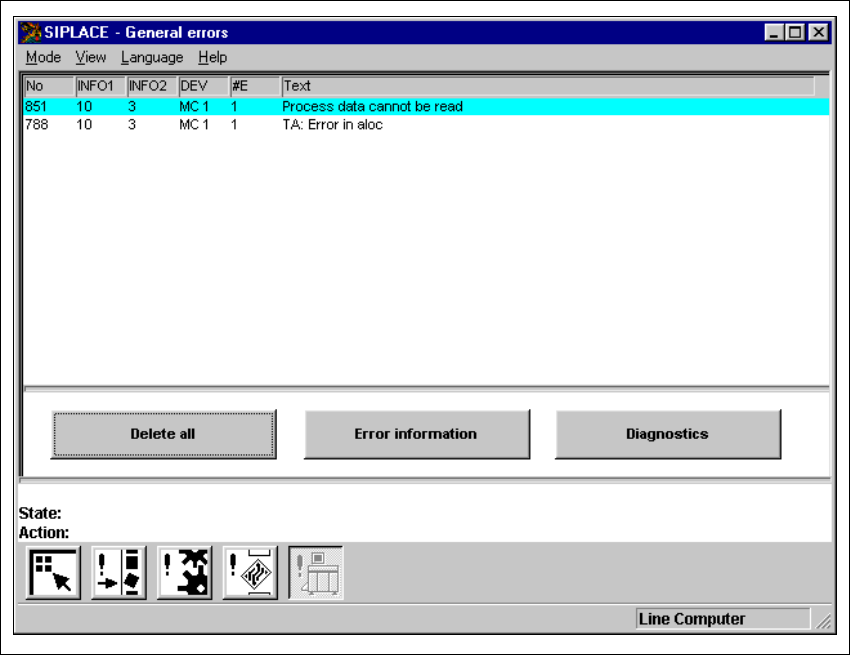
4.2.5 "General errors" view
4
Fig. 4.2 - 4 "General errors" view
4.2.5.1 Meaning of the entries in the table for "General errors"
– No
Error number of the corresponding error.
– Info1 / Info 2
These are only intended for internal use by Siemens.
– DEV
Short description of the sender of the error
– #E
Error counter (see also Section 4.2.2.1.
–Text
Description of the corresponding error.
User Manual SIPLACE 80S-20/F4 4 Placement functions
Software Version SR.406.xx 02/2000 Issue US 4.3 Feeders
155
4.3 Feeders
Å Click on the icon in the toolbar in the Main view.
The user interface switches to one of the views described in the following sections.
NOTE
When the "Feeders" menu function is called for the first time after starting the SC software, then
the "Empty tracks" view is displayed first (see Fig. 4.3 - 1). 4
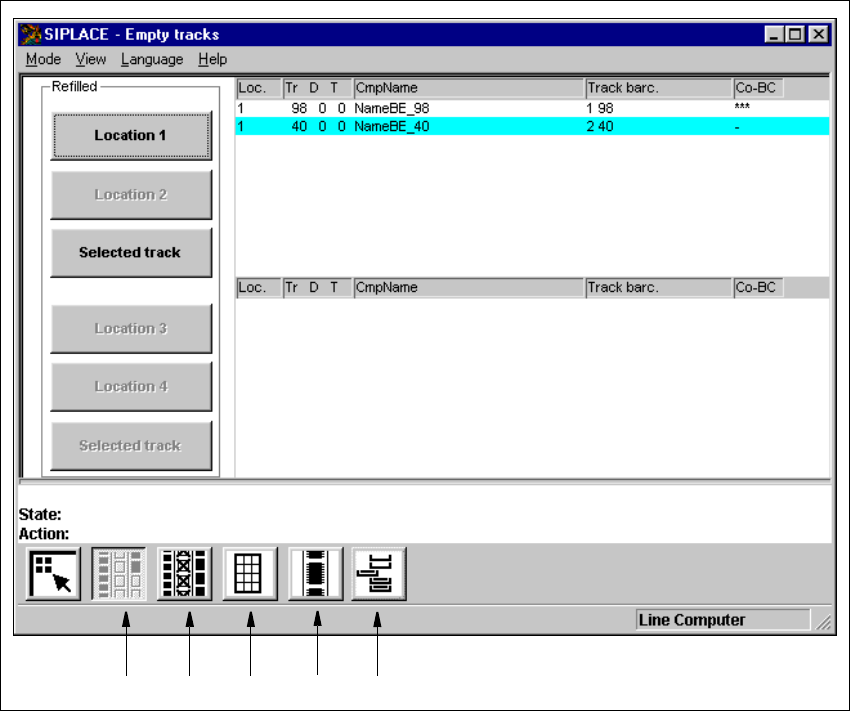
4.3.1 "Empty tracks" view
If the placement head cannot pick a component from a track after 3 attempts, then it will not use
this track again. This track is added to the "Empty tracks" list.
As soon as the feeders or waffle pack trays in the empty tracks are filled with components, this
fact must be confirmed so that the placement head can access these tracks again. This is done
by refilling the empty tracks using the "Refill track" function. You can refill individual tracks or all
tracks of a location at the same time when refilling empty tracks with "Refill track". 4
NOTE
The manual refilling of tracks that contain components with specified component barcodes is only
possible using "Refill track" when the "Component verification with barcode" option in the machine
options is not
active.
If the "Component verification with barcode" option is active, then a corresponding note is dis-
played instead of the buttons for locations 1 through 4 (see Fig. 4.3 - 2). 4
4
Å Click on the icon, if necessary.
The "Empty tracks" view is displayed (see Fig. 4.3 - 1).
4
4
4 Placement functions User Manual SIPLACE 80S-20/F4
4.3 Feeders Software Version SR.406.xx 02/2000 Issue US
156
4
Fig. 4.3 - 1 "Empty tracks" view
Key to Fig. 4.3 - 1
(1) "Empty tracks" view
(2) "Omit components" view
(3) "Trays" view
(4) "Linear feeder" view
(5) "Waffle pack changer" view
4
123
4
5