00191913-01.pdf - 第387页
User Manual SIPLAC E 80S-20/F4 8 Error information and diagnostics Software Version SR.406.xx 02/2000 Issue US 8.1 General 385 8 Error information and diagnostics 8.1 Gen eral If errors occur dur ing oper ations a t the …
7 What should you do ... User Manual SIPLACE 80S-20/F4
7.13 Line engineer profile Software version SR.406.xx 02/2000 Issue US
384
7.13 Line engineer profile
The line engineers should normally have attended the SIPLACE basic training course and are to
be assigned the following tasks:
– Acting as a contact for the operators
– Maintaining the machine log book
– Monitoring and carrying out maintenance at the specified intervals
– Monitoring the workplace to ensure that it is clean and safe
– Monitoring conformity with EGB regulations
– Carrying out quality control
– Following up and reporting fault messages
– Making sure that errors have been eliminated
– Providing all materials required to produce the job in a timely manner, such as
–PCBs
–Soldering paste
–Components
–Feeder modules, etc.
– Setting up the station for a new production batch
– Checking the settings of the feeder modules
– Checking the management data
– Asking the responsible programmers to modify placement programs
– Ensuring a smooth flow of information between the individual groups
7
User Manual SIPLACE 80S-20/F4 8 Error information and diagnostics
Software Version SR.406.xx 02/2000 Issue US 8.1 General
385
8 Error information and diagnostics
8.1 General
If errors occur during operations at the placement station, you can all up information concerning
the possible causes and ways of eliminating the error in question. To do this, you start the help
system for the station computer (see Chapter 9).
– You call error information on the currently displayed error by clicking the "Error information"
button in the main view (see section 8.2.1).
– You can call up information on an observed error of a specific type by clicking the "Error infor-
mation" button in the corresponding error display (see section 8.2.2).
8 Error information and diagnostics User Manual SIPLACE 80S-20/F4
8.2 Calling error information Software Version SR.406.xx 02/2000 Issue US
386
8.2 Calling error information
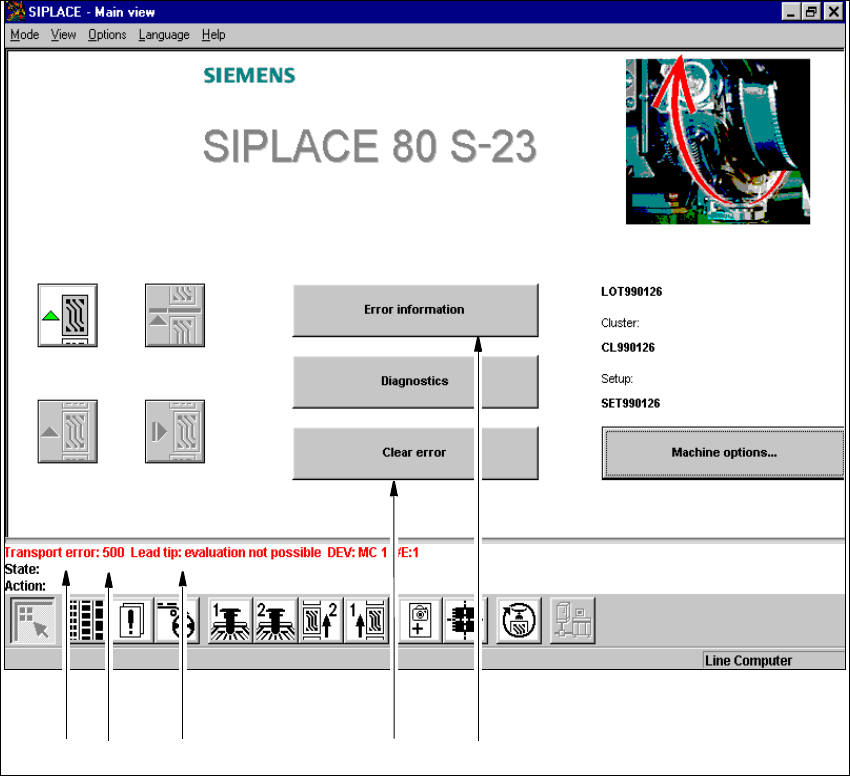
If an error occurs during operation, a corresponding error message is displayed in the status bar
in the user interface. In main view, the Error information and Clear error buttons are active
(see Fig. 8.2 - 1).
8
Fig. 8.2 - 1 Main view with error message
Key to Fig. 8.2 - 1
(1) Type of error (track, machine, transport or general error)
(2) Error number (the error number assigned to the error)
(3) Error message (summary information on error)
(4) "Clear error" button (to acknowledge the error after error elimination)
(5) "Error information" button (to call up help on the current error)
12 3 4 5