00191913-01.pdf - 第174页
5 Single functions User Manual SIPLACE 80S-20/F4 5.2 Single functions, gant ry Software Version SR.406.xx 02/2000 Issue US 172 5.2.1.1 F unctions In the "Revolv er head function s" vie w , the functi ons desc r…
User Manual SIPLACE 80S-20/F4 5 Single functions
Software Version SR.406.xx 02/2000 Issue US 5.2 Single functions, gantry
171
5
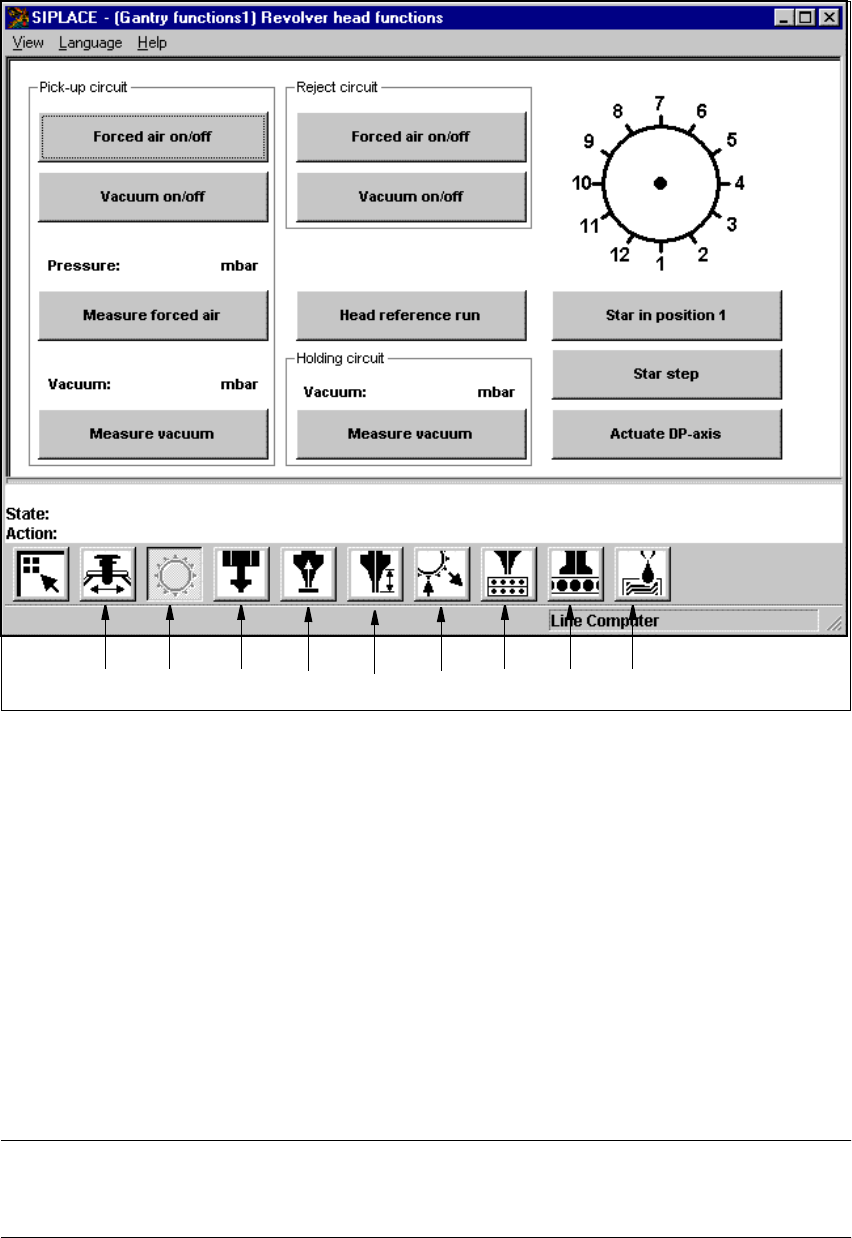
Fig. 5.2 - 1 "Revolver head functions" view (12-nozzle revolver head)
Key to Fig. 5.2 - 1
(1) Gantry functions
(2) Revolver head functions
(3) IC-head functions
(4) Vacuum test, revolver head
(5) Nozzle offset, revolver head
(6) Nozzle configuration, revolver head
(7) Nozzle changer configuration, revolver head
(8) Nozzle changer configuration IC-head
(9) Fluxer head functions
NOTE
The current position of the revolver head segment is shown by the graphic above the "Star in
position 1" button. 5
12 34 56789

5 Single functions User Manual SIPLACE 80S-20/F4
5.2 Single functions, gantry Software Version SR.406.xx 02/2000 Issue US
172
5.2.1.1 Functions
In the "Revolver head functions" view, the functions described below are available to help you test
the revolver head. 5
– Vacuum test in the pick-up position
– Vacuum test in the reject position
– Vacuum test in the holding circuit
– Revolver head functions
The functions are triggered by clicking the appropriate button. 5
Pick-up circuit - Forced air on/off 5
When this function is activated, the forced air to the nozzle in the pick-up position is either
switched on or off.
Å In the "Pick-up circuit" area, click the Forced air on/off button.
This switches the forced air on or off.
Pick-up circuit - Vacuum on/off 5
When this function is activated, the vacuum at the nozzle in the pick-up position is either
switched on or off.
Å In the "Pick-up circuit" area, click the Vacuum on/off button.
This switches the vacuum on or off.
Pick-up circuit - Measure forced air 5
When this function is activated, forced air at the pick-up position is measured.
Å Switch on the forced air (using the "Forced air on/off" function in the "Pick-up circuit" area).
Å Click the Measure forced air button in the "Pick-up circuit" area.
The forced air is measured and the result displayed in [mbar] above the button.
NOTE
The value displayed after the measurement is taken does not correspond to the actual values at
the nozzle.
When calibrating the machine, you must use a manometer to establish the values (see Adjustment
instructions or the Service Manual). 5
Pick-up circuit - Measure vacuum 5
When this function is activated, vacuum at the pick-up position is measured.
Å Switch on the vacuum (using the "Vacuum on/off" function in the "Pick-up circuit" area).
Å Click the Measure Vacuum button in the "Pick-up circuit" area.
The vacuum is measured and the result displayed in [mbar] above the button.
User Manual SIPLACE 80S-20/F4 5 Single functions
Software Version SR.406.xx 02/2000 Issue US 5.2 Single functions, gantry
173
Reject circuit - Forced air on/off 5
When this function is activated, the forced air at the nozzle in the reject position is switched on or
off.
Å Click the Forced air on/off button in the "Reject circuit" area.
The forced air is switched on or off.
Reject circuit - Vacuum on/off 5
When this function is activated, the vacuum to the nozzle in the reject position is switched on or
off.
Å Click the Vacuum on/off button in the "Reject circuit" area.
The vacuum is switched on or off.
Head reference run 5
This function is used to start a head reference run of all the head axes, or in other words, all head
axes travel to their origin. The gantry axes travel over the reject container and discard compo-
nents in a defined manner.
Å Click the Head reference run button.
The head axes execute a head reference run.
Holding circuit - Measure vacuum 5
When this function is activated, the vacuum at the nozzle in the holding circuit is measured.
Å Click the Measure vacuum button in the "Holding circuit" area.
The vacuum is measured and the result displayed in [mbar] above the button.
Star in position 1 5
This function is used to bring the revolver head into a defined starting position.
Å Click the Star in position 1 button.
The revolver head is moved round so that segment 1 is in the pick up and placement position
(lowest position). In addition the revolver head and the z-axis perform a reference run.
RV head indexing 5
This function is used to move the revolver head. Each time you click the button the revolver head
is moved round by one segment.
Å Click the RV head indexing button.
The revolver head is moved by one segment.
The current positions of the segments is displayed in the graphic.