00191913-01.pdf - 第382页
7 What should you do ... User Man ual SIPLACE 80S-20/F4 7.9 How to avoid t rack errors Software version SR.406.xx 02/2000 Issue US 380 7.9.4 Component coordinate system and pick-up angle 7 Fig. 7.9 - 1 Position of the co…
User Manual SIPLACE 80S-20/F4 7 What should you do ...
Software version SR.406.xx 02/2000 Issue US 7.9 How to avoid track errors
379
7.9.2 ... on the 8 mm S tape feeder module
Å NEVER open the cover flap without first releasing the tension of the cover foil remover.
Å Set the pick-up position and the spacing of the tape according to the short instructions en-
closed with each tape feeder module.
Å Insert the tape material over the spring into the tape feeder module.
7.9.3 ... on the tape container
Å Insert the spacers correctly (see Fig. 7.5 - 2).
Å Use insertable shafts for large tape reels.
7 What should you do ... User Manual SIPLACE 80S-20/F4
7.9 How to avoid track errors Software version SR.406.xx 02/2000 Issue US
380
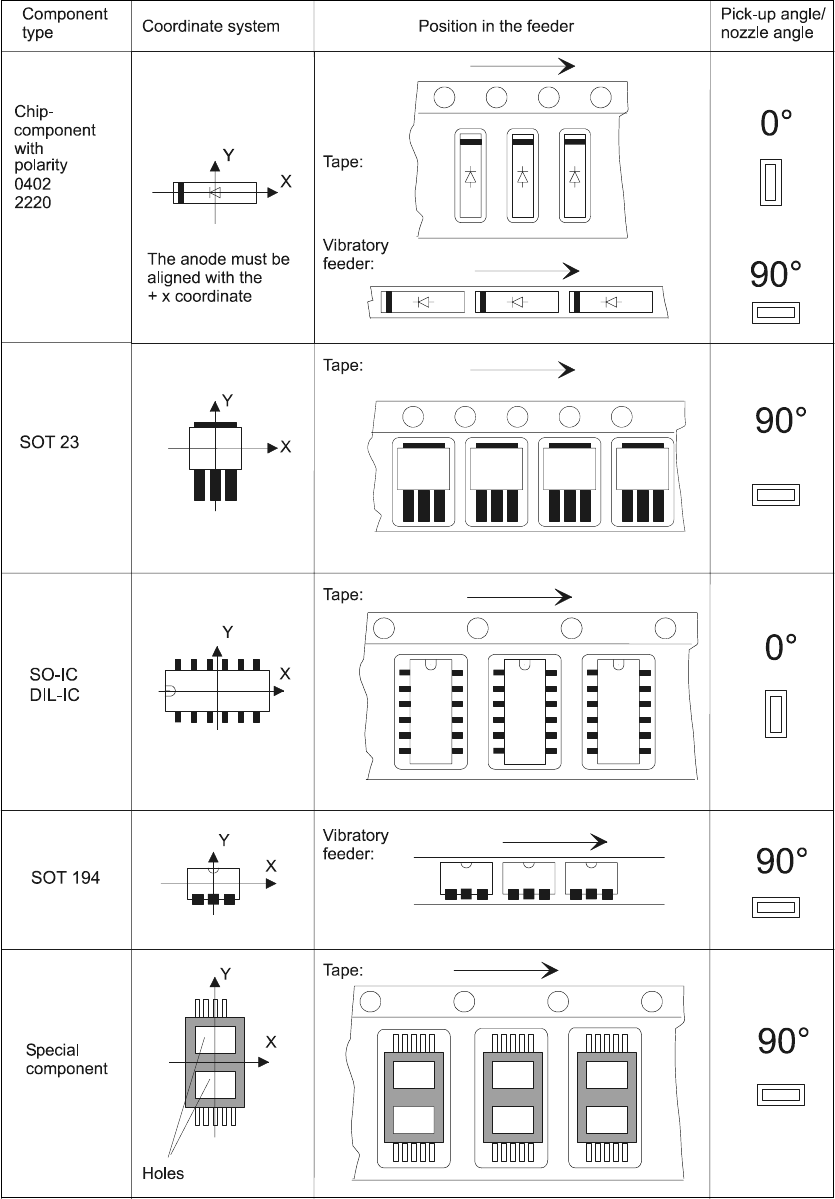
7.9.4 Component coordinate system and pick-up angle
7
Fig. 7.9 - 1 Position of the component and its pick-up angle
User Manual SIPLACE 80S-20/F4 7 What should you do ...
Software version SR.406.xx 02/2000 Issue US 7.10 What to note when refilling components
381
7.10 What to note when refilling components
The refilling of components with and without a barcode is described in chapter 4, section 4.1. 7
Å With tape feeder modules, make sure that you always splice on a new tape early enough so
that the feeder modules do not run out of components.
Å However, do not splice the tapes too early because if you wind the tape onto the new reel after
splicing the end of the old tape, the reel with the new tape may be over-filled. The tape could
then slip off the reel and become tangled. Under certain circumstances, this could cause pick-
up errors and prolonged down times.
Å Always insert shafts when using large tape reels and make sure that the dividing plates are
inserted correctly (see Fig. 7.5 - 2).