00191913-01.pdf - 第406页
8 Error information and diagnostics User Man ual SIPLACE 80S-20/F4 8.4 Diagnostics Software Version SR.406.xx 02/2000 Issue US 404
User Manual SIPLACE 80S-20/F4 8 Error information and diagnostics
Software Version SR.406.xx 02/2000 Issue US 8.4 Diagnostics
403
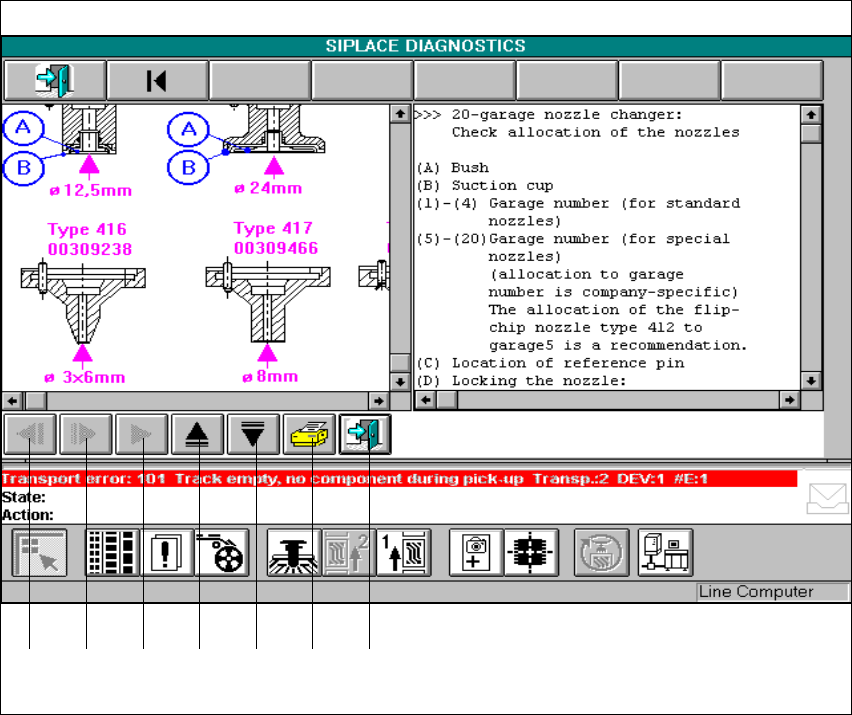
Fig. 8.4 - 12 Example of additional information
Key to Fig. 8.4 - 12
1 Scroll back in displayed window 2 Page through additional windows
3 Display additional information (if active) 4 Scroll up in displayed window
5 Scroll displayed window downwards 6 Print displayed window
7 Return to previous window
Å You can use the active buttons to call and scroll through all information in the windows.
8
1 2 3 4 5 6 7
8 Error information and diagnostics User Manual SIPLACE 80S-20/F4
8.4 Diagnostics Software Version SR.406.xx 02/2000 Issue US
404
User Manual SIPLACE 80S-20/F4 9 Online help system
Software Version SR.406.xx 02/2000 Issue US 9.1 General
405
9 Online help system
9.1 General
The help system integrated in the station computer software allows you to call up online help on
the functions, menus and icons available in the station computer’s user interface as well as to
consult general station computer information.
The corresponding sections of this chapter contain more detailed information on the various help
system functions. 9
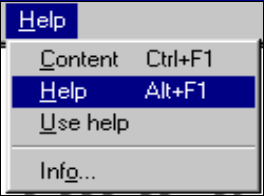
9.1.1 Functions in the "Help" menu
Å Click Help in the menu bar of the view which is currently active in the SC user interface.
The "Help" menu is opened.
This menu contains all the options which are necessary to call up help on the functions of the
SC user interface, general help on help system operation or information on the station
computer and the installed software. 9
9
9