00191913-01.pdf - 第196页
5 Single functions User Manual SIPLACE 80S-20/F4 5.2 Single functions, gant ry Software Version SR.406.xx 02/2000 Issue US 194 5.2.9 "Fluxing" view 5 Å In the cur rent vi ew for the single fu nction fo r Gantr …
User Manual SIPLACE 80S-20/F4 5 Single functions
Software Version SR.406.xx 02/2000 Issue US 5.2 Single functions, gantry
193
5.2.8.2 Functions
Confirm 5
This function is used to confirm that an individual nozzle holder has been filled with a new nozzle
type.
When changing the set-up of a machine it may be necessary to change the type of nozzle in
some of the nozzle holders. To do this, the current nozzle configuration (Actual) and the nozzle
configuration for the new set-up (Preset) is shown in the table for each nozzle holder. When you
change the nozzle type from the "Actual" to "Preset" type, you must confirm this for each nozzle
holder separately.
Å In the table, click on the entry for the nozzle holder for which the nozzle is to be replaced. The
line is now highlighted in light blue.
Å Replace the nozzle currently in this nozzle holder with a nozzle of the type entered in the "Pre-
set" column.
Å Click the Confirm button.
The change of is now confirmed. The arrow ( <== ) no longer appears in the table against the
corresponding nozzle holder.
5
5
5 Single functions User Manual SIPLACE 80S-20/F4
5.2 Single functions, gantry Software Version SR.406.xx 02/2000 Issue US
194
5.2.9 "Fluxing" view
5
Å In the current view for the single function for Gantry, click the symbol .
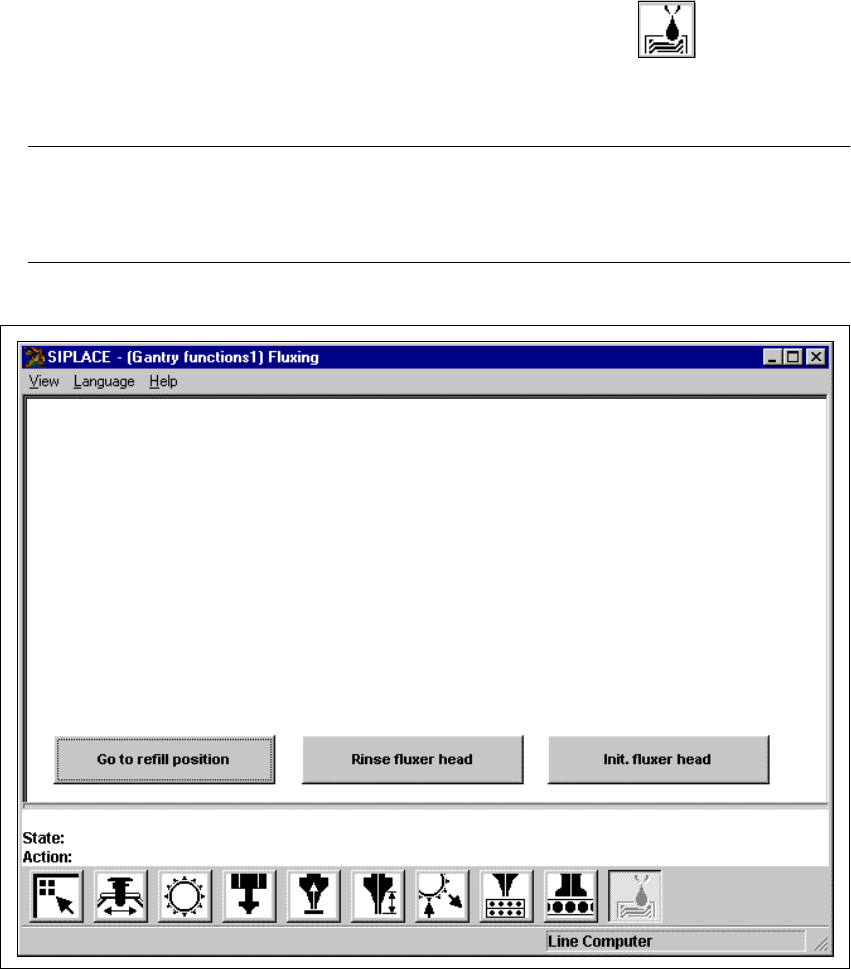
The user interface is switched to the "Fluxing" view (see Fig. 5.2 - 9). 5
NOTE
The "Fluxing" option must be installed and configured in the machine options before the func-
tions in this view can be executed. 5
5
Fig. 5.2 - 9 "Fluxing" view

User Manual SIPLACE 80S-20/F4 5 Single functions
Software Version SR.406.xx 02/2000 Issue US 5.2 Single functions, gantry
195
5.2.9.1 General comments
The "Fluxing" view provides the fluxing functions described below. Click on the appropriate button
to carry out the required function. 5
Go to refill position 5
This function moves the fluxer head to the refill position. It is only possible to refill the flux storage
tank or replace the flux nozzle in this position. 5
Å Click on the Go to refill position button.
The fluxer head moves to the refill position.
5
Rinse fluxer head 5
This function allows you to rinse the piping system of the fluxer head as required in order to re-
move trapped air or flux residue. This can, for instance, be necessary after changing the flux stor-
age tank or when no flux has been applied for some time. 5
NOTE
The flux parameter "No. of rinse cycles" can be used to set how many rinse operations will be car-
ried out (see Chapter 11 Station extensions / hardware). 5
Å Click on the Rinse fluxer head button.
First the flux nozzle is cleaned on the brush and then the piping system of the fluxer head is
rinsed.
Init. fluxer head 5
This function starts a reference run of the fluxer head. The valve and lifting axis are moved to the
home position. 5
Å Click on the Init. fluxer head button.
The reference run is carried out.
5
5