00191913-01.pdf - 第330页
6 Vision functions User Manual SIPLACE 80S-20/F4 6.6 Test Component S oftware version SR.406.xx 02/2000 Issue US 328 6.6.4.22 ‘Set component type’ option (F 4 ) On the F mac hine, the ‘T est com ponent’ menu now i nclude…
User Manual SIPLACE 80S-20/F4 6 Vision functions
Software version SR.406.xx 02/2000 Issue US 6.6 Test Component
327
Measurement 6
You can choose between the following measuring methods: 6
– the profile method for fast analysis or
– the filter method for a more robust measuring method, although this will take longer.
The ’fast’ measuring method is generally sufficient. However, for critical components we recom-
mend the ’robust’ measuring method if the quality is insufficient, for example if the quality factor is
less than 50. 6
Analysis 6
This is used to analyze the position of the balls and to determine whether they are present. It can
also be used to determine the quality of the measurement. The quality of the measurement should
generally be better than 50. 6
If you are placing BGAs, µBGAs or flip-chips with high reproducibility, i.e. if there is very little dif-
ference between the optical parameters of the components, we recommend the following settings
to guarantee fast placement: 6
– Switch off the determination of position / presence for components with large balls and spac-
ing. The position of the components has already been adequately determined using the grid
measurement of 3 balls per corner, and the ball presence analysis is unnecessary.
– Do not activate determination of the quality of the measurement unless you want to detect han-
dling or production errors.
Determination of the position is always necessary if the individual ball positions differ greatly from
the grid structure, i.e. if the individual ball positions are fairly scattered about the desired position.6
6 Vision functions User Manual SIPLACE 80S-20/F4
6.6 Test Component Software version SR.406.xx 02/2000 Issue US
328
6.6.4.22 ‘Set component type’ option (F
4
)
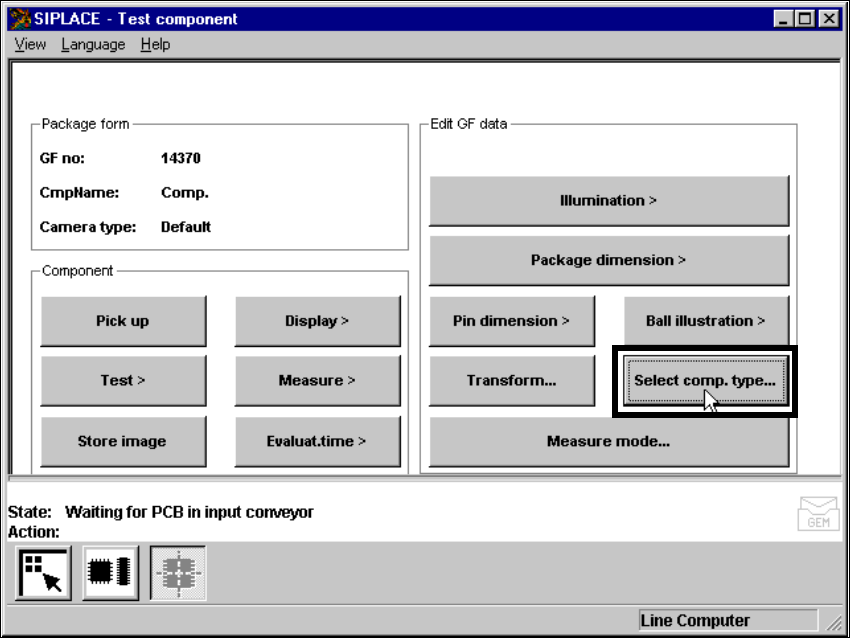
On the F machine, the ‘Test component’ menu now includes the ‘Set component type’ option. 6
Abb. 6.6.43 ‘Test component’ menu, ‘Set component type’ option (on F machines only)
User Manual SIPLACE 80S-20/F4 6 Vision functions
Software version SR.406.xx 02/2000 Issue US 6.6 Test Component
329
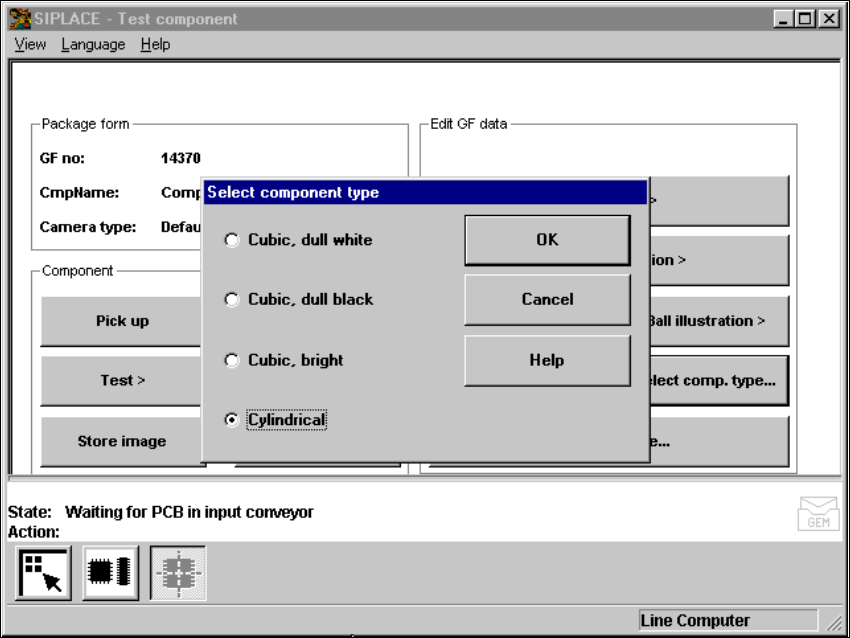
The following button appears when this option is selected. 6
Abb. 6.6.44 ‘Test component’ menu, ‘Set component type’ option
Select this option if centering errors occur with standard lighting. These 4 selection
options enable you to match the illumination perfectly to the component to be placed. All these
options provide specific combinations of the flat, average, and steep methods of illumination. 6
6
Mouse functions 6
Å Use the mouse to highlight the component type.
Å Click on ‘OK’ to confirm your input. The option box will close, and you will return to the ‘Test
component’ menu.
Å Click on ‘Cancel’ to leave the option box without making any changes.
6