SIPLACE Vision Customer_en.pdf - 第109页
Component Shapes SIPLACE Vision Robu stness Display New SIPLACE Vision Functions for 605 and 701 Statio n SW S tudent Guide SIPLACE Vision (Customer) Edition 12/2008 EN Component Shapes 109 5.4.2.6 Rot ation In the follo…
Component Shapes
New SIPLACE Vision Functions for 605 and 701 Station SW SIPLACE Vision Robustness Display
Student Guide SIPLACE Vision (Customer)
Component Shapes Edition 12/2008 EN
108
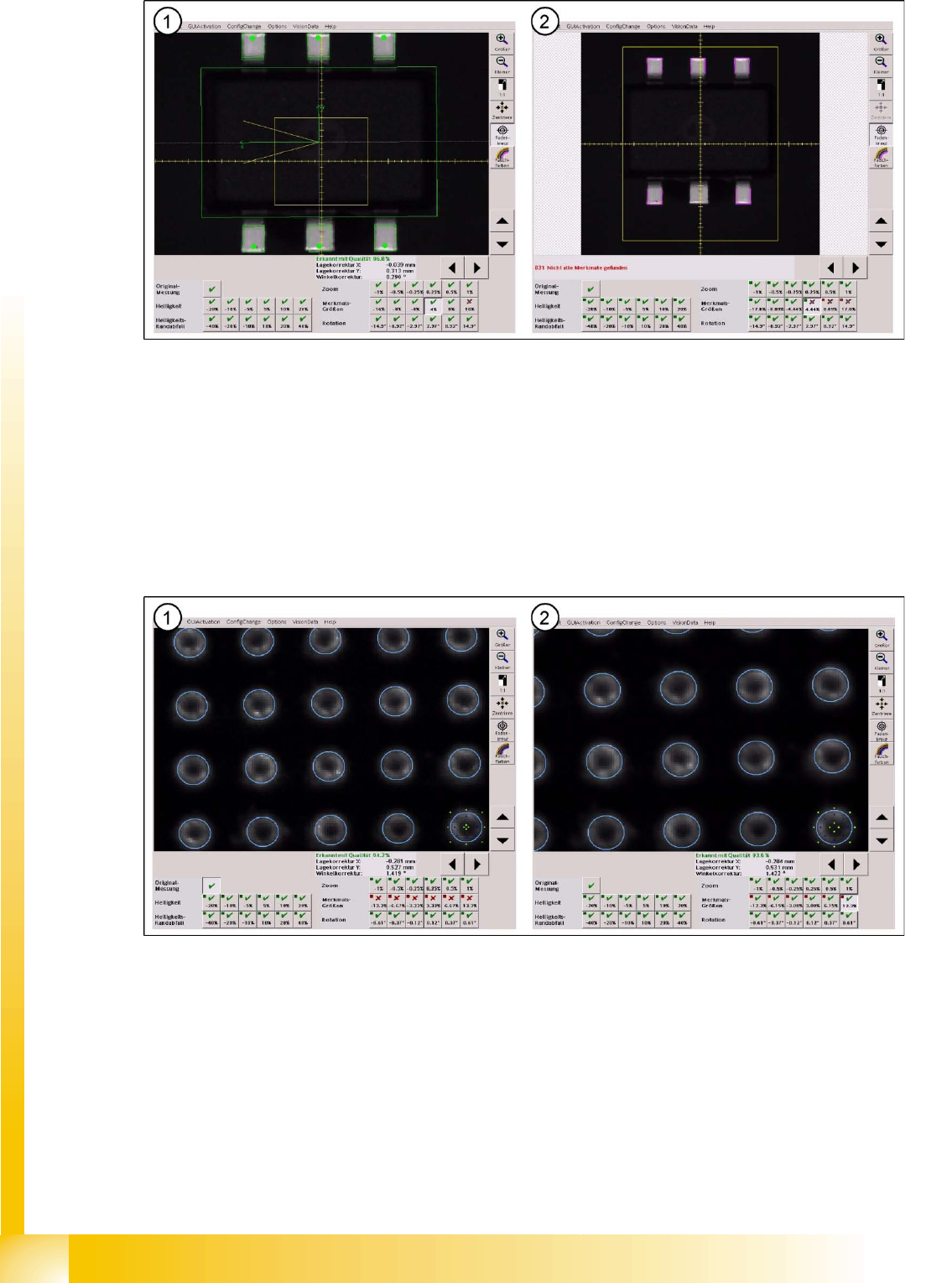
5-12: FeatureSize test
As can be seen in this zoomed view, the lower central lead is a bit too big. With an 8% zoom of the
component shape, image filter size and tolerance don't suffice to detect this lower central lead.
Zoom factors are adapted when the geometry is changed, which can be seen when comparing these
two displays.
The solution for detecting this lead with its oversized width is to increase the lead width from 0.32 mm to
0.35 mm and to reset the tolerance to 20%.
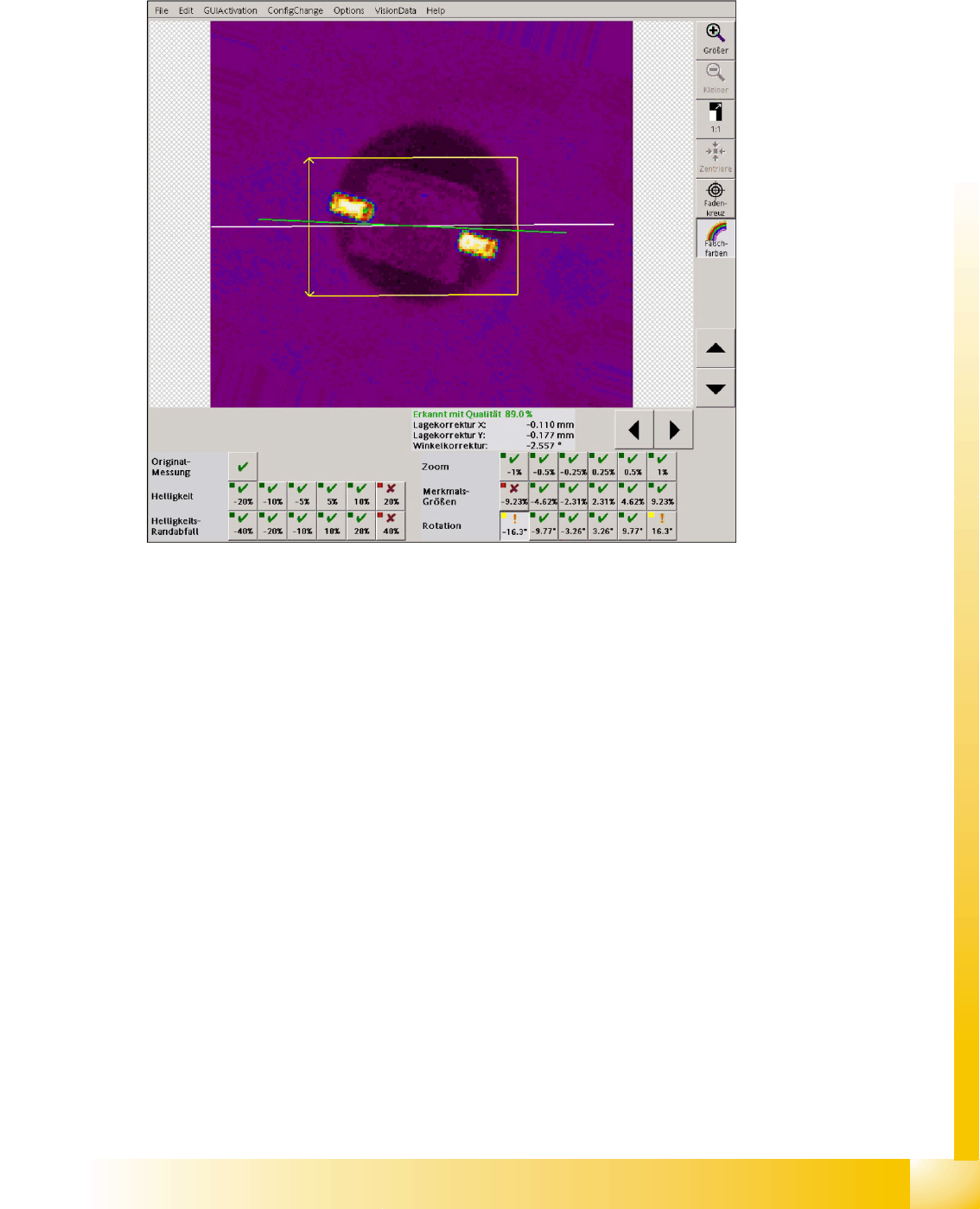
Looking at the following BGA example it is not possible to see doubtlessly that the ball diameter is
programmed too small in the original optical centering (only visible with higher zoom).
5-13: Ball diameter
Legend
1. The ball diameter, which is programmed with 0.6 mm in this case, only fits in the original
measurement.
2. A correction to 0.65 mm ball diameter supplies correct results for all 6 feature size measurements.
Component Shapes
SIPLACE Vision Robustness Display New SIPLACE Vision Functions for 605 and 701 Station SW
Student Guide SIPLACE Vision (Customer)
Edition 12/2008 EN Component Shapes
109
5.4.2.6 Rotation
In the following 6 measurement steps the component image is rotated electronically and a detection is
carried out. It is checked if the measurement methods can detect these rotated component images with
the existing algorithms or filters.
5-14: Angle measurement in the robustness test
The angle measurement fails in the fine angle measurement step if the camera image was rotated to
16°. The measurement returns a result which, however, doesn't reflect the actual angle position which
is near the programmed tolerance minimum.
Attention: A SOD323 component with this angle position would be incorrectly placed.

Component Shapes
New SIPLACE Vision Functions for 605 and 701 Station SW SIPLACE Vision Flux Inspection – only in 605 SW
Student Guide SIPLACE Vision (Customer)
Component Shapes Edition 12/2008 EN
110
5.4.3 SIPLACE Vision Flux Inspection – only in 605 SW
When placing BGAs, to which no solder paste can be applied, (e. g. POP = Package on Package) the
balls of the BGA must be coated with a flux or solder paste. To ensure a secure soldering, it is necessary
to check if the coating of the balls is sufficient. This check is carried out by the Vision system by means
of a flux inspection.
The inspection of the coating is combined with the position detection and the component inspection in
order to avoid an additional image to be taken and to save time. The flux inspection is carried out after
the normal optical component centering steps.
The inspection of the coating makes special demands to the flux. Usually the flux is transparent in the
applied layer thicknesses. For this reason pigments must be added to the flux to ensure that the system
can recognize if the balls are sufficiently coated.
Flux inspection can only be used in conjunction with the 605 SW because it is not possible to place
Linear Dipping Units (LDU) on a SIPLACE X41.
Other X machines can house the LDU (on X feeder tables) or the hitherto existing flux dipping unit with
DIP turntable (on S tables). In SIPLACE Vision from version 351.15 onwards, intended for SC SW 605,
the dipped contacts can be optically centered after being picked up. The "Dipping before Vision" function
is not available in previous SW versions.
Two modes are available for a combination of flux dipping and optical recognition:
Vision Dipping
Dipping Vision
From station SW 605 onwards generally all component shape types with Vision before dipping can
absorb flux at the electrical contacts which is already possible with the 50X SW and the hitherto existing
flux dipping units.
For a 3D coplanarity inspection of a BGA Vision before dipping must be selected since the ball heights
change unpredictably during dipping, thus causing all coplanarity measurements of dipped BGAs to fail.
In this workflow, however, the centered component could be moved on the nozzle during dipping.
The dipping before Vision function can only be used for BGAs (CCGA) and the special nonstandard,
connector and socket types, thus for ball connections only.
Using dipping before Vision the flux is applied to component in the dipping unit after the component is
being picked up.
5.4.3.1 Flux Inspection
In this inspection step a visual check is performed in order to find out if the contacts are coated with flux
or solder paste.
Requirements and General Information
The following requirements must be met in order to use this option:
The Dipping option must be selected for the component.
The required sequence of the function must be programmed for the component shape.
With Dipping before Vision it is not possible to determine the amount of applied flux or solder on the
contacts! (E. g. in order to detect if the solder paste causes short circuits.)
Possible causes for insufficient coating of flux or solder paste:
Damage to the balls
Surface properties of the balls (e. g. dirt that hampers a coating)
Inappropriate flux (The flux is transparent and does not change the optical appearance of the balls.
The flux must be white or darkly pigmented.)
Height of the flux in the dipping unit too small