SIPLACE Vision Customer_en.pdf - 第80页
Component Shapes Specific Component Shapes Optical Re cognition and Evaluation of Leaded COs S tudent Guide SIPLACE V ision (Customer) Component Shapes Edition 12/2008 EN 80 Presentation of lead filters In the diagram, t…
Component Shapes
Optical Recognition and Evaluation of Leaded COs Specific Component Shapes
Student Guide SIPLACE Vision (Customer)
Edition 12/2008 EN Component Shapes
79
5.3.8 Optical Recognition and Evaluation of Leaded COs
Shown in the example of a SO 14…
A leaded CO is processed with the following measurement steps:
1. Position recognition through:
A.) Recognition of possible feature positions
B.) Filtering, evaluation and determination of actual features
C.) Combination of features so that the CO center position can be calculated for placement.
2. Component inspection via:
A.) Determination of feature position
B.) Determination of feature quality
C.) Recalculation of CO position.
The term "feature" stands for programmed, recognizable parts of the component, suitable for clear
determination of the CO center for placement purposes.
5.3.8.1 Determination of Leaded CO Position
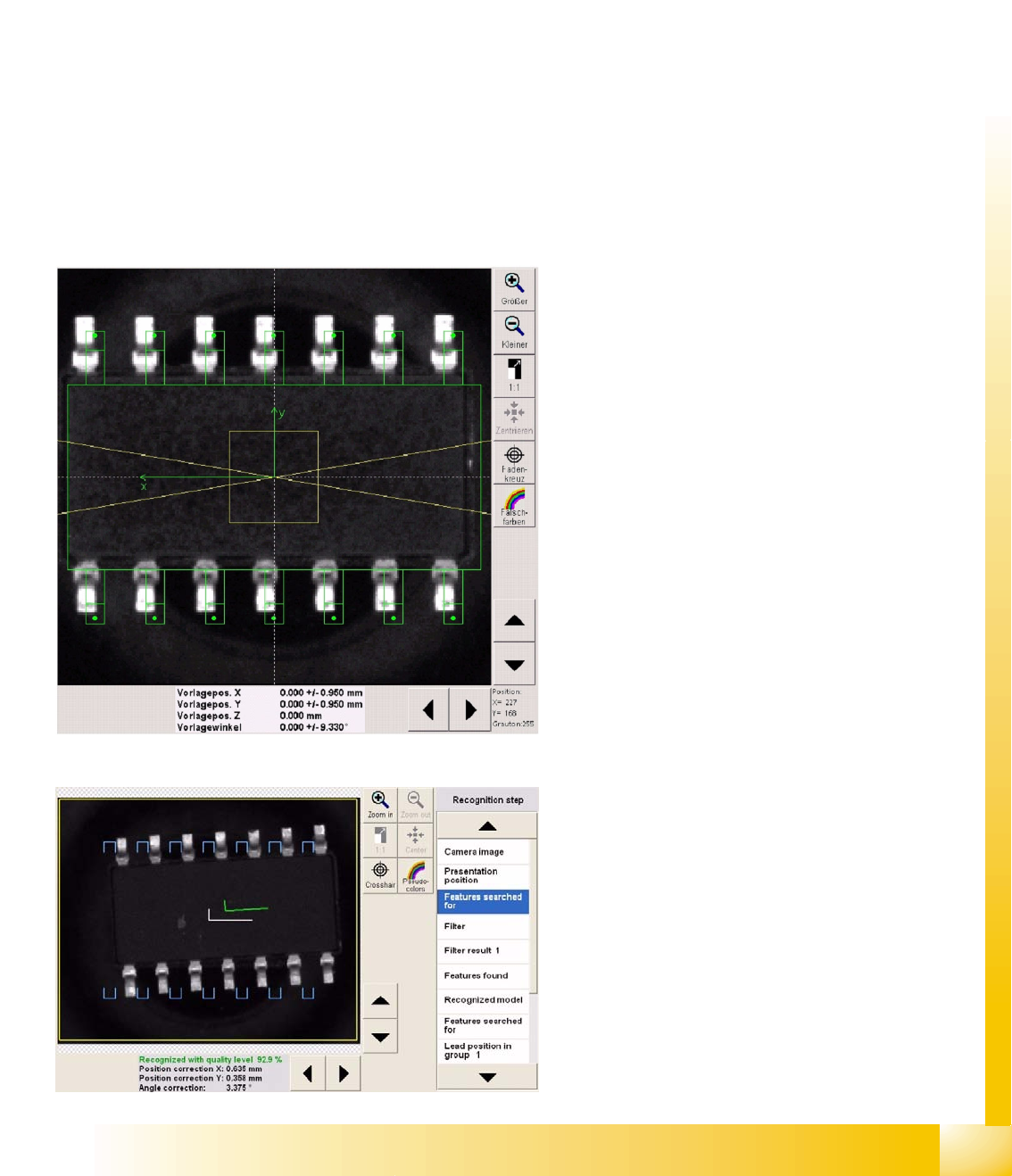
Diagram Presentation position
This menu is the same as that used for the
unleaded COs.
The green points in the leads indicate the lead
ends.
Attention: an incorrect lead angle will result in false
measurement values!
The division in the leads shows the contact length
(at the end of the pin) for a Gullwing lead type.
The outline of the plastic body should reach up to
where the lead begins, making evaluation and
correct programming simpler. SIPLACE Vision will
not check this dimension.
The gray value of 255 in the diagram on the left,
shows that the mouse cursor is pointing to a part
of the camera field which has this brightness.
The gray value 255 means that the mouse cursor
has been placed on a bright contact surface.
Presentation Features searched for
The blue U-shaped tick marks the gullwing lead
ends searched for i.e. the contact surfaces.
The green tick shows the measured CO center
(also see the measurement results below the
screenshot).
The white tick shows the expected CO center in
the CO camera center.
Component Shapes
Specific Component Shapes Optical Recognition and Evaluation of Leaded COs
Student Guide SIPLACE Vision (Customer)
Component Shapes Edition 12/2008 EN
80
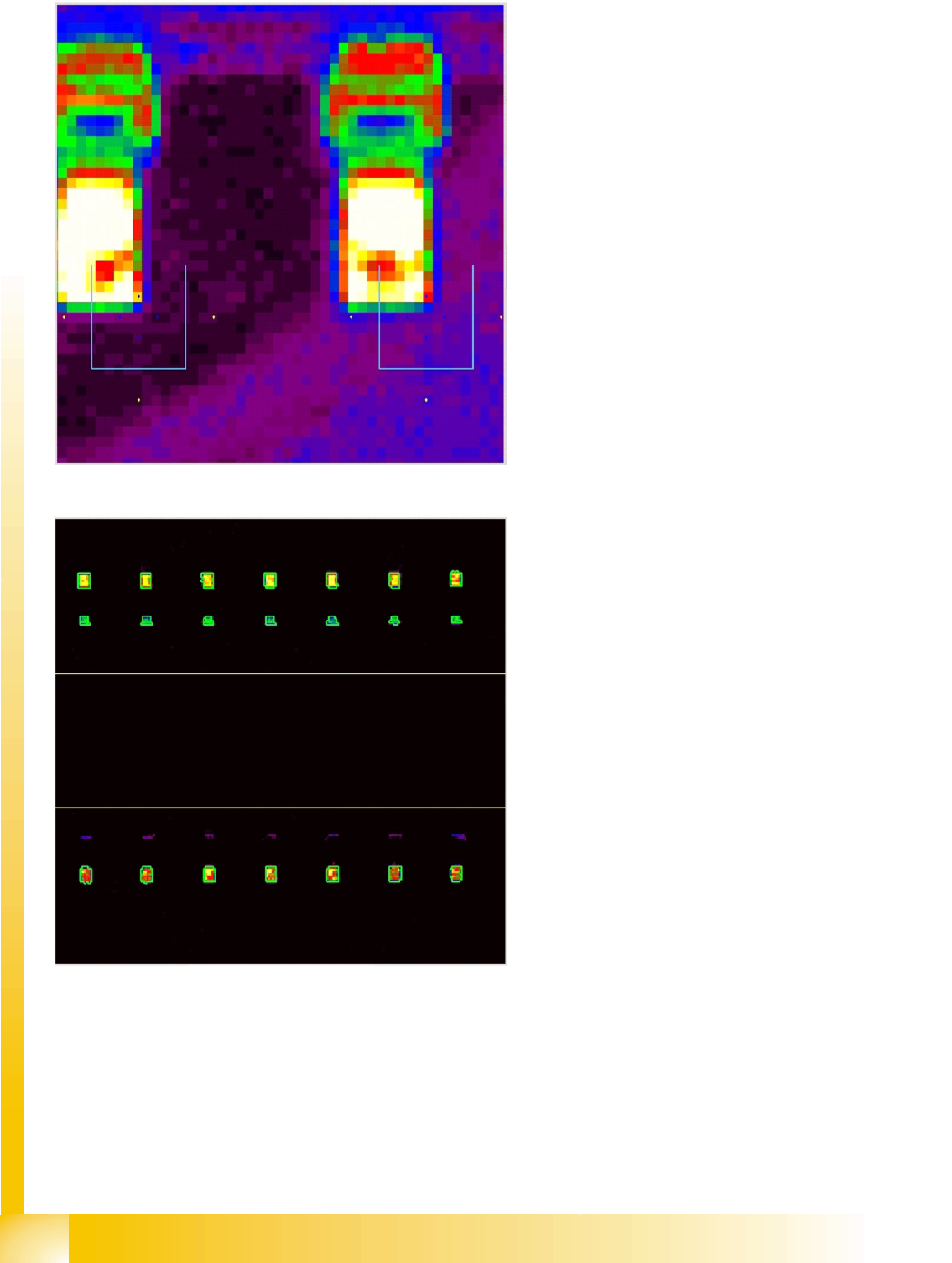
Presentation of lead filters
In the diagram, the evaluation points for
recognition of the gullwing contact surfaces are
marked at the expected lead positions.
Dark blue shows the four evaluation points for the
bright contact surface.
Yellow shows the three evaluation points for the
dark background.
Red and green shows the lead background and
the lead bend.
The contact surface is shown by: white/yellow
with a red/green outline.
Recognition step Filter result 1
The lead brightness is recognized by the filtering
process. The appropriate regions are outlined in
green (including the lead surfaces in the
background), indicating that they have been
recognized as lead candidates.
Increased illumination helps the system to
recognize the lead parts in the background row
below. This menu clearly demonstrates the effect
achieved by changing the illumination.
Component Shapes
Optical Recognition and Evaluation of Leaded COs Specific Component Shapes
Student Guide SIPLACE Vision (Customer)
Edition 12/2008 EN Component Shapes
81
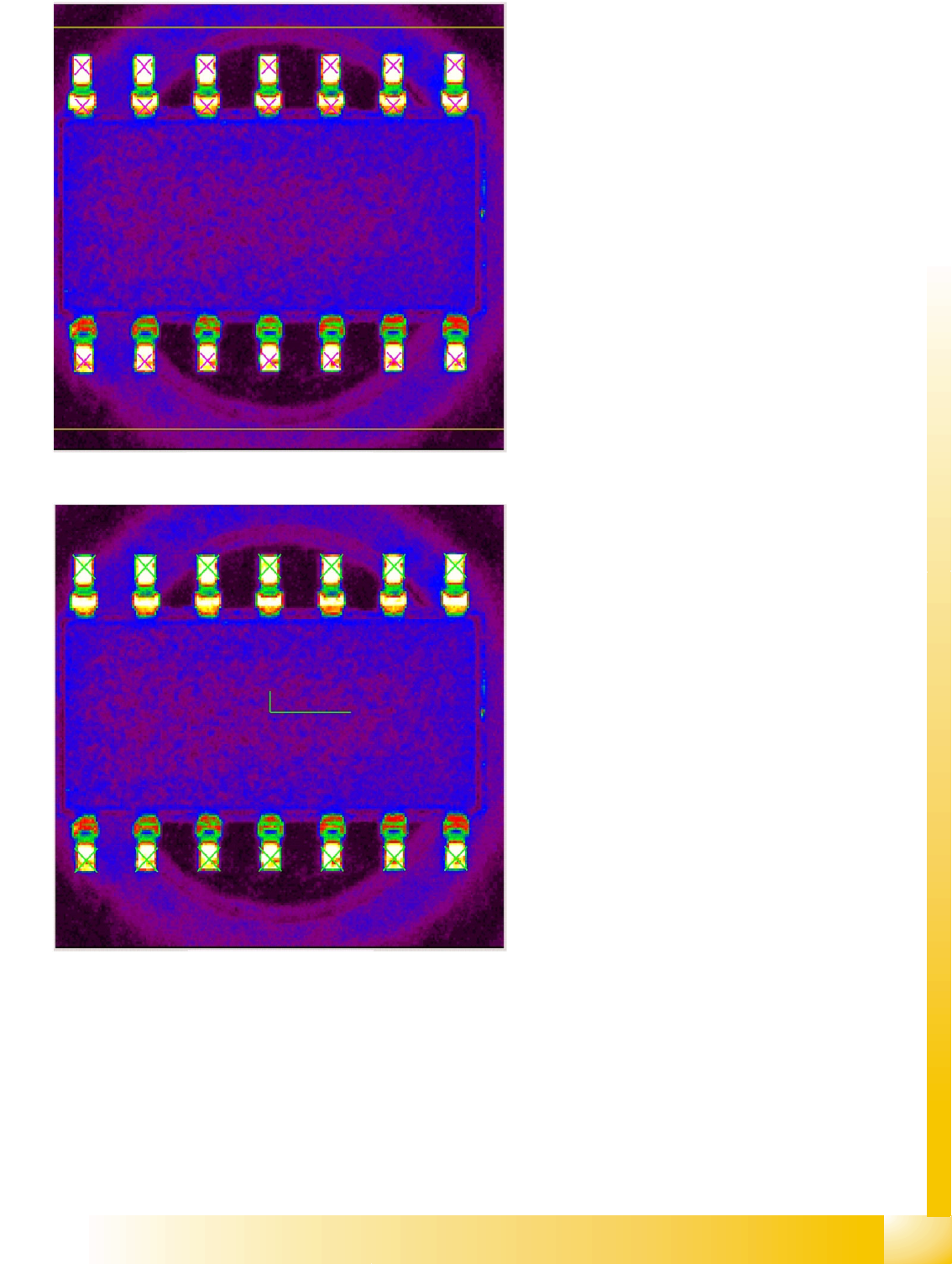
Recognition step Features found
The purple crosses mark the surfaces of the lead
candidates.
In the next step, the distance between the lead
candidates is checked. Candidates which do not
fulfill this criterion will be singled out.
Recognition step Recognized model
The green crosses mark the contact surfaces of
the lead models.
The green tick shows the CO center for
placement, calculated from the lead positions. The
CO position is therefore determined and CS-
specific CO inspection can begin.