SIPLACE Vision Customer_en.pdf - 第194页
linienfarbe 192,26, 128 Pin description Wraparound: - could not be dark / Gullwing: have a contact length s horter than the pin length / J-Lead have a 4- sided filter / ICOS Ball filter could NOT distinguish balls fr om …
linienfarbe 192,26,128
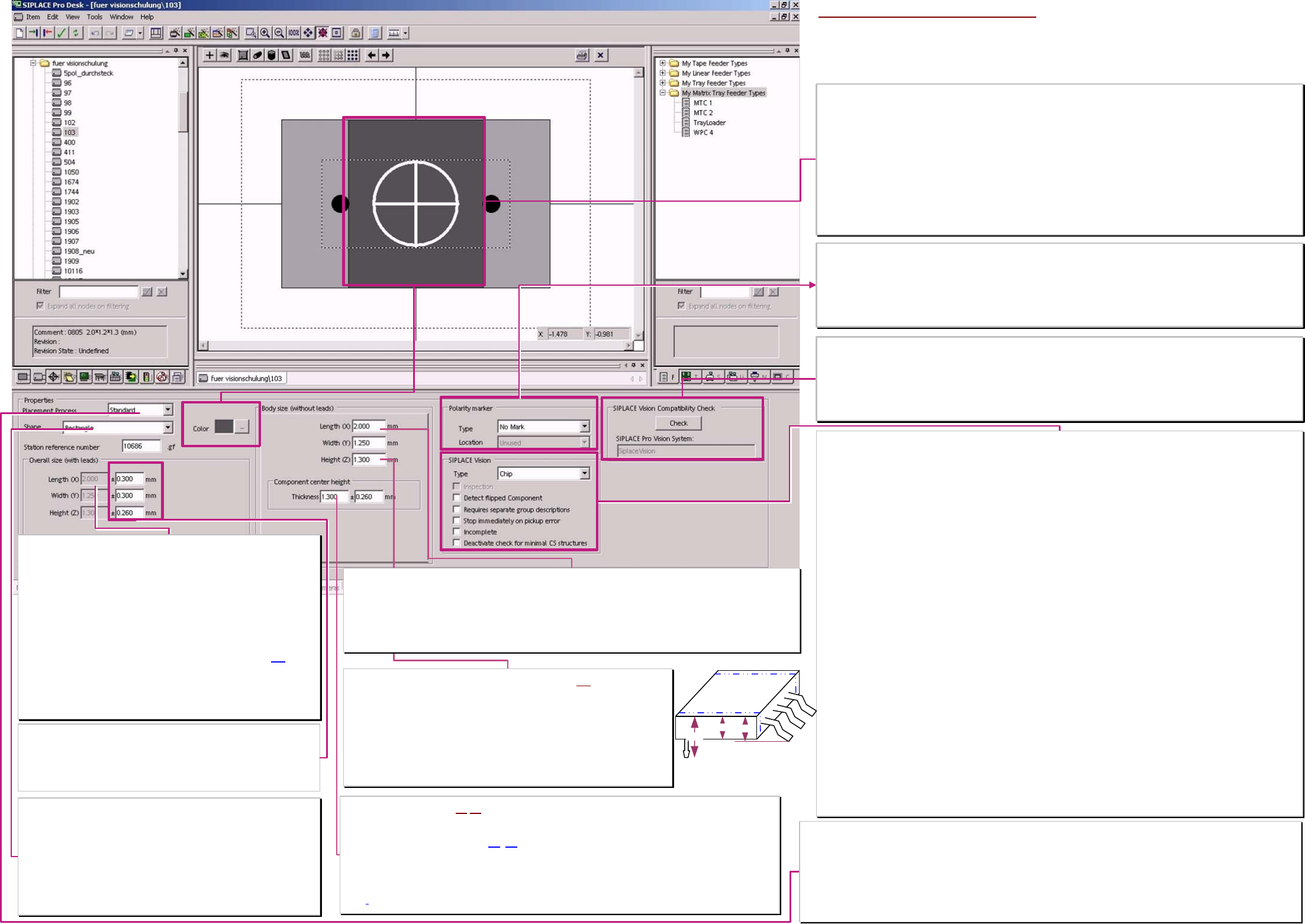
Overall size with leads (component dimensions WITH pin's)
The comp. dimensions X/Y/Z without pin's & the PIN dimensions in all
groups are respectively added and the result is displayed here.
With SIPLACE Pro 5.1 this 3 values are separated for SIPLACE Vision
& ICOS.
** This allow to separate ICOS-special programmings from
the calculated real dimensions for SIPLACE Vision.
X/Y-value equal to X/Y without PINs for CHIP/MELF. or
X/Y-value for comp. with PIN = ∑ (PINgruop offset * PIN-Length/2 ) of
the respective, opposite pin-groups
The height of the centering pins is added to the body height (3).
From this calculated Z dimension is the target position for the Z-Axis
positioning defined for: pickup height (lin.feeder...); optical centering
(stationary cameras); placement height & for AOI inspection system.
(for the height of the centering pins the Z-axis should move slowly).
Component body shape
The comp. body shape is a classification feature of different component
shape types.
From the horizontal cylinder of a MELF the kind of illumination and the
measurement method for comp. width measurement reduced.
The vertical cylinder of the ECV’s set no special illumination or
measurement.
The standard body is rectangular and is selected also if the real body
(of e.g. a shield is an Polygon.
Properties (placement methods)
This setting checks the specified, special handling methods of the comp. shape type. (at Integrity check
√ or at
producability test of the download). This functionaltiy could be reached also with single setting of profile and comp.
checks in the respective menus,
Standard: comp. Is picked with contact and is placed with maximum speed.
0201 (0603mm): is picked contactless (profile 17) and with comp sensor is the presence tested.
01005 (0402mm): is picked contactless (profile 35) / with comp sensor is the presence tested and with reduced force
placed profile 33 or 34 set this. / C&P12 with restrictions and special sleeve / feeder ).
Programming windows of comp. dimension tolerances X/Y/Z
This comp. dimension tolerances define the possibility to
recognize wrong picked comp.’s optically and sort them OUT!
Tiny, proper tolerances are (especially at comp. width of CHIP &
com. length) necessary for YOUR increased placement reliability.
Component dimensions Z WITHOUT (Centering) pin's (2)
This comp. dimension Z is the comp. height without centering pins but
electrical terminals are included in this height value
because of focus height & dynamic profiles entered in other editor windows!
!30% of this height value (given by C height and R on nozzle) is the minimum
limit for the comp. sensor at C&P20-head for component presence check (at
the moment (up to 701) programming error workaround).
Calculation for the height with pin -centering pins- see left.
Body dimensions (component dimensions X/Y WITHOUT pin’s)
The comp. dimensions X in horizontal direction is the direction in which (normally) the nozzle is set.
Y direction is the vertical component direction (normally the shorter one).
At teaching with SIPLACE Vision camera support this X/Y-Data may include the Pinlength round the plastic
body (body is the outline arround the visible bright parts if programmer set nothing different).
This depent on the programming of the operator on the end to the Comp. shape-assistent teach sequence.
Component center height (1)/(2) This field must not have a 0 value in future!
>This is the body height of the component normally identical to the height ‚without Pin’s.
Electrical terminals (Gullwing/J-Lead/Wraparound) on the side or Balls/ columns are included.
>The tolerance is defined that way (2)
-(1)that a measurement between this pin's is accepted too.
Used is this value for comp. height check at the comp. sensor of C&P20 head and the C&P12head and
for the comp. presence check of the comp. sensor from C&P12 head.
For a component with centering pins or with coloumns program the comp. sensor only for presence
check!
SIPLACE Vision Data window (contents not transferred to ICOS machines)
Type
One of the 17 possible component shape types have to be selected before Download to the SIPLACE Vision
machines! Component shapes at ICOS machines do not need this classification.
BareDie; Chip; Melf; Moulded; ECV; SOxx; QFP; DPACK; SOT; SOJ; PLCC; BGA; CCGA; Socket; connector;
Shield; Nonstandard. With defined type & with ’Incomplete’ the comp. shape geometry could be taught w. comp.
camera.
❑ Inspection
The inspection mode is always active (also when it is insensitive OFF). With Nonstandard, Moulded, BGA and
CCGA comp. shape types the programmer could disable this mode !NOT recommended!.
❑ Detect flipped Components
Resistors in CHIP spape type could be recognized in their Z-orientation. Low grade solder connections caused by
paint or slopes are avoided.
❑ Requires separate Group description
This is necessary for terminals like: corners; polygon circles, columns and blops because at ICOS are no proper
measurement algorithms therefore available (error message at producability test or download).
Necessary also for bright terminals on bright background which mighty be recognized by the better cameras of
SIPLACE Vision.
Another use is for BGA’s with desired inspection for a lot of terminals (at ICOS often only the outer terminal ring is
inspected because of excessive time consumption)
❑ Stop immediately at pickup error
Thisis to activate at tantal capacitors that the component could be removed from the operator. (This avoid sparking
if the component would be cut).
❑ Incomplete
With this in complete comp. shape description could be downloaded to SIPLACE Vision machines to teach them
with the comp. camera.
(program comp. Dimensions /-tolerances and SIPLACE Vision comp. shape types).
❑ Deactivate check for minimal CS structures
necessary to place components with very tiny terminal features in ’prototype numbers’.
comp. features which are to tiny for the comp. camera resolution and for the precision specification are not
anymore checked at download to the station (and they could be placed ).
Take placement accuracy restriction in account !
Polarity marking
For a marking of PCB- and set up printouts, to see components with polarity better. (Helpful also to color the body
of such components (e.g. red).
Marking type: Line or dot
Marking location: (may cover connecting features)
Body color
For marking comp. shapes for PCB printouts to recognize special comp.’s for visual inspection better.
Helpful e.g.
Red comp.’s with polarity
Blue comp.’s with separate group description
Orange comp.’s with Precedence’s
Yellow comp. for high resolution camera or 3D-Coplanarity
Green real BareDie -take care on ESD safe Die Handling-
Lila comp. programming with not recommended features or with disabled ‚min. structure check.
Light blue Resistors
Rosa Coil
Brown Tantal. ...
SIPLACE Vision Compatibility check
testing functional extensions in SIPLACEVision recognition SW.
❑ SIPLACE Vision V33 (since SR/MC 603) is the required extension for:
► comp. Shape description incomplete
► Deactivate check for small component shape structures
Component shape body data
** since SIPLACE Pro 5.1 the X/Y-Z-body dimensions for SIPLACE
Vision are calculated (incl. Centering pin height) and separatelly
from this dimensions for ICOS also respectivelly they are entered.
1
2
3
A programing overview about process reliability Editon for SIPLACE Pro 5.0 extended for 5.2
linienfarbe 192,26,128
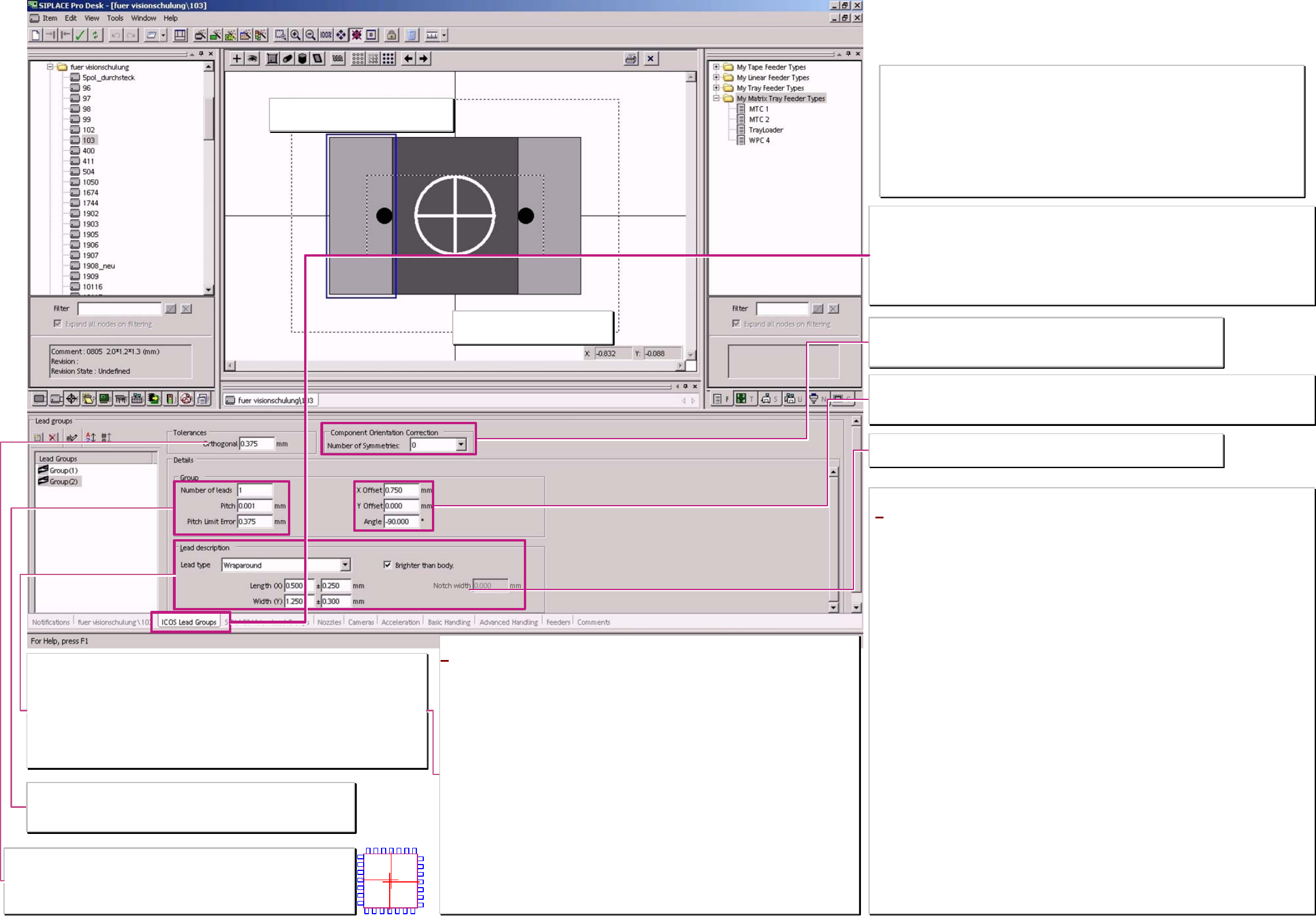
Pin description
Wraparound: - could not be dark / Gullwing: have a contact length shorter than the pin length /
J-Lead have a 4- sided filter / ICOS Ball filter could NOT distinguish balls from circles /
corner and polygon circles for Shield recognition aswell as Blops and Columns are ONLY for
SIPLACE Vision to program.
Pin's are searched in width and length At Gullwings the recognition area is defined by the
shorter contact length.
Width tolerance
Set the filter but ICOS do not measure the width.
Full marking line for PIN group show that
Drag&Drop function is activated at setting.
Tolerances - ortogonality
Important only for ICOS systeme! 4 sided comp. shapes should be programmed here
with an ortogonality threshold of approx. 10-20% (ident. with pitch tol.) of the pitch.
The opposite groups may differ with their center positions from the center coordinate
line. This is a reject criteria if the programmed limits are exceeded.
Coordinate cross show the comp.
reference of the programming
Component orientation correction
ONLY for SIPLACE Vision starting with Station-SW 603 on the machine.
Valid ONLY for Components with asymmetrical terminal features!!
Otherwise you create accidential placement angle errors!! ;-C !!
Notch / ❑ brighter than body
Only for Nonstandards which are scheduled to SIPLACE Vision.
*Gullwing (gull wing)
pin's are measured on the Pin end.
The shorter the contact length of the pin is programmed the more precise the centering get the Pin
bending.
Wraparound (‚wrapped around the body edge’)
pin's are measured at the counter side of the pin end (you might call it the pin beginning’) mean at the
edge where it is wrapped around the body edge.
The pin could be programmed that it is outside orientated this avoid measurement at pin ends with
notches (This pin’s with notches could ICOS not recognize).
ONLY SIPLACE Vision could recognize the pin's which might be dark on a bright background.
e.g. for flat illumination on components with white ceramic body there, the pin metal reflect not back
to the camera.
J-Lead
pin's are measured on all 4 sides of the lead.
The illumination of the pin bottom rounding come from all 4 illumination levels of the cameras.
Ball (hemispherical terminal)
pin's are recognized at the terminal center.
With flat illumination direction the top of the terminal is not visible. This creates the so characteristic
ring shape for the Ball position in camera image.
Correct and damaged Ball’s could not be distinguished with ICOS camera technique.
Group (parameter)
In the editor is the Pitch shown a fault if the pitch is smaller than the Pin width.
The Pitch tolerance should not exceed 10-20% of the pitch. This may lead to
overlapping measurement windows for the pin recognition.
Lead group coordinates
This coordinates have to align CHIP and MELF pin edges to the body edges.
The position of the lead groups for integrated circuits could be programmed that way that the drawing has
no connection to the body or that the pin group looks to be inside the body dimension.
Programming window titel (according function)
‚pin's for both Vision systems’
– with SIPLACE Vision function extention:
‚ICOS pin groups only’–
Think at EACH programming of a component shape on the possibility of a wrong pick up of the
component.
If such sideway picked (billboard effect) or upright picked (tombstone effect) components are
NOT recognized by the camera they are placed and cause the functional defect of the board.
An extreme example is the SOD323;
Is this is programmed for ICOS-Visionsystem as a comp. with 2 Gullwings so it might happen
caused by nozzle and/or feeder difficulties that the DPM rate increase up to 1000 or 20000.
A programming for ICOS as a CHIP component (Comp. as wide as pin's & Wraparound pins
inside instead of Gullwings outside) recognize the wrongly picked component safely
(at SIPLACE Vision recognize each measurement algorithm this in Inspection).
Component shape
Pin - /Group data
* at this descriptions for training we assume that this component
shapes are also valid for machines with ICOS-systems.
Therefore, program here only Leads ICOS SW & ICOS Cameras could
recognize.
The programming desk is designed for users they do not use this on
the previous ICOS vision system
– for pure placement on SIPLACE Vision Machines (X/D) –.
Therefore, all the pin types are offered in this general programming
window. We describe trhis new pins for training in the SIPLACE Vision
programming window
If following Pin types are programmed here so ICOS systems could get
the data too and center those components optically.
Columns: In ICOS, they are identically illuminated to balls and
optically centered.
Blobs: They are programmed like J-leads (contact length/-width
equal to Pin length/-width). Therefore, they are illuminated like
J-Leads and optically centered.
Pin’s with prog. notches: according their optical impression they are
recognized in ICOS (or not).
Since SIPLACE Pro 5.2 you could sent also
Centering pins to ICOS systems. At no actual system an optical
recognition is done.
A programing overview about process reliability Editon for SIPLACE Pro 5.0 extended for 5.2
linienfarbe 192,26,128
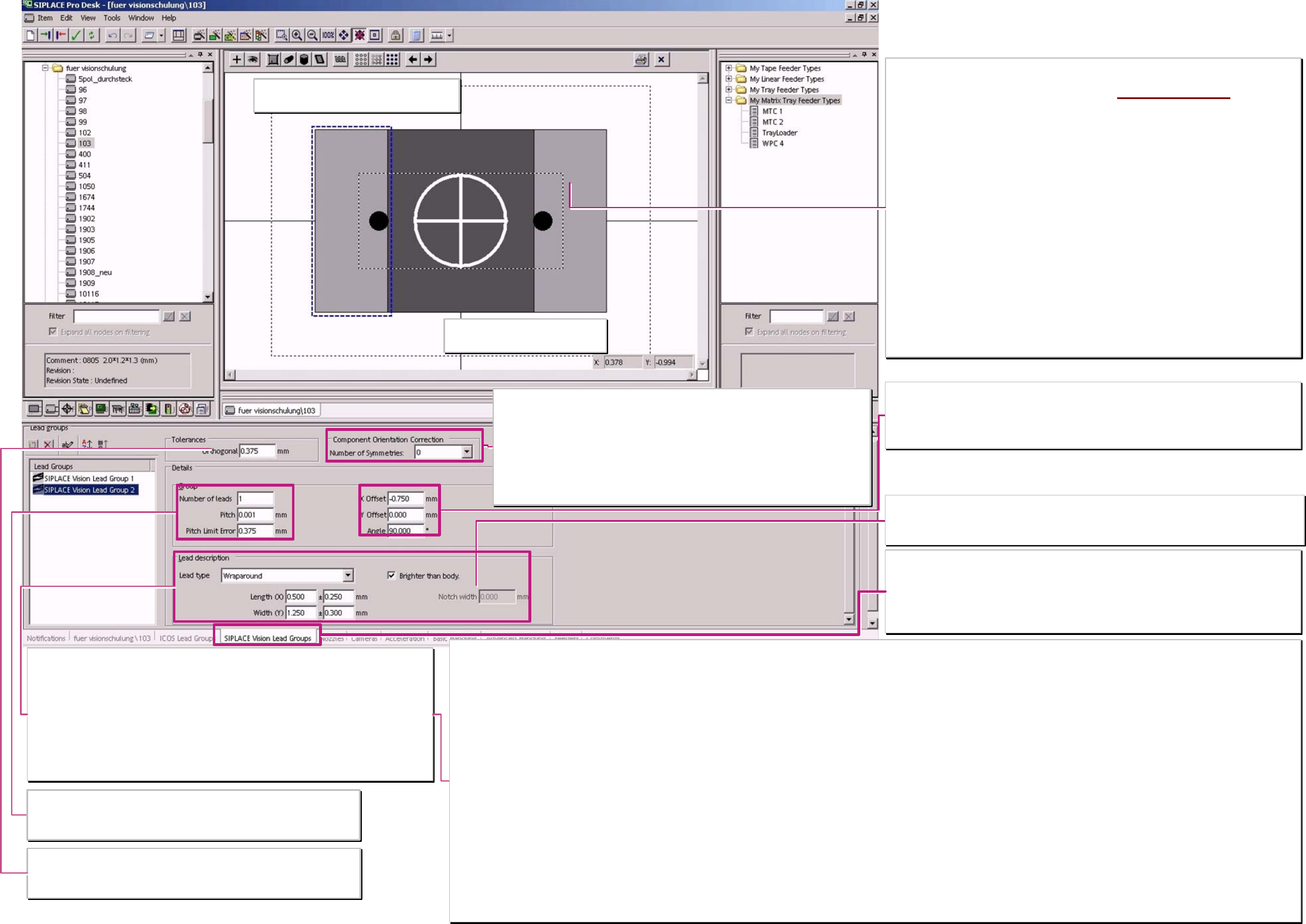
Pin description
Wraparound: - could be dark / Gullwing: have a contact length shorter than the pin length /
J-Lead have a 4- sided filter / ICOS Ball filter could NOT distinguish balls from circles /
corner and polygon circles for Shield recognition aswell as Blops and Columns are ONLY for
SIPLACE Vision to program.
pin's are searched in width and length At Gullwings the recognition area is defined by the
shorter contact length.
Width tolerance
larger approx. 40% change the filter parameter for pin recognition respectively, a length width
relationship of less than 1:2 show the same changing on the filter.
Dotted marking line for PIN group shows that
Drag&Drop function is De-activated at setting.
Tolerances - Ortogonality
ONLY important for ICOS systems!
In the inspection step algorythm of SIPLACE Vision the plausibility of the group
positions is automatically checked.
Coordinate cross show the comp.
reference of the programming
Component orientation correction
with unsymmetrical terminals they could be found with multiple measurements in different
angles. The TWIN turn the comp. in the different angles when the measurement before
failed. At C&P heads are the electronic images of th programming are turned. (anyway
time consuming).
For components with symmetric terminal features create a number more than 0 or 1 a
polarity placement error.
2 => 180° / 4 => 90° / 6 => 60° / 8 =>45° are the possible placement angles in which the
camera may recognize the asymmetric terminals.
Notch / ❑ brighter than body
Only for Nonstandard compomponents with Wraparound pins.
This programming of a notch avoid at the pin width center to set a recognition pixel pair for Pin
recognition.
Terminal types with a better programming and recognition in SIPLACE Vision than in ICOS!
Blop
Pin is measured in the center.
At ICOS are the straight edges programmed for short Gullwings.
The Blop learn and recognize the irregular connecting area. A comparison of size and center position guarantee that no structures are mixed up and therefore placement errors occur.
Columns
Terminal is measured in the center.
Such a circular area was programmed in ICOS also as a ball. SIPLACE Vision could distinguish with special filters balls from defects or columns. These Columns do not have the characteristic black
center position.
Polygon circles
Feature is measured in the center.
At ICOS balls are programmed & with teaching the illumination, contrast and the measuring method are set for the dark circle. drillings at Shields are often not specified and deviates widely.
In SIPLACE Vision each polygon circle has to be programmed for a single feature.
The measurement algorithm search along the tangential search lines for the brightness transition.
Corner (inside - / outside corners)
Feature is recognized on the outermost edges of the measurement vectors.
At ICOS are ‚virtual, short and wide Gullwing pins are programmed.
Short measurement vectors close to the edge recognize the edging dark bright transitions.
Minimum 3 corners have to be programmed for position determination of the component. Not 90° (45°- 135°) corners are the best programmed with the camera.
Wraparounds with notches Dark wraparounds on bright background
These pin's than not measured at the Pin width center the pixel pairs and measurement windows are positioned at the corners of the pin's. The pin side edge is measured with a pixel pair and the pin end
edge is measured with 2 pixel pairs. The notch width is NOT measured. The measurement algorithm for dark wraparounds on bright background are also only in SIPLACE Vision available!
Centering pins
This feature is NOT optically measured it is used to program the ’dynamic profile move slowly in to target height position’.
Group (parameter)
In the editor is the Pitch shown for faulty if it is smaller than the Pin width.
The Pitch tolerance should not exceed 10-20% of the pitch. This may lead to
overlapping measurement windows for the pin recognition.
Lead group coordinates
This coordinates have to align CHIP and MELF pin edges to the body edges.
The position of the lead groups for integrated circuits could be programmed that way that the
drawing has no connection to the body or that the pin group looks to be inside the body
dimension.
Programming window titel (according function)
for SIPLACE Vision functional extension:
‚SIPLACE Vision lead groups’
Pin programming parameter copied from ‚for both Vision
systems - with SV-functions only ICOS PIN groups
’
Setting the tick at ‚Require separate group description’ copy
the programming data from ‚ICOS-window into SIPLACE
Vision – programming window!
Deleting this tick erase the SIPLACE Vision programming
data immediately! ;-(
Separate Pin group descriptions are required when:
> the optical feature is NOT available in ICOS (see below)
> with the better camera technique the comp. Features are
better illuminated and recognized.
> the programming because of algorithm difficulties in ICOS
not fit to the real geometry.
> the terminal Inspection with SIPLACE Vision is remarkable
faster than with ICOS. (for SIPLACE Vision we use the full
number of terminal programmings)
Component shape Pin - /
Group data SIPLACE Vision
A programing overview about process reliability Editon for SIPLACE Pro 5.0 extended for 5.2