SIPLACE Vision Customer_en.pdf - 第146页
SIPLACE Vision - Teaching Fiducials Fiducials for Good/Bad Recognition of panels Teach Surface for Inkspots S tudent Guide SIPLACE V ision (Customer) SIPLACE Vision - T eaching Fiducials Edition 12/2008 EN 146 6.3.2 T ea…
SIPLACE Vision - Teaching Fiducials
Synthetic Inkspots Fiducials for Good/Bad Recognition of panels
Student Guide SIPLACE Vision (Customer)
Edition 12/2008 EN SIPLACE Vision - Teaching Fiducials
145
Features
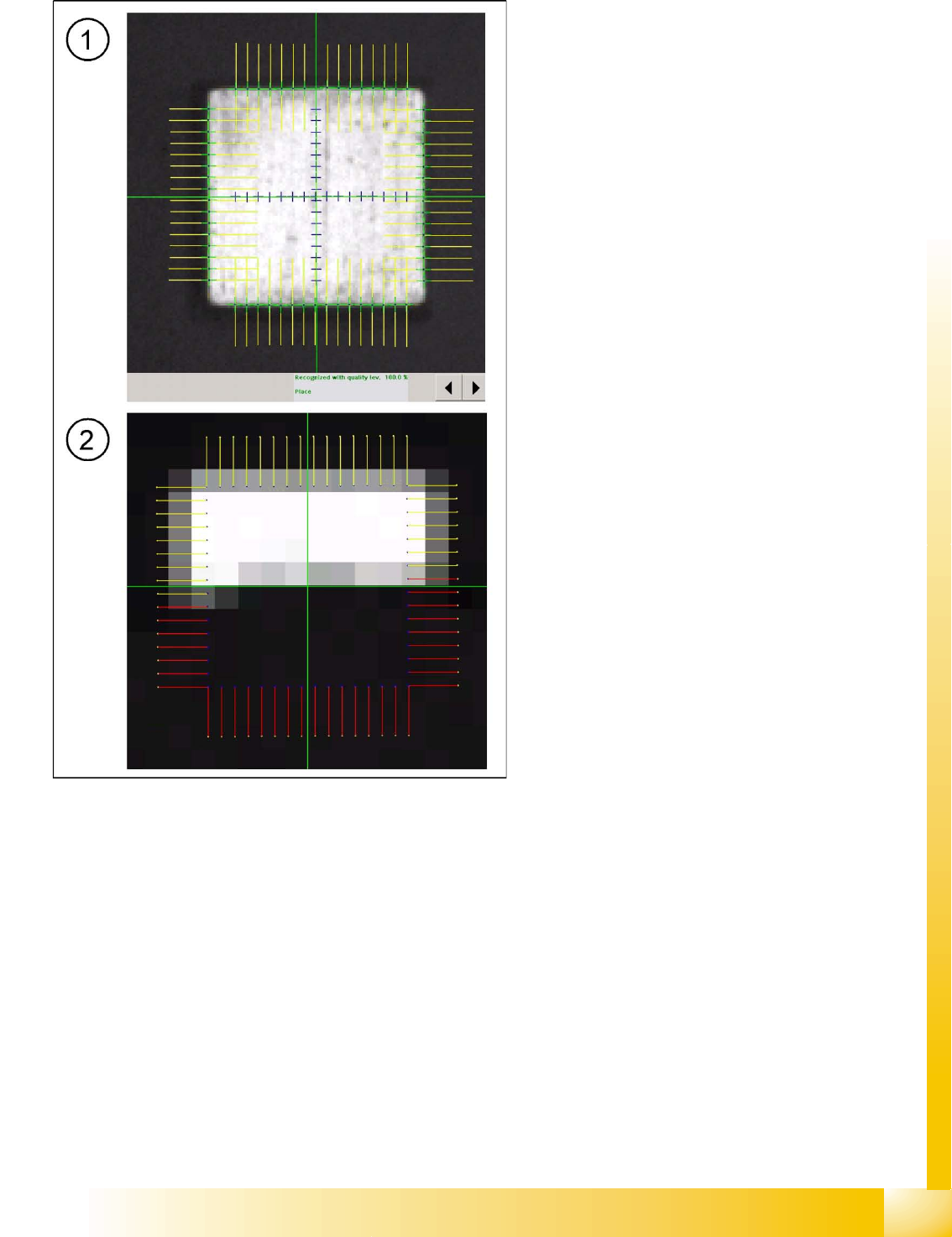
6-12: Synthetic good/bad fiducials (inkspots)
The model is assigned a geometric description
(circle, rectangle, diamond). Teaching is not
required. That makes this method the most
convenient for the operator, which is why it is
recommended as a standard procedure. (If the
precentering step (1) fails, the fine centering
process will not be continued (2) and "do not
place" will be issued).
This method only evaluates the outer contours
of the fiducial. It is therefore not susceptible
towards fluctuations in brightness and
contrast.
During classification, the fiducial is searched
for in a defined search area (see position
correction for fiducials). It does not need to be
in the same position in the camera image as it
is for teaching. This enables conveyor
tolerances to be compensated.
The algorithm has been optimized for position
finding purposes and less for placement
classification. The algorithm is therefore not
suitable for applications in which interfering
structures with similar contours are located in
the vicinity of the fiducial i.e. especially when
the bad case can not be differentiated from the
good case by looking at differences in the
outer contours alone. This can be the case
with laser engraving or incomplete blacking
out with a marker pen.
If the same geometric shape is used both for
position recognition and for good/bad
classification, you will need to create the fiducial
shape twice in SIPLACE Pro: (so that the relevant
teaching position can be opened in SIPLACE
Vision).
1. Position 1 mm square
2. Bad mark 1 mm square
For illumination settings and algorithms, refer to
the explanations of position fiducials.
SIPLACE Vision - Teaching Fiducials
Fiducials for Good/Bad Recognition of panels Teach Surface for Inkspots
Student Guide SIPLACE Vision (Customer)
SIPLACE Vision - Teaching Fiducials Edition 12/2008 EN
146
6.3.2 Teach Surface for Inkspots
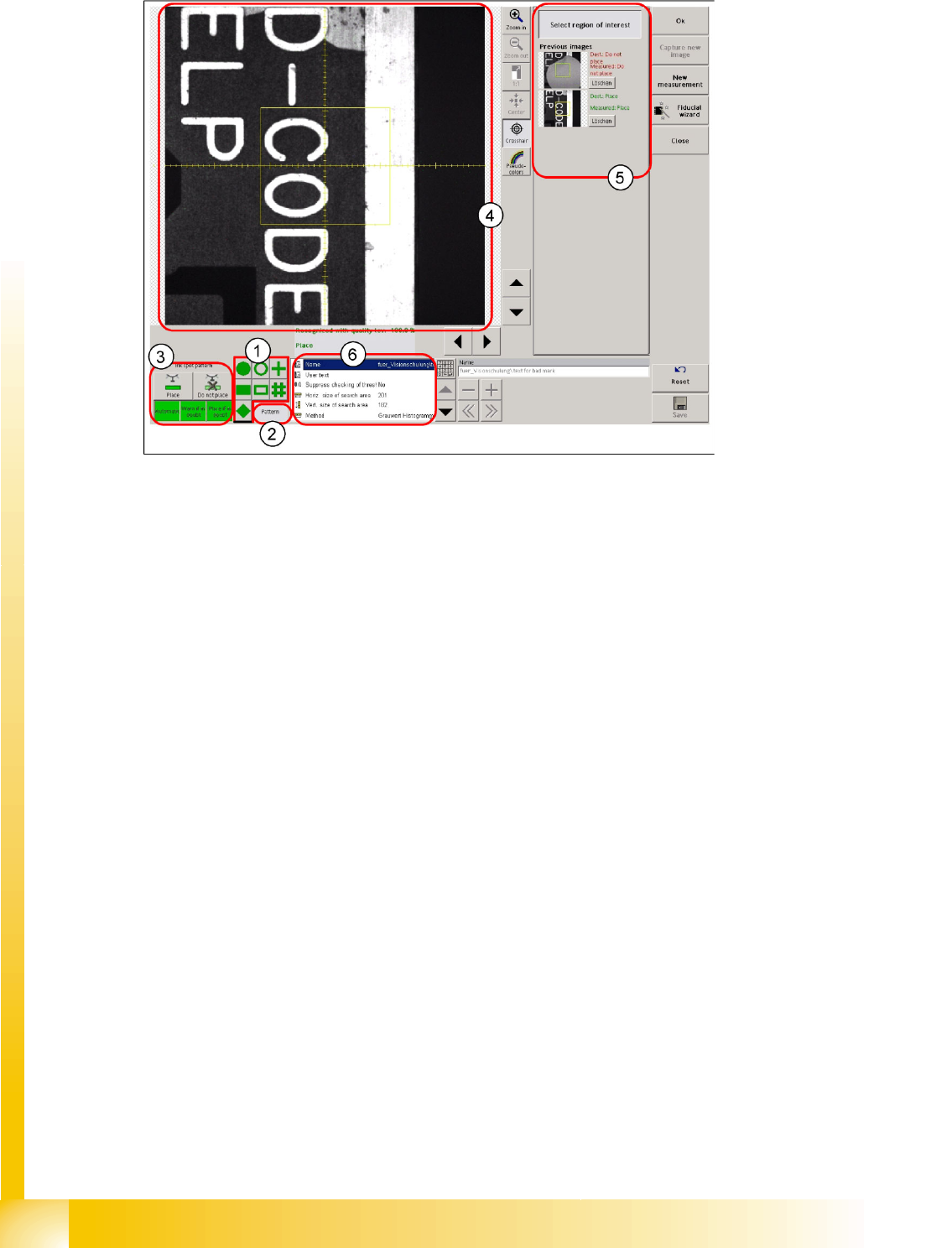
6-13: Teach surface for good/bad teach fiducials
Legend
1. 7 selection buttons for the synthetic inkspot shape
2. Selection button for pattern teaching. The SIPLACE Pro programming system specifies that this
function is for teaching the good/bad state recognition - inkspot - (or position measurement).
3. Function buttons, which can only be selected when teaching inkspot patterns.
4. Evaluation window for inkspots. This is ALWAYS centered around the camera center point!
5. Overview of trained good/bad state fiducials
6. This programming field is normally NOT changed by manual entries during inkspot programming.
However, the method with which good/bad recognition is to be performed is set here (template; gray
value histogram; middle gray value)!
6.3.3 Trained Inkspots
There are several methods which can be used for inkspot classification:
The template method
The histogram method, based on brightness
The middle gray value method, based on brightness
These can be selected while teaching the inkspot pattern.
6.3.3.1 Algorithm Parameters
This parameter setting is not activated for "trained inkspots".
SIPLACE Vision - Teaching Fiducials
Trained Inkspots Fiducials for Good/Bad Recognition of panels
Student Guide SIPLACE Vision (Customer)
Edition 12/2008 EN SIPLACE Vision - Teaching Fiducials
147
6.3.3.2 Template
Features
Relatively high computing time involved
This method evaluates the complete area of the pattern, not just the outline: This therefore does not
need to be defined quite so exactly.
Also requires a defined shape, to which the match is then determined.
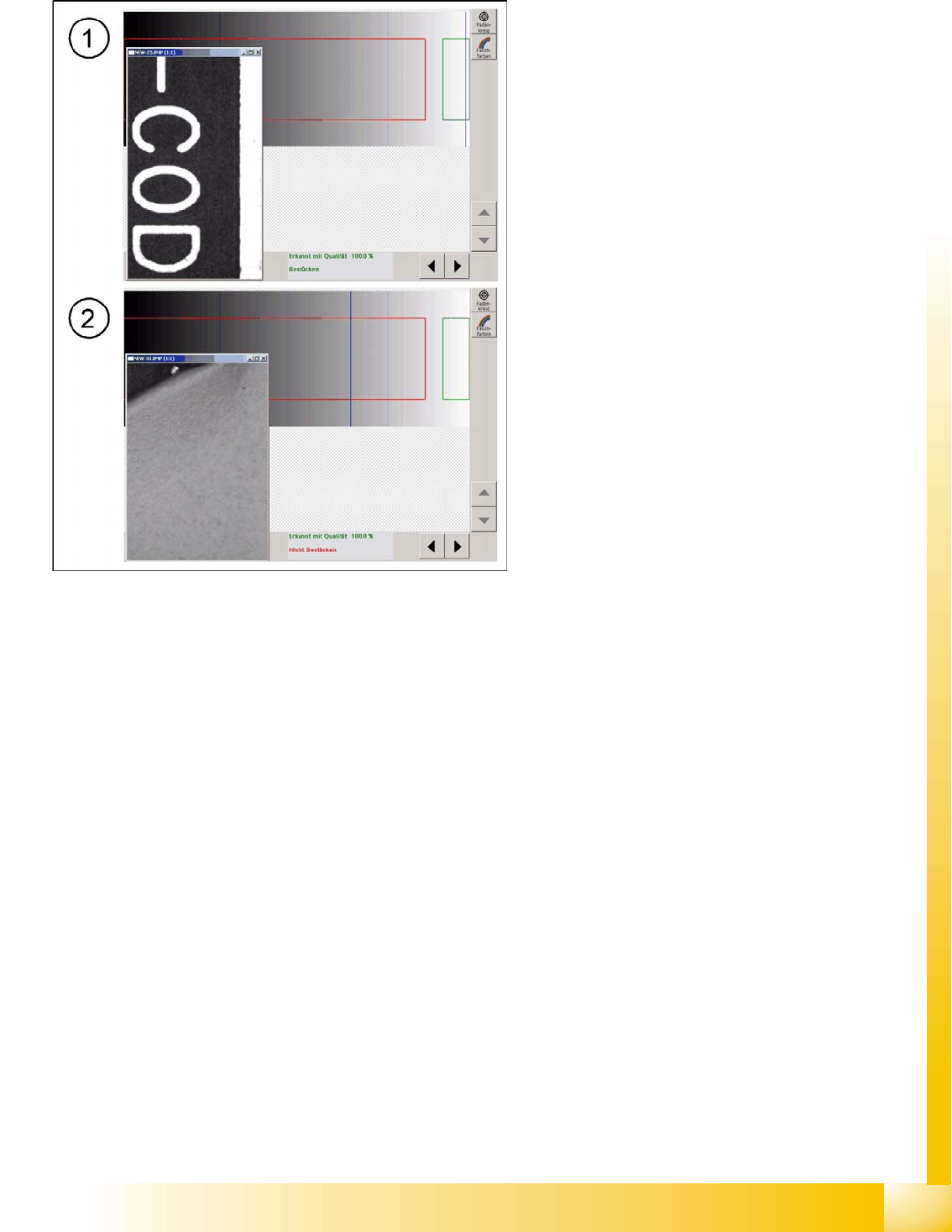
6-14: Good pattern "component" with classification marking "good" fig. 18
bad pattern with classification marking
The template for recognition of the good case is
shown by the pattern in the evaluation field above
the text. The second image needed, for the "bad
case fiducial" is also taught as a template. The
user can change the colors for the bad case label
as required. These can be recognized by the wide
area over which the bad fiducial pattern is
distributed.
The two trained patterns are then always shown
as standardized templates for the placement or
non-placement decision in each fiducial case. This
is why you are only shown the evaluation fields
with their template (pattern) results, here.
The intended application case for this method is
for changing markings on ceramic, with laser
engraving. (if no suitable PCBs are available,
covered fiducials could be used as an exception!)
If there is noise (interference) in the background,
this may prevent a clear assignment to
"placement" or "non-placement", so that the
intermediate area is "in doubt". In this case, you
need to define the following during programming:
That placement is to be performed (the
component should then be relatively low
priced)
That placement is not be performed (the loss
of a panel is better than placement of an
expensive component on a possibly defect
circuit)