SIPLACE Vision Customer_en.pdf - 第149页
SIPLACE Vision - T eaching Fiducials Trained Inkspots Fiducials for Good/Bad Recognition of panels S tudent Guide SIPLACE Vision (Customer) Edition 12/2008 EN SIPLACE Vision - T eaching Fiducials 149 Move the mouse over …
SIPLACE Vision - Teaching Fiducials
Fiducials for Good/Bad Recognition of panels Trained Inkspots
Student Guide SIPLACE Vision (Customer)
SIPLACE Vision - Teaching Fiducials Edition 12/2008 EN
148
6.3.3.3 Brightness Histogram
The respective brightness between totally black and white can be seen in the background to the bar
chart.
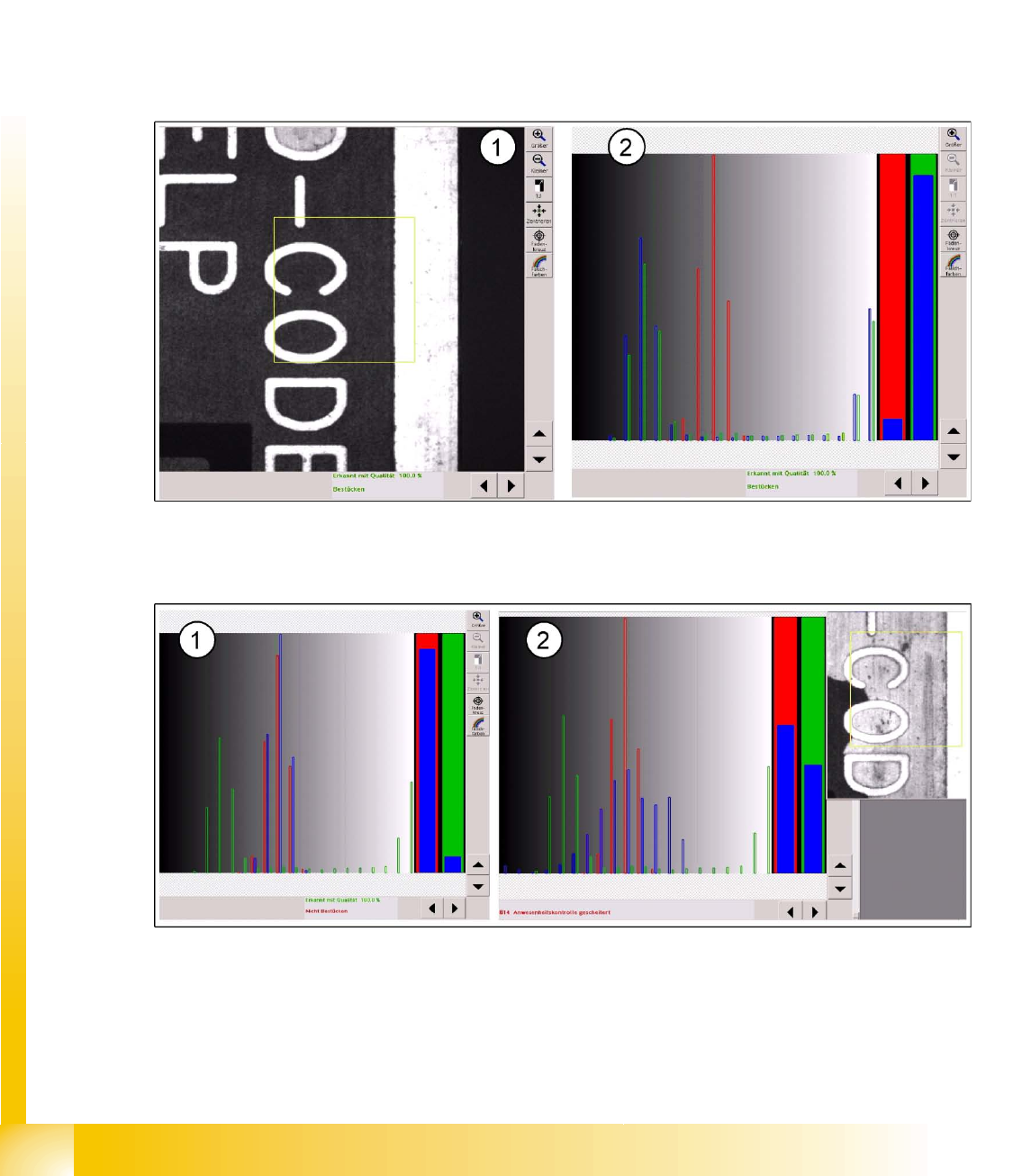
The brightness histogram for good case recognition is shown by the green bars for brightness
distribution, for the evaluation field above the text.
The second image required, the "bad case fiducial", is shown in the histogram by the red bar on the
respective brightness area of the background.
The operator can not change the colors on the bad case label to any other color.
The brightness distribution of the inkspot to be evaluated is entered as blue brightness bars for various
different image areas and the correlation to the trained brightness distribution of the good/bad case is
checked.
6-15: Evaluation area above the PCB text (1) and brightness distribution for the good case (2)
The percentage correlation of brightness for the evaluation is shown as a quality bar chart (2) before the
respective "good case " (green) or "bad case" (red).
6-16: Brightness distribution for bad case: light label and light background as interference (noise) for inkspot recognition
If the text area is covered with a light colored label, this distribution of brightness will lead to a "non-
placement" classification.
The light background (missing soldering paste) causes an unfavorable distribution of brightness,
meaning that a classification as "good" or "bad" is not possible.
An evaluation based on the middle gray value would result in an assignment to "non-placement".

SIPLACE Vision - Teaching Fiducials
Trained Inkspots Fiducials for Good/Bad Recognition of panels
Student Guide SIPLACE Vision (Customer)
Edition 12/2008 EN SIPLACE Vision - Teaching Fiducials
149
Move the mouse over the gray values in the background to determine the respective gray value from any
position. This is interesting for the threshold values and the respective measuring result.
Legend
Fast procedure
Classification consists of global image attributes, meaning that a defined shape is not required.
This procedure is not sensitive to fluctuations in brightness.
You need to make sure that the evaluation area in the image is in the same place for classification
as it is for teaching. This means that you need to perform a position recognition run before inkspot
recognition.
SIPLACE Vision - Teaching Fiducials
Fiducials for Good/Bad Recognition of panels Trained Inkspots
Student Guide SIPLACE Vision (Customer)
SIPLACE Vision - Teaching Fiducials Edition 12/2008 EN
150
6.3.3.4 Middle gray value
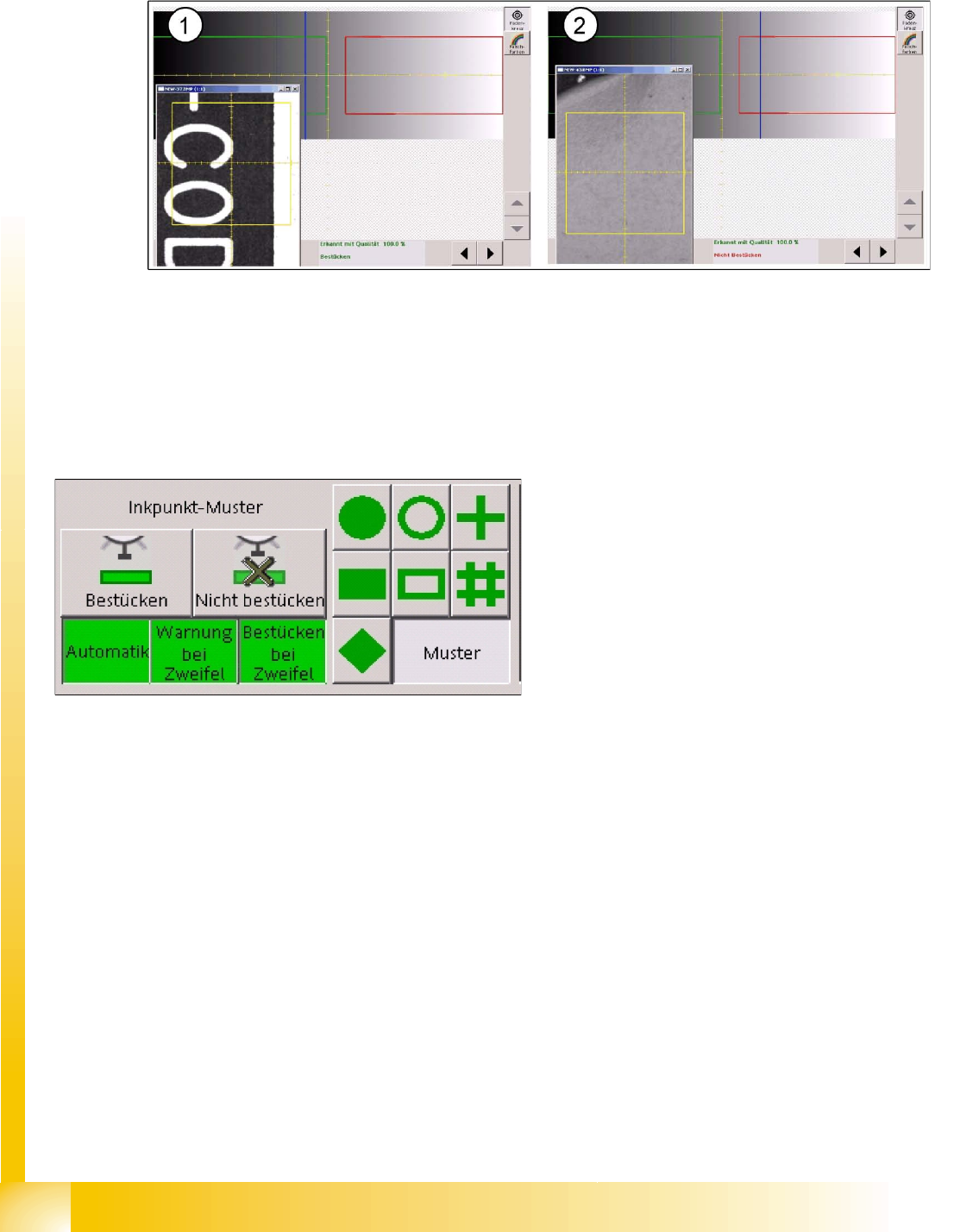
The evaluation diagram is similar to the template method, with a red marked bad case area and a green
marked good case area.
6-17: Dark fiducial for good case (1) and light label for bad case (2)
The light-colored label for the bad case state (2) causes the two classification areas to be "swapped"
with one another.
The threshold for the good area ranges up to gray values of 126 and the bad area begins in this example
at 140.
The bad state is on the right, on a bright background, and with a brightness of 155. The good state has
a medium gray value of 110.
Features
Fast procedure
The classification is based on the global features of the image. A defined shape is therefore not
required.
This procedure is sensitive to fluctuations in brightness, meaning that this method is not ideal when
used with lines which have different PCB camera brightnesses.
Once again, you need to perform a position recognition run before inkspot recognition.
In this example, if a fiducial is between 126 and
140, the following decisions can be made during
programming:
That components are to be placed
That components are not to be placed
That the operator is to be warned of this state
with a warning message
(to allow time for improvement e.g. through
crossing out the fiducial).
Switching on the "automatic function" terminates
the inkspot teaching procedure.
The function buttons
Placement
and
Do not
place
are only visible after the pattern button for
the inkspot has been selected.